





ajhdr
Members
-
Joined
-
Last visited
-
I'm rebuilding my array with new drives (have done New Config) but parity sync is slow around 35mbps. I suspect one or more disks have errors, but not sure how to interpret the data. Attached is diagnostics. unraid2-diagnostics-20250208-0930.zip
-
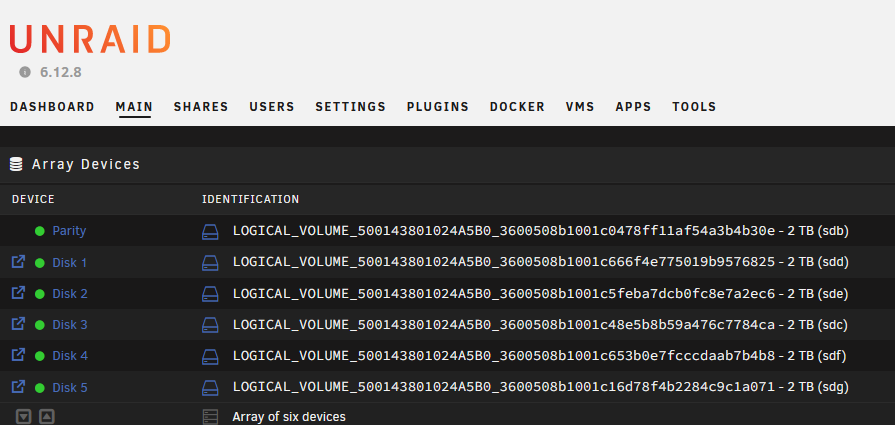
I'm trying to replace my parity drive with a larger disk, but I can not figure out which physical disk corresponds with what I'm seeing in the unraid UI. Here is what my UI is showing: *ATTACHED SCREENSHOT* Here is what I am seeing in the CLI: root@unraid:~# lshw -c disk -c storage *-raid description: RAID bus controller product: Smart Array G6 controllers vendor: Hewlett-Packard Company physical id: 0 bus info: pci@0000:05:00.0 logical name: scsi1 version: 01 width: 64 bits clock: 33MHz capabilities: raid pm msi pciexpress msix bus_master cap_list rom configuration: driver=hpsa latency=0 resources: irq:36 memory:fbc00000-fbdfffff memory:fbbf0000-fbbf0fff ioport:4000(size=256) memory:fbb00000-fbb7ffff *-disk:0 description: SCSI Disk product: LOGICAL VOLUME vendor: HP physical id: 1.0.0 bus info: scsi@1:1.0.0 logical name: /dev/sdb version: 6.64 serial: 500143801024A5B0 size: 1862GiB (2TB) capabilities: 15000rpm partitioned partitioned:dos configuration: ansiversion=5 logicalsectorsize=512 sectorsize=512 *-disk:1 description: SCSI Disk product: LOGICAL VOLUME vendor: HP physical id: 1.0.1 bus info: scsi@1:1.0.1 logical name: /dev/sdc version: 6.64 serial: 500143801024A5B0 size: 1862GiB (2TB) capabilities: 15000rpm partitioned partitioned:dos configuration: ansiversion=5 logicalsectorsize=512 sectorsize=512 As you can see, the serial numbers are the same, and they do not match what I physically see on the drives. How can I determine which drive I should replace if I am unable to match up the serial numbers. Also attached are my diagnostics. unraid-diagnostics-20240306-1507.zip
-
I think I made a mistake and messed with Docker and now I can't restore my bedrock container. I was about to download the container again and I can see backups under /mnt/user/appdata/binhex-minecraftbedrockserver/minecraft/backups There are folders which look like their my backups, but I tried to delete what under /mnt/user/appdata/binhex-minecraftbedrockserver/minecraft/worlds/Bedrock level/ and copy the same files to this location, but when my container the log says: NO LOG FILE! - Failed to up file descriptor limit Operation not permitted NO LOG FILE! - setting up server logging... [2024-02-15 20:52:18:627 INFO] Starting Server [2024-02-15 20:52:18:627 INFO] Version: 1.20.62.02 [2024-02-15 20:52:18:627 INFO] Session ID: 172ea9fd-12a2-4751-b23f-285bc001c7e9 [2024-02-15 20:52:18:627 INFO] Build ID: 22010383 [2024-02-15 20:52:18:627 INFO] Branch: r/20_u6 [2024-02-15 20:52:18:627 INFO] Commit ID: ecfbe634e2e231921b3c799f34169d1dcaf5bd74 [2024-02-15 20:52:18:627 INFO] Configuration: Publish [2024-02-15 20:52:18:627 INFO] Level Name: Bedrock level [2024-02-15 20:52:18:633 INFO] No CDN config file found for dedicated server [2024-02-15 20:52:18:633 INFO] Game mode: 1 Creative [2024-02-15 20:52:18:633 INFO] Difficulty: 0 PEACEFUL [2024-02-15 20:52:18:635 INFO] Content logging to console is enabled. [2024-02-15 20:52:19:314 INFO] Opening level 'worlds/Bedrock level/db' [2024-02-15 20:52:19:320 WARN] LevelDB worlds/Bedrock level/db status NOT OK(IO error: fopen failed.). Trying repair. [2024-02-15 20:52:20:204 ERROR] Failed to open LevelDB! [2024-02-15 20:52:20:204 ERROR] IO error: fopen failed. [2024-02-15 20:52:20:258 ERROR] Network port occupied, can't start server. [2024-02-15 20:52:20:258 INFO] Server stop requested. Any help would be greatly appreciated! ** Update - I fixed it by running with the sudo command: # sudo ./bedrock_server
-
I'm using Fix Common Problems and it's telling me my server has hardware issues. I've downloaded the syslog, but I can't seem to interrupt the specific hardware which is having the issue. Here is what I'm seeing: Feb 5 08:53:44 unraid kernel: mce: [Hardware Error]: Machine check events logged Feb 5 09:33:28 unraid webGUI: Successful login user root from 192.168.X.X Feb 5 10:40:22 unraid kernel: mce: [Hardware Error]: Machine check events logged ### [PREVIOUS LINE REPEATED 4 TIMES] ### Should I be looking in a different place to determine the bad hardware? unraid-diagnostics-20240206-1623.zip
-
ajhdr joined the community
-
I received a message in Fix Common Problems about a hardware error, but I am not familiar with troubleshooting which component is throwing errors. Attached are my logs. unraid-diagnostics-20240206-1623.zip
