idean
Members
-
Joined
-
Last visited
-
Perfect, that fixed it! Thanks for a great extension!!
-
I tried the developer version, too, but went back to the latest today. [17-Mar-2025 17:44:57 America/New_York] PHP Fatal error: Uncaught DivisionByZeroError: Division by zero in /usr/local/emhttp/plugins/disklocation/pages/page_benchmark.php:111 Stack trace: #0 /usr/local/emhttp/plugins/dynamix/include/DefaultPageLayout.php(706) : eval()'d code(4): require_once() #1 /usr/local/emhttp/plugins/dynamix/include/DefaultPageLayout.php(706): eval() #2 /usr/local/emhttp/plugins/dynamix/template.php(82): require_once('/usr/local/emht...') #3 {main} thrown in /usr/local/emhttp/plugins/disklocation/pages/page_benchmark.php on line 111
-
I'm getting a Go to System... error but the entire tab is missing:
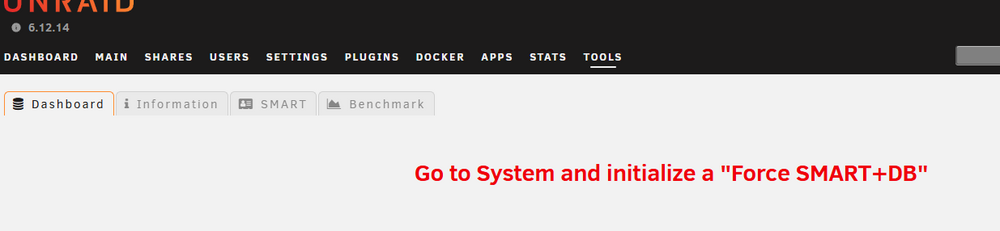
-
Well... mostly. My processor data is not showing any activity. Guess I need to schedule a reboot. Both top and htop run fine in a shell.
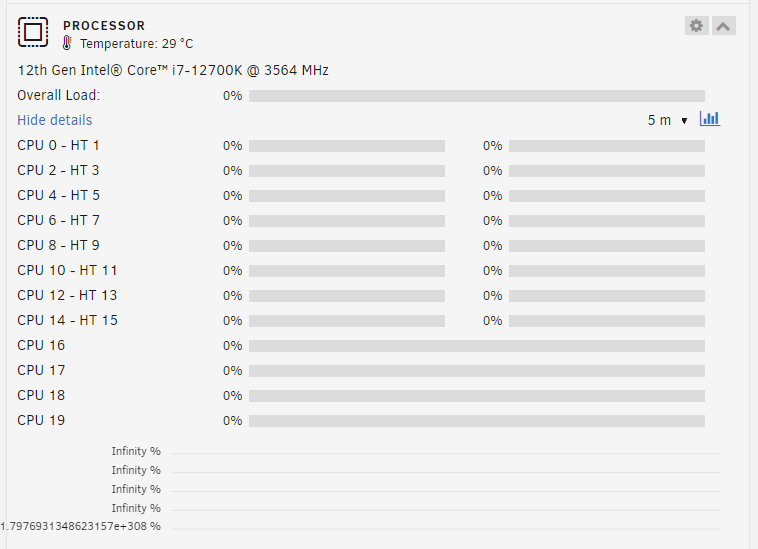
-
Same issue, Unraid 6.12.14 Restarting nginx seems to have fixed it: # /etc/rc.d/rc.nginx restart Checking configuration for correct syntax and then trying to open files referenced in configuration... nginx: the configuration file /etc/nginx/nginx.conf syntax is ok nginx: configuration file /etc/nginx/nginx.conf test is successful Shutdown Nginx gracefully... {"level":"info","time":"2025-01-10T21:53:23.837Z","pid":32324,"hostname":"unraid","logger":"cli","msg":"Stopping 1 unraid-api process(es)..."} Starting Nginx server daemon...
-
Same issue, I worked around it by copying my rclone.conf to /boot/config and referring to it directly with --config /boot/config/rclone.conf But I'd still like to know why background processes can't access it directly?
-
Force update seems to have cleared it up. I guess I should have tried that first.
-
I'm running the April 14 update and I get the following on startup: Lucee 5.3.12.1 Error (expression) Message key [CONFIG] doesn't exist Stacktrace The Error Occurred in /var/www/DispBenchmarkGraphs.cfm: line 62 60: <CFSET Key=Ref.DriveID[tmpDriveID].Key> 61: <CFSET PortNo=Ref.DriveID[tmpDriveID].PortNo> 62: <CFSET BenchmarksDir="#PersistDir#/driveinfo/#HW[Key].Ports[PortNo].Config.SaveDir#/benchmark"> 63: <CFSET MaxBenchDate=CreateDate(1970,1,1)> 64: <CFSET UseBenchDir=""> called from /var/www/DispOverview.cfm: line 76 74: </CFOUTPUT> 75: 76: <CFINCLUDE TEMPLATE="DispBenchmarkGraphs.cfm"> 77: 78: <CFOUTPUT> Java Stacktrace lucee.runtime.exp.ExpressionException: key [CONFIG] doesn't exist at lucee.runtime.type.util.StructSupport.invalidKey(StructSupport.java:67) at lucee.runtime.type.StructImpl.get(StructImpl.java:149) at lucee.runtime.util.VariableUtilImpl.get(VariableUtilImpl.java:278) at lucee.runtime.util.VariableUtilImpl.getCollection(VariableUtilImpl.java:272) at lucee.runtime.PageContextImpl.getCollection(PageContextImpl.java:1547) at dispbenchmarkgraphs_cfm$cf.call(/DispBenchmarkGraphs.cfm:62) at lucee.runtime.PageContextImpl._doInclude(PageContextImpl.java:1056) at lucee.runtime.PageContextImpl._doInclude(PageContextImpl.java:948) at lucee.runtime.PageContextImpl.doInclude(PageContextImpl.java:929) at dispoverview_cfm$cf.call(/DispOverview.cfm:76) at lucee.runtime.PageContextImpl._doInclude(PageContextImpl.java:1056) at lucee.runtime.PageContextImpl._doInclude(PageContextImpl.java:948) at lucee.runtime.listener.ClassicAppListener._onRequest(ClassicAppListener.java:65) at lucee.runtime.listener.MixedAppListener.onRequest(MixedAppListener.java:45) at lucee.runtime.PageContextImpl.execute(PageContextImpl.java:2493) at lucee.runtime.PageContextImpl._execute(PageContextImpl.java:2478) at lucee.runtime.PageContextImpl.executeCFML(PageContextImpl.java:2449) at lucee.runtime.engine.Request.exe(Request.java:45) at lucee.runtime.engine.CFMLEngineImpl._service(CFMLEngineImpl.java:1216) at lucee.runtime.engine.CFMLEngineImpl.serviceCFML(CFMLEngineImpl.java:1162) at lucee.loader.engine.CFMLEngineWrapper.serviceCFML(CFMLEngineWrapper.java:97) at lucee.loader.servlet.CFMLServlet.service(CFMLServlet.java:51) at javax.servlet.http.HttpServlet.service(HttpServlet.java:623) at org.apache.catalina.core.ApplicationFilterChain.internalDoFilter(ApplicationFilterChain.java:209) at org.apache.catalina.core.ApplicationFilterChain.doFilter(ApplicationFilterChain.java:153) at org.apache.tomcat.websocket.server.WsFilter.doFilter(WsFilter.java:51) at org.apache.catalina.core.ApplicationFilterChain.internalDoFilter(ApplicationFilterChain.java:178) at org.apache.catalina.core.ApplicationFilterChain.doFilter(ApplicationFilterChain.java:153) at org.apache.catalina.core.StandardWrapperValve.invoke(StandardWrapperValve.java:167) at org.apache.catalina.core.StandardContextValve.invoke(StandardContextValve.java:90) at org.apache.catalina.authenticator.AuthenticatorBase.invoke(AuthenticatorBase.java:481) at org.apache.catalina.core.StandardHostValve.invoke(StandardHostValve.java:130) at org.apache.catalina.valves.AbstractAccessLogValve.invoke(AbstractAccessLogValve.java:673) at org.apache.catalina.valves.ErrorReportValve.invoke(ErrorReportValve.java:93) at org.apache.catalina.valves.RemoteIpValve.invoke(RemoteIpValve.java:768) at org.apache.catalina.core.StandardEngineValve.invoke(StandardEngineValve.java:74) at org.apache.catalina.connector.CoyoteAdapter.service(CoyoteAdapter.java:343) at org.apache.coyote.http11.Http11Processor.service(Http11Processor.java:390) at org.apache.coyote.AbstractProcessorLight.process(AbstractProcessorLight.java:63) at org.apache.coyote.AbstractProtocol$ConnectionHandler.process(AbstractProtocol.java:926) at org.apache.tomcat.util.net.NioEndpoint$SocketProcessor.doRun(NioEndpoint.java:1791) at org.apache.tomcat.util.net.SocketProcessorBase.run(SocketProcessorBase.java:52) at org.apache.tomcat.util.threads.ThreadPoolExecutor.runWorker(ThreadPoolExecutor.java:1191) at org.apache.tomcat.util.threads.ThreadPoolExecutor$Worker.run(ThreadPoolExecutor.java:659) at org.apache.tomcat.util.threads.TaskThread$WrappingRunnable.run(TaskThread.java:61) at java.base/java.lang.Thread.run(Unknown Source)
-
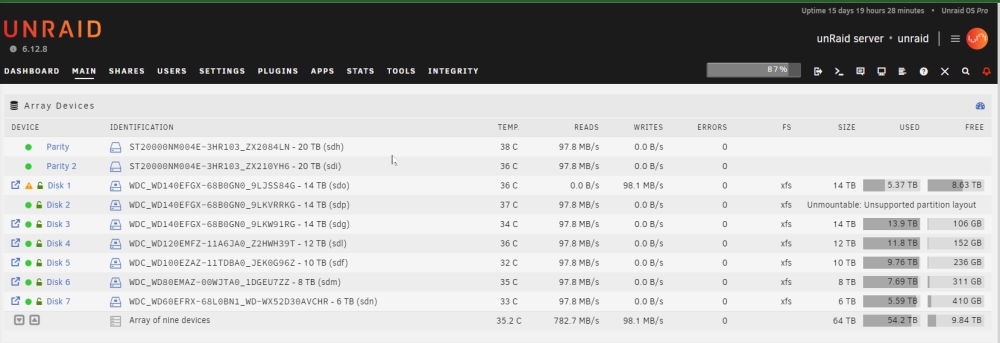
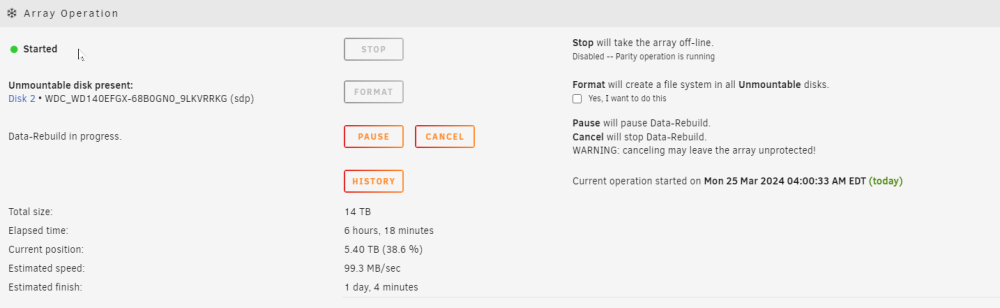
All good now after a reboot... the "Unmountable" drive mounted right up! The drive I replaced is rebuilding, as expected. And I found an email from unRaid saying that the preclear on it completed last week, so the whole disk swap thing was a false alarm. Phew! It was just scary that the disk logically next to the one I replaced was now unmountable. It's scary that it this happened as I was replacing a drive. Was it due to the encryption key being missing from /root due to some sort of race condition? I use the webGui "events": # auto unlock array install -D /boot/custom/bin/fetch_key /usr/local/emhttp/webGui/event/starting/fetch_key install -D /boot/custom/bin/delete_key /usr/local/emhttp/webGui/event/started/delete_key install -D /boot/custom/bin/fetch_key /usr/local/emhttp/webGui/event/stopped/fetch_key My biggest lesson learned: Lots of screenshots and notes before and after system changes on unRaid. My memory in regards to serial numbers is totally unreliable.
-
Ah, it only asks you to reformat when adding a drive then? Not when replacing? Good to know (if I got that right)!
-
Background: all the drives have been plugged in for days. The old Disk 1 (6TB) was replaced in the interface with a newish pre-cleared 14TB drive. To do this, I stopped the array, selected the 14TB drive in "Disk 1", and re-started the array. When it started, it started rebuilding the array... sorta. Instead of putting the new drive in slot it seems to have put it in Drive 2 and moved old Drive 2 to Drive 1?? I'm not 100% sure about that, my short-term memory looking at serial numbers is not what it was. I just know that now I have it rebuilding Disk 1 (like it should) but Disk 2 is "Unmountable", which I expected Disk 1 to be, since I haven't yet formatted it. What should I do? Wait for this to rebuild before I format Disk 2? (Good thing I have dual parity??) Lesson learned: screenshots before and after any change so that I know exactly what serial numbers I'm dealing with and don't have to rely on my short term memory more than 5 minutes. unraid-diagnostics-20240325-0938.zip