





ZarZ
Members
-
Joined
Everything posted by ZarZ
-
WOW, even the same cooler as me lol. I have a HL-15, its a mini-storinator, but otherwise almost identical builds. I am temped to try and squeeze an AIO cooler in there somehow.
-
I am glad I was able to help, If you dont mind, Curious on your temps and cooler for your 14900k. Also more info about our issues. I'm actually thinking of downgrading sadly till they resolve all this. I'm just glad i was able to help both of us know its not Unraid or hardware failures per say. https://www.tomshardware.com/video-games/pc-gaming/outpost-infinity-siege-devs-ask-13900k-14900k-owners-to-downclock-their-chips-to-prevent-crashing
-
Found this last night after I found out it was also crashing Windows. Appears to be a plex issue. https://forums.plex.tv/t/end-credits-detection-causing-windows-crash-bsod/870270/4
-
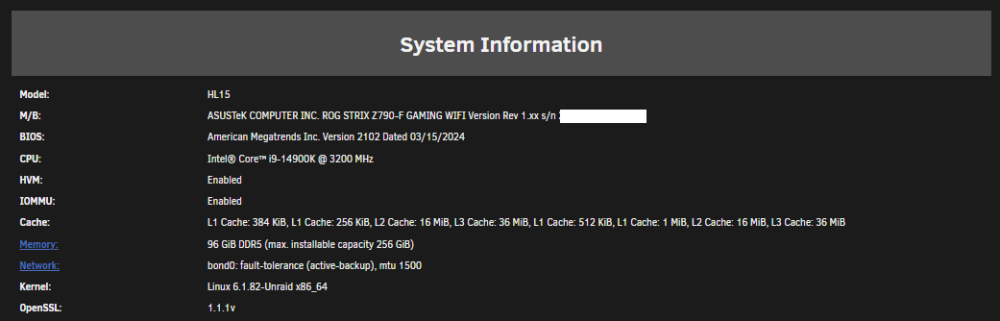
This is exactly how mine has been, ran great for about 2 months, maybe less. then crashes with uptimes less than 2hrs. Also using have GSkill 5600 but 2x48GB sticks, same chipset Z-790 but ASUS board, same 14900-K CPU. I also have XMP off, Multicore enhancement to enforce all limits, fast boot off, etc. Very similar hardware with exactly same crashes, freezes and even the syslogs are looking the same. as far as dockers I am only running Plex anymore. I have even tried BIOS updates. syslog-127.0.0.1 (2).log
-
I have also been experiencing similar issues. hoping to see if you find resolution. I was also told to test ram, tested both together, then seperate for over 24hrs each time. No errors only passes. Did you issues start about 2-3 weeks ago? I Also have a Z-790 motherboard, but ASUS. Is your ram DDR5?
-
I been testing the hardware, and every OS I have tried was stable except Unraid, and that's why I tried here. Ram has passed 16hr runs of memtest86, hardware was stabile with constant 100% loads in windows running handbrake, Cinebench, etc. trying to get any sort of issue to rear its head. Perhaps the answer is to just switch the OS, because to replace the motherboard, ram, and CPU with same items is a minimum $1500, when nothing is testing bad. So I'm hesitant to throw money into a fire just because it's something to do. I suppose I need to figure out how to retrieve my files from the array since unraid is unable to run stable enough to move it off normally.
-
is there a particular piece of hardware that it looks like? I have booted this system on windows to stress test it, and also ram memorytest for 16hours and nothing has turned up as having issues. so i did all i knew how to do to check it. instability is only occurring with unraid not windows
-
So last night when i found this log, I say that certain cores were giviing MCE issues, so i tried to unpin those so plex would not use them, and they got the errors on different cores instead. So not sure if this is unraid OS or Plex issue, i see other errors also that i don't understand.
-
syslog-127.0.0.1.log
-
So I am new to Unraid, I had it working fine for the first month, now it is locking up and getting unclean shutdowns daily, I thought it might have been the leaving the dashboard open causing it, now i don't even open it and still server quits responding. All I am running is Plex media server currently. I dont know where to look for issues so much. Any help will be appreciated, if you need logs, i just need to know where to get them from. void-diagnostics-20240322-2341.zip

