





Bladedude
Members
-
Joined
Everything posted by Bladedude
-
Currently on 6.12.15. 10Gb SFP+ PCI card interface is the active and preferred interface. Onboard 1Gb NIC is port down. After each .x point upgrade in 6.12.x, the onboard 1Gb NIC is reenabled during the point upgrade. Is this by design or a bug?
-
Hi All, Trying to reset the webui password, but following the instructions here doesn't work. I've tried deleting the sha1 line and also deleting the web.conf file after stopping the container. Is there something specific to unraid? Do I also need to delete the web.conf.bak?
-
From this post, only root has WebUI access. Is that correct?
-
It's working now, since I added NVIDIA_DRIVER_CAPABILITIES.
-
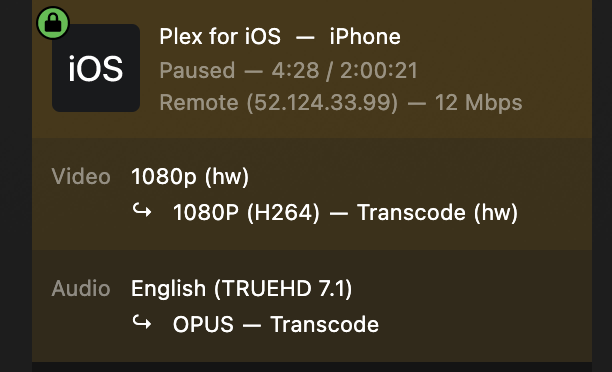
Yes. I followed the tutorial. Ah OK. Once Advanced View was enabled, I saw that I had already added "--runtime=nvidia" during initial setup. Today I noticed HW transcode wasn't working, but had been working 1-2 months ago, so I: 1. Uninstalled, reinstalled the Nvidia plugin, and installed the latest Nvidia driver. No change, same Plex error in log 2. Followed the tutorial, and added NVIDIA_DRIVER_CAPABILITIES parameter. HW transcode works. Not sure how HW transcode was working on initial setup w/o NVIDIA_DRIVER_CAPABILITIES set..
-
Works now. I was missing "NVIDIA_DRIVER_CAPABILITIES" parameter. However, when I set this up 2 months ago, I didn't have that parameter. I was following a YT from AlienTech, but this guide is much better. And I still can't find where to add '--runtime=nvidia' to the 'Extra Parameters'" to complete all the documented steps from the guide. docker run -d --name='Plex-Media-Server' --net='host' --pids-limit 2048 -e TZ="America/Los_Angeles" -e HOST_OS="Unraid" -e HOST_HOSTNAME="supermicro" -e HOST_CONTAINERNAME="Plex-Media-Server" -e 'PLEX_CLAIM'='Insert Token from https://plex.tv/claim' -e 'PLEX_UID'='99' -e 'PLEX_GID'='100' -e 'VERSION'='latest' -e 'NVIDIA_VISIBLE_DEVICES'='GPU-XXX' -e 'NVIDIA_DRIVER_CAPABILITIES'='all' -l net.unraid.docker.managed=dockerman -l net.unraid.docker.webui='http://[IP]:[PORT:32400]/web' -l net.unraid.docker.icon='https://raw.githubusercontent.com/plexinc/pms-docker/master/img/plex-server.png' -v '/mnt/user/data/media':'/data/media':'rw' -v '/dev/shm':'/transcode':'rw' -v '/mnt/user/appdata/Plex-Media-Server':'/config':'rw' --runtime=nvidia 'plexinc/pms-docker' The command finished successfully!
-
PlexInc. Repository plexinc/pms-docker:latest From Nvidia driver plugin: Nvidia Driver Version: 565.57.01
-
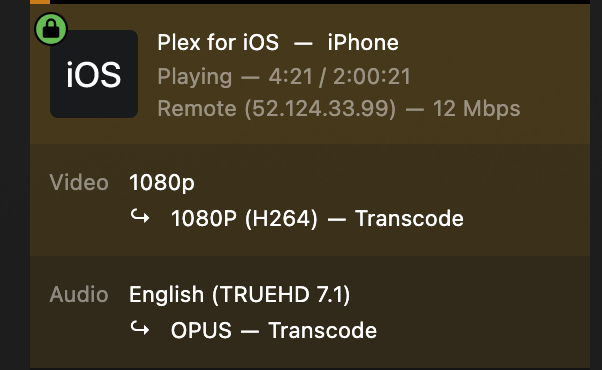
Hello All, HW transcode not working. PMS Version 1.41.2.9200 Followed ICH777 instructions above "Installation of Nvidia driver v565.57.01 successful" GPUID in Plex docker config matches Nvidia plugin info nvidia-smi sees the GPU NVIDIA_VISIBLE_DEVICES added I don't see any place to add: '--runtime=nvidia' to the 'Extra Parameters But HW transcode is not working: Nov 22, 2024 17:35:47.787 [22699250924344] ERROR - [Req#2bd/Transcode] [FFMPEG] - Cannot load libnvidia-encode.so.1 Nov 22, 2024 17:35:47.787 [22699250924344] ERROR - [Req#2bd/Transcode] [FFMPEG] - The minimum required Nvidia driver for nvenc is 455.28 or newer
-
Cosmetic feedback. It would be helpful if the install script ended with "... done" plugin: installing: mft-tools.plg Executing hook script: pre_plugin_checks plugin: downloading: mft-tools.plg ... done plugin: downloading: mft-tools-2024.07.11.txz ... done +============================================================================== | Installing new package /boot/config/plugins/mft-tools/mft-tools-2024.07.11.txz +============================================================================== Verifying package mft-tools-2024.07.11.txz. Installing package mft-tools-2024.07.11.txz: PACKAGE DESCRIPTION: plugin: downloading: mft-4.29.0-1.txz ... done +============================================================================== | Installing new package /boot/config/plugins/mft-tools/mft-4.29.0-1.txz +============================================================================== Verifying package mft-4.29.0-1.txz. Installing package mft-4.29.0-1.txz: PACKAGE DESCRIPTION: Package mft-4.29.0-1.txz installed. plugin: skipping: mft-4.29.0-2.txz - Unraid version too low, requires at least version 6.13.0 plugin: mft-tools.plg installed Executing hook script: post_plugin_checks Updating support link
-
Fresh install of Unraid on hardware listed in signature. Forum thread with posts starts here. Migrating exact same HW from TrueNas Scale. Spent a month trying to understand why Unraid did not bring up the DAC in SFP+ Mellanox PCI card, when rebooting the same HW into Scale would bring up the same interface. Learned I had to manually bring up the interface. IMO, all interfaces, or at least those with a link response, should be enabled on installation. Thanks! supermicro-diagnostics-20240303-1147.zip
-
Hi All, I've read this blog post by Spaceinvader One, and watched his YT vids on ZFS and Hybrid, but I'm still not sure which way to go. Server details are in signature. Primary use case is Plex server with HW transcode, *arr apps and maybe other docker apps, and SMB as I migrate away from a Synology unit. Given the array will have 12 * 10TB identical SAS drives, that would suggest ZFS. The server could handle another 12 * 3.5" in the future. Given the age of the server, I don't think it can spin down drives not in use. I've been running TrueNas Scale (K8s is too complicated), and reboot into Unraid while I figure out the optimal setup. I'd love to hear opinions.
-
After chasing this down for a few weeks after installation, I discovered that Unraid only enabled the on-board 1GbE NICs in my server. The PCI card with SFP+ was not enabled. Feature request would be to enable all interfaces during installation. Note: TrueNas Scale enables all interfaces, since I've been dual booting this machine.
-
@bmartino1Thanks. I had already installed the Mellanox Firmware Tools plugin. I assumed the interface would be enabled by default on install. It wasn't, but all I had to do was enable the interface. The board has 4 GbE + 2 SFP+, so I missed that on the network page. 🤦♂️ Once enabled, it came right up with no issues. Thanks again! Feature request / bug fix would be to enable, by default, on install any/all interfaces.
-
Thanks @bmartino1. I'm not using infiniband, just 10GbE ethernet via DAC cable. Will that work as is? Or do I need fiber transceiver and cable?
-
Data when booting server and Mellanox ConnectX-3 Pro into TrueNas scale and ethernet comes up, but ethernet does come up when I reboot into Unraid. admin@supermicro[~]$ uname -srm Linux 6.1.63-production+truenas x86_64 admin@supermicro[~]$ /sbin/ifconfig enp1s0: flags=4163<UP,BROADCAST,RUNNING,MULTICAST> mtu 1500 inet 192.168.X.201 netmask 255.255.255.0 broadcast 192.168.X.255 inet6 XX prefixlen 64 scopeid 0x20<link> inet6 XX prefixlen 64 scopeid 0x0<global> ether 9c:dc:X txqueuelen 1000 (Ethernet) RX packets 47076 bytes 49359473 (47.0 MiB) RX errors 0 dropped 1 overruns 0 frame 0 TX packets 16362 bytes 6274827 (5.9 MiB) TX errors 0 dropped 0 overruns 0 carrier 0 collisions 0 admin@supermicro[~]$ sudo dmesg | grep -i enp1s0 [ 9.744788] mlx4_core 0000:01:00.0 enp1s0: renamed from eth0 [ 9.836760] mlx4_core 0000:01:00.0 enp1s0d1: renamed from eth0 [ 11.154076] mlx4_en: enp1s0: Link Up [ 48.685128] mlx4_en: enp1s0: Steering Mode 1 [ 48.740749] mlx4_en: enp1s0: Link Up admin@supermicro[~]$ netstat -i Kernel Interface table Iface MTU RX-OK RX-ERR RX-DRP RX-OVR TX-OK TX-ERR TX-DRP TX-OVR Flg enp1s0 1500 57271 0 1 0 20159 0 0 0 BMRU admin@supermicro[~]$ lspci | grep Ethernet 01:00.0 Ethernet controller: Mellanox Technologies MT27520 Family [ConnectX-3 Pro]
-
Yup. Fair enough. Let me 100% validate on my end again. I'll reboot into TrueNas Scale and grab a screenshot and dmesg on boot and see if that can help.
-
Thanks, but help me understand: If I reboot the server, without touching the server or hardware, and only change the boot device, TrueNas Scale boots and detects the Mellanox NIC with DAC cables and receives a reserved IP. Unraid does not. Same HW, one OS brings up NIC ok, but another OS does not. Sounds to me like software.
-
DAC cables
-
Diagnostics attached. Yes, it's in ethernet mode. supermicro-diagnostics-20240303-1147.zip
-
Ah gotcha. It wasn't crystal clear from the docs. I did that. Files were there. Perhaps for clarity, it should say browse to the USB flash device, and complete the following steps from the flash device directory.
-
I don't follow
-
# lspci | grep Mellanox 01:00.0 Ethernet controller: Mellanox Technologies MT27520 Family [ConnectX-3 Pro] # lspci -vv -s 01:00.0 | grep "Part number" -A 3 [PN] Part number: 779793-B21 [EC] Engineering changes: B-5718 [SN] Serial number: IL271700F5 [V0] Vendor specific: PCIe 10GbE x8 6W New install of Unraid. Adaptor will not link up out of the box. I installed Mellanox Firmware Tools plug-in, and it's still not up. If I reboot into Truenas Scale (I'm wiping my existing Scale and installing Unraid), it came up from the default Truenas Scale installation.
-
Thanks. I tried manual install from both Mac and Windows with the errors detailed in OP. Mac USB Flash creator tool with deselected UEFI worked. Mac USB creator docs should include a link to open app from unidentified developer.
-
For Mac manual install, looks like it's failing in the last lines of the script: mkdir -p /tmp/UNRAID/syslinux ; cp -rp /Volumes/UNRAID/syslinux/* /tmp/UNRAID/syslinux echo -n "To continue please enter your admin " sudo /tmp/UNRAID/syslinux/make_bootable_mac.sh $TARGET
-
Brand new metal Sandisk 32GB USB key, used the USB Flash creator tool on Mac with no issues. UEFI may have been enabled. Server errored out with USB not bootable. On PC, tried to reformat and reinstall OS to USB via PC Flash creator tool. Hit this known Unraid issue from 2 yrs ago, with USB device (incompatible). Followed suggestion on above page to use manual install. For manual install on Windows, downloaded Unraid.zip and verified MD5. Formatted USB drive as FAT32 with name UNRAID. Ran script and received the following error: For manual install on Mac, downloaded Unraid.zip and verified MD5. Formatted USB drive as FAT32 with name UNRAID. Ran script and received the following error: $ /Users/XXX/Downloads/unRAIDServer-6.12.8-x86_64/make_bootable_mac ; exit; INFO: make_bootable_mac v1.3 INFO: The following drive appears to be the unRAID USB Flash drive: /dev/disk5 30.8GB Permit UEFI boot mode [Y/N]: n cp: /Volumes/UNRAID/syslinux/*: No such file or directory To continue please enter your admin Password: sudo: /tmp/UNRAID/syslinux/make_bootable_mac.sh: command not found logout Saving session... ...copying shared history... ...saving history...truncating history files... ...completed. Deleting expired sessions...1 completed. [Process completed] Please advise

