





Vircos
Members
-
Joined
-
Last visited
-
I did miss the increace. After modifying it, it is working again. Thanks for the help.
-
I have exactly the same issue with an alderlake cpu.
-
Yes I actually did using a splitter. It is not optimal. But the server is still stable. 2 Ssd's are active and the 3 sata drives are most of the time spinned down. However I am planning to ditch the 2 ssd's for one nvme drive and one of the three sata drives. Hopefully it will then reach lower c-states.
-
@Malbjerg. I am running stable with 2 ssd's and three normal hard drives powered by a 150w 12v power supply without any problems since February this year.
-
In addition to the post above. The atx power connector is right behind the DC power connector. See the manual on the Asus website for more info and the attached screenshot.
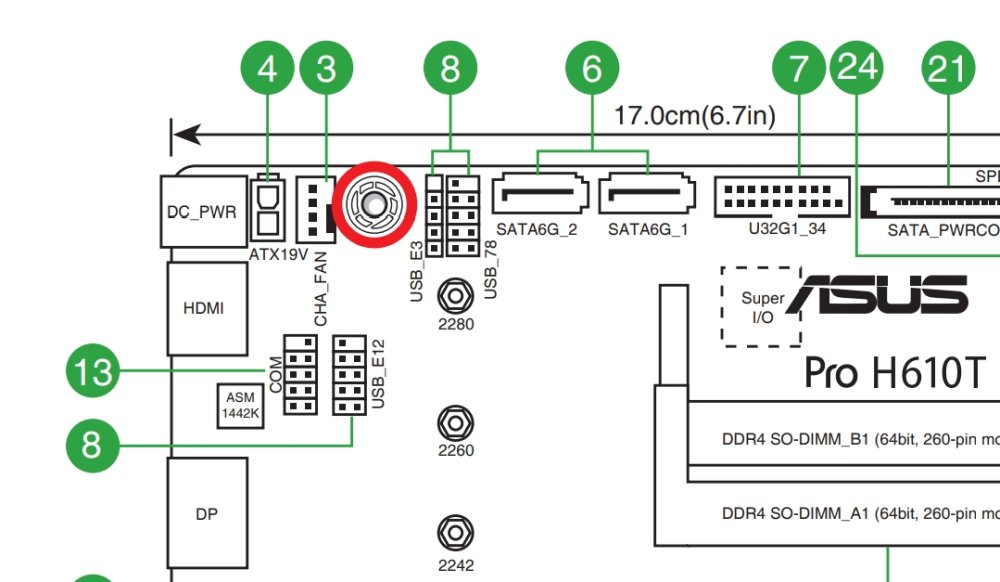
-
I did order this motherboard (with an Intel Core i3-14100) based on this topic and I use it with an ASM1166. But I am facing the same issue as descriped by bagican. It won't go past C2 WITH hard drives connected. Without the harddrives connected, it was able to reach C6 with the ASM116 installed. Idle with 2 SSD's and 3 hard drives I am doing 20-22 watts right now, which is an improvement over its predecessor (QNAP quad nas with an Intel Celeron J4025).

