





drilus
Members
-
Joined
-
Last visited
Everything posted by drilus
-
You are using the latest which is v3. There were a lot of changes and the docker plugin is broke. Just wait for Eurotimmy to update it.
-
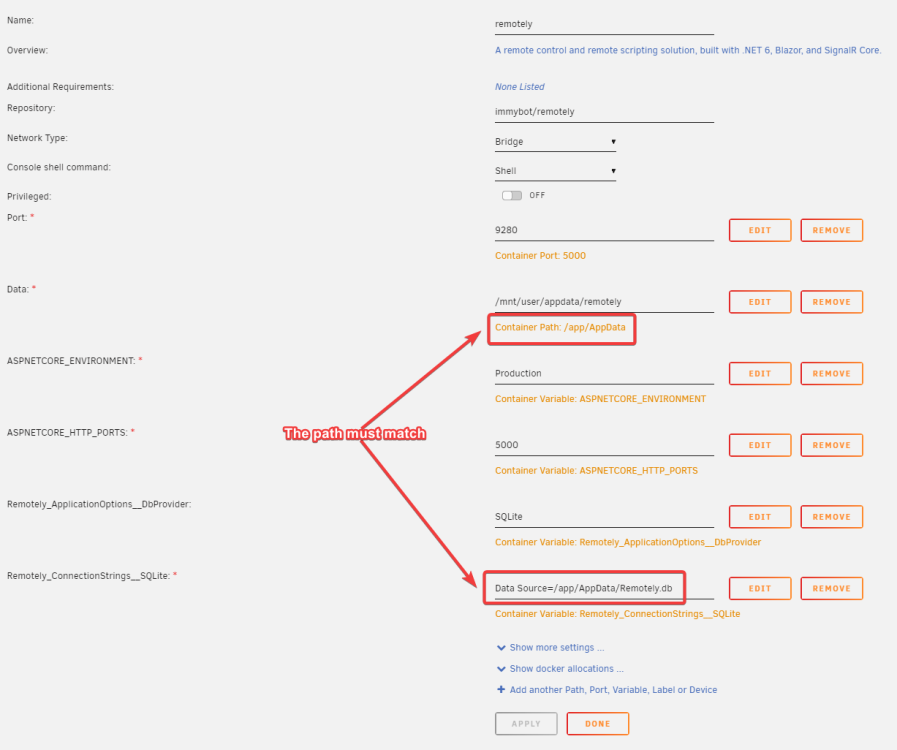
I've got it working completely. Here's a screenshot of the settings I've added. One thing to note is that you must specify the Sql environment variables and the path's must match that of the container path. ASPNETCORE_ENVIRONMENT=Production ASPNETCORE_HTTP_PORTS=5000 Remotely_ApplicationOptions__DbProvider=SQLite Remotely_ConnectionStrings__SQLite=Data Source=/app/AppData/Remotely.db The author also mentions "I did not test with Cloudflare Tunnels, so I'm assuming that still won't work." but it's working fine for me.
-
I downgraded back to tag 69 by setting the repository property to: immybot/remotely:69 You changed the host path or the container path?


