





.png.9f18389e3ad92cb778955468a99b286d.png)
runawaydevil
Members
-
Joined
-
Last visited
Everything posted by runawaydevil
-
Hi, I’m trying to run Facet on Unraid (Docker) and I’m consistently running into a startup crash related to port usage. Setup Unraid 7.2.0 Docker image: ghcr.io/jesper/facet:latest Network mode: bridge Port mapping: Host 8542 → Container 8080 Reverse proxy (Cloudflare Tunnel), but the issue also happens locally Problem On startup, Facet crashes with: Error: listen EADDRINUSE: address already in use 0.0.0.0:8080 This error comes from Node/SvelteKit, not Caddy. From the logs: Caddy starts normally and binds to port 8080 PocketBase starts normally on port 8090 The frontend (Node/SvelteKit) crashes immediately After that, Caddy returns 502 errors because the frontend never comes up. What seems to be happening Unraid requires an “Internal Port” to be defined in the container template. That automatically injects: PORT=8080 into the container environment. Because of this: Node/SvelteKit tries to listen on port 8080 Caddy is already listening on port 8080 This causes an immediate port conflict (EADDRINUSE) From what I understand, Facet expects: Caddy on 8080 Frontend on 3000 PocketBase on 8090 But the forced PORT=8080 breaks that separation. Unraid doesn’t allow removing this variable, so it’s hard to avoid. Questions Is the frontend meant to respect the PORT environment variable? Is there a way to force the frontend to always bind to 3000 regardless of PORT? Is there a recommended workaround for Unraid users, where PORT cannot be removed? Would it make sense for Facet to ignore or unset PORT internally to avoid this conflict? At the moment I can’t get Facet to run on Unraid without modifying internals. Happy to provide more logs or test a fix if needed. Thanks!
-
Thank you a lot, this solved for me.
-
Good afternoon, everyone. Thank you all for your help. It looks like the issue was resolved after I disabled C‑STATE in the BIOS. Although it’s strange—I’ve never needed to do that before—as long as it’s working perfectly now, that’s what matters, right? Thanks again! I hope anyone else experiencing the same problem can fix it the same way.
-
UPDATE: Hi all, I disabled the CPU C‑States in the BIOS. I’ve now got about 2 hours of uptime with no freezes, so maybe that’s the fix. Odd, though—I’ve never had to do this before and suddenly I do. Not 100% sure yet; still testing.
-
Good afternoon. I don’t have a Threadripper, so I’m not sure whether the advice above applies to my setup—sorry if my English is off. I isolated the RAM and tested each module individually; the system still froze even with a single stick. Since the issue persisted, I swapped in a low‑power test GPU I have—same crash. I’m starting to worry the CPU might be the culprit, but I’m not certain. Would it be worth installing Windows on the machine and letting it run to see if it still locks up?
-
Update: Well, this whole issue started after a power surge. Here’s a quick rundown of what I’ve tried since then: Updated the network card driver. Swapped the flash drive for a new one and updated my USB key. Moved the flash drive to a rear USB port. Disabled some fans and swapped the SATA cable order. Despite all that, the problem persists. I’m nearly out of hope, hehe. On the hardware side, I’m at a loss—just yesterday I ran a different OS on this machine without a single freeze. Any ideas?
-
Good evening, so I’m not going crazy hehe, since I didn’t spot anything in the logs either. I’m afraid the issue might be with the USB flash drive.
-
Here are the syslog server logs for your review. I hope you can help me, as I haven’t been able to spot any anomalies. syslog-192.168.50.7.log
-
Yes, I did that, and now I’m waiting for the crash. Previously, I had done the same, and, unbelievably, I detected nothing. I hope you can help me soon when the new logs arrive.
-
Good morning, everyone, I hope you’re all doing well. I could use some assistance diagnosing an issue with my Unraid server. Until recently, it operated flawlessly, but over the past few days it has begun exhibiting freezes that I can’t pinpoint. What’s happening: During parity validation (synchronization), the system suddenly becomes unresponsive— the web GUI hangs, and I must perform a manual reboot to regain access as the server appears to “lock up.” Earlier today, it froze mid-parity sync, forcing me to restart the process from scratch. On that occasion, however, it recovered on its own without a reboot—but the array was unmounted and had to be manually remounted before normal operation could resume. Troubleshooting steps already taken: Checked all SATA and power cables. Ran Memtest for 15 hours with zero errors. Reformatted the USB flash device and reinstalled Unraid OS. Recreated the arrays on a clean installation. I’ve attached the relevant logs for your review. Any insights or suggestions would be greatly appreciated. Thank you in advance for your help! rabbit-syslog-20250714-1222.zip
-
Hello, im noob here I just installed UD plus and when I set destructive mode and apply it carries me for update.php and dont activate, is something im doing wrong?
-
Good morning, I conducted some additional tests. The steps were: I formatted the HDDs in EXT4, then reformatted them through Unraid using the native function, and set them to synchronize. I can't seem to increase the speed, as I briefly managed to do last night. Could this HDD be defective, and should I send it in for RMA? I used Crystal Disk Info to check, and it shows as healthy. I'm almost considering reinstalling Unraid within Proxmox. Best regards anubis-diagnostics-20240313-0524.zip
-
Hello my friends, how are you? I'd like to share my experience so far. I don't know if I mentioned this, but I didn't have anything saved on Unraid; I was just testing. So, I removed the HDDs, took them to Windows, and used Disk Partition Assistant. I deleted all the partitions on the disks, created new ones, formatted them, and removed the disks. When they were put back into my server, they started to perform at a relatively satisfactory speed, given that I was previously at a very low speed. At this moment, it's at 190mb. After more testing at this low speed and before finishing the "parity," I rebooted, and again the speeds became low, but a bit above what it was the first time (1mb). I'm going to post the diagnostics here again, if you could help me. Thank you. anubis-diagnostics-20240313-0344.zip
-
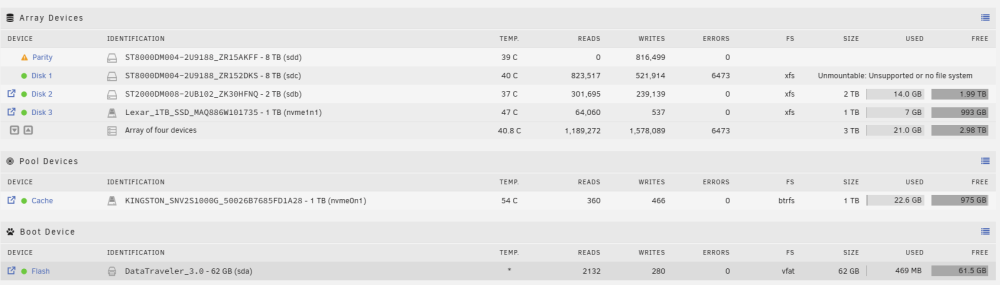
Hello my friends, how are you? I continue to face problems. I've replaced all the SATA cables, could it be the power cables? The speed remains at 245kb, and it will take about 300 days to synchronize 8TB, I honestly don't know what else it could be. I even tried to clean the disks with gparted live, but everything remains the same. I tried "new config" and nothing worked, except now it shows that one HDD is not mountable. I'm quite new to this, I don't know how to proceed anymore, I'm going to attach a new diagnostic, I hope you can help me. Thank you. anubis-diagnostics-20240312-1610.zip
-
Good morning, I'll take a look at night and I'll post the results here.
-
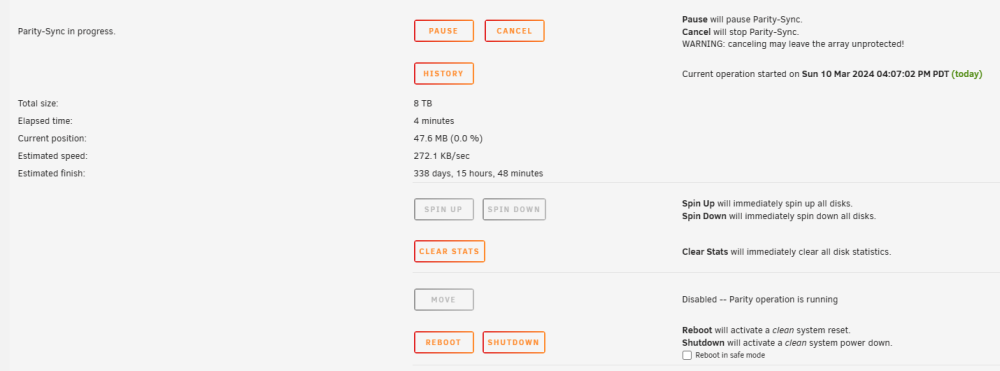
Good evening everyone, I started my tests with Unraid with proxmox, it was working so well that I decided to move on to the installation alone. I removed proxmox from my machine, and installed unraid, as I didn't know how to do it properly, and apparently it worked well, the first “parity” synchronization was relatively quick, taking less than a day to complete, after other tests, I decided format the pendrive by backing up my key and start a kind of “clean install”. Then my problems started, the “parity” is extremely slow and I don't know what could be happening anymore. Things I tried: I used parity plugins to try to improve speed. I did tests using diskspeed, apparently without any problems. I took the preclear. And nothing helped. Can you help me? diag.zip
-
Esqueci de anexar o diagnóstico hehe anubis-diagnostics-20240310-1613.zip
-
Salve galera, tudo bem? Instalei o Unraid há algum tempo, na primeira vez, usei ele por dentro do proxmox, e foi tudo ok, fiquei maravilhado e resolvi instalar ele cru no PC. Funcionou perfeitamente bem, e após alguns testes resolvi fazer um “clean install”, então meus problemas começaram. A paridade está extremamente devagar, em torno de 250 kbs. Não estou entendendo o que eu possa estar fazendo de errado ou o que possa estar acontecendo de errado. Já chequei os cabos, já passei o diskspeed (está tudo ok), nesse instante não há dockers ou VM, apenas rodando a paridade. Alguém pode me ajudar? Obrigado.
.thumb.png.4860e4d33556d6178998a720451f708d.png)


