





bl00dy-c0d3
Members
-
Joined
-
Last visited
-
Ohh okay Thank you! Probably had that enabled before I reinstalled the system.
-
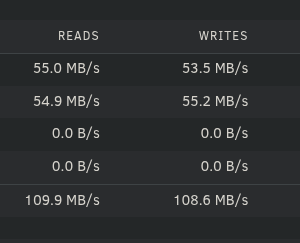
Hey there, I just reinstalled my Unraid System to use xfs encryption. I realized that since I did that, my writing speed is basically halfed, as when I write onto the pool, it will read and write onto the disk and parity disk at the same time, instead of just writing to the disk/parity. Is that an expexted behaviour with xfs encryption? I would love to use encryption, but not at the cost of half the writing speed. Thanks in advance Mia
-
Hey Guys, is there an estimation on when Sonoma will be available?
-
Nah, that does activate it depending on how many disks are in use. I want it depending on time. Would love to have it quiet when I sleep
-
Werid, so its just not shown in the GUI? Can I read out the state in CLI?
-
Hey, I try to turn on/off Fastwrite with a cronjob depending on time. Unfortunately if i type the command "mdcmd set md_write_method 0" or "mdcmd set md_write_method 1" nothing changes. So in the GUI the setting "Tunable (md_write_method)" stays on what it was before. On dmesg I can see that the command does apply tho. How can I enable/disable fastwrite with a command?

-
I will probably just use a cronjob to turn it off by night and on by day. mdcmd set md_write_method [0,1] should do the trick
-
Thanks, that was my "problem". Out of your experience, is there a hugh write speed difference when turning it off?
-
You probably mean that?

-
Sometimes i am able to manually spin it down for 2 minutes before they spin up again. Nothing to see in File Activity
-
Yes i have. Same thing. Its also every HDD thats turning on again. So not just like 1 or 2.
-
Hey Guys, for some reason my HDDs never spin down. I can spin down them manually but they will spin up again after some seconds. I checked File Activity and Open Files but there is nothing accessing my drives. VMs are on my SSDs, so that they can run without making any noice. But even with VMs and Docker completely disabled they dont spin down. The timing is set to 15min for automaticaly spin down. I appreciate any help Thanks Marcel unraid-diagnostics-20240312-1300.zip

