





LeroyLaFontaine
Members
-
Joined
-
Last visited
Everything posted by LeroyLaFontaine
-
root@UnRaidServer:~# zpool import pool: cache id: 1554510259976988443 state: ONLINE action: The pool can be imported using its name or numeric identifier. config: cache ONLINE nvme0n1p1 ONLINE pool: disk1 id: 5601764256316518606 state: FAULTED status: The pool was last accessed by another system. action: The pool cannot be imported due to damaged devices or data. The pool may be active on another system, but can be imported using the '-f' flag. see: https://openzfs.github.io/openzfs-docs/msg/ZFS-8000-EY config: disk1 FAULTED corrupted data wwn-0x5000c500db1abb61-part1 ONLINE root@UnRaidServer:~# root@UnRaidServer:~# root@UnRaidServer:~# root@UnRaidServer:~# zpool import -f pool: cache id: 1554510259976988443 state: ONLINE action: The pool can be imported using its name or numeric identifier. config: cache ONLINE nvme0n1p1 ONLINE pool: disk1 id: 5601764256316518606 state: FAULTED status: The pool was last accessed by another system. action: The pool cannot be imported due to damaged devices or data. The pool may be active on another system, but can be imported using the '-f' flag. see: https://openzfs.github.io/openzfs-docs/msg/ZFS-8000-EY config: disk1 FAULTED corrupted data wwn-0x5000c500db1abb61-part1 ONLINE root@UnRaidServer:~# I've tried (a few days ago), to add this pool to a TrueNAS server, but since then, added it back to UnRaid, here it was working fine. The error came after a simple UnRaid restart.
-
They should be showing up now as normal HDD, in that last diagnostics file. root@UnRaidServer:~# fdisk -l /dev/sdb Disk /dev/sdb: 14.55 TiB, 16000900661248 bytes, 31251759104 sectors Disk model: ST16000NE000-2RW Units: sectors of 1 * 512 = 512 bytes Sector size (logical/physical): 512 bytes / 4096 bytes I/O size (minimum/optimal): 4096 bytes / 4096 bytes Disklabel type: gpt Disk identifier: 68EE1A68-2918-48E8-B09E-01BEA5FAF072 Device Start End Sectors Size Type /dev/sdb1 64 31251759070 31251759007 14.6T Linux filesystem root@UnRaidServer:~# and root@UnRaidServer:~# blkid /dev/sda1: LABEL_FATBOOT="UNRAID" LABEL="UNRAID" UUID="18F3-0F43" BLOCK_SIZE="512" TYPE="vfat" PARTUUID="ed7a2645-01" /dev/loop1: TYPE="squashfs" /dev/nvme0n1p1: LABEL="cache" UUID="1554510259976988443" UUID_SUB="7566520858075654888" BLOCK_SIZE="4096" TYPE="zfs_member" /dev/sdb1: LABEL="disk1" UUID="5601764256316518606" UUID_SUB="10016781515377418896" BLOCK_SIZE="4096" TYPE="zfs_member" PARTUUID="84035d80-8e40-485d-9b36-59feece5ffb8" /dev/loop0: TYPE="squashfs" /dev/sdc1: UUID="84a8d6c0-d5eb-48ab-937c-937004310c0b" UUID_SUB="d78948b9-8d49-4add-80b8-f8480617dc19" BLOCK_SIZE="4096" TYPE="btrfs" /dev/md1p1: LABEL="disk1" UUID="5601764256316518606" UUID_SUB="10016781515377418896" BLOCK_SIZE="4096" TYPE="zfs_member" /dev/loop2: UUID="a7489dd4-c70f-4f80-ab0e-2a28f5356a4b" UUID_SUB="0055cad2-89ee-43a5-a284-4e6178de1d54" BLOCK_SIZE="4096" TYPE="btrfs" root@UnRaidServer:~# I'm using ZFS on both the HDD in the array, that we're talking about now, and on the nvme cache drive. The SSD storing docker and VM's is using btrfs.
-
I'm passing through the disks. Unfortunately, I can't pass through the controller since drives are attached that I need for something outside UnRaid. What I had done, is passthrough two drives, a 16TB HDD (array) and a 256SSD (dockers and VM's). And I passed through a PCIe device (1TB NVMe for Cache). For the sake of troubleshooting, I started UnRaid baremetal. And I get the same results, where I can't do what the manual tells me to do: What I see when I go to Main -> Disk1: https://i.gyazo.com/621f647772e118c5fb852dc396bf4cd3.png I don't see anything about checking the filesystem status (again, no difference if array is not started, started normally, or started in Maintenance Mode. Not sure if that's supposed to make a difference here already). unraidserver-diagnostics-20241110-1412.zip
-
I had not, but I'm trying it now, as per your recommendation, but I'm running into the issue that I cannot see the options that are being described for checking the filesystem. Step 4.) is where I can't do what is described. I can't check for a file system status, and it appears that UnRaid doesn't know what filesystem was being used. I've followed these steps with the Array stopped, started normally, and started in Maintenance Mode. I'm unsure if this is because I don't have a parity drive, since my Array consists of just one drive.
-
Hey there, I'm in a bit of a pickle. Just now, I was restarting my server, and during the shutdown, I saw some error: unraid cannot connect to the docker daemon at unix ///var/run/docker.sock. is the docker daemon running? It seemed stuck on this, so I forcefully turned it off. And now, the only drive in my array says: "Unmountable: Unsupported or no file system" Is there any way to "fix" this? unraidserver-diagnostics-20241110-0331.zip
-
I’m sorry to have wasted your time, but apparently the drive itself is the issue. I made this wonky setup to attach this 3.5” drive to the SFF backplane of the TrueNAS server, and setup a new pool in there. And I get low write speeds as well. is that something that can happen to a drive, messed up write speeds but being able to read normally?
-
So I emptied the drive, put it in a pool, zfs, no improvements, formatted it to xfs, put it back to the array, no improvements yet again. This is getting very frustrating unraidserver-diagnostics-20241018-0037.rar
-
Aight, I'll try that out. And what about the remaining Disk? Can I just remove that from the array as well, put it in another pool, by itself, whilst keeping the data in the progress? I can then add some random USB stick to the array so I'll at least have one drive to be able to start the array.
-
If I'm gonna empty the drive, and format it, could I not take it out of the array, and set it up as a new one-drive ZFS pool? And if yes, could I remove the other drive that's pretty much filled, and place that in another pool by itself, leaving the data and the ZFS filesystem?
-
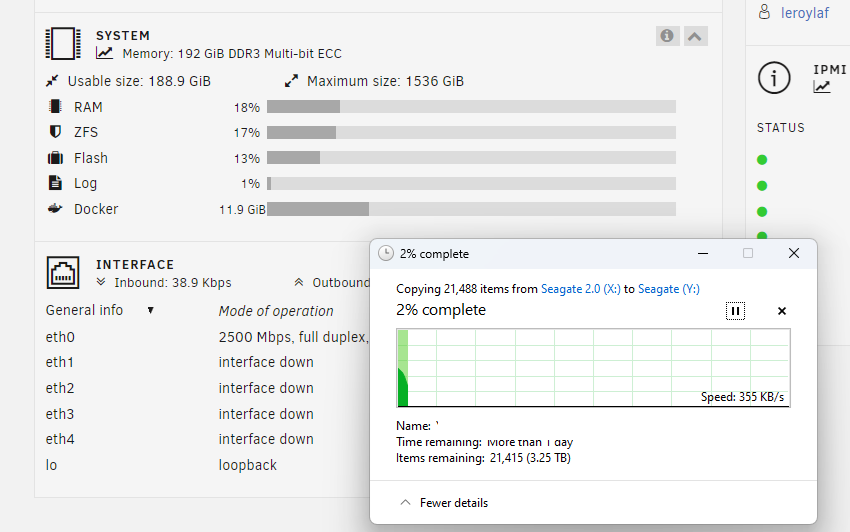
The ZFS ram is set to 163GB, of the 192GB available, that leaves for 29GB for UnRaid, and the very few dockers I run. Anyways, I did a reboot, and started the transfer again, and it would drop down very quickly to 15MB/s. I could see the ZFS cache filling up again, since it was empty before because of the reboot. But the speed started dropping when ZFS memory was at like 9%. I've attached the diagnostics to this post. Also I've rules out any issues with the TrueNAS server. I'm getting the same results when transferring a large, local file. unraidserver-diagnostics-20241017-1813.zip
-
I’m not sure it has anything to with the speed situation you described. My TrueNAS shares are still very responsive, whilst the UnRaid share are very sluggish. Also, the pool in question has hard drives, with around 300 MB/s usually. However, I will look into the flowers you mentioned. The RAM thing does look interesting. But if that’s the issue, what’s the point if it then? At the time, I bought it to improve performance. I had it set if with a lot of RAM for ZFS, and a 1TB NVMe to improve writes (which I disabled temporarily for this transfer).
-
Hello there, I'm trying to move a share from my TrueNAS server to my UnRaid server, and for some reason, it starts off as normal, around 200MB/s. But very quickly, it drops down to about 15MB/s and slowly but surely goes slower even still. It's now hovering at 3-5MB/s. I'm talking about 3.5TB of data, and I don't want to wait a few days for it to finish. My UnRaid server is an R720 and the array is a two-drive non-raid ZFS array. When I started the first attempt, I quickly stopped it, because I realized I still had a cache drive enabled, which is smaller than the data I wanted to copy, so I quickly disabled that, and started over. Shouldn't have anything to do with it, but I just figured I'd mention it. I know that my UnRaid server is the problem, not the TrueNAS machine, because all the UnRaid shares I've set up are very slow to respond. It literally takes 15 seconds for Windows File Explorer to load the blue bars that show capacity utilization. The setup is as follows: TrueNAS pool: 4x HDD, data striped (I know, not responsible, but I only had to park it for a few days). Not sure if relevant, but 2x Xeon 2637 V3, 32GB RAM. Connected to Windows machine (that's initiation the copy) over 25Gb connection Windows PC is connected to a switch with a 2.5Gbit connection. UnRaid machine also 2.5Gbit connection, two HDD drive ZFS array. Not sure if relevant, but 2x Xeon 2620 V1, 192GB of RAM) Does anyone know what's going on here, or know where to look? Cheers EDIT: Things I've looked into since Disabled cache drive Checked the flowrate Ruled out TrueNAS server as the issue; same issue with local files Ruled out ZFS memory taking away memory from UnRaid OS. unraidserver-diagnostics-20241017-1813.zip
-
Well, I think I found the problem. It says Speed "5GT/s (downgraded), Width x4 (downgraded)." That's running at PCIe 2.0 x 4 then, right? Not really sure how that's happening though. I've included the complete return of that command (it's very long though:P):
-
I went through some manuals and double checked my settings. On my desktop, The GPU and M.2 drive (C-drive) is using the CPU PCIe lanes, and another M.2, and the network card are using the chipset. PowerShell tells me the card is running 8.0 GT/s and at 4x. So that's not it. I don't have SATA drives attached either so that seems correct. Idk how to check the link speeds between the UnRaid network card. The BIOS is quite garbage, doesn't say anything about PCIe lanes, just that there are devices; M.2 to 4x PCIe 4.0 adapater, a 1x PCIe 2.5Gb ethernet card, and the Mellanox 25GB card, so theoratically there should be enough lanes. But how do I verify the current PCIe versions/lane width? I guess it's just a UnRaid CPU bottleneck. You say >10G only works on certain boards with Xeon or Threadripper, but what makes those CPU's so special? I would understand a 10 year old CPU (actually 10 years exactly tomorrow :P), has difficulty, but shouldn't any modern CPU easilly be able to handle this? ~Leroy
-
I just redid iperf, keeping an eye on CPU usage. My desktop didn't really go up, from 12% to 13%, but that's a 12600k. The server showed one core going to 55-60%. That's an older 4790. Sure it's old, but 60% still leaves a lot of headroom, no?
-
Hey there, I know, yet another "I'm not hitting my speeds"-thread, but I can't seem to figure it out. I've recently gotten two Mellanox ConnectX-4 25Gb NICS, to get a faster connection between my server and my desktop. I've gotten two of these to be excact, and a Ubiquiti 25 Gbps 3m DAC-cable. I've done a few CrystalDiskMark 8 tests, and gotten around ~900MBps transfer speeds at first (to a Samsung 970 Evo Plus). After setting "Permit exclusive shares" to yes, I got around 1.2GBps. Windows file transfers were ~8-900MBps (array with that Samsung disk as cache) and 1.4GBps (on a share that's only located on cache drive) respectively. I've also done some DiskSpeeds on UnRaid, DiskSpeed says read/write speeds are both 4.0GBps. Not sure what's up with that. That seems quite a bit above what that drive is supposed to do. I also did a few iperf3 tests, and got around 12Gbps speeds there, which seems in line with the 1.4GBps transfer speed I got to that share on the share on the pool. Not sure what to expect from my setup, but I was hoping for a bit more. My desktop is a modern Z690 Gigabyte motherboard and the NIC is running at PCIe 3.0 x4. On my server I'm not sure how to check it. It's a Dell OptiPlex 9020 tower, and from what I understand, it should support those PCIe speeds as well. I've gone through several threads of people with similar issues, but I wasn't able to pin-point my problem. Anyone know what might be going on? C:\Users\llafo\Downloads\iperf3.16_64>iperf3.exe -c 192.168.3.203 Connecting to host 192.168.3.203, port 5201 [ 5] local 192.168.3.200 port 14903 connected to 192.168.3.203 port 5201 [ ID] Interval Transfer Bitrate [ 5] 0.00-1.01 sec 1.37 GBytes 11.7 Gbits/sec [ 5] 1.01-2.00 sec 1.35 GBytes 11.7 Gbits/sec [ 5] 2.00-3.01 sec 1.37 GBytes 11.7 Gbits/sec [ 5] 3.01-4.02 sec 1.37 GBytes 11.7 Gbits/sec [ 5] 4.02-5.00 sec 1.34 GBytes 11.7 Gbits/sec [ 5] 5.00-6.01 sec 1.37 GBytes 11.7 Gbits/sec [ 5] 6.01-7.01 sec 1.36 GBytes 11.7 Gbits/sec [ 5] 7.01-8.01 sec 1.39 GBytes 11.9 Gbits/sec [ 5] 8.01-9.01 sec 1.39 GBytes 11.9 Gbits/sec [ 5] 9.01-10.01 sec 1.39 GBytes 11.9 Gbits/sec - - - - - - - - - - - - - - - - - - - - - - - - - [ ID] Interval Transfer Bitrate [ 5] 0.00-10.01 sec 13.7 GBytes 11.8 Gbits/sec sender [ 5] 0.00-10.06 sec 13.7 GBytes 11.7 Gbits/sec receiver iperf Done. Cheers, Leroy unraidserver-diagnostics-20240430-1530.zip EDIT: I set the MTU on both NICS at 9000, it netted a tiny bit of a boost, just barely missing out on 13GBps, at 12.8.
-
For some reason I can't read that post: "You do not have permission to view this topic."
-
Hey guys, Let me preface this by saying I'm very new to Unraid, still in the trial period, so hopefully you guys can be patient with me. I currently have a server with a 16TB HDD in the array, a 1TB SSD Cache, and a 250GB SATA SSD for my docker images. I'm using it as a Plex Media Server. All the dockers are Plex and some of the Arr apps, and Deluge. Recently I've run into the issue where if I'm trying to move from my other desktop, it says there is no storage left, even though there clearly is (12TB/16TB used on the array, ~7-800GB/1TB on the Cache, and used 55.8GB/250GB on the Docker SSD). I've run the Fix Common Problems plugin, and it says "Unable to write to cache -- Drive mounted read-only or completely full." I've gone to the "More information" page, and the "This will happen usually because of an improperly configured docker app where within its internal settings it is storing information directly within the docker image instead of to an external share" seemed like something I might have misconfigured, but after double-checking, everything seemed fine, to the best of my knowledge. I've recently added that 250GB SSD for my docker images. They were on the 1TB Cache drive previously. I moved them to the array with the Mover, and then moved them to the 250GB SSD, also with the Mover. I don't know if that was something that's prone to mistakes, or other errors. Anyone got any tips on where to fix this? Cheers, Leroy unraidserver-diagnostics-20240421-0208.zip

