





datahorder
Members
-
Joined
-
Last visited
Everything posted by datahorder
-
turns out the issue was the Realtek R8168 plugin. now my server is running fine
-
at this point i am not sure how to continue. since whenever i do a test i have to pull out the motherboard and swap coolers. since i have more pc parts and i am only missing a cooler for a 2nd server build. thank you @JorgeB . i will give this a try.
-
thank you for your response. the memory is known good, since it is the same i use with the old motherboard. what should i do in save mode? i tested the motherboard already with a new flesh drive - this did work as expected
-
Hi everyone, I just moved my Unraid setup to a new motherboard and ran into some issues I’m not sure how to troubleshoot. When I first booted the new system, it seemed like the array started, but none of my drives were showing up. The CLI also felt unusually slow. I stopped the array, waited a bit, and eventually my drives appeared. I added them to the config and started the array. After a few moments, I noticed the web UI was no longer responding. I connected an HDMI cable to the system and rebooted. After this reboot, the web UI came up eventually, but it stopped responding again shortly after. From the CLI, the system seems to respond normally. uptime and btop do not show high system load. I’m not sure where to start troubleshooting this issue. Has anyone seen similar behavior after a motherboard swap? Any advice would be greatly appreciated. Thanks in advance! orion-diagnostics-20251005-1437.zip edit: i just saw this message on the Monitor output mr8168 0000:04:00:0 et0: NETDEV WATCHDOG: CPU 2 : transmit queue 0 timed out 6272 ms
-
i have 5 drives attached. since i only got 4 sata ports on the board, i added a PCI Card with 4 additional sata ports. as far as i am aware the card does not support raid
-
i just did another migration attempt. this time i disabled all vm passthrough devices. ping was still reliable, and so was the web-ui but i could see that the motherboard and the drives have been detect. however the array was started but without any drives. i then stopped the array, tried to put in the devices in the correct slots. this is when the webui stopped responding completely. i shut down the array and the system via webcli and stopped the migration process
-
thank you very much. i will give that a try
-
yes i have a Zigbee USB drive with passed on to Home Assistant VM is this an issue for such a migration?
-
Hi everyone, A new motherboard recently became available to me, so I decided to upgrade my home server and migrate my Unraid setup to it. However, when I booted it up, things started behaving oddly. Ping was unreliable with periodic drops, and when I managed to log in to the web UI - it was very slow, the motherboard wasn’t detected and most of my drives were missing. Since it was already late, I aborted the operation and switched back to the original motherboard. Today, I found another CPU cooler and PSU and set up a fresh Unraid trial stick (version 7.0.1) to test the new board. It booted up without any issues—motherboard details and all were showing as expected. Does anyone have an idea what might be going on? the new motherboard is a Asus Prime Z370-P
-
i have not seen this issue for a few weeks now. but today it is back. i did a quick check on my docker cotainers and noticed that scrutiny can not read the disk info.
-
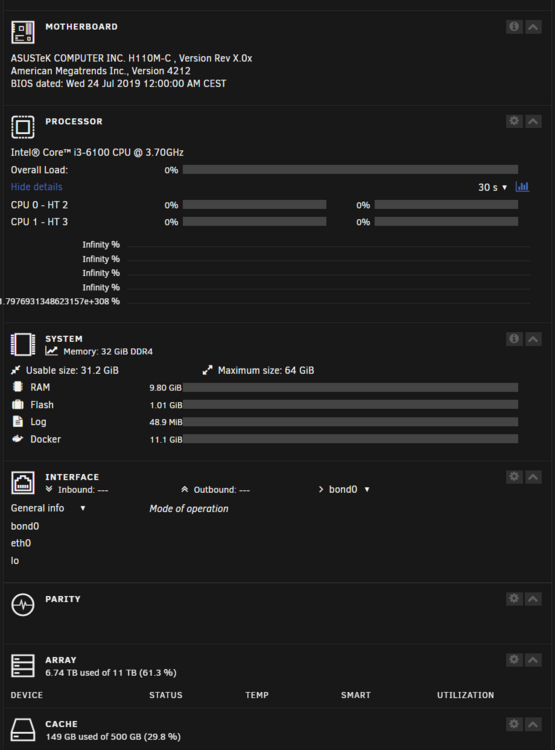
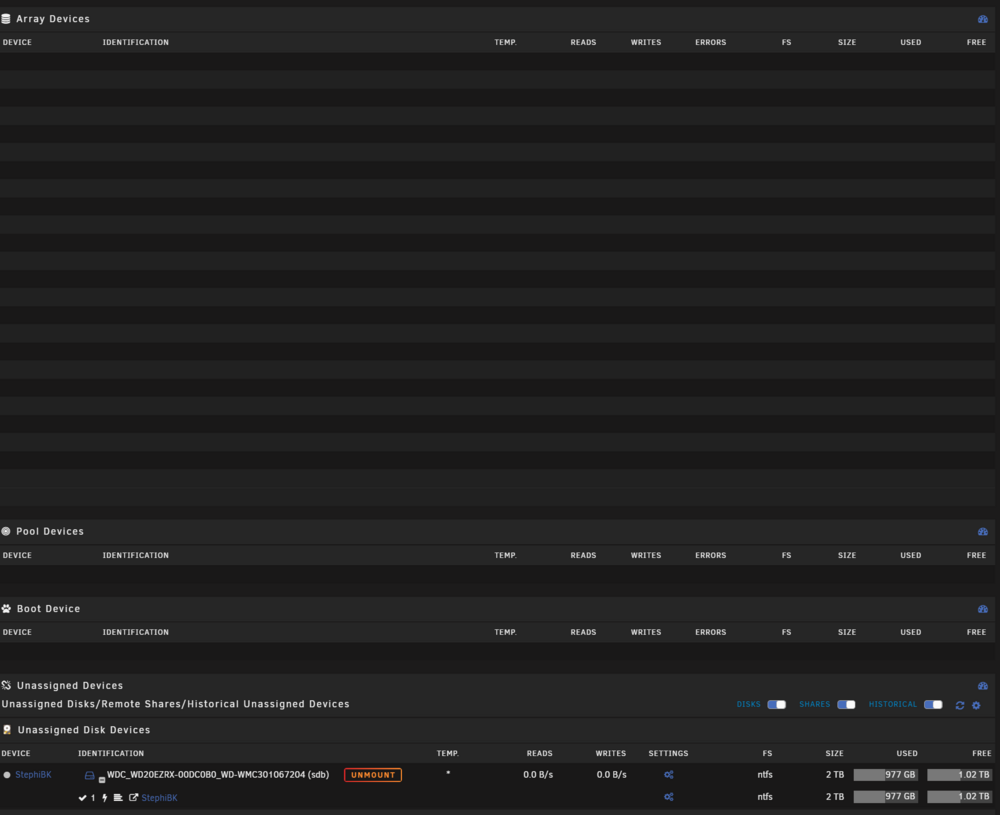
hi everyone, i have an odd issue with my system: as you can see in my attached screenshots, the dashboard is not showing any information about cpu usage or other system information. While for RAM the graphs are missing the values seem to be displayed. My main page is missing all the arry details, but oddly the unassigned device is there. when i try to use the web CLI i get a blank page (previsouly it opened shortly, but closed again quickly). other then that, my system seems operational. my docker containers are running, my VM is working. My shares are accessible. the previous 2 times this happened i could only solve it with a reboot. Because of this i know the uptime of my system is now almost 6 days. in these 6 days i did not experience any other issues. has anybody seen such an issue before?
-
thank you for pointing this out - i have been told the opposite before. does this mean i could mount a lot more additional drives as unassigned drives. i had this specific requirement before and was told the 6 drive limit does prevent me from that. i will test the drive, but i just unplugged it for the change and plugged it in later. so i would be very much suppressed if this was an issue.
-
hello everyone, in addition to my array, i have a 2TB disk in my system which i share with unassigned devices. when i recently changed my caching SSD i unplugged the 2TB drive (i was at my 6 Disks limit). With my ssd change finished i wanted to reconnect my 2TB drive. i can see it showing up in the unassigned disk devices list, but i only see the format button no mount option. right now i am back to 6 disk (including the 2TB drive) and i deleted the old caching SSD in the "Historical Unassigned Devices" list. does anybody have an idea how i can mount this device again?
-
hello everyone, in addition to my array, i have a 2TB disk in my system which i share with unassigned devices. when i recently changed my caching SSD i unplugged the 2TB drive (i was at my 6 Disks limit). With my ssd change finished i wanted to reconnect my 2TB drive. i can see it showing up in the unassigned disk devices list, but i only see the format button no mount option. right now i am back to 6 disk (including the 2TB drive) and i deleted the old caching SSD in the "Historical Unassigned Devices" list. does anybody have an idea how i can mount this device again?
-
thank you for your help! orion-diagnostics-20240324-0227.zip
-
Hello everoney, noob here. there is a script i need to run every time my vpn IP changes (or i could just run it every hour). with my basic linux knowledge i went looking for cron inside the container but could not find it. I am pretty sure there is an intended way to do this but i could not figure it out. Can someone help me out please?
-
oh. i have the setting set to show dot files. but on my UD share, i do not see the files. but when i check on my unraid server itselfs in the cli i can see the files.
-
Hi everone, noob here... is there a way to not hide "dot" files? I tired the normal SMB settings, but this does ether not effect unassigned device shares or I am am doing something wrong.

