





TheImmatureAdmin
Members
-
Joined
-
Last visited
-
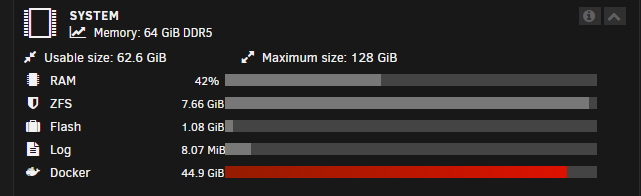
For anyone curious, I found this old thread and the 'docker volume prune' command worked for me. I anticipate the size to keep growing until I find root cause, but for now it worked. https://forums.unraid.net/topic/103674-solved-kinda-high-docker-utilization-but-container-size-doesnt-match/ For more context, I ran 'docker system df' with these results: 89 local volumes seemed like a high number with only 3 in active use. I decided to go ahead and try the 'docker volume prune' command even though only ~1.8GB seemed to be reclaimable. The result showed "total reclaimed space: 1.449GB", but checking the dashboard in Unraid now shows only 23.1 GiB usage when I was sitting at 44+ GiB before executing the prune command. That command got me back over 20GB. There still is the mystery of how that space is getting filled up, but at least I can clear it out now manually as needed.


-
Hi all, I have found a lot of topics similar to this but still haven't found my answer/solution. I hope I'm missing something easy. UNRAID: 6.12.10 Docker image size: 50GB Problem Description: My docker image is getting full, and seems to keep growing even though I'm not adding more containers. Eventually, I have issues because there is no free space. Typically, this is because of logs that are growing out of control, misconfigured paths, etc. So far, I haven't found anything that is misconfigured and my log sizes look reasonable. One thing I haven't figured out that would help me troubleshoot is, how do I ever find what is using this space? Knowing the container would greatly simplify the problem. I am running ~35 containers currently, and based on the measurements from using the "Container Size" tool, I'd expect at most around 23GB used out of 50GB, but I'm using now 44GB+. Below are screenshots from the Docker tab > Container Size output and from the Dashboard showing Docker image usage. I've also found a script from SpaceInvaderOne that gives more detailed data on docker image disk space usage, however it appears to align with the "Container Size" tool. I am still not seeing where the extra 20GB of data is being used. Please let me know if I can provide any additional information. Thank you!

-
TL;DR - Solution was to close all tabs in my browser that had Unraid open. Sorry for reviving a dead post, however, I just experienced this exact issue. I am running 6.12.10 and needed to restart Unraid due to a (presumably) separate issue. I found this thread: I ran diagnostics and found a very similar message about nginx limiting requests. Next, I simply closed the 2 or 3 tabs that I had opened to Unraid. The web GUI immediately started working again after that. This issue seems to be related to those tabs remaining open. In my instance, the Unraid tabs were open on my desktop before I rebooted the Unraid server. Once the server was back online, the login page seemed to load just fine, I submitted my credentials, and then I immediately got the HTTP 503 (maybe the login page was just cached, not sure). My shares were still all online, docker services were still running, I was just unable to access the Unraid web GUI.
-
One more update! I started having issues again, but this time not with Plex. I added Immich to my server and the CPU load was high enough while running Face Detection to cause the same type of crashing. The issue is 100% with the Core i9-14900k. Ultimately, I resolved it by changing the "Loadline Calibration Control" in the BIOS to mode 7. Depending on the motherboard, this setting may be called "LLC" or "LCC". The value may be called "Mode 7", "L7", or similar. Effectively, it adjusts the voltage curve for the CPU when under load. Other values may work as well, but that value increases the voltage curve high enough so the voltage drop under load doesn't destabilize the CPU. After changing that, I have had zero issues. I was able to run face detection on 30k+ photos and videos. I am contemplating turning Credit Detection back on in Plex now as well, I'm sure it will not cause the server to crash anymore (at least, not because of the CPU). Thanks again to @ZarZ for finding this thread. It had the first mention of LLC as being a solution that I saw. https://forums.plex.tv/t/end-credits-detection-causing-windows-crash-bsod/870270/8 I also found helpful information here: https://community.intel.com/t5/Processors/Solved-Stability-issue-with-proc-I9-14900K-crash-BSOD/td-p/1574516
-
I just installed the Dynamix System Temp plugin, so I don't know what my temps look like under load. Right now at idle, it looks like my CPU is at 40 C. My cooler is the Noctua NH-D12L which is one of the few air coolers that fit in my 4U case (RSV-L4411). I also have three 120mm intake and two 80mm exhaust case fans.
-
Much appreciation to @JorgeB and @ZarZ. The problem was narrowed down to Plex and the link above isolated the configuration causing the problem. I turned off End Credit Detection for my libraries and have now been running for 24 hours without a crash. If anything changes, I'll update here. This may still partly have to do with hardware since most, if not all, of the people experiencing issues with credit detection were running Core i9 K-series processors, e.g. Core i9-14900K. Apparently there is some instability with those processors and issues may also be resolved by changing power limit and voltage settings to keep the processor stable under higher loads. So far I haven't touched those settings in the BIOS, but that'll be my next step if the problems start back up.
-
Any thoughts on why Unraid won't boot until I make a change in the BIOS after a crash like that? EDIT: I found this thread which says to disable the "fast boot" feature. This is probably my boot issue. I'll give that a shot and see if I can restart after a crash.
-
Thanks, I didn't realize that was so easy. I added back most of the containers, spacing them out a bit. The server was stable for hours until I added Plex back. The plex container caused the system to crash not longer after setting it up. For most of the containers, I kept the original template and appdata from before. For Plex, I started fresh and started re-importing the libraries again (I thought maybe some automatic media optimization I setup in Plex could have been causing it, so I wanted to be sure that was gone). Nonetheless, within about 15 minutes the server hung and was unresponsive again. This time, the syslog doesn't seem to capture any error or segfault, it just stops until the system is restarted (at Mar 26 19:46:39 in the log). I also wasn't able to get Unraid to boot until I made some minor modifications in the BIOS, saved, and restarted. That pattern has happened before, after a crash the system won't boot until I make a BIOS change. It could be just turning XMP on, or turning XMP off. Either way, the change allows me to boot back up. No idea what is going on there. I wonder if maybe this is still a hardware issue given that I started fresh with Plex, the weird BIOS boot problem, and the lack of anything in syslog. Maybe Plex is the only container triggering it because it is using more resources than the other containers (more power/memory/cpu/etc)? I have attached the most recent logs and diagnostics. Thank you again for all your help! ligma-diagnostics-20240326-2315.zip syslog-192.168.3.93 (3).log
-
Is there a way to stop containers from automatically starting first? Once I enable Docker, the containers start up and the server hangs faster than I can go in and disable/stop them. Short of deleting the docker image and clearing out templates, I haven't found a way to prevent them from starting automatically. Hopefully there is an easy way that I'm missing, but if I need to start fresh with my containers then no problem. That is easier than replacing the mobo/cpu.
-
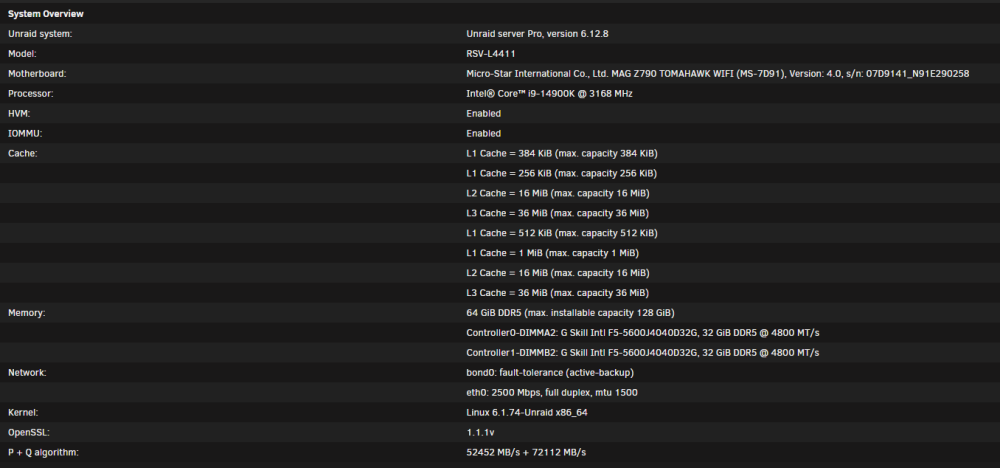
I believe my issues started more than 3 weeks ago. I turned rsyslog on to start having logs saved around March 1st, and my problems started 1-2 weeks before that. In total, about 4-5 weeks ago. Yes, my RAM is DDR5. It is some cheap G.Skill RAM that runs at 5600 with XMP but 4800 with XMP turned off. I've tried with XMP enabled and without, both ways still causes the hang. Everything was working great for about 1 month straight after I initially set up the server, then it started crapping out.
-
Thank you for the feedback! I tested with each stick of memory by itself and reproduced the same results both times. I actually tried the first stick by itself yesterday, but never tried the second stick by itself until today. Both times, however, the server locks up almost immediately after Docker is enabled and my containers start running. If there is anything new in the logs I'll post them here. Sometimes it seems like there isn't a segfault or error at all in the logs. All I see are normal log messages and then log messages from after I press the restart button. From what I've read, that can happen when a hardware failure is the root cause. EDIT: I have attached the latest syslog. For reference, below is a snippet of the log which I believe captures when I enabled docker until the server hung up (tried to remove some lines so it wasn't too long). Mar 25 16:41:58 Ligma ool www[24269]: /usr/local/emhttp/plugins/dynamix/scripts/emcmd 'cmdStatus=Apply' ... ...**applying settings to enable docker** ... Mar 25 16:42:01 Ligma emhttpd: shcmd (961): /etc/rc.d/rc.docker start Mar 25 16:42:01 Ligma root: starting dockerd ... Mar 25 16:42:01 Ligma avahi-daemon[31534]: Server startup complete. Host name is Ligma.local. Local service cookie is 335134691. ... ...**containers starting - I left the last container start message as a reference for time** ... Mar 25 16:42:12 Ligma rc.docker: vaultwarden: started succesfully! Mar 25 16:42:14 Ligma kernel: kernel tried to execute NX-protected page - exploit attempt? (uid: 99) Mar 25 16:42:14 Ligma kernel: BUG: unable to handle page fault for address: ffff88834158f000 Mar 25 16:42:14 Ligma kernel: #PF: supervisor instruction fetch in kernel mode Mar 25 16:42:14 Ligma kernel: #PF: error_code(0x0011) - permissions violation Mar 25 16:42:14 Ligma kernel: PGD 4c01067 P4D 4c01067 PUD 80000003400001e3 Mar 25 16:42:14 Ligma kernel: Oops: 0011 [#1] PREEMPT SMP NOPTI Mar 25 16:42:14 Ligma kernel: CPU: 12 PID: 9735 Comm: python3 Tainted: P O 6.1.74-Unraid #1 Mar 25 16:42:14 Ligma kernel: Hardware name: Micro-Star International Co., Ltd. MS-7D91/MAG Z790 TOMAHAWK WIFI (MS-7D91), BIOS H.B3 03/13/2024 Mar 25 16:42:14 Ligma kernel: RIP: 0010:0xffff88834158f000 Mar 25 16:42:14 Ligma kernel: Code: 7a 99 32 d3 32 f3 9d fa 9d fa 6c fa 7c fa 36 e6 36 e6 f2 02 f2 02 a7 54 ed 44 19 60 09 70 b8 64 d2 b5 90 9f 84 9f b9 af b1 af <00> 00 00 00 00 00 00 00 01 00 00 00 00 00 00 00 00 00 00 00 0c 00 Mar 25 16:42:14 Ligma kernel: RSP: 0018:ffffc9000c723e90 EFLAGS: 00010046 Mar 25 16:42:14 Ligma kernel: RAX: 0000000000000000 RBX: ffff88834158f000 RCX: 0000000000000000 Mar 25 16:42:14 Ligma kernel: RDX: 0000000000000000 RSI: ffffffff8214ded8 RDI: ffffffff82102b9a Mar 25 16:42:14 Ligma kernel: RBP: ffff88885f32e200 R08: 0000000000000000 R09: 00001543e7fd8b80 Mar 25 16:42:14 Ligma kernel: R10: 00000000000002db R11: 0000000000000000 R12: ffff88834158f000 Mar 25 16:42:14 Ligma kernel: R13: 0000000000000000 R14: 0000000000000000 R15: 0000000000000000 Mar 25 16:42:14 Ligma kernel: FS: 00001543e5ffe6c0(0000) GS:ffff88885f300000(0000) knlGS:0000000000000000 Mar 25 16:42:14 Ligma kernel: CS: 0010 DS: 0000 ES: 0000 CR0: 0000000080050033 Mar 25 16:42:14 Ligma kernel: CR2: ffff88834158f000 CR3: 0000000314402000 CR4: 0000000000750ee0 Mar 25 16:42:14 Ligma kernel: PKRU: 55555554 Mar 25 16:42:14 Ligma kernel: Call Trace: Mar 25 16:42:14 Ligma kernel: <TASK> Mar 25 16:42:14 Ligma kernel: ? __die_body+0x1a/0x5c Mar 25 16:42:14 Ligma kernel: ? page_fault_oops+0x329/0x376 Mar 25 16:42:14 Ligma kernel: ? exc_page_fault+0xf4/0x11d Mar 25 16:42:14 Ligma kernel: ? asm_exc_page_fault+0x22/0x30 Mar 25 16:42:14 Ligma kernel: ? __schedule+0xa9/0x612 Mar 25 16:42:14 Ligma kernel: ? _raw_spin_lock+0x13/0x1c Mar 25 16:42:14 Ligma kernel: ? schedule+0x8e/0xcc Mar 25 16:42:14 Ligma kernel: ? __do_sys_sched_yield+0xa/0x11 Mar 25 16:42:14 Ligma kernel: ? do_syscall_64+0x68/0x81 Mar 25 16:42:14 Ligma kernel: ? entry_SYSCALL_64_after_hwframe+0x64/0xce Mar 25 16:42:14 Ligma kernel: </TASK> Mar 25 16:42:14 Ligma kernel: Modules linked in: ipvlan veth xt_nat nf_conntrack_netlink nfnetlink xfrm_user xfrm_algo xt_addrtype br_netfilter xt_CHECKSUM xt_MASQUERADE xt_conntrack ipt_REJECT nf_reject_ipv4 xt_tcpudp ip6table_mangle ip6table_nat iptable_mangle iptable_nat nf_nat nf_conntrack nf_defrag_ipv6 nf_defrag_ipv4 vhost_net tun vhost vhost_iotlb tap md_mod ip6table_filter ip6_tables iptable_filter ip_tables x_tables efivarfs af_packet 8021q garp mrp bridge stp llc bonding tls i915 zfs(PO) intel_rapl_msr intel_rapl_common x86_pkg_temp_thermal intel_powerclamp coretemp input_leds iosf_mbi drm_buddy i2c_algo_bit kvm_intel ttm zunicode(PO) btusb drm_display_helper btrtl btbcm kvm btintel drm_kms_helper zzstd(O) bluetooth drm crct10dif_pclmul crc32_pclmul crc32c_intel ghash_clmulni_intel sha512_ssse3 sha256_ssse3 sha1_ssse3 zlua(O) aesni_intel hid_apple crypto_simd ecdh_generic joydev led_class zavl(PO) ecc i2c_i801 cryptd intel_gtt icp(PO) zcommon(PO) znvpair(PO) rapl spl(O) mei_hdcp mei_pxp Mar 25 16:42:14 Ligma kernel: intel_cstate wmi_bmof mxm_wmi intel_uncore agpgart i2c_smbus nvme igc mei_me i2c_core ahci nvme_core syscopyarea mei libahci sysfillrect sysimgblt thermal fb_sys_fops video fan tpm_crb tpm_tis tpm_tis_core tpm backlight wmi intel_pmc_core acpi_pad acpi_tad button unix Mar 25 16:42:14 Ligma kernel: CR2: ffff88834158f000 Mar 25 16:42:14 Ligma kernel: ---[ end trace 0000000000000000 ]--- Mar 25 16:42:14 Ligma kernel: RIP: 0010:0xffff88834158f000 Mar 25 16:42:14 Ligma kernel: Code: 7a 99 32 d3 32 f3 9d fa 9d fa 6c fa 7c fa 36 e6 36 e6 f2 02 f2 02 a7 54 ed 44 19 60 09 70 b8 64 d2 b5 90 9f 84 9f b9 af b1 af <08> 40 00 00 00 00 00 00 01 00 00 00 00 00 00 00 00 00 00 00 0c 00 Mar 25 16:42:14 Ligma kernel: RSP: 0018:ffffc9000c723e90 EFLAGS: 00010046 Mar 25 16:42:14 Ligma kernel: RAX: 0000000000000000 RBX: ffff88834158f000 RCX: 0000000000000000 Mar 25 16:42:14 Ligma kernel: RDX: 0000000000000000 RSI: ffffffff8214ded8 RDI: ffffffff82102b9a Mar 25 16:42:14 Ligma kernel: RBP: ffff88885f32e200 R08: 0000000000000000 R09: 00001543e7fd8b80 Mar 25 16:42:14 Ligma kernel: R10: 00000000000002db R11: 0000000000000000 R12: ffff88834158f000 Mar 25 16:42:14 Ligma kernel: R13: 0000000000000000 R14: 0000000000000000 R15: 0000000000000000 Mar 25 16:42:14 Ligma kernel: FS: 00001543e5ffe6c0(0000) GS:ffff88885f300000(0000) knlGS:0000000000000000 Mar 25 16:42:14 Ligma kernel: CS: 0010 DS: 0000 ES: 0000 CR0: 0000000080050033 Mar 25 16:42:14 Ligma kernel: CR2: ffff88834158f000 CR3: 0000000314402000 CR4: 0000000000750ee0 Mar 25 16:42:14 Ligma kernel: PKRU: 55555554 Mar 25 16:42:14 Ligma kernel: note: python3[9735] exited with irqs disabled Mar 25 16:42:14 Ligma kernel: note: python3[9735] exited with preempt_count 1 syslog-192.168.3.93 (2).log
-
First time Unraid user, and so far have loved the product. With the issues I have right now though, the server is all but unusable. I'm currently running Unraid 6.12.8, but this problem seems to have started before upgrading. After building this machine in January, it ran for nearly 1 month without any crashes or restarts. Slowly it started having issues where it would crash/hang every week to every few days. It started getting worse and worse. Now, the only way the machine will run is if I do not start Docker. Almost immediately after starting Docker and my containers start spinning up, the system will crash. When this happens, it doesn't restart - it is just frozen and is not accessible from the network. About a month ago, I enabled persistence of the syslog so I could see what is going on. It seems like mostly there are segfaults and "unable to access opcode bytes at [HEX ADDRESS]". Based on the countless reboots, changing of BIOS settings, and google searches, I've come to the conclusion that there is most likely a hardware issue with the CPU or MOBO. I should mention that I ran memtest for 24+ hours with multiple passes and there were no errors. Before setting up my pool of HDDs, I ran the SMART test on each and they all passed without issues. Will someone please take a look at my logs/diagnostics and see if anything stands out? I'm hoping that there is something I'm missing that'll fix this issue, but if all signs are pointing to CPU/motherboard failure then I will start replacing those. Please let me know if there are any questions, logs, or other info I can provide to help. ligma-diagnostics-20240325-1144.zip syslog-192.168.3.93 (1).log

