





G3orgios
Members
-
Joined
-
Last visited
-
Apologies, I missed to post an update here. Indeed, adding the 2nd 2TB NVMe worked and the 2nd disk has finally synced (RAID1). Still, strange to have all this in the first place, where the newly added disk should have simply replicated the 1st (operational) disk and used to rebuilt the pool. Hopefully the system will be become more "clever" in the future! Thank you.
-
@JorgeB The existing disk (nvme0n1) was 100% full and I thought this might be an issue (I had all docker containers not starting up sometimes). Thus I removed some files to make it "operational". After this I RETRIED your procedure (remove pool, re-add as 1-slot, set the NEW disk as stand-alone and formatted BTRFS, re-insert it as slot-2) but again the same result with the NEW NVME disk (ready in BTRFS this time) not showing up within the Cache Settings (same as my initial post). Then I took another path, I setup the NEW NVME disk as stand-alone and copied all files from the existing disk (nvme0n1) to the NEW one. Then i removed the pool, added a new pool with same name ("cache") and 1-slot, using the NEW disk (nvme0n1p1). This worked and it seems that the dockers and apps operate properly. A couple of questions please: Is there something I may have missed by doing so instead of the proper RAID1 repair? How do you recommend adding the 2nd 2TB NVME to this "cache" pool (1-slot currently) and activating both disks in RAID1? Thank you.
-
Following the instructions, Pool removed Pool added, same name, 1-slot, auto-FS Indeed, pool showed up as 2-slots added NEW (empty) disk on slot-2, start-array SAME status, exactly as my initial post and images. Here are the fresh diagnostics eos-diagnostics-20250926-1421.zip Thank you.
-
Diagnostics as requested: eos-diagnostics-20250926-1238.zip Thank you.
-
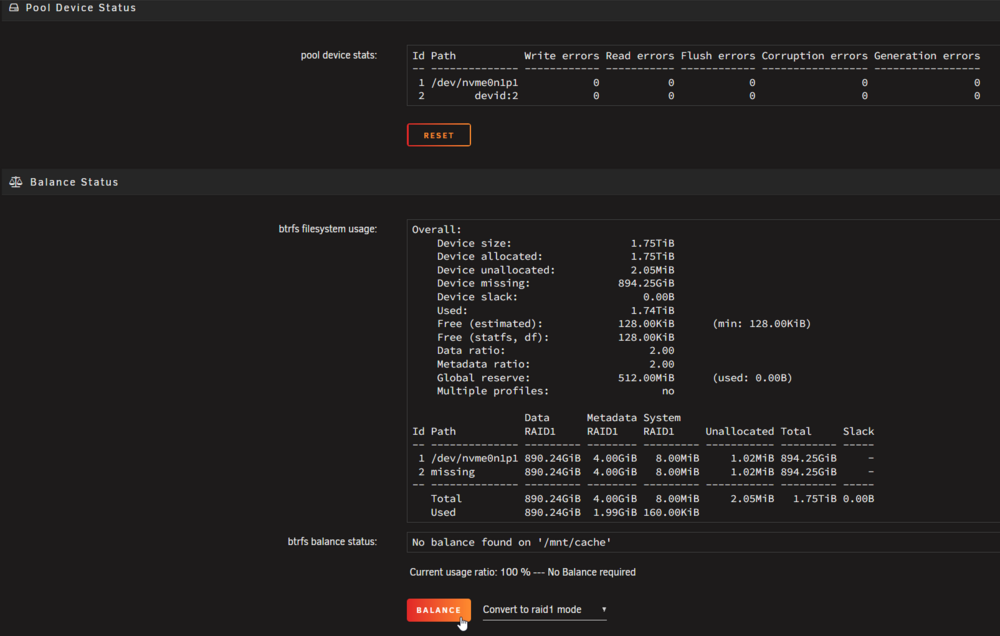
Hello Team, I have my Cache running on RAID1, 2x1TB NVME disks and needed to updated to 2x2TB NVME (due to being 100% full...). I stopped the array, powered down the server and replaced ONE of the RAID1 disks. I powered up the server and in the missing Cache disk, I selected the new 2TB NVME disk. Starting the array shows the new disk fine in the Main-tab: BUT strangely, the NEW disk does NOT show up in the Cache Settings: So, neither the RAID1 rebuild has not started automatically nor I am able to manually trigger it by selecting "Convert to raid1 mode". What am I missing here about the procedure to replace ONE (1) RAID1 drive and rebuild the array? Thank you.

-
@itimpi indeed, the Dynamix File Manager does the job and PHYSICALLY MOVES (COPY & DELETE) the file! Thank you.
-
I have read that I should be careful NOT to move files from a SHARE to a DISK or vice-versa and making sure to always use Share-to-Share OR Disk-to-Disk MOVING. I assume that this is still valid for the latest Unraid v6.12.9? I have a bunch of disks added as Pools (1-disk per pool) containing a few TB of data that I need to migrate to the newly setup ARRAY. I have been trying to MOVE these data from these disks to the array via MC or Krusader. On a DISK-to-DISK level this works fine and PHYSICALLY MOVES the data to the selected array-DISK. Sadly, this annuls the whole Unraid-balancing, since i have to manually select the array destination-disk... Using MC or Krusader to MOVE on a SHARE-to-SHARE level, seems that it simply maps/links the file to be moved instead of physically moving it, leaving the file residing in the pool-disk. So, how can I PHYSICALLY MOVE files from my pool-disks to the Array? Thank you.
-
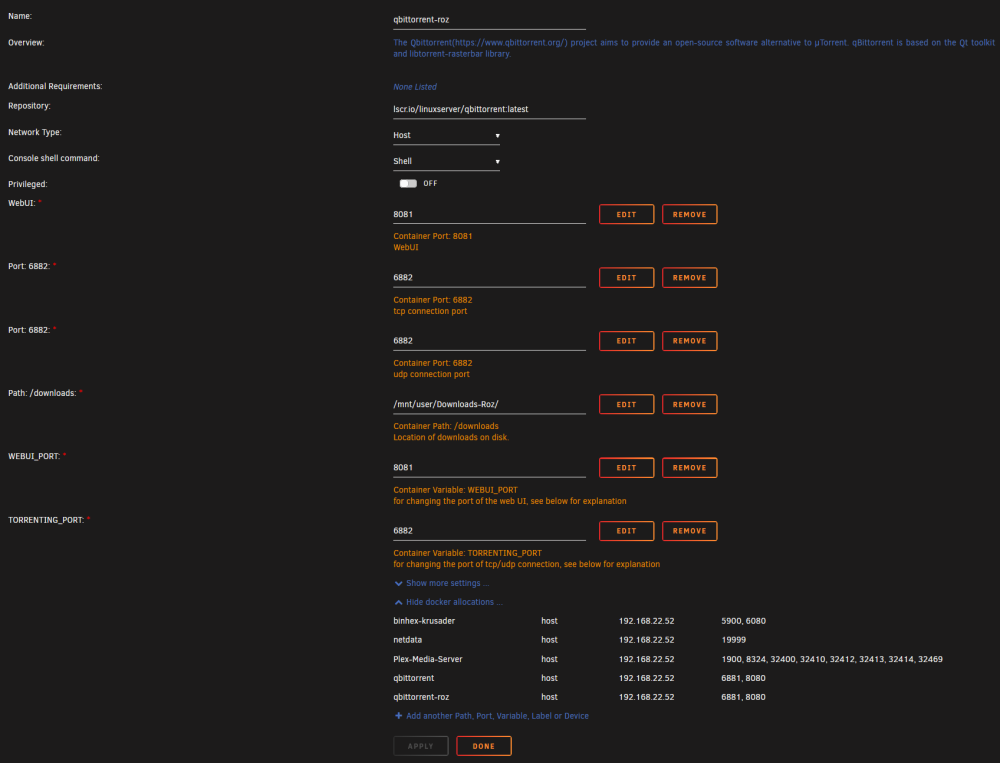
@Squid the 2nd instance works great and installs fine a 2nd docker container. I configure DIFFERENT ports for this 2nd container and i have proper web-ui access in the manually configured port (8081) BUT I keep seeing the SAME PORTS as container-1 under the docker allocations... Why so?

-
@JorgeB As you said, via the web-UI, removing just one (1) disk kept the ZFS pool intact and accessible. Removing more disks (one per raidz1 vdev, of course!) didn't worked. CLI worked fine! (zpool command reference) removed the zfs pool from the web-UI added it via CLI: zfs pool import [poolname] deactivated one (1) disk per vdev: zpool offline [poolname] [disk] accessing pool fine at /mnt/[poolname] The zfs pool disks show as Unassigned Devices in web-UI but the pool operates fine and i have used the offlined disks to start building the array and migrating data (100TB), Thank you and I hope the new Unraid version to have more flexible web-UI in this aspect.
-
@JorgeB so, how may I degrade the ZFS pool by removing one (1) disk from each raidz1 group and making the pool as 3groups x 3disks? When you say "v6.12 does not support multiple devices missing from a zfs pool", do you refer to web-UI? Could this be done via CLI, by either un-mounting the three (3) disks OR by removing the whole ZFS pool and then add the ZFS pool with ONLY the 3groups x 3disks only? In theory, this Raidz1 pool remains active even losing up to one (1) disk from each group. I even considered the hard(ware)-approach, by physically removing the 3 disks (one from each group) BUT I would prefer the soft(ware)-approach (e.g. CLI). Any proposals on HOW this can be done? Thank you.
-
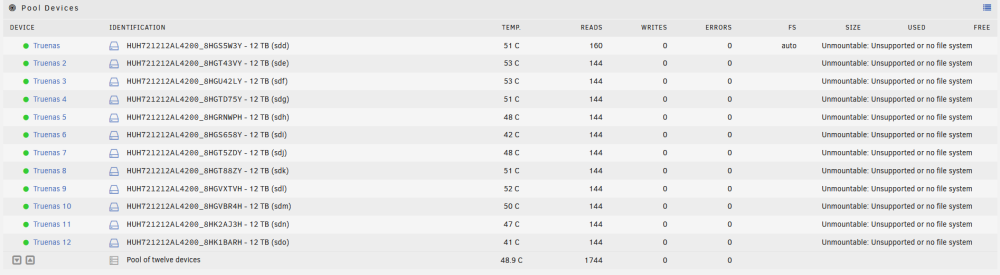
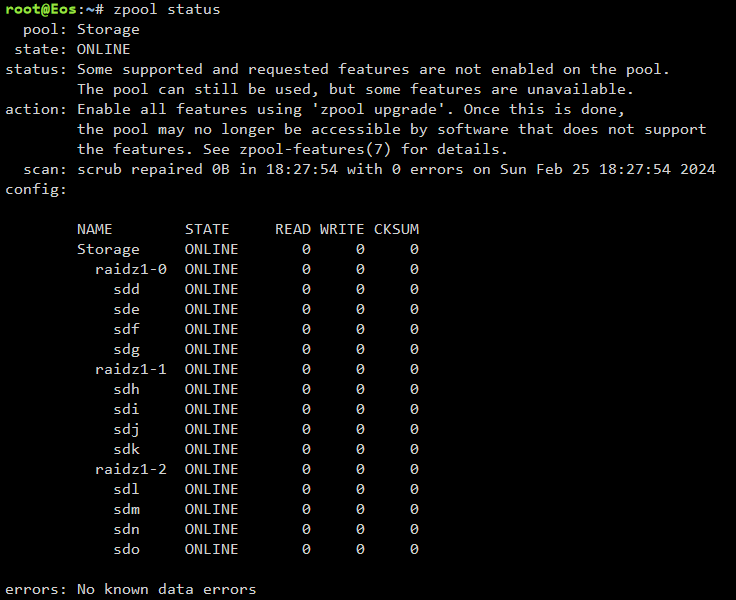
In this 3 x 4disks Raidz1 configuration, in theory i can remove one disk from each Raidz1 group and the overall ZFS pool be still healthy (without redundancy any longer). I need to remove sdd, sdh and sdl disks, to start migrating ZFS to array (btrfs). HOW can I remove (unmount?) these three disks and then add them in the array?
-
@bmartino1 thank you for the feedback provided! The migration described by Plex didn't worked in the OFFICIAL PMS docker app, even after setting the proper owner (chown -R nobody:users ./) and access rights (chmod -R 755 ./) to all copied files. Strangely the SAME procedure using the BinHex PMS docker app, works fine and all content and metadata appear intact in the new installation (Unraid) from the past one (TrueNAS Core). On a side note, it seems that following the OFFICIAL instructions, I have "sign out of your account under Settings > Server > General in Plex Web App" which led to losing the server and thus all configured shared-users and history! Do NOT do so! The first time I tried the BinHex install I have NOT signed out of the new-server and all users and history was maintained just fine. After a few tries to make the OFFICIAL PMS docker app to work, I did the mistake to remove the server and thus lost users and history. ...really strange how one docker (BinHex) worked fine but the other (Official) didn't. Possibly the one you are proposing (LinuxServer) might work as well. I would prefer to use the official docker-app (I tried quite a lot and even broken the users and history!) but since another release does the job i will stick with this one I guess!
-
Seems that the Web-UI disappearance was a glitch and after a container restart it was fine. Still, although I stopped the container, unzipped all past Plex files (FreeNAS), restarted the container, the server is visible via Web-UI and registered to my account but NO Library is visible, showing just as a fresh PMS install. Any ideas?
-
Hello, I am trying to migrate Plex-Media-Server (PMS plex-pass) from TrueNAS (core, v13) to UnRaid (v6.12.9), on the same system (Supermicro). I have already imported the ZFS pool of TrueNAS in Unraid and trying to follow the "Move an install to another system" Plex guide. I have made the app install (docker container) but after unzipping all TrueNAS files & folders (all expect the not-needed Cache folder) PMS went “dark” and although the container starts there is no web-UI functionality any longer. Setting all files and folders to “root” user as owner (the user under which PMS was installed) made no difference. Any ideas/hints on how TrueNAS PLEX can migrate to UnRaid please? Thank you.
-
UPDATE: seems that the hic-up was in the disks' partitions, namely partion-1 (FreeBSD-swap) had to be manually deleted from EACH disk. Please refer to



