





unraid_fk34
Members
-
Joined
-
Last visited
Everything posted by unraid_fk34
-
Even though my server is online and uploading something for example? I switched the cable anyway and tried a different LAN port on my server. EDIT: To add to this. "NIC Link is down" happens at boot I think. My WebGUI and SSH keeps working after that until it doesn't
-
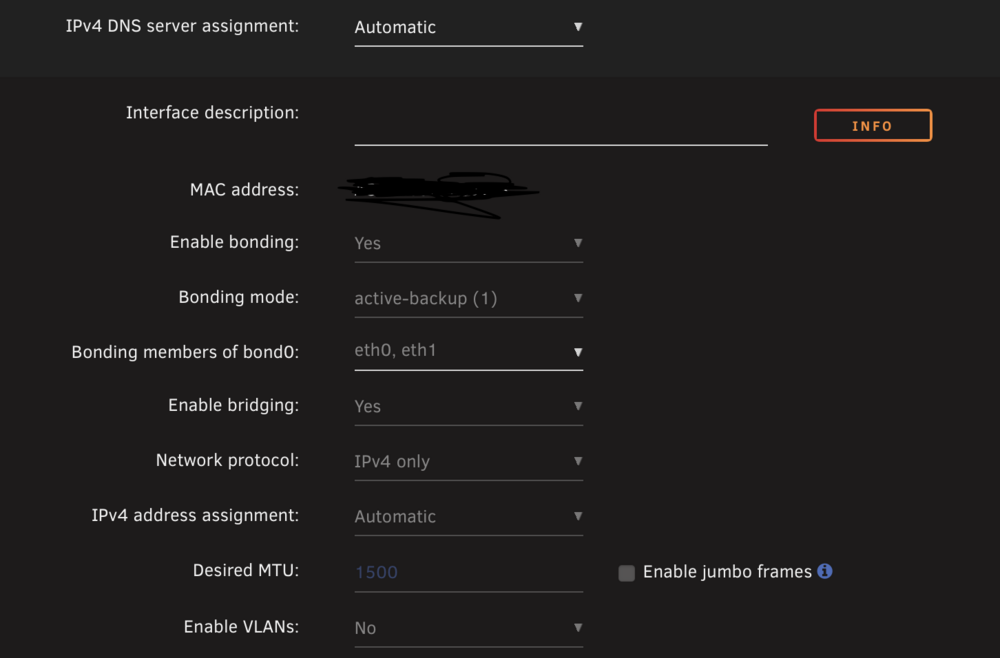
I'm trying to figure out what could be causing it? Any idea? Eth0 is my router connection via cable Eth1 is the internal server connection? I don't really understand networking too well. This is how my Network settings look: Should I change anything?
-
Here is the syslog file. I had downgraded to 7.1.2 again after my last message but it's still happening. syslog-previous-20250730-0937.zip
-
Here are my diagnostics right after my startup. diagnostics-20250729_2322.zip
-
Hey, so after updating last week to 7.1.4 my webGUI crashes after a while. I can't pinpoint after how much time. Seems to be different every time. The problem is that SSH also refuses connection even though it is enabled and my Mac has SSH Keys exchanged with my Unraid server. So I can't get diagnostics. All my docker containers are working fine and continuing to work when the WebGUI crashes and SSH stops working. What I'm doing is disconnect my PSU as I have Unraid configured to do a clean shut down after 5mins off power. After that I power up the server and everything works for a while again. What could be the issue? Is there anything I can do to pinpoint the problem?
-
You are probably right. I had a failing boot drive recently which I replaced and switched licence to. I had it occure before the switch but after a couple reinstalls and reboots it appeared again. After the flash drive replacement it appeared pretty quickly. So probably it was the reason for all this. The only fix was manually deleting the compose folder on the boot drive and then copy my projects into the newly created compose plugin folder.
-
I just did exactly that and it did the trick. Probably something corrupted in the install files or something. When it pulled the plugin fresh from the Community Apps it appeared again. Added the stacks to the projects folder afterwards and all is running again after the reboot. The only weird thing that happened after the reboot is that the Compose Plugin Settings moved from the Settings tab to the Tools tab (under System Information) after the reboot. But all is working nonetheless. Thank you
-
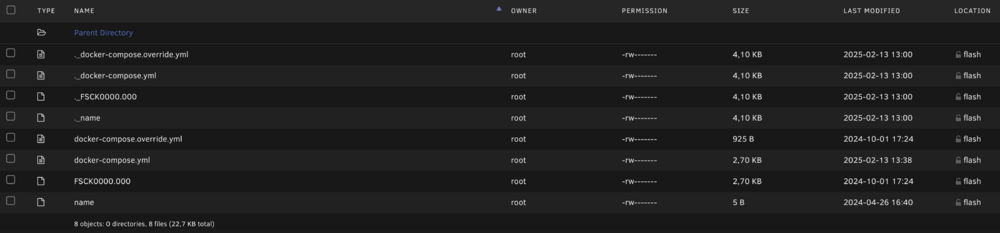
Thanks for getting back to me. Checking if all the stacks are still in the mentioned path is the first thing I did when this started occurring. Everything is there. But what I got in all of my stack folders are these other weird duplicates. I don't know exactly when they started popping up but they are not part of the daily backup. --- This is how my compose tab looks btw. There is no option for anything like add stacks. Just completely blank: Oh and important to note. All my dockers are running and active. They start up normally after a reboot. Just docker compose manager isn't showing anything.

-
Okay, after reinstalling the plugin for the 10th time probably it is showing in the Settings Tab again. But still no luck. Blank page when I click on it. Also it is the only plugin displaying this behaviour. So it's not an overall unraid issue I believe.
-
Do you mean the setting page when I access "compose" through the Tools tab in the webGUI? Because that gives me a blank page. Or is there another way to access the setting page? (On the Settings tab there is no Compose Icon) Thanks by the way for a great plugin. I really appreciate the work that you put into this for me essential plugin!
-
Hi, so since updating to 7.0 I've had the issue that the compose plugin just doesn't show any stacks at all. My containers are all started but I see no stacks to edit at all. I checked if the docker-compose.yml are in their respective folders in the plugin folder and they are. Reinstalling the plugin or rebooting didn't do the trick. What could be the issue?
-
Oh I just saw this. Thanks! I just checked out the PR. As I understand it I have to replace both or edit with the new lines the two files DockerClient.php and DockerContainers.php. Could you maybe tell me where I can find them? I have code-server running but can also do it in the CLI with nano. While when I replace the files I just have to refresh the webgui and everything will show up correctly? Edit: I think I found it after some more searching. It is under /usr/local/ right? Edit: This worked beautifully. Thank you for the work! Also I'm no expert in CLI but how can I select all and delete when nano inside. I just held ^K to cut out every line and then pasted in the updated file. There is certainly a better way.
-
So I'm having issues displaying the custom network name in the docker containers tab. It will only show me the ID. I found a thread discussing this particular issue on the forums. Is that something that has to do with unraid or the plugin? Is it something that could be fixed in the future or is there a solution maybe?


