drohack
Members
-
Joined
-
Last visited
-
I'm pretty sure this is coming from Uptime Kuma itself and not my plugin. I think you're on Uptime Kuma 1.23.x, because latest is still v1. Uptime Kuma checks GitHub for newer releases, and 2.5.5 is actually out. Also the plugin works on v1 and v2 and automatically switches it's backend on which one is installed, so it can work with both. You can switch the container to louislam/uptime-kuma:2 (back up appdata first if you have existing data), or hide the notice under Settings -> About
-
Done! Changelog and releases are both up: - Changelog: https://github.com/drohack/UptimeKumaPlugin/blob/main/CHANGELOG.md - Releases: https://github.com/drohack/UptimeKumaPlugin/releases (every version is tagged — "Watch → Custom → Releases" on the repo gets you notified of new versions) You can also see the changelog right in Community Apps: search "uptime kuma" (with a space), click the plugin card, and scroll down to the Change Log section in the popup. Future releases will publish to GitHub automatically, so these will always stay in sync.
-
support link now points to the thread; the settings page has the folder picker (select the data folder, the DB is found automatically); and PostgreSQL isn't something Uptime Kuma supports — the v2 wizard's "recommended" option is the embedded MariaDB, which the plugin now reads (container must be running, since it's queried through the container itself). Also worth mentioning: v2 users get a bonus fix — 7d–180d graphs were previously lumping all history into the first bar.
-
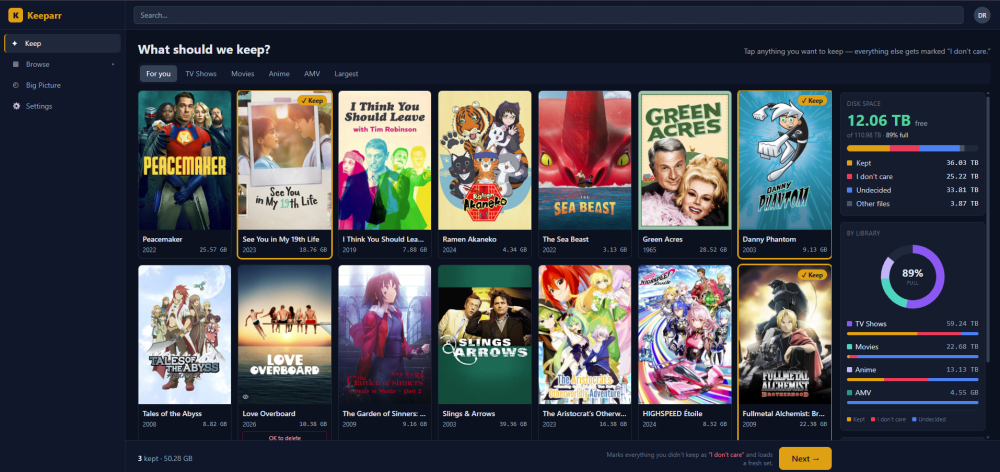
Keeparr is a web app where everyone on your media server votes on what's worth keeping — and it reports what can safely be deleted to reclaim space. It never deletes anything itself. How it works: users sign in with their Plex (or Jellyfin/Emby) account and land on a "For You"-style Keep feed — a screenful of titles dealt at a time, weighted toward the biggest space-hogs, so everyone can chip away at a few decisions whenever they have a minute instead of facing the whole library at once. For each title: Keep, "I don't care", or — for things they requested via Seerr — "OK to delete" (the original requester signing off). Keeps are protective: if anyone keeps a title, it's safe. The Big Picture dashboard shows what's reclaimable, what nobody has ever watched, and per-quality storage breakdowns; you do the actual deleting in your media server or Sonarr/Radarr. Unlike rule-based cleanup tools (e.g. Maintainerr), Keeparr crowdsources the human decisions instead of automating them — it's the "are we done with this?" conversation with your users, as an app. Optional integrations: Tautulli (watch history), Seerr/Overseerr/Jellyseerr (requests + the OK-to-delete flow), any number of Sonarr/Radarr instances (quality/tags, match health). Install: search Keeparr in Community Applications, or pull ghcr.io/drohack/keeparr:latest (multi-arch: amd64/arm64). No required setup beyond the port and appdata path — the session secret is auto-generated on first start (stored in appdata; set the SESSION_SECRET variable only if you want to manage it yourself). Appdata: /mnt/user/appdata/keeparr → /data First user to sign in becomes the admin. Zero telemetry; scheduled database backups built in. Links: Project + docs: https://github.com/drohack/Keeparr Issues: https://github.com/drohack/Keeparr/issues Template: https://github.com/drohack/unraid-templates Feedback, bug reports and feature requests welcome — here or on GitHub.
-
Yes this has been published: https://ca.unraid.net/apps/uptime-kuma-dashboard-widget-1bemfxg08a2qds
-
I've updated the app so that it can move around. This has been tested and shipped in a new update. You should just need to update your app and you'll be good to go.
-
I am trying to get this added to Community App store so if a moderator can move this thread over to the Plugin Support area (I can't figure out how to create a thread there, and that might be by design) that would be awesome.
-
Hey everyone! I built an Unraid plugin that brings Uptime Kuma monitor statuses directly onto the Unraid dashboard as a native widget. What it does: - Displays heartbeat bars matching Uptime Kuma's style (green/red/orange/blue) with hover tooltips showing date/time and status - Uptime percentage badges with color coding - Configurable time periods (1h, 12h, 24h, 7d, 30d, 90d, 180d) - Quick link to open Uptime Kuma's WebUI (auto-detected from your Docker container) - Choose which monitors to display via checkboxes in settings - Native Unraid dashboard tile with standard controls (settings cog, collapse, etc.) How it works: It reads Uptime Kuma's SQLite database directly in read-only mode from the Docker volume mount. No API keys, no background services, no modifications to Uptime Kuma. Supports both v1.x and v2.x (auto-detected). Install: Plugins tab > Install Plugin > paste this URL: https://raw.githubusercontent.com/drohack/UptimeKumaPlugin/main/uptime-kuma.plg Then go to the plugin settings, set your database path (usually /mnt/user/appdata/uptimekuma/kuma.db), click Test Connection, enable the widget, and check your dashboard. GitHub: https://github.com/drohack/UptimeKumaPlugin Feedback and suggestions welcome!
-
Hey everyone! I built an Unraid plugin that brings Uptime Kuma monitor statuses directly onto the Unraid dashboard as a native widget. What it does: - Displays heartbeat bars matching Uptime Kuma's style (green/red/orange/blue) with hover tooltips showing date/time and status - Uptime percentage badges with color coding - Configurable time periods (1h, 12h, 24h, 7d, 30d, 90d, 180d) - Quick link to open Uptime Kuma's WebUI (auto-detected from your Docker container) - Choose which monitors to display via checkboxes in settings - Native Unraid dashboard tile with standard controls (settings cog, collapse, etc.) How it works: It reads Uptime Kuma's SQLite database directly in read-only mode from the Docker volume mount. No API keys, no background services, no modifications to Uptime Kuma. Supports both v1.x and v2.x (auto-detected). Install: Plugins tab > Install Plugin > paste this URL: https://raw.githubusercontent.com/drohack/UptimeKumaPlugin/main/uptime-kuma.plg Then go to the plugin settings, set your database path (usually /mnt/user/appdata/uptimekuma/kuma.db), click Test Connection, enable the widget, and check your dashboard. GitHub: https://github.com/drohack/UptimeKumaPlugin Feedback and suggestions welcome!
-
Was this ever going to get added to CA or officially to Unraid? I'm hesitant to add this via the instructions given as the last post said they had issues.
-
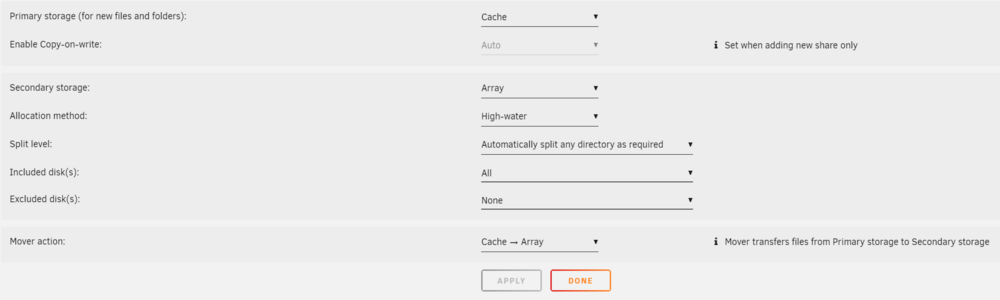
How do I setup the Mover to automatically run when it gets full? I have the Mover Tuning app installed, and set the Settings -> Scheduler -> Mover Tuning -> Move all from Cache-Yes shares when disk is above 65%. With the new Storage system it's a bit confusing how to set this up. I have my Media share and Download share setup with the following: Primary: Cache Secondary: Array (High-water) Mover action: Cache -> Array As far as I am aware this is the same as "Cache Preferred" from the old system. So I don't think it'll trigger the Auto Mover for "Cache Yes". Is there a setting to let me do this? I'd like to keep the shares as with these Primary Cache, Secondary Array settings, but still have the mover run when it gets full. Is this something I need to take up with that Plugin/different forum? Can these features be added into Unraid?

-
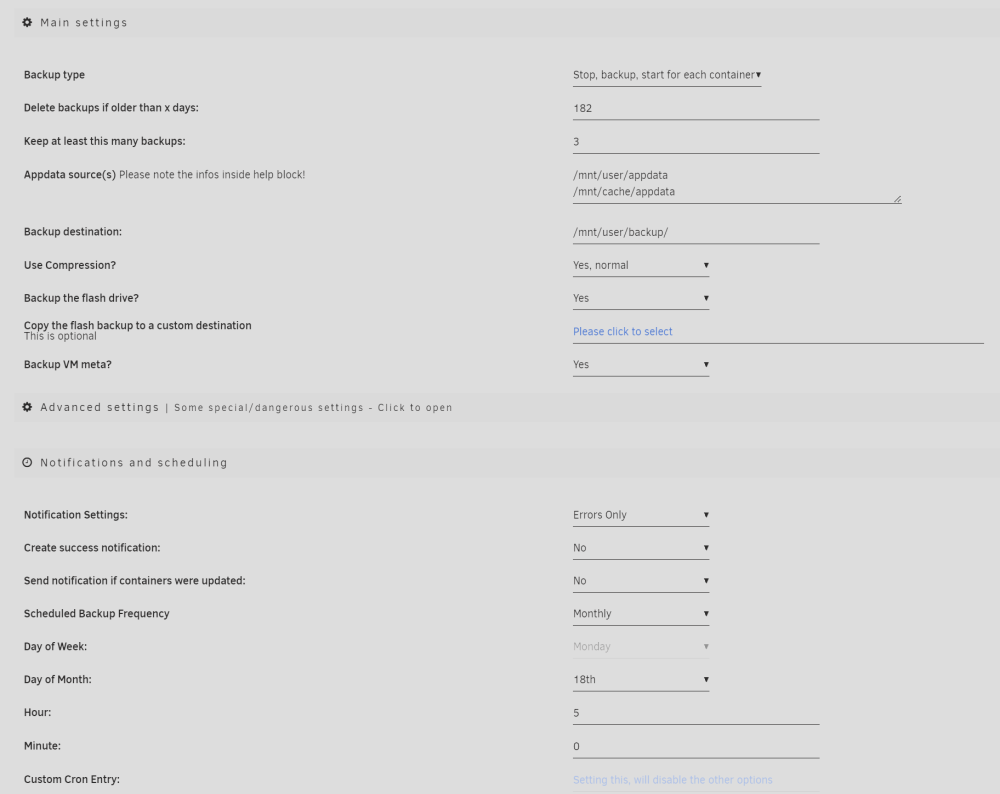
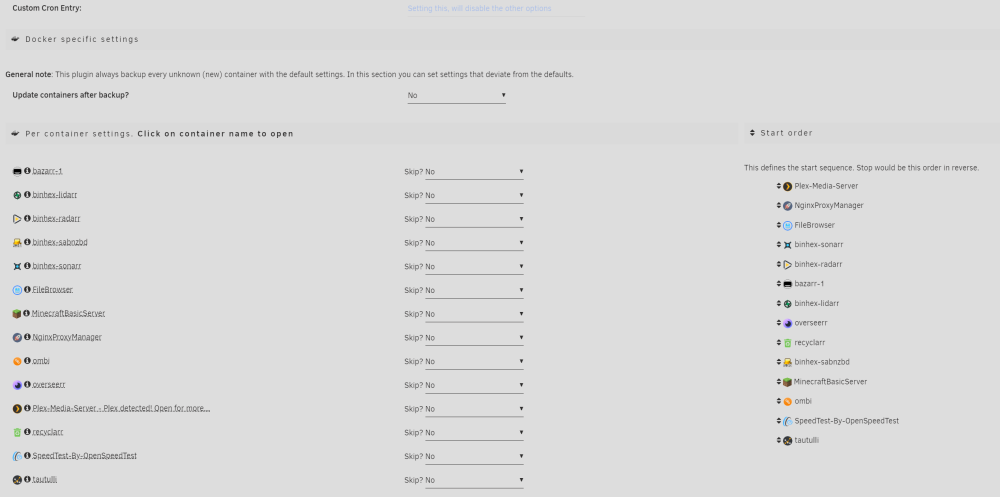
I'm having issues with my Appdata.Backup (v2024.03.17 up-to-date). I've installed it for the first time and tried having it run overnight. But it got stuck on "[18.04.2024 06:46:58][ℹ️][Plex-Media-Server] Verifying backup..." It was on this step for over 2 hours which seems like that shouldn't be the case. Here's my log after Aborting the flow. (you can see the 2 hour difference when it give the message "[18.04.2024 08:19:39][❌][Plex-Media-Server] tar verification failed! Tar said: tar: Removing leading `/' from member names"): [18.04.2024 05:00:02][ℹ️][Main] 👋 WELCOME TO APPDATA.BACKUP!! :D [18.04.2024 05:00:02][ℹ️][Main] Backing up from: /mnt/user/appdata, /mnt/cache/appdata [18.04.2024 05:00:02][ℹ️][Main] Backing up to: /mnt/user/backup/ab_20240418_050002 [18.04.2024 05:00:02][ℹ️][Main] Selected containers: FileBrowser, MinecraftBasicServer, NginxProxyManager, Plex-Media-Server, SpeedTest-By-OpenSpeedTest, bazarr-1, binhex-lidarr, binhex-radarr, binhex-sabnzbd, binhex-sonarr, ombi, overseerr, recyclarr, tautulli [18.04.2024 05:00:02][ℹ️][Main] Saving container XML files... [18.04.2024 05:00:02][ℹ️][Main] Method: Stop/Backup/Start [18.04.2024 05:00:02][ℹ️][tautulli] No stopping needed for tautulli: Not started! [18.04.2024 05:00:02][ℹ️][tautulli] Should NOT backup external volumes, sanitizing them... [18.04.2024 05:00:02][ℹ️][tautulli] Calculated volumes to back up: /mnt/user/appdata/tautulli [18.04.2024 05:00:02][ℹ️][tautulli] Backing up tautulli... [18.04.2024 05:00:03][ℹ️][tautulli] Backup created without issues [18.04.2024 05:00:03][ℹ️][tautulli] Verifying backup... [18.04.2024 05:00:03][ℹ️][tautulli] Starting tautulli is being ignored, because it was not started before (or should not be started). [18.04.2024 05:00:03][ℹ️][SpeedTest-By-OpenSpeedTest] No stopping needed for SpeedTest-By-OpenSpeedTest: Not started! [18.04.2024 05:00:03][ℹ️][SpeedTest-By-OpenSpeedTest] Should NOT backup external volumes, sanitizing them... [18.04.2024 05:00:03][⚠️][SpeedTest-By-OpenSpeedTest] SpeedTest-By-OpenSpeedTest does not have any volume to back up! Skipping. Please consider ignoring this container. [18.04.2024 05:00:03][ℹ️][SpeedTest-By-OpenSpeedTest] Starting SpeedTest-By-OpenSpeedTest is being ignored, because it was not started before (or should not be started). [18.04.2024 05:00:03][ℹ️][ombi] Stopping ombi... done! (took 14 seconds) [18.04.2024 05:00:17][ℹ️][ombi] Should NOT backup external volumes, sanitizing them... [18.04.2024 05:00:17][ℹ️][ombi] Calculated volumes to back up: /mnt/user/appdata/ombi [18.04.2024 05:00:17][ℹ️][ombi] Backing up ombi... [18.04.2024 05:00:18][ℹ️][ombi] Backup created without issues [18.04.2024 05:00:18][ℹ️][ombi] Verifying backup... [18.04.2024 05:00:18][ℹ️][ombi] Starting ombi... (try #1) done! [18.04.2024 05:00:32][ℹ️][MinecraftBasicServer] No stopping needed for MinecraftBasicServer: Not started! [18.04.2024 05:00:32][ℹ️][MinecraftBasicServer] Should NOT backup external volumes, sanitizing them... [18.04.2024 05:00:32][ℹ️][MinecraftBasicServer] Calculated volumes to back up: /mnt/cache/appdata/minecraftbasicserver [18.04.2024 05:00:32][ℹ️][MinecraftBasicServer] Backing up MinecraftBasicServer... [18.04.2024 05:01:20][ℹ️][MinecraftBasicServer] Backup created without issues [18.04.2024 05:01:20][ℹ️][MinecraftBasicServer] Verifying backup... [18.04.2024 05:03:06][ℹ️][MinecraftBasicServer] Starting MinecraftBasicServer is being ignored, because it was not started before (or should not be started). [18.04.2024 05:03:06][ℹ️][binhex-sabnzbd] Stopping binhex-sabnzbd... done! (took 6 seconds) [18.04.2024 05:03:12][ℹ️][binhex-sabnzbd] Should NOT backup external volumes, sanitizing them... [18.04.2024 05:03:12][ℹ️][binhex-sabnzbd] Calculated volumes to back up: /mnt/user/appdata/binhex-sabnzbd [18.04.2024 05:03:12][ℹ️][binhex-sabnzbd] Backing up binhex-sabnzbd... [18.04.2024 05:03:13][ℹ️][binhex-sabnzbd] Backup created without issues [18.04.2024 05:03:13][ℹ️][binhex-sabnzbd] Verifying backup... [18.04.2024 05:03:13][ℹ️][binhex-sabnzbd] Starting binhex-sabnzbd... (try #1) done! [18.04.2024 05:03:24][ℹ️][recyclarr] Stopping recyclarr... done! (took 7 seconds) [18.04.2024 05:03:31][ℹ️][recyclarr] Should NOT backup external volumes, sanitizing them... [18.04.2024 05:03:31][ℹ️][recyclarr] Calculated volumes to back up: /mnt/user/appdata/recyclarr [18.04.2024 05:03:31][ℹ️][recyclarr] Backing up recyclarr... [18.04.2024 05:03:33][ℹ️][recyclarr] Backup created without issues [18.04.2024 05:03:33][ℹ️][recyclarr] Verifying backup... [18.04.2024 05:03:34][ℹ️][recyclarr] Starting recyclarr... (try #1) done! [18.04.2024 05:03:46][ℹ️][overseerr] Stopping overseerr... done! (took 11 seconds) [18.04.2024 05:03:57][ℹ️][overseerr] Should NOT backup external volumes, sanitizing them... [18.04.2024 05:03:57][ℹ️][overseerr] Calculated volumes to back up: /mnt/user/appdata/overseerr [18.04.2024 05:03:57][ℹ️][overseerr] Backing up overseerr... [18.04.2024 05:03:59][ℹ️][overseerr] Backup created without issues [18.04.2024 05:03:59][ℹ️][overseerr] Verifying backup... [18.04.2024 05:03:59][ℹ️][overseerr] Starting overseerr... (try #1) done! [18.04.2024 05:04:10][ℹ️][binhex-lidarr] Stopping binhex-lidarr... done! (took 18 seconds) [18.04.2024 05:04:28][ℹ️][binhex-lidarr] Should NOT backup external volumes, sanitizing them... [18.04.2024 05:04:28][ℹ️][binhex-lidarr] Calculated volumes to back up: /mnt/user/appdata/binhex-lidarr [18.04.2024 05:04:28][ℹ️][binhex-lidarr] Backing up binhex-lidarr... [18.04.2024 05:04:59][ℹ️][binhex-lidarr] Backup created without issues [18.04.2024 05:04:59][ℹ️][binhex-lidarr] Verifying backup... [18.04.2024 05:05:05][ℹ️][binhex-lidarr] Starting binhex-lidarr... (try #1) done! [18.04.2024 05:05:19][ℹ️][bazarr-1] Stopping bazarr-1... done! (took 15 seconds) [18.04.2024 05:05:34][ℹ️][bazarr-1] Should NOT backup external volumes, sanitizing them... [18.04.2024 05:05:34][ℹ️][bazarr-1] Calculated volumes to back up: /mnt/user/appdata/bazarr-1 [18.04.2024 05:05:34][ℹ️][bazarr-1] Backing up bazarr-1... [18.04.2024 05:05:38][ℹ️][bazarr-1] Backup created without issues [18.04.2024 05:05:38][ℹ️][bazarr-1] Verifying backup... [18.04.2024 05:05:39][ℹ️][bazarr-1] Starting bazarr-1... (try #1) done! [18.04.2024 05:05:53][ℹ️][binhex-radarr] Stopping binhex-radarr... done! (took 17 seconds) [18.04.2024 05:06:10][ℹ️][binhex-radarr] Should NOT backup external volumes, sanitizing them... [18.04.2024 05:06:10][ℹ️][binhex-radarr] Calculated volumes to back up: /mnt/user/appdata/binhex-radarr [18.04.2024 05:06:10][ℹ️][binhex-radarr] Backing up binhex-radarr... [18.04.2024 05:10:12][ℹ️][binhex-radarr] Backup created without issues [18.04.2024 05:10:12][ℹ️][binhex-radarr] Verifying backup... [18.04.2024 05:26:39][ℹ️][binhex-radarr] Starting binhex-radarr... (try #1) done! [18.04.2024 05:26:52][ℹ️][binhex-sonarr] Stopping binhex-sonarr... done! (took 9 seconds) [18.04.2024 05:27:01][ℹ️][binhex-sonarr] Should NOT backup external volumes, sanitizing them... [18.04.2024 05:27:01][ℹ️][binhex-sonarr] Calculated volumes to back up: /mnt/user/appdata/binhex-sonarr [18.04.2024 05:27:01][ℹ️][binhex-sonarr] Backing up binhex-sonarr... [18.04.2024 05:28:21][ℹ️][binhex-sonarr] Backup created without issues [18.04.2024 05:28:21][ℹ️][binhex-sonarr] Verifying backup... [18.04.2024 05:46:40][ℹ️][binhex-sonarr] Starting binhex-sonarr... (try #1) done! [18.04.2024 05:46:51][ℹ️][FileBrowser] Stopping FileBrowser... done! (took 5 seconds) [18.04.2024 05:46:56][ℹ️][FileBrowser] '/mnt/user/appdata/filebrowser/branding' is within mapped volume '/mnt/user/appdata/filebrowser'! Ignoring! [18.04.2024 05:46:56][ℹ️][FileBrowser] Should NOT backup external volumes, sanitizing them... [18.04.2024 05:46:56][ℹ️][FileBrowser] Calculated volumes to back up: /mnt/user/appdata/filebrowser [18.04.2024 05:46:56][ℹ️][FileBrowser] Backing up FileBrowser... [18.04.2024 05:46:56][ℹ️][FileBrowser] Backup created without issues [18.04.2024 05:46:56][ℹ️][FileBrowser] Verifying backup... [18.04.2024 05:46:56][ℹ️][FileBrowser] Starting FileBrowser... (try #1) done! [18.04.2024 05:47:05][ℹ️][NginxProxyManager] Stopping NginxProxyManager... done! (took 7 seconds) [18.04.2024 05:47:12][ℹ️][NginxProxyManager] Should NOT backup external volumes, sanitizing them... [18.04.2024 05:47:12][ℹ️][NginxProxyManager] Calculated volumes to back up: /mnt/user/appdata/NginxProxyManager [18.04.2024 05:47:12][ℹ️][NginxProxyManager] Backing up NginxProxyManager... [18.04.2024 05:47:14][ℹ️][NginxProxyManager] Backup created without issues [18.04.2024 05:47:14][ℹ️][NginxProxyManager] Verifying backup... [18.04.2024 05:47:15][ℹ️][NginxProxyManager] Starting NginxProxyManager... (try #1) done! [18.04.2024 05:47:25][ℹ️][Plex-Media-Server] Stopping Plex-Media-Server... done! (took 13 seconds) [18.04.2024 05:47:38][ℹ️][Plex-Media-Server] Should NOT backup external volumes, sanitizing them... [18.04.2024 05:47:38][ℹ️][Plex-Media-Server] Calculated volumes to back up: /mnt/user/appdata/Plex-Media-Server [18.04.2024 05:47:38][ℹ️][Plex-Media-Server] Backing up Plex-Media-Server... [18.04.2024 06:46:58][ℹ️][Plex-Media-Server] Backup created without issues [18.04.2024 06:46:58][ℹ️][Plex-Media-Server] Verifying backup... [18.04.2024 08:19:39][❌][Plex-Media-Server] tar verification failed! Tar said: tar: Removing leading `/' from member names [18.04.2024 08:25:03][ℹ️][Plex-Media-Server] Backing up the flash drive. [18.04.2024 08:25:57][ℹ️][Plex-Media-Server] Flash backup created! [18.04.2024 08:25:57][⚠️][Main] Backup cancelled! Executing final things. You will be left behind with the current state! [18.04.2024 08:25:57][ℹ️][Main] DONE! Thanks for using this plugin and have a safe day ;) [18.04.2024 08:25:57][ℹ️][Main] ❤️ I'm not sure the best way to post my settings: Let me know if there's any other logs or information I should provide. I did a quick Google Search and didn't see anything specific for this "stuck" or "hung" status on "verifying backup". But maybe I didn't look hard enough.