Everything posted by ggfevans
-
Yup, I get into Unraid - it typically boots in about 2 minutes. I have it set to auto start on Proxmox startup. I can absolutely bump it up to 8 GB of RAM, I have 32 on the machine - I was keeping it in reserve for VMs on the Proxmox hypervisor.
-
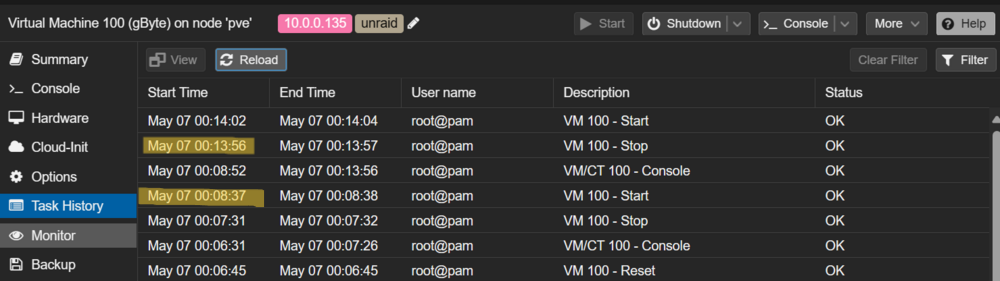
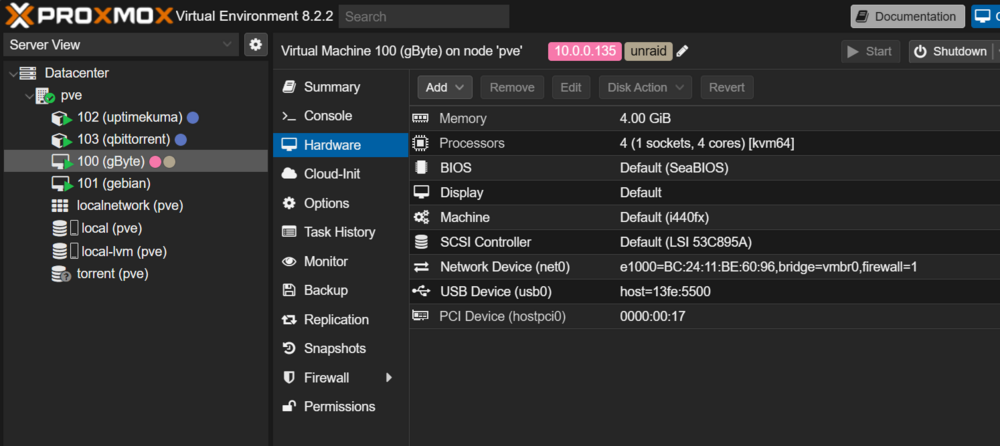
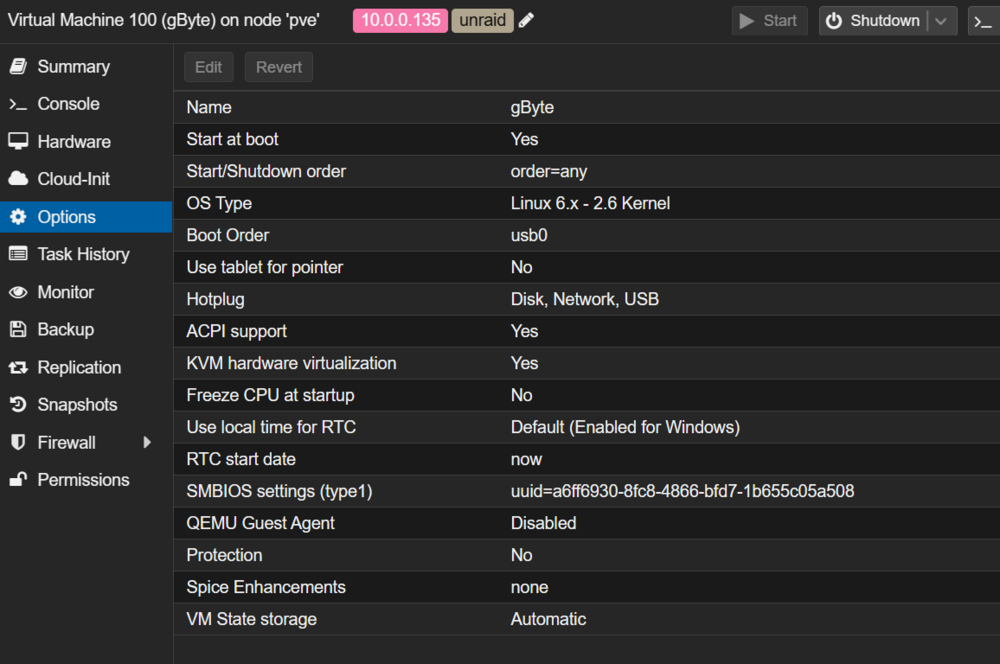
Gave this a shot, unfortunately I see the same behaviour. These are my current hardware settings: We can see it reboot 5 minutes & 19 seconds after startup: Here also are my VM Options: I also just booted Unraid back up on bare metal without Proxmox in the mix and it ran perfectly stable. That certainly points to my Proxmox config being the problem, though I am not sure what about it. These are all default settings. I have just jumped back into Unraid on Proxmox - and it reboots after exactly 5 minutes and 19 seconds again. I am not sure what there is specifically about 319 seconds, but apparently it is my lucky/unlucky number. I am going to shut it down for the night, sleep on it and decide what to do tomorrow. My Unraid trial license ends tomorrow so that puts a definitive timeline on things. Right now, I am leaning towards dropping Proxmox and using Unraid as my hypervisor. I had initially favoured Proxmox for the additional functionality around snapshotting etc though I think if I have to choose between the Unraid array or Proxmox VM functionality, I would go with Unraid.
-
@tjb_altf4certainly - thanks for lending a hand. This is what I have configured in proxmox for my unraid machine: I just booted it back up, and it reboots almost exactly 5 minutes after first boot. That certainly aligns with the theory it is a preset timer, like a watchdog timer, being tripped.
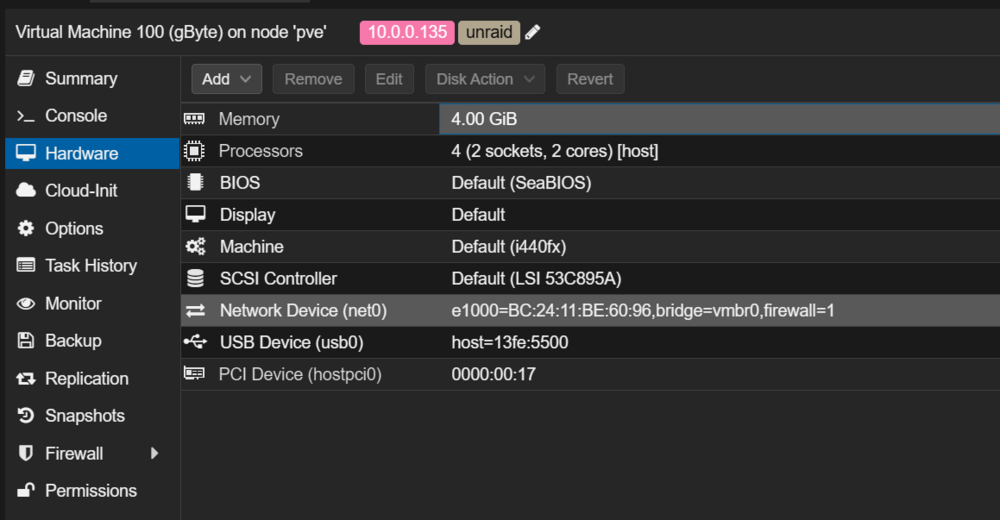
-
The Proxmox host and other VMs/LXCs remain stable. I am not familiar with watchdog timers, what are those? A brief Google gets me "A watchdog timer is a component of a computer system that helps it recover from malfunctions. During normal operation, software will periodically reset the watchdog timer to prevent it from elapsing, or "timing out". If, due to a software or hardware problem, the watchdog timer is not reset, it will elapse and generate a system reset, or in some cases a system interrupt. This mechanism ensures that if your program or system hangs, it will automatically reboot after a certain amount of time." ... sounds pretty darn likely! How would I dig further on this?
-
Yes, this is normal. Though I should note that as a new user, you shouldn't add parity until all array drives are added and your data has been moved. Once you do that, then you can add your parity drives and let it do it's thing. Understanding the operation of Parity in Unraid, including the functionality of a parity sync/check, is crucial. The parity drive retains the requisite value to achieve an EVEN bit result across all your drives. For instance, if the initial bit of four array drives is set to 1, 1, 1, and 1, marking it EVEN, then the first bit on the Parity drive is set to 0. If the succeeding bit is 1, 0, 1, and 1, marking it UNEVEN, then the second bit on the Parity drive is set to 1, making it EVEN. While this explanation is pertinent to a single Parity drive, the operation of two parity drives, though not entirely clear to me, presumably follows a similar bit-by-bit computation. Bear in mind, the speed of a parity sync/check, which necessitates accessing all your drives, can be influenced by various factors: Any read/write operation on any array drives can decelerate the parity check. Faster drives will be stalled by slower ones, thus it's not advisable to mix drives with different RPMs. Transfer speeds of the controller will be distributed among the connected drives. Thus, an IT-Mode RAID controller with a 2GBit/s transfer rate won't be able to operate every drive at maximum speed; it will be restricted to the controller's transfer capabilities. Age or deterioration of drives can also affect the speed. It's generally advisable to use the "Pre-Clear" plugin first and run all your drives through it, particularly if the drives have been utilized previously. This process serves two purposes: It zeroes the drive, ensuring it doesn't affect parity - a significant factor if you have an existing parity. Unraid also performs this operation when a new drive is added to your array. Importantly, it verifies your drive by reading the current state, zeroing everything, then re-reading to confirm correctness. By adhering to this protocol, you can detect faulty hardware before integrating it into your server or array. Additionally, you can determine how many runs you want to check, permitting you to stress test the drive multiple times to identify potential issues.
-
@kydar congrats! and welcome, the journey has just begun.
-
I am highly tempted to bail on the virtualized setup and go back to Unraid on bare metal here. Though any insight on troubleshooting before I do that would be highly appreciated!
-
There are quite a few out there, this is the one I used: How to Install and Setup Unraid
-
Yes, as mentioned, you can setup on bare metal and virtualize later. I followed this process, Unraid is quite resilient in that regard in terms of being hardware agnostic. Though, I am also only now discovering that virtualized Unraid is not Supported so your mileage may vary! I am currently troubleshooting some stability issues... I think you are correct to have as few layers of complexity as possible.
-
Yes, as @ChatNoirpoints out the free ESXi has been killed by Broadcom. I would suggest that Proxmox vs Unraid is a better comparison. Proxmox is an industry standard open source hypervisor that would do well in a homelab that offers a focus on virtualization with features like clustering, replication, VM snapshots.
-
Anecdotally, I have had issues. I have a forum topic open around this right now. Though, sounds like there are many others without issue!
-
Thanks for approving, @trurl. Further to my issue here, I have noticed the reboot occurs every 5 minutes. I also noted it occurs even in Safe Mode, so I can rule out a plugin causing this. My suspicion is this is virtual hardware related, though I cannot identify which specific piece of VM configuration is causing this. I have a few other VMs & LXCs that are all running stably, though they are Debian-based and not Slackware that I think Unraid is based on. I am a bit of a loss here as to what the cause is, particularly as I have not been able to get syslog writing to my array so every time I peek at the logs I can only see the boot up logs. I have the server stopped for now, to not waste power/drive life. Though, I am determined to get this to work!
-
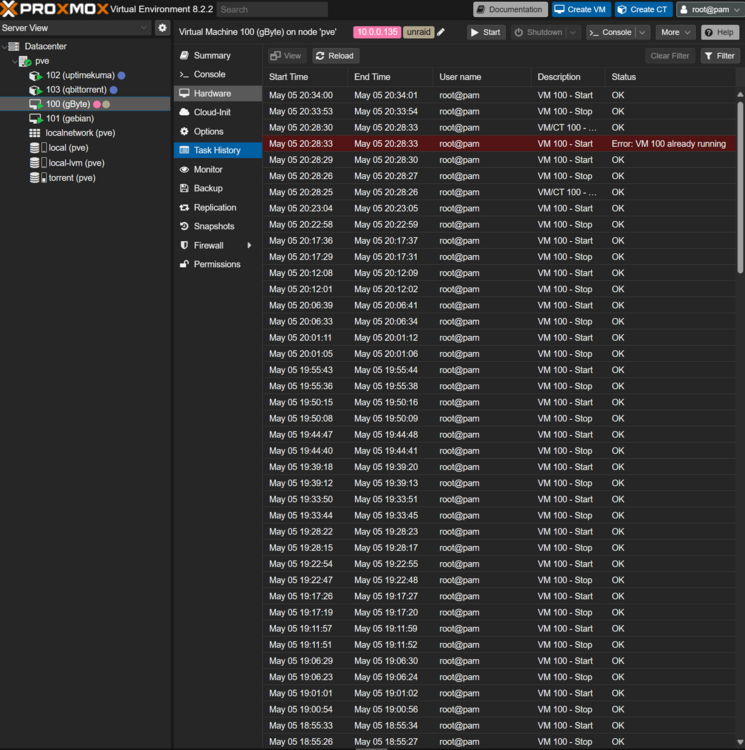
Hi I recently deployed a new Proxmox server. I am intending to use Unraid as a VM to manage the storage. I have the VM created and booting from a USB, however, I noted today that it will randomly restart every few minutes. Despite my troubleshooting efforts I cannot pin down why. Here is a screenshot of the task history of the VM in Proxmox: Attached are my diagnostics. Is there anything in there that sticks out as problematic? Thanks in advance for any guidance. gbyte-diagnostics-20240505-2030.zip