






asceticism
Members
-
Joined
-
Last visited
-
Haha at one point, I had user: nut, password: nut. Thanks for the look, surprised to see auth issues in the zip. According to the logs, it's connecting: Trying to connect to UPS [[email protected]] and Logged into UPS [email protected] Oct 22 09:18:21 namehere ool www[586085]: /usr/local/emhttp/plugins/nut-dw/scripts/start Oct 22 09:18:22 namehere rc.nut: Writing NUT configuration... Oct 22 09:18:23 namehere rc.nut: Updating permissions for NUT... Oct 22 09:18:23 namehere rc.nut: Checking if the NUT Runtime Statistics Module should be enabled... Oct 22 09:18:23 namehere rc.nut: Enabling the NUT Runtime Statistics Module... Oct 22 09:18:24 namehere rc.nut: Network UPS Tools upsmon 2.8.4.39-39+g009fbbd1b (development iteration after 2.8.4) Oct 22 09:18:24 namehere rc.nut: UPS: [email protected] (secondary) (power value 1) Oct 22 09:18:24 namehere rc.nut: Using power down flag file /etc/nut/no_killpower Oct 22 09:18:24 namehere rc.nut: 0.000018 [D1:691416] debug level is '6' Oct 22 09:18:24 namehere rc.nut: 0.000023 [D1:691416] will use a shutdown command (SHUTDOWNCMD): '/sbin/poweroff' Oct 22 09:18:24 namehere rc.nut: 0.000025 [D1:691416] will use custom notification command (NOTIFYCMD): '/usr/sbin/nut-notify' Oct 22 09:18:24 namehere upsmon[691417]: Startup successful Oct 22 09:18:24 namehere upsmon[691417]: Warning: running as one big root process by request (upsmon -p) Oct 22 09:18:24 namehere upsmon[691417]: [D1:691417] Saving PID 691417 into /var/run/nut/upsmon.pid Oct 22 09:18:24 namehere upsmon[691417]: [D1:691417] upsnotify: failed to notify about state NOTIFY_STATE_READY_WITH_PID: no notification tech defined, will not spam more about it Oct 22 09:18:24 namehere upsmon[691417]: [D1:691417] Trying to connect to UPS [[email protected]] Oct 22 09:18:25 namehere upsmon[691417]: [D1:691417] Logged into UPS [email protected] Oct 22 09:18:25 namehere upsmon[691417]: [D2:691417] pollups: [email protected] Oct 22 09:18:25 namehere upsmon[691417]: [D3:691417] get_var: [email protected] / status Oct 22 09:18:25 namehere upsmon[691417]: [D3:691417] get_var: [email protected] / buzzword Oct 22 09:18:25 namehere upsmon[691417]: [D3:691417] get_var: [email protected] / X-buzzword Oct 22 09:18:25 namehere upsmon[691417]: [D2:691417] parse_status: [OL CHRG] Oct 22 09:18:25 namehere upsmon[691417]: [D3:691417] parsing: [OL] Oct 22 09:18:25 namehere upsmon[691417]: [D3:691417] ups_on_line: [email protected] (first time) Oct 22 09:18:25 namehere upsmon[691417]: [D3:691417] parsing: [CHRG] Oct 22 09:18:25 namehere upsmon[691417]: [D4:691417] Known and ignored status token: [CHRG] Oct 22 09:18:25 namehere upsmon[691417]: [D3:691417] Handled 2 status tokens Oct 22 09:18:25 namehere upsmon[691417]: [D3:691417] Current power value: 1 Oct 22 09:18:25 namehere upsmon[691417]: [D3:691417] Minimum power value: 1 Oct 22 09:18:25 namehere upsmon[691417]: [D4:691417] Beginning 5-sec delay between main loop cycles Oct 22 09:18:30 namehere upsmon[691417]: [D4:691417] 5-sec delay between main loop cycles finished, took 5.000099 Oct 22 09:18:30 namehere upsmon[691417]: [D2:691417] pollups: [email protected] Oct 22 09:18:30 namehere upsmon[691417]: [D3:691417] get_var: [email protected] / status Oct 22 09:18:30 namehere upsmon[691417]: [D3:691417] get_var: [email protected] / buzzword Oct 22 09:18:30 namehere upsmon[691417]: [D3:691417] get_var: [email protected] / X-buzzword Oct 22 09:18:30 namehere upsmon[691417]: [D2:691417] parse_status: [OL CHRG] Oct 22 09:18:30 namehere upsmon[691417]: [D3:691417] parsing: [OL] Oct 22 09:18:30 namehere upsmon[691417]: [D4:691417] ups_on_line: [email protected] (no change) Oct 22 09:18:30 namehere upsmon[691417]: [D3:691417] parsing: [CHRG] Oct 22 09:18:30 namehere upsmon[691417]: [D4:691417] Known and ignored status token: [CHRG] Oct 22 09:18:30 namehere upsmon[691417]: [D3:691417] Handled 2 status tokens Oct 22 09:18:30 namehere upsmon[691417]: [D3:691417] Current power value: 1 Oct 22 09:18:30 namehere upsmon[691417]: [D3:691417] Minimum power value: 1 Oct 22 09:18:30 namehere upsmon[691417]: [D4:691417] Beginning 5-sec delay between main loop cycles
-
Here it is!nut-debug-20251022084513.zip Thanks for any and all help, much appreciated.
-
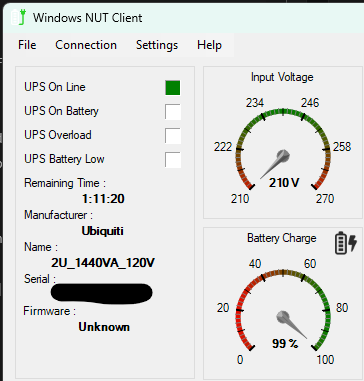
I'm also having this issue. I have the log level turned up and I'm seeing: Oct 21 19:14:19 namehere upsmon[128611]: [D4:128611] 5-sec delay between main loop cycles finished, took 5.000064 Oct 21 19:14:19 namehere upsmon[128611]: [D2:128611] pollups: [email protected] Oct 21 19:14:19 namehere upsmon[128611]: [D3:128611] get_var: [email protected] / status Oct 21 19:14:19 namehere upsmon[128611]: [D3:128611] get_var: [email protected] / buzzword Oct 21 19:14:19 namehere upsmon[128611]: [D3:128611] get_var: [email protected] / X-buzzword Oct 21 19:14:20 namehere upsmon[128611]: [D2:128611] parse_status: [OL CHRG] Oct 21 19:14:20 namehere upsmon[128611]: [D3:128611] parsing: [OL] Oct 21 19:14:20 namehere upsmon[128611]: [D4:128611] ups_on_line: [email protected] (no change) Oct 21 19:14:20 namehere upsmon[128611]: [D3:128611] parsing: [CHRG] Oct 21 19:14:20 namehere upsmon[128611]: [D4:128611] Known and ignored status token: [CHRG] Oct 21 19:14:20 namehere upsmon[128611]: [D3:128611] Handled 2 status tokens Oct 21 19:14:20 namehere upsmon[128611]: [D3:128611] Current power value: 1 Oct 21 19:14:20 namehere upsmon[128611]: [D3:128611] Minimum power value: 1 Oct 21 19:14:20 namehere upsmon[128611]: [D4:128611] Beginning 5-sec delay between main loop cyclesI can also confirm that via WinNUT the UPS is reading out correctly with the same configurations:
-
asceticism changed their profile photo
-
Hey! Best of luck!

