





Kliu
Members
-
Joined
-
Last visited
-
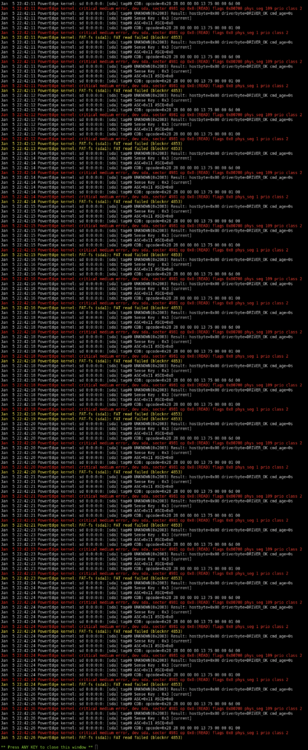
I wasnt sure how to copy the log here is a screenshot.
-
Not sure what going on with the flash drive it shows zero bytes used and zero bytes free. Its a 30GB drive, the last time I paid attention to its size it had more than 75% free space from what I can remember.

-
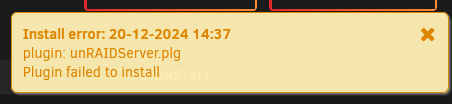
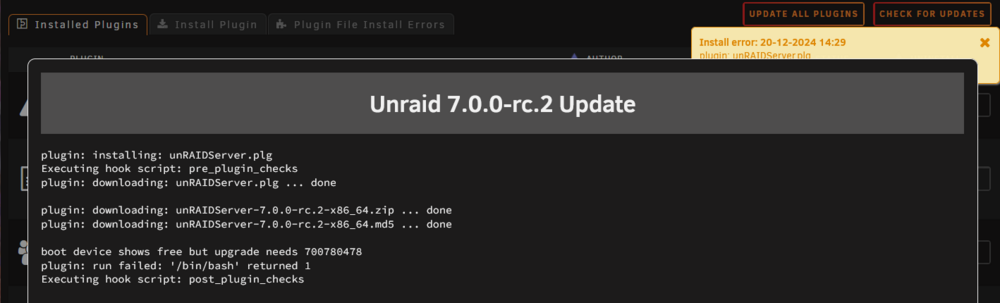
plugin: installing: unRAIDServer.plg Executing hook script: pre_plugin_checks plugin: downloading: unRAIDServer.plg ... done plugin: downloading: unRAIDServer-7.0.0-rc.2-x86_64.zip ... done plugin: downloading: unRAIDServer-7.0.0-rc.2-x86_64.md5 ... done boot device shows free but upgrade needs 700780478 plugin: run failed: '/bin/bash' returned 1 Executing hook script: post_plugin_checks Im running 7.0.0-beta 4 and trying to update to 7.0.0-rc.2 It seems the plugin unRAIDServer.plg is failing to install. Any ideas how to rectify the situation?
-
After upgrading to 7 beta 4 the array wont start and gives this error: "Wrong Pool State cache invalid expansion" I have a 1 TB nvme and 1 TB SSD in Pool 1 and a single 250GB in Pool 2. Ive only had unraid running a couple months, so Im not too familiar with the inner workings of it and linux. poweredge-diagnostics-20241108-1311.zip
-
Server '192.168.111.3' responds to a 'ping' Testing SMB... Remote server 'SMB' port 445 is not open ** Remote Server is not online for SMB Testing NFS... Remote server 'RPC' port 111 is not open ** Remote Server is not online for NFS
-
/usr/bin/timeout 10 bash -c '(echo >/dev/tcp/<IP>/445) &>/dev/null'; echo $? I received a value of 1
-
Here is the zip. ud_diagnostics-20241031-092758.zip
-
Hi, sorry Im new to unraid. Where can I find this folder /flash/logs/ ?
-
Unraid 6.12.13 Im trying to mount a remote share thats on my ubuntu pc on the local network using the unassigned devices plugin. However the plugin only ever shows the unraid server no matter what protocol I select. Ive tried entering the IP of the ubuntu machine but it makes no difference. Ive setup SMB shares on ubuntu and a windows machine on the same network. I pinged both machines from the unraid server and there is no issues there. I can access the unraid shares from either machine but not the other way around. What am I missing?
-
Unraid 6.12.13 Im trying to mount a remote share thats on my ubuntu pc on the local network using the unassigned devices plugin. However the plugin only ever shows the unraid server no matter what protocol I select. Ive tried entering the IP of the ubuntu machine but it makes no difference. Ive setup SMB shares on ubuntu and a windows machine on the same network. I pinged both machines from the unraid server and there is no issues there. I can access the unraid shares from either machine but not the other way around. What am I missing?
-
Thanks, is there anyway to have it show the size of the folders so I can figure out which folders are responsible?
-
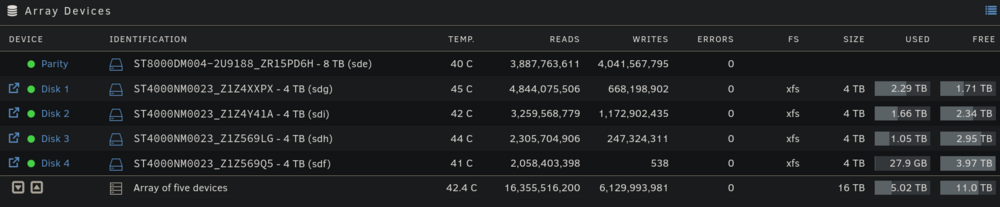
Ive transferred less than 1 TB of media files to a data directory. My array shows 5TB used. How do I check what this 4 TB consists of. I have installed some docker containers with the typical media applications, plex, arr suite, jellyfin, etc. These could not possibly come up to 4 TB.
-
Thank you. This worked.
-
Ive created a share folder called data which I can access from windows 11. However I am unable to see this folder in my pop_os install, and unable to mount it. I have enabled nfs for the share. Any help is appreciated.
-
@jbat66 thanks for the guide. I’m curious why you suggest to not pass thru the hard drives directly and to instead create only large virtual drive. Would that not defeat the whole purpose of using of using unraid and its raid features? You mentioned a performance hit but how bad is it really? If one of my drives gives out within this large virtual drive you have suggested to use, would that data not just be lost? I’ve personally never used unraid but have decided to use it instead of truenas because I want to use a number of mixed sized drives which I understand can’t be done with truenas. Thanks for your time.


