





YujiTFD
Members
-
Joined
-
Last visited
-
Okay, I disabled user share in settings, FCP's warnings gone. I got the idea, thank you.
-
Yes, I know, I've seen it during 6.12.10 setup, but as for 7.0.0 b2 - no shares were created after array started. By default Docker vDisk location points to /mnt/usr/system/docker/docker.img, but with pure ZFS pool there is no array, therefore - no /mnt/usr directory, Docker page says "Path does not exist". If I edit location to /mnt/cache/system/docker/docker.img and start Docker service - corresponded directories appear, but FCP plugin reports "Share system set to not use the cache, but files / folders exist on the cache drive". I'm here because of this.
-
Fresh from new unraid installer. When I start Docker/VM services system reports it has no corresponded folders in order to function properly.
-
Hi there. Fresh Unraid 7.0.0-beta2 setup, 5 HDDs raidz1 + NVMe cache drive for docker and VMs. Since there are no array, no default folders has been created, I've manually assigned appdata, isos, domain and system folders to the cache device and now I get a warning from FCP plugin: Please, advise a correct algorythm for creating correct folders structure for my config.

-
So basicly we can have either one or another, something hybrid with best of both worlds are not possible? We can somewhat mitigate writing speed with SSD cache, but nothing for reading? Shame.
-
Does this mean if I choose a ZFS pool over a ZFS array, I lose all the array benefits? For example, won't I be able to add more HDDs into the pool as easily as into the array? After I set up 5 HDDs as RAID-Z1, can I add more drives later, and can these drives be of different sizes? I had a full-blown TrueNAS SCALE setup (3 x mirrored vdevs). While I/O and transfer speeds were awesome, I had no use for such a system, and about 85% of the time it was idling, with occasional movie access and very modest torrenting. It felt like a waste of hardware and electricity bills, so I went for Unraid for its perks, finding it quite slow in comparison. I can hardly saturate a 1G network, let alone the 10G network I had installed, I'm looking for improvement without sacrificing too much >_<
-
Regarding Unraid 7.0 and ZFS During my test setup usage I realised I'm not happy with regular ZFS array (not ZFS pool) read/write speeds (4 x 6 TB WD Red Plus). Unraid 7.0 brings L2ARC and SLOG subpools, but will they be useable for ZFS arrays (not pools)? In hybrid ZFS array you can have pools and datasets, but is there any info that L2ARC and SLOG will work too?
-
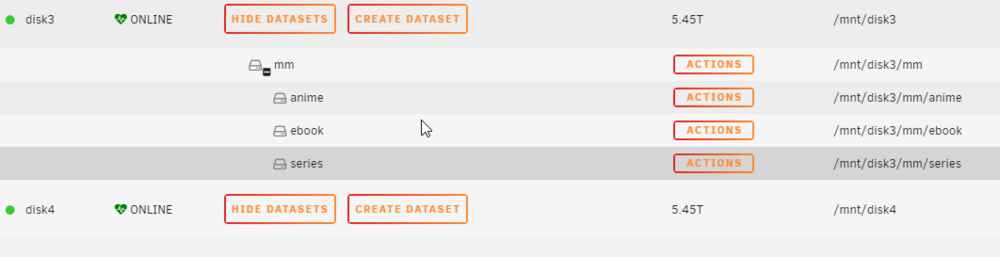
Okay, I figured it out, although this method is not exactly elegant. I had share settings look like this: Then I accessed this SMB share and created a "videos" folder: due to disk4 was empty, this new folder has been created there. Then I changed allocation back to "High-water", leaving split level as I set before (split only top level), then deleted "/mnt/disk4/videos" folder and created "disk4/mm/video" zfs dataset. In result, I have my multimedia share on disks 3 & 4, while only "movies" are going to the disk4, and all subdirectories are datasets available for snapshots. I'm gonna test how share is working, but once setup I don't expect any issues.

-
Hello. Moved to unRAID from TrueNAS SCALE couple of days ago, trying to wrap my head around data placement. In TrueNAS I wouldn't have to worry about it since data were automatically striped across all disks in the pool which were spinning all the time, but in unRAID I pursue a goal of setup where disks are being used only when accessed to. Now, specifics: - I have 4 x 6 TB HDDs in ZFS hybrid array, where disk3 and disk4 has been chosen for multimedia storage, - I've created a share named "mm", which is also a ZFS dataset, available for disks 3 & 4; unRAID created in on disk3, - Using "ZFS Master" plugin I've also created folders/datasets named "anime", "ebooks", "series", Now my task is to put movies on disk4, separating them from everything else, but "movies" should still be a part of root "mm" dataset, so inside SMB share named "mm" I would have anime, ebooks, tv shows and movies alike. So, question is: am I thinking straight, can it even be done? I've read abour unRAID alot, I've seen people talking they have such data structure, but I can't to graps the idea of how to do this How should I setup the share for my choice: allocation, split level disks availability and such? Thank you in advance.
-
Thing is I can't find X570 boards freely these days, B550s are plenty but their PCIe lanes are pain. Another concern is that budget consumer B550 in terms of stability and life expectancy won't do as good as a 24/7-ready server board. Which leads me to the conclusion I gotta stop looking for replacement until I get my funds straight. Gotta compromise again 😭
-
Figured as much. Unfortunately, it's ridiculously priced these days, simply outrageous, while other mATX Ryzen 5000 motherboards are mostly joke due to very few SATA or PCIe ports. I think of boosting my rack from Supermicro X11SSM-F + Xeon E3-1240 v5 (4C/8T, 80W) towards something modern without costing me arm and leg. I found your comment, did some reading (5600x is 2.5 times more productive than 1240 v5, according to cpubenchmark.net), found used 5600x, but motherboard situation is killing me. I can survive w/o IPMI (if needed, PiKVM is at my service), but need PCIe for 10GbE NIC and GPU at least, while having 3+ PCIe much more preferable. Asrock has X470D4U2-2T with 2x10GbE NICs, but the price...
-
Hi. What MB did you choose? I'm looking at the similar setup (5600x, ECC, etc), but struggling with MB: they are either expensive or too few PCIe or SATA. Thank you.
-
An NVMe SSD as cache, a main array of ZFS HDDs, a share with primary storage set to cache, and secondary storage - to the array with mover on schedule. In this particular case will ARC be used? Can it be used?
-
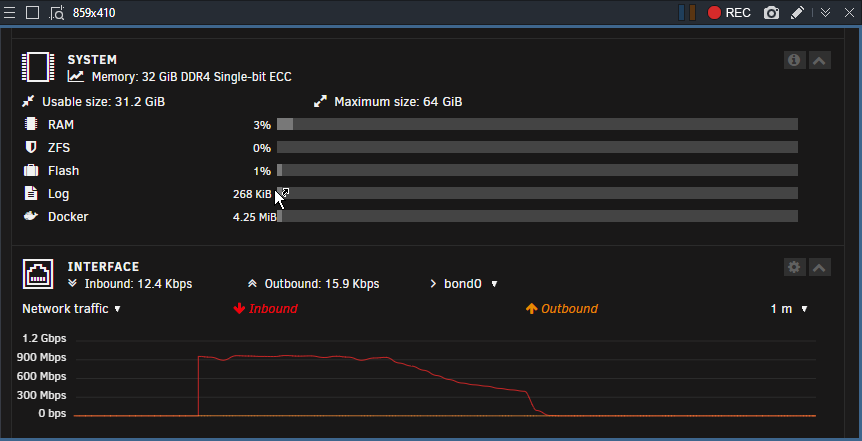
I take back my statement, but not completely: my 12 GB ARC was not filled till 100% before speed dropped, only about 40%, which took ~20 seconds, but not 5 Yeah, I know ARC has nothing to do with the mover, question was: if both present, which one goes first? Apparently, it's ARC, but not till 100%. Yes, I have no cache in test setup, only 3 old HDDs. And looks like that ARC was the first in the queue.
-
As I said before in https://forums.unraid.net/topic/166724-zfs-arc-vs-unraid-cache-priority/#comment-1424125, while 12 GB ARC had space in it, my transfer speed over 1GbE link was ~103 MB/s sharp, it sustained much longer than 5 seconds. It's really strange, let me fire it and test it again. P.S. Still, if ARC IS a write cache, how does it work with the Mover?


