





Mad_cyclist
Members
-
Joined
-
Last visited
-
I am using Jellyfin, but that has nothing to do with the client capability to direct play right? The goal is to avoid Jellyfin transcoding or remuxing while streaming to that specific client, that's why I went with the tdarr route. But like I said, I'm not very familiar with this and maybe I'm missing something in my setup.
-
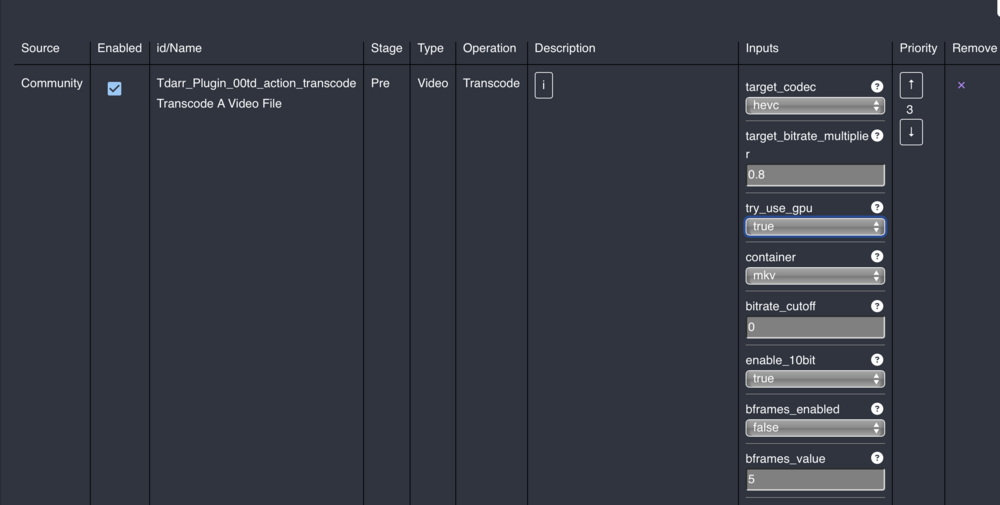
I have two Samsung TVs, a newer model that can directy play pretty much everything 4k Dolby Vision with DTS. However the older model (from 2019-2020) while 4k, can't direct play most with DTS, TrueHD, DV and some HDR. I've see up a container with Tdarr and its corresponding node. Created a library pointing to a movie folder (just for testing) and set up this transcode plugin. When I scan the library the file gets checked but it says conditions are met. Whats conditions? Isn't this supposed to force transcoding? Then I tried another plugin with the same results. I've got to say this is all very new to me and I'm not familiar with tdarr and its plugins.
-
Hi all, my container gets stuck trying to get access to google.com. See the logs below: 2025-07-31 22:41:19,410 DEBG 'start-script' stdout output: -P INPUT DROP -P FORWARD DROP -P OUTPUT DROP -A INPUT -s 185.76.11.17/32 -i eth0 -j ACCEPT -A INPUT -s 172.17.0.0/16 -d 172.17.0.0/16 -j ACCEPT -A INPUT -s 185.76.11.17/32 -i eth0 -j ACCEPT -A INPUT -i eth0 -p tcp -m tcp --dport 8080 -j ACCEPT -A INPUT -i eth0 -p udp -m udp --dport 8080 -j ACCEPT -A INPUT -p icmp -m icmp --icmp-type 0 -j ACCEPT -A INPUT -i lo -j ACCEPT -A INPUT -i wg0 -j ACCEPT -A OUTPUT -d 185.76.11.17/32 -o eth0 -j ACCEPT -A OUTPUT -s 172.17.0.0/16 -d 172.17.0.0/16 -j ACCEPT -A OUTPUT -d 185.76.11.17/32 -o eth0 -j ACCEPT -A OUTPUT -o eth0 -p tcp -m tcp --sport 8080 -j ACCEPT -A OUTPUT -o eth0 -p udp -m udp --sport 8080 -j ACCEPT -A OUTPUT -p icmp -m icmp --icmp-type 8 -j ACCEPT -A OUTPUT -o lo -j ACCEPT -A OUTPUT -o wg0 -j ACCEPT 2025-07-31 22:41:19,412 DEBG 'start-script' stdout output: -------------------- 2025-07-31 22:41:19,416 DEBG 'start-script' stdout output: [info] Configuring WireGuard... 2025-07-31 22:41:19,432 DEBG 'start-script' stdout output: [info] Attempting to bring WireGuard interface 'up'... 2025-07-31 22:41:19,433 DEBG 'start-script' stdout output: [debug] Running WireGuard kernel implementation... 2025-07-31 22:41:19,457 DEBG 'start-script' stderr output: Warning: `/config/wireguard/wg0.conf' is world accessible 2025-07-31 22:41:19,470 DEBG 'start-script' stderr output: [#] ip link add wg0 type wireguard 2025-07-31 22:41:19,473 DEBG 'start-script' stderr output: [#] wg setconf wg0 /dev/fd/63 2025-07-31 22:41:19,476 DEBG 'start-script' stderr output: [#] ip -4 address add 10.2.0.2/32 dev wg0 2025-07-31 22:41:19,486 DEBG 'start-script' stderr output: [#] ip link set mtu 1420 up dev wg0 2025-07-31 22:41:19,490 DEBG 'start-script' stderr output: [#] resolvconf -a wg0 -m 0 -x 2025-07-31 22:41:19,521 DEBG 'start-script' stderr output: [#] wg set wg0 fwmark 51820 2025-07-31 22:41:19,522 DEBG 'start-script' stderr output: [#] ip -4 route add 0.0.0.0/0 dev wg0 table 51820 2025-07-31 22:41:19,524 DEBG 'start-script' stderr output: [#] ip -4 rule add not fwmark 51820 table 51820 2025-07-31 22:41:19,526 DEBG 'start-script' stderr output: [#] ip -4 rule add table main suppress_prefixlength 0 2025-07-31 22:41:19,531 DEBG 'start-script' stderr output: [#] sysctl -q net.ipv4.conf.all.src_valid_mark=1 2025-07-31 22:41:19,534 DEBG 'start-script' stderr output: [#] iptables-restore -n 2025-07-31 22:41:19,539 DEBG 'start-script' stderr output: [#] '/root/wireguardup.sh' 2025-07-31 22:41:19,545 DEBG 'start-script' stdout output: [debug] Waiting for valid VPN gateway IP addresses from tunnel... [debug] Waiting for valid VPN adapter IP addresses from tunnel... 2025-07-31 22:41:20,555 DEBG 'start-script' stdout output: [debug] Valid local IP address from tunnel acquired '10.2.0.2' 2025-07-31 22:41:21,570 DEBG 'start-script' stdout output: [debug] Valid gateway IP address from tunnel acquired '10.2.0.1' 2025-07-31 22:41:21,572 DEBG 'start-script' stdout output: [debug] Checking we can resolve name 'www.google.com' to address... This is my routing table inside the container: [root@e5d7c89081d7 /]# ip route default via 172.17.0.1 dev eth0 172.17.0.0/16 dev eth0 proto kernel scope link src 172.17.0.2 192.168.9.0/24 via 172.17.0.1 dev eth0 And in the host: Kernel IP routing table Destination Gateway Genmask Flags Metric Ref Use Iface default OPNsense.locald 0.0.0.0 UG 1 0 0 eth2 172.17.0.0 0.0.0.0 255.255.0.0 U 0 0 0 docker0 172.20.0.0 0.0.0.0 255.255.0.0 U 0 0 0 br-b438feaca71a 192.168.9.0 0.0.0.0 255.255.255.0 U 0 0 0 vhost2 192.168.9.0 0.0.0.0 255.255.255.0 U 1 0 0 eth2 192.168.12.0 0.0.0.0 255.255.255.0 U 0 0 0 vhost3 192.168.12.0 0.0.0.0 255.255.255.0 U 1008 0 0 eth3 192.168.122.0 0.0.0.0 255.255.255.0 U 0 0 0 virbr0 The DNS inside the container is automatically set to 10.2.0.1. I'm kind of at a lost and not sure how to fix it.
-
I have two ethernet interfaces on my server: one for my regular use lan and one for cctv. Each interface has its own bridge, although no other interface belongs to that bridge (pointless I know). For some reason, my docker containers didn't work if I passed the interface directly to them, but they did with the bridge. Each bridge, creates an additional interface named "shim-brX". Some even get assigned as default with the highest priority metric. I manually clean up my routing table from the shim-br interfaces and assign proper default route and priorities. Basically, the regular lan is the default and the cctv subnet gets routed through its corresponding interface. Despite that, after every reboot, the whole routing table gets messed up again with the shim-brX interfaces, the server looses the way to get packets out to my main router and docker containers loose internet access. It's a pain in the neck to have to set it all up again after every boot. How can I make my changes stick? Or how can I prevent the shim-br interfaces being created. Even more, why can't I just pass the interface to the containers and avoid the whole bridging thing? My routing table now with the unnecessary interfaces and no internet Destination Gateway Genmask Flags Metric Ref Use Iface default 192.168.19.1 0.0.0.0 UG 0 0 0 shim-br2 default 192.168.19.1 0.0.0.0 UG 1011 0 0 br2 default 192.168.112.1 0.0.0.0 UG 1012 0 0 br3 172.17.0.0 0.0.0.0 255.255.0.0 U 0 0 0 docker0 192.168.19.0 0.0.0.0 255.255.255.0 U 0 0 0 shim-br2 192.168.19.0 0.0.0.0 255.255.255.0 U 1011 0 0 br2 192.168.112.0 0.0.0.0 255.255.255.0 U 0 0 0 shim-br3 192.168.112.0 0.0.0.0 255.255.255.0 U 1012 0 0 br3 192.168.122.0 0.0.0.0 255.255.255.0 U 0 0 0 virbr0
-
Will this only work on the parity drives then? Regardless of the time, I suspect that would put less strain on the system (drives) than doing it on the entire array? If so, could you point me to some thread or part of the documentation where this process is detailed? Edit: Is this the procedure you're referring to? https://docs.unraid.net/unraid-os/manual/storage-management/#rebuilding-a-drive-onto-itself
-
In the process of reorganizing my attic, which is where I keep my server and other network stuff, I accidentally moved the hdd case that I had outside my server (temporarily) and one of the sata power cable partially disconnected while operating. Immediately I received an email notification that my array had a failed device. I checked the hdds and noticed the one partially disconnected. Connected the power cable properly and rebooted the server. The message still appears but I'm reasonably confident that the disk is okay, meaning that it wasn't failing and was just a matter of time. My array is composed of 6 drives, including 2 parity drives. The failed drive is one of the parity drives. Do you have any suggestions about how to proceed? Is my only option to recompute the parity of the entire array? or maybe this drive has like a "dirty bit" that I can clean up?
-
The pcie slot I was using on the Unraid server motherboard was doing weird stuff. I tested the adjacent slot and everything worked fine, 9.9 Gbps on iperf as expected!
-
I've installed a similar switch, a 4x2.5G+ 2x10G sfp+. On the sfp+ ports the 1G light is flashing instead of the 10G one next to it. Triple-checked everything, tested a different cable, different transceivers. I have no idea what's going on. Ethtool reports 10000Mbps and the OPNsense router shows 10Gbase-CX4 for that interface. Switch in between shows 1G instead of 10G, and iperf still stuck at 850Mbps.
-
After having replaced the transceivers, fiber, and now the Mellanox NICs the problem persists (provided the configuration is ok which by the looks of it, it is). There's only one piece of hw that I haven't changed and that is the switch. I'll replace it tomorrow and report back.
-
As I said, the router port autoselects 10Gbls with CX4 protocol. The sfp+ port on the switch shows a green light flashing that indicates a 10Gbps link.
-
To isolate the issue, I've temporarily replaced the fiber+transceiver for twinax DAC cables. The ethtool output: Supported ports: [ FIBRE ] Supported link modes: 10000baseKX4/Full 1000baseX/Full 10000baseCR/Full 10000baseSR/Full Supported pause frame use: Symmetric Receive-only Supports auto-negotiation: No Supported FEC modes: Not reported Advertised link modes: 10000baseKX4/Full 1000baseX/Full 10000baseCR/Full 10000baseSR/Full Advertised pause frame use: Symmetric Advertised auto-negotiation: No Advertised FEC modes: Not reported Speed: 10000Mb/s Duplex: Full Auto-negotiation: off Port: Direct Attach Copper PHYAD: 0 Transceiver: internal Supports Wake-on: d Wake-on: d Current message level: 0x00000014 (20) link ifdown Link detected: yes iperf speeds are now down from 800 to 780 Mbps. [ ID] Interval Transfer Bitrate Retr Cwnd [ 5] 0.00-1.00 sec 96.4 MBytes 809 Mbits/sec 0 223 KBytes [ 5] 1.00-2.00 sec 94.5 MBytes 793 Mbits/sec 0 223 KBytes [ 5] 2.00-3.00 sec 74.7 MBytes 627 Mbits/sec 0 223 KBytes [ 5] 3.00-4.00 sec 96.9 MBytes 813 Mbits/sec 0 221 KBytes [ 5] 4.00-5.00 sec 93.4 MBytes 784 Mbits/sec 0 221 KBytes [ 5] 5.00-6.00 sec 95.7 MBytes 803 Mbits/sec 0 223 KBytes [ 5] 6.00-7.00 sec 83.2 MBytes 698 Mbits/sec 0 223 KBytes [ 5] 7.00-8.00 sec 95.1 MBytes 798 Mbits/sec 0 221 KBytes [ 5] 8.00-9.00 sec 97.1 MBytes 815 Mbits/sec 0 243 KBytes [ 5] 9.00-10.00 sec 98.5 MBytes 826 Mbits/sec 0 5.66 KBytes - - - - - - - - - - - - - - - - - - - - - - - - - [ ID] Interval Transfer Bitrate Retr [ 5] 0.00-10.00 sec 926 MBytes 776 Mbits/sec 0 sender [ 5] 0.00-10.00 sec 922 MBytes 774 Mbits/sec receiver I'm just not sure what's going on... Link negotiated speed seems like it's 10Gbps. But bw tests shows 1Gbps at best.
-
Recently upgraded part of my network to 10Gb. My router and Unraid server had a Mellanox MCX322A card installed and they're connected with OM3 fiber. There's a 5x2.5GE+2x10G sfp+ Tenda switch in between, both router and Unraid server are connected to the sfp+ ports. LC-LC transceivers on each side. The router interface reports 10Gbase-CX4 instead of 10G-SR, but I guess that's not that big of a deal. UnRaid reports 10000Mbps, full duplex and 1500 mtu. The problem is when testing the bandwidth with iperf, the results speed show 1Gbps at best and average around 750-800 Mbps!! Prior to "upgrading" my network, iperf tests averaged at 950Mbps. Not sure how to proceed, is there anything I should edit on the Unraid side to work with Mellanox cards? They were detected just fine, plug and play.
-
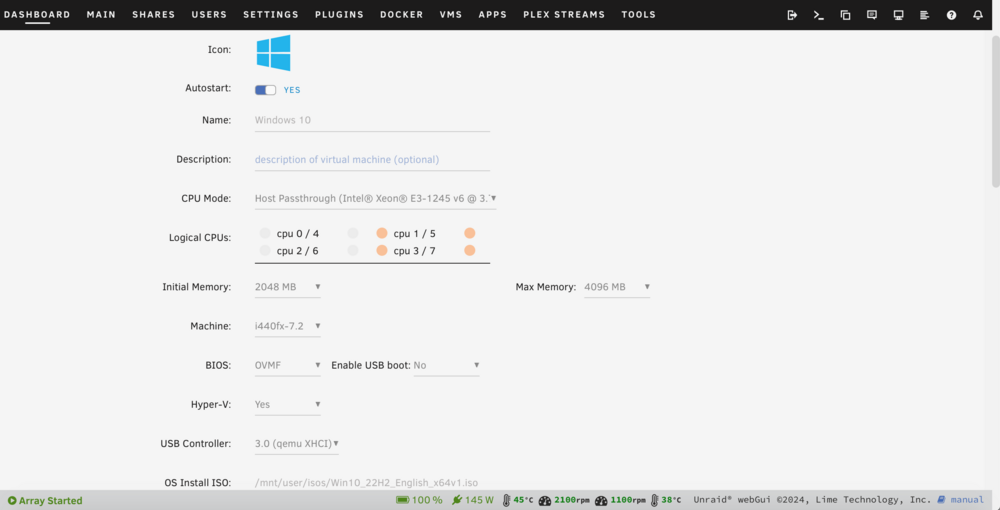
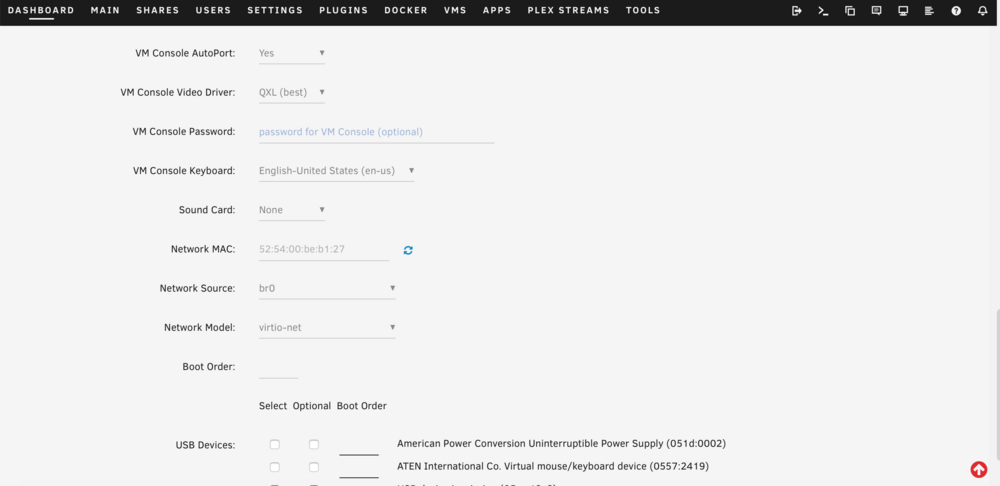
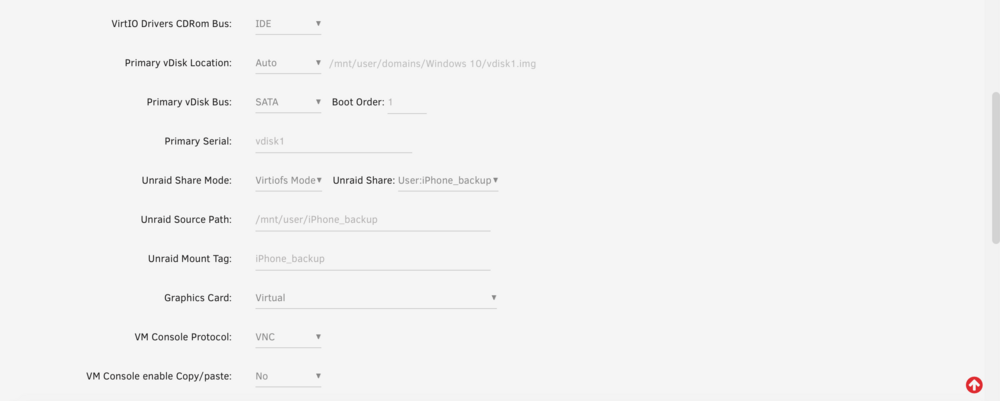
A few days ago I set up a Win10 VM for iTunes backup purposes. The VM settings followed the configuration in the first post (pinning cpu cores, pairs for hyperthreading and not using the first two). 4GB of ram and vdisk on my cache SSD. After all of this I still find that the VM is extremely slow to use, almost unusable. I don't know what else to tweak because it seems like the configuration ticks all the boxes for usable performance.
-
I see, that makes sense, thanks for the clarification! I did not mention it in my first post, but we have PV panels and a 10kWh battery back at home. This is enough for us to be self-sufficient pretty much every day, which going back to your explanation, the mains power being cut off from that UPS may potentially indicate something serious happened. The UPS is now set to be powered off, so that both switch and Synology will also power off. It was just NUT having the router shut down. Now that I changed the UPS settings to shutdown the unit, I guess the router BIOS condition will be met because the power to the router will go off when the UPS shuts down.
-
I managed to plug the router, switch and ONT with a 3 way adapter. Performed a second test, and this time the Unraid server shutdown gracefully and so did the router. The Synology server entered into standby mode but didn't shutdown completely, from what I read, it's safe to power off at that stage anyways. I'll call it a partial success because there are a couple of issues: 1) the switch is a "dumb" switch, so it doesn't have the capability of having a NUT client listening for a shutdown command. Which means it'll run on batteries until it drains the UPS. Should I set the UPS to turn itself off? The hardware is not very accessible and I'd like to avoid having to go turn on the UPS every time this happens (yeah I know it shouldn't be very often). As far as I know, the UPS can't be configured to turn on automatically after the mains is restored? 2) I've got the router BIOS configured to always power on after the power is restored. When performing the test I didn't let the battery drain out completely and switched the mains back on when the battery was at 60%. The router didn't turn on automatically which was unexpected. I guess that only happens if the power is cut off, instead of it being commanded to power off?


