Hache
Members
-
Joined
-
Last visited
-
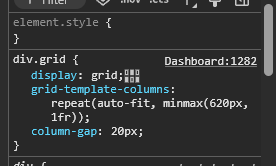
Hello I'm on 6.12.10 long time ago and just today, it changed to two columns (maybe because I updated to a Vivaldi major version). This is the top Google result. I have a solution, so I'll post it here. In my case, I use Vivaldi, which has a toolbar on the left, so even though my screen is 1920px wide, the effective width is less. The Dashboard CSS is set up as follows: - Automatic number of columns ‘auto-fit’ - Each must be at least 620px wide ‘min 620px’ - If there is space left over, each column will take up one fraction ‘max 1fr’ The easiest option for me is to create a CSS rule for Unraid. For this, extensions such as ‘Custom CSS by Denis’ are used. I use it on certain websites where I need to change the layout to make them more user-friendly. In this case, you simply need to create a CSS rule: .frame div.grid { grid-template-columns: repeat(auto-fit, minmax(620px, 1fr)); column-gap: 20px; } You’ll need to experiment with the “620px” value (reducing it) to suit your screen, and, if you wish, with the “column-gap” (the space between columns), which is set to “20px” by default (reduce this too) I’m not sure if this is different in UnRAID 7.x, but it would be very easy to allow users to set their desired number of columns directly from the dashboard.
-
Come on. This is the first result on google when searching for "unraid increase docker image". There's even people saying that they successfully increased the size. And still the question is not answered. When someone ask "How do I increase the size of the docker image?" Why answer "that's not the best solution"? Just answer the question, please.
-
Thanks for your reply. I'm in the progress of migration. I'll mark as solution when it's finished. This are the steps I did, for future readers: Stop all docker containers (also temporarlly autostart since they restarted for me after starting the array again) Stop the array Delete the cache Start the array* Stop it again* Add the drive to the array (*maybe this could be done between 3 and 4 to avoid Stoping it again but I did it this way) Start it again Format (button under Stop). Important: read what unraid says when clicking that button. Extra: Since I wanted to change the split level, I had to move manually the files. This is what I did: 1. Look for folders with files on both disks (for example, Cowboy Bebop had some files on disk1 and some on disk2) 2. See how many space where they using on each disk with: du -h /mnt/disk1/media/anime/Cowboy\ Bebop du -h /mnt/disk2/media/anime/Cowboy\ Bebop 3. It was using more space on disk1 than on disk2 so I moved all files from disk2 to disk1 with: cp -avr /mnt/disk2/media/anime/Cowboy\ Bebop /mnt/disk1/media/anime/ 4. Since you can't use `mv` command because folders are not empty, you have to first `cp` and then `rm`. BE CAREFULL WITH `rm`: rm -rf /mnt/disk2/media/anime/Cowboy\ Bebop 5. Repeat this with all items as needed. I could have made a script for this but I was too lazy. Maybe there are better ways like Krusader or other specific apps, but again, I was too lazy to search for them. EDIT: Well... If you are using hardlinks to have the files on /torrent folder while having them also on their separated folders, I think just using rm won't delete them and you'll get dupes on both drives... EDIT2: After a lot of time moving files back and forward I realised that split would not work as expected for me because of my torrents folder and hardlinking configurations xDDD. ---- PS: @JorgeB Do you speak spanish? My real name's Jorge and I'm from Spain. If that's the case, I know we have to, but I always find it odd to talk to another Spanish-speaker in English.
-
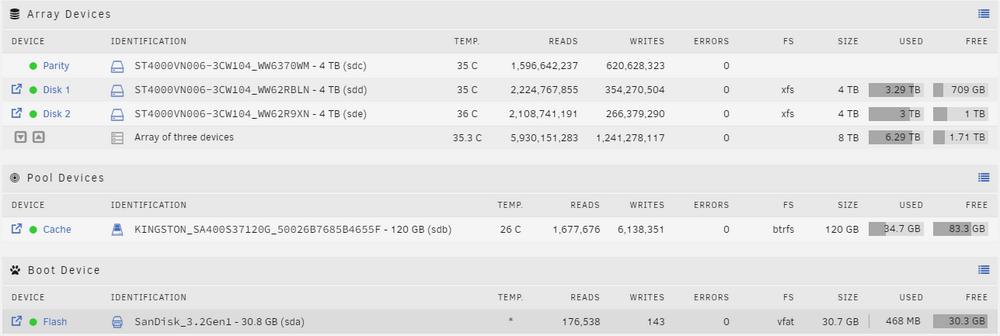
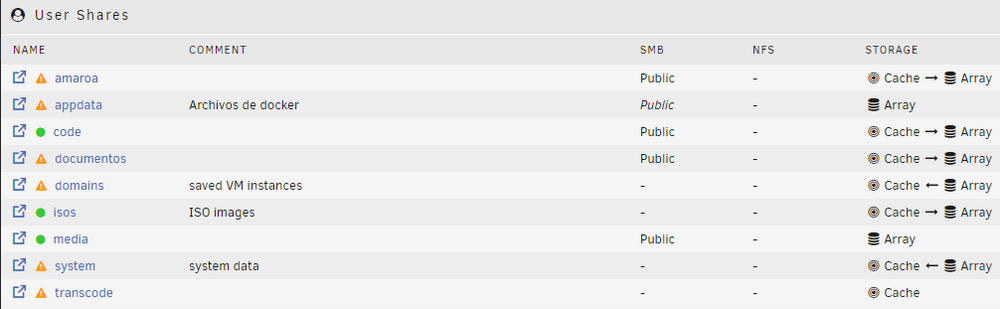
Hello. I'm new to unRaid (My Trial Key Expires in 9 days) and I'm loving it so far. I'm still learning how array, pools, etc work and also english is not my language so I'll try to explain everything. PS: I tried searching the forum before posting but I don't know what to actually look for. I can't afford to buy a lot of discs or a lot of capacity. I bought three 4TB disks and configured one as parity. I also used a small SSD as a cache for certain share. After having tested and configured unRaid, I can now get rid of my xpenology and make use of the two extra 2TB disks. I just realised that my primary use (speaking in size) is storing media files (movies and shows) that don't need backup or parity because they are not critical. I also have three shares that do have critical files and I do want to have backup and parity, but that data is unlikely to exceed 1TB. So this is my idea: Remove the 4TB parity disk to have a total of 12TB WITHOUT PARITY. Add the two 2TB disks and set one as parity or RAID1. This way, I would have: -12TB (3x4TB) for multimedia. - 2TB (2x2TB with parity/raid1) for critical data. The main problem is that I don't know how to proceed without losing the current data or messing it up. Can you lend me a hand with this? I understand that I should configure the 3x4TB in the array and I would add the 2x2tb to a pool, configuring one of them as redundancy. What steps do I follow? Should I stop the array and remove the parity disk and then add it as a normal disk? How would I then ‘reorder’ the data between the three disks? My idea is to set up the split so that the same movie or series is on only one disk. My structure is: └── media (share) │ └── movie │ │ └── Shrek 1 │ │ └── Shrek 2 │ └── tv │ │ └── Doctor Who │ │ │ └── Season 1 │ │ │ └── Season 2 So movies and tv would be on any disk but the contents of e.g. Shrek 1 must be on same disk while other movies might be in another and the contents of e.g. Doctor Who must be in same disk while other shows might be in another. More info: - I have a lot of dockers configured and I don't have appdata backup. - If you could give me some advice on how to backup to gDrive the boot USB, appdata and any other important data, I would appreciate it.