





graywolf
Members
-
Joined
-
Last visited
Everything posted by graywolf
-
I know I am far behind the times with upgrading unRaid. Anything I should be aware of in doing the upgrade? Advice on best method to perform upgrade and what to do in order to perform backout if it goes wrong? How long would an upgrade take? Is the GO file still valid for setting up aliases and creating a tmp file to update crontab to run scripts (i.e. crontab /tmp/file) Have array stopped before upgrading? Any other tips to help it go smoothly?
-
So even with the 128 Read errors on disk20 the rebuilt disk11 should be good? What should I do about the 1 Current Pending Sector on disk20? I'll have to get another 12TB drive for dual parity, I'll work getting another one What would be best approach in future prior to replacing parity or data drives? Ensure dockers don't stop Ensure nothing writes to disks (downloads, etc) What else?
-
Disk rebuild just finished 18hrs 35mins 35secs 128 errors Disk11 returned to normal operation Current diagnostics attached Disk20 showing 1 Current Pending Sector tower-diagnostics-20211201-1346.zip
-
Disk11 showed error on Dashboard with 48 reallocated sectors and a bunch of raw read errors. Since I wanted to replace a 6TB with an 8TB drive I picked that one. Disk6 has 1 reallocated sector. Disk20 showed as Healthy on the Dashboard before the disk11 rebuild. I have the original disk11, but there have been writes to the array.
-
Diagnostics attached. So is the rebuild messed up and I need to try again? Replaced a 6TB drive with an 8TB drive, currently 3.40 TB into the rebuild tower-diagnostics-20211201-0125.zip
-
I think I probably need to replace the SeaGate (Disk11) drive but unsure about the HGST (Disk6) drive. Advice would be appreciated. tower-smart-20211126-1608.zip tower-smart-20211126-1610.zip
-
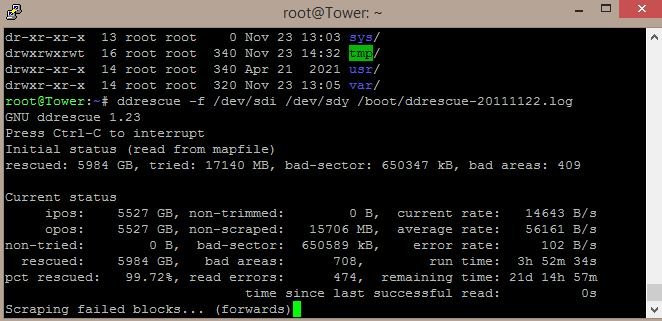
Another question. If I stop the ddrescue Scraping Failed Blocks then mount the destination disk. If I do the ddrescue fill command to find out what is corrupted, would I be able to unmount the destination disk and restart the ddrescue Scraping Failed Blocks if there are any files I still want it to try recovery? Asking because it looks like it might be days still for the 2nd pass
-
Once I'm done with ddrescue, it talks about being a good idea to run a file system check on the destination drive. How do I do that for a XFS disk? Do I mount it before the file system check or leave it unmounted? About how long should a file system check run on a 6TB drive (if size of disk matters)?
-
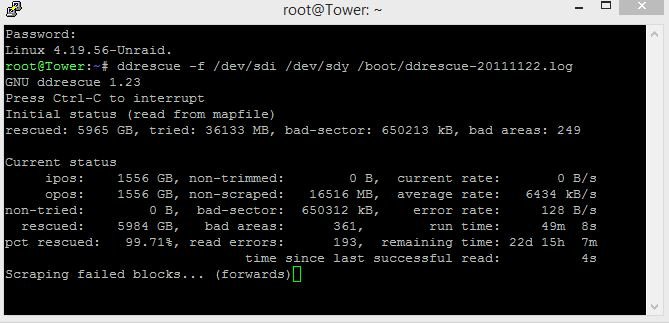
Could I stop the ddrescue scraping failed blocks, then mount the destination drive to check on a couple files (and maybe copy them to another drive), then stop array, unmount the drive, and then restart ddrescue again?
-
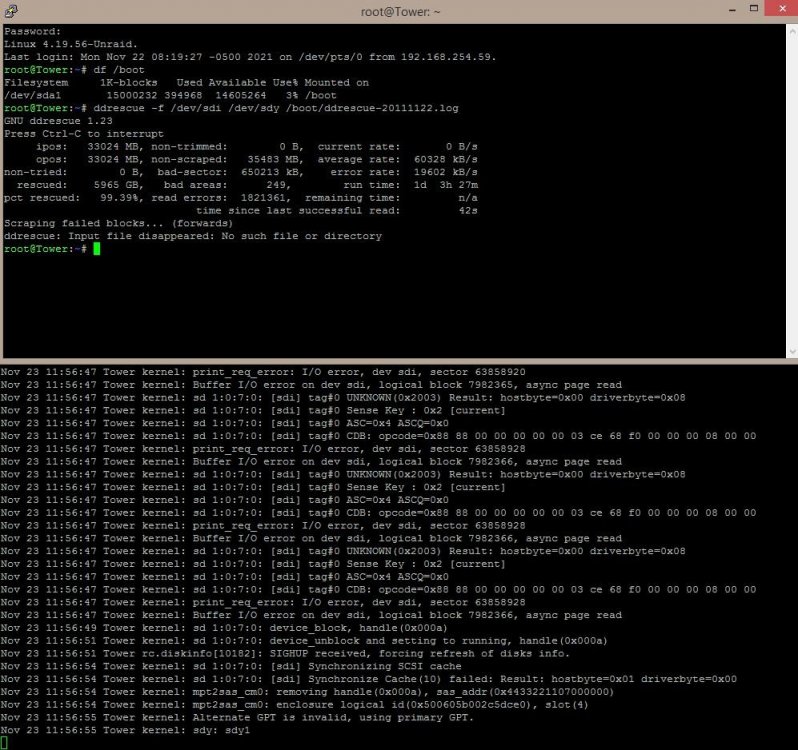
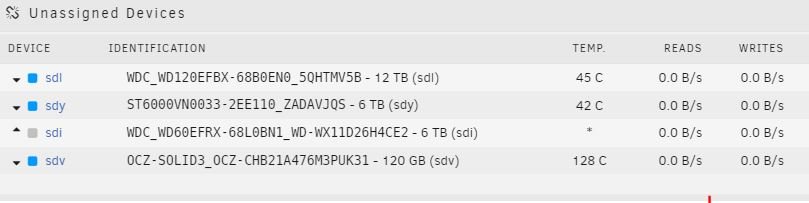
What should I do now at this point? ddrescue: Input file disappeared: No such file or directory looks like the source disk went offline?
-
"ddrescue -f --fill=- ~/fill.txt /dev/sdY /boot/ddrescue.log" What if a bad sector did not have any file(s)? does it create a file and fill it with the text?
-
I read that after ddrescue completes it's thing that "After the clone is complete you can mount the destination disk manually" What would be the command to do that? I don't have UD plugin installed And would mounting the disk be the same as adding it to the array? (no parity currently)
-
Interesting. Just to clarify, if a video file did play, the visible corruption would be because of the bad blocks anyways and not the addition of the text from the ddrescue fill cmd? Otherwise, is there another method other than adding the text with the ddrescue --fill to correlate the bad blocks with the files?
-
so "ddrescue -f --fill=- ~/fill.txt /dev/sdY /boot/ddrescue.log" will add the text inside the file that has bad blocks but if I understand correctly, that shouldn't matter for any type of file (txt, pdf, jpg, mkv, etc) since that file is corrupted anyways and would not open/play correctly. Is that correct?
-
I set it up last month, prior to Nov 6th Parity Check which ran without issue. Never saw anything for Disk18 until the Parity-Resync when I tried to replace the Parity drive with a larger drive. Unfortunately stuff had written to the array during that process so the old parity drive wouldn't be usable.
-
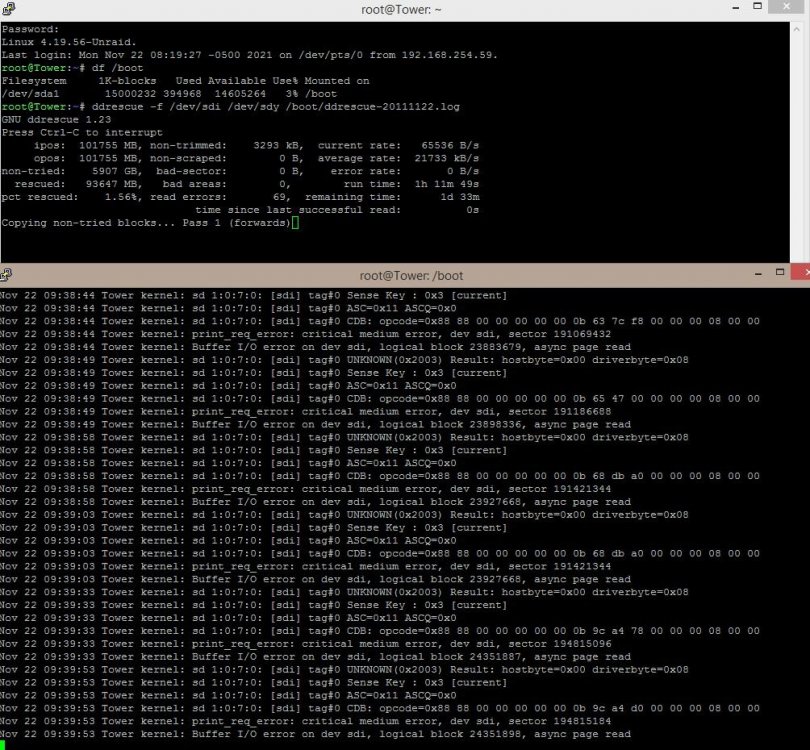
Running ddrescue. is there a good link that tells me what the different labels mean? Some are obvious but others not. i.e. non-trimmed = space that is bad during 1st pass? But that doesn't seem to match what I get when I subtract the rescued ammount from the opos number. Also, Bad Sectors and Bad Areas and Error rate are 0 but have 76 read errors.
-
There were writes unfortunately. So running without parity. I have never used ddrescue and don't want to screw up more. It says that "Both source and destination disks can't be mounted" So what is the best way to unmount disk18? With disk18 unmounted, can the rest of the array be running? Does the destination drive (precleared) need to be formatted first?
-
Disk18 (sdg) is getting tons of these. Happened when trying to put in a larger parity drive. that didn't work and other disks were written to so the old parity drive isn't good. Any way to pull data from the drive or identify what isn't recoverable? tower-diagnostics-20211122-0042.zip
-
Did power down, then restarted server. Since no parity, I put in a new drive and am trying to copy the contents of Disk18 to Disk23 (unBalance Copy) now to see what I can get. Still getting read errors from disk18. Attaching current diagnostics file any help/advice would be greatly appreciated or if there is a better/faster process than unBalance Copy to transfer what I can from disk18 to disk23 tower-diagnostics-20211121-1351.zip
-
Additional info. It looks like a smart report was not available for Disk18 in the Diagnostics. Tried doing it individually and got the attached which said: Smartctl open device: /dev/sdu failed: No such device Also noticed that it looks like /var/log is at 100% WDC_WD60EFRX-68L0BN1_WD-WX11D26H4CE2-20211120-1121.txt
-
Was replacing Parity drive with a larger drive. Last Parity Check (11/6/2021) was good without errors. Got messages that Disk18 (6TB) has tons of Read Errors and 6 Pending Sector errors. Parity-Sync is still running (past 6TB) I assume that the Parity-Sync is invalid? Advice on how best to proceed? tower-diagnostics-20211120-1525.zip
-
Thanks @Tybio for providing the logs. @jbrodriguez I assume you don't need logs from me since @Tybio already provided. I was getting same type of info in my log
-
Question regarding Gather. I see when done it copied all that I wanted to the desired drive but I had to go back and delete from the old drives manually what was copied. Used the default options.
-
BTW. Looking forward to the Gather function. Been meaning to consolidate some shares to specific drives but have not done it yet due to time constraints. How close are you for it?
-
Going from memory since not near machine. Tools tab. Docker safe permission (think part of fix common problem plugin)


