




Skip to content
View in the app

A better way to browse. Learn more.

Unraid

A full-screen app on your home screen with push notifications, badges and more.

To install this app on iOS and iPadOS
  1. Tap the Share icon in Safari
  2. Scroll the menu and tap Add to Home Screen.
  3. Tap Add in the top-right corner.
To install this app on Android
  1. Tap the 3-dot menu (⋮) in the top-right corner of the browser.
  2. Tap Add to Home screen or Install app.
  3. Confirm by tapping Install.

francesc0

Members
  • Joined

  • Last visited

Everything posted by francesc0

  1. Edit to the above comment: changing both paths from /mnt/user to /mnt/poola seems to have fixed the issue. Still took ~45 minutes just for Plex though, so I'll have to keep the container running during the backup unfortunately.
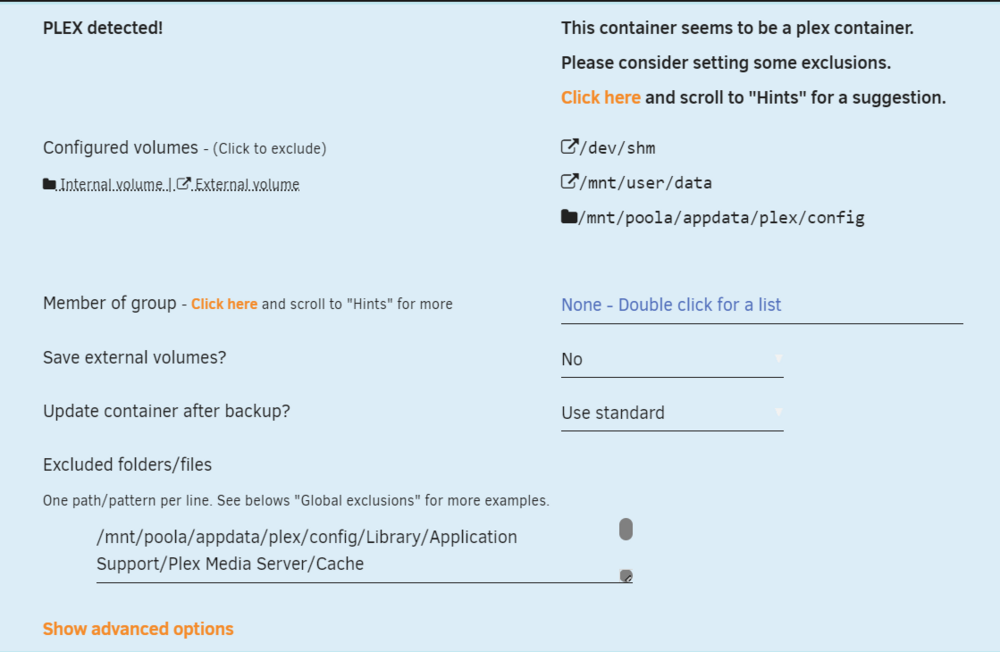
  2. The tool is including folders that I have marked for exclusion, namely Plex's Cahce, Media and Metadata folders. Here's a screenshot of my config. Curious if anyone can see an error with my input or if there's a known issue. Haven't seen anything mentioned about this so I must've screwed up the config somewhere. Things I've tried: changing exclusion path and container path to /mnt/user, and any variation in between excluding folder names without the full path (e.g. /Cache, /Media, /Metadata
Account

Navigation

Search

Search

Configure browser push notifications

Chrome (Android)
  1. Tap the lock icon next to the address bar.
  2. Tap Permissions → Notifications.
  3. Adjust your preference.
Chrome (Desktop)
  1. Click the padlock icon in the address bar.
  2. Select Site settings.
  3. Find Notifications and adjust your preference.