





wdpaynter
Members
-
Joined
-
Last visited
-
I see. I knew you were not supposed to mix, but never understood why. It does not appear that happened in my case, as all the files are reporting a particular size and are not appearing "missing" from programs. Thanks!
-
I did first one using Krusader and second using File Manager. Will use File Manager moving forward. Thx! Maybe i moved a share to a disk previously or vice versa that screwed things up to begin with?
-
I was just going to move them and then let unRAID do its thing moving forward (not manually move). Not sure excatly how this happened in the first place, as I have it set to a 97.7GB minimum
-
Should I move files to other drives manually?
-
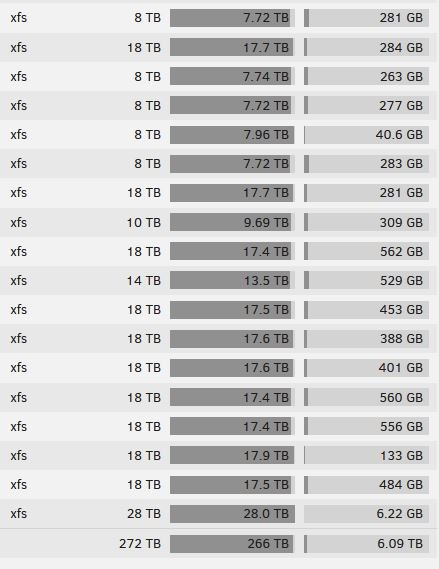
One last question. At some point disk18 was incorrectly reporting its free space and it looks to be corrected. It only has 6GB of free space, which seems really low. Should I move files to another disk manually (Krusader)? Or leave it be? Pic of drives attached. Thx
-
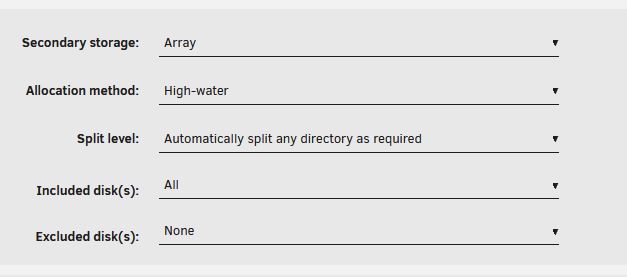
I am not familiar with this setting and am not very good with unRAID in general. Any recommendations? I don't have deep folder hierarchy but understand that I should likely have it set. It looks to be set to "Automatic" Thanks for your help!
-
I manually removed the cache files that were on disk18 prior to running check filesystem. I feel like something I run keeps putting some on there despite settings being corrected and all other appdata/cache files being handled correctly. Originally, the intent was to backup the appdata/cache to the array as I followed instructions somewhere to do so. I was later told that this was wrong. Not moving the originals from cache to array, but copy/backup. I guess having a NVME pool likely negates the need anyway media-server-diagnostics-20260717-0938.zip
-
Did both this morning. Disk18 check filesystem says: No file system corruption detected. Thanks
-
I will do both upon my return. Thank you
-
got it. thx. Guesing I need to stop the array to change cache minimum? As it is greyed out currently.
-
Weird, as I thought I had changed it. Perhaps I only changed it within sabNZBD. Thanks
-
webGUI of array disks

-
I saw those error messages too, but have a minimum set and it never got below 20GB
-
A reboot appears to have fixed this. Curious as to what may have happened or if my diagnostics/logs point to anything I may have screwed up. Also, I received a warning that disk18 was low on space and that it is 100% full, but the webGUI shows it has 6+ TB of free space?! I am aware there shows some appdata files on there. This was leftover from a previous settings being incorrect and has since been fixed (can I delete those files?) Posting new diagnostics after reboot for full drive message troubleshooting Any help is appreciated. media-server-diagnostics-20260716-0825.zip
-
I woke up this morning to an e-mail message from my server: error: error renaming /mnt/user/Downloads/syslog-"Internal IP ADDRESS".log.1 to /mnt/user/Downloads/syslog-192.168.68.57.log.2: Input/output error Most of my User shares are missing and this is causing issues with several of my docker containers. I think the error above is simply because something couldn't see those shares. No drive/SMART errors are shown. Posting diagnostics. Any help is appreciated. media-server-diagnostics-20260716-0739.zip EDIT: Just stopped array and attempts to restart have failed (array configuration is valid). Going to reboot now that logs were supplied
