Everything posted by wdpaynter
-
Errors after scheduled (monthly) parity check
My server hasn't been rebooted in 13 days. I have syslog installed and the log is attached. For some reason it hasn't logged anything in a few hours. I'll likely just run a corrections parity check if nobody thinks anything else is advisable. Thx syslog-192.168.68.57.log syslog-192.168.68.57.log.1
-
Errors after scheduled (monthly) parity check
I beleive it was shutdown related. I cannot remember if these same errors were present last month(s). Is there anyway to identify alternative issues in the log? I can comb through it, but am inexperienced in this regard
-
Errors after scheduled (monthly) parity check
Thanks. I do use the plugin and have it stop while mover is running (or perhaps that is default). The parity check doesn't seem to interrupt or affect server usage during the 2-3 days it runs. Should I re-run parity check with corrections checked? I don't beleive my drives are an issue.
-
Errors after scheduled (monthly) parity check
My monthly parity check resulted in (3) errors. Guessing I had an unclean shutdown. My assumption is to rerun parity with "write corrections" checked, but wanted to check since I have not seen this in previous checks and it takes nearly 3 days Also, I feel like monthly parity checks may be too frequent and plan to change unless there is a good reason not to. Thanks media-server-diagnostics-20260604-0728.zip
-
Issues with IP Address - webGUI Access
I saw those an some other things that seemed to be concurrent with the times it went offline. I kept tinkering and rebooting both the server and router and it seems to be working better now. I will keep an eye on it (and leave sys.log on). Thank you for your help!
-
Issues with IP Address - webGUI Access
adding another syslog from right after reboot syslog-192.168.68.57.log
-
Issues with IP Address - webGUI Access
Doing this now as originally suggested. Leaving static IP set in router. Rebooting now
-
Issues with IP Address - webGUI Access
Happened again. New syslog attached. This time Plex (and other containers were inaccessible from Windows PC) syslog-192.168.68.57.log
-
Issues with IP Address - webGUI Access
It just happened again. How do I get syslog if I cannot access the share? Just wait to see if it comes online again? Last time I had to reboot FYI, Plex is working from our devices...this is why I am convinced it is IP/network related EDIT: I can now access the syslog (attached) syslog-192.168.68.57.log
-
Issues with IP Address - webGUI Access
I changed my IPv4 settings on my Windows PC to obtain and IP and DNS server automatically and was able to access the webGUI from the PC (still can;t see the command line nor webGUI from the server via the monitor (KVM switch that I even tried to bypass) Diagnostics attached. I know these are after reboot, but...Not sure what to do next media-server-diagnostics-20260521-1303.zip
-
Issues with IP Address - webGUI Access
I shutdown the server because it had frozen and the only thing that would accept input was the command line. Upon starting it backup, I got to the boot menu, chose webGUI, watched it load drivers,etc and now when I switch to the server (KVM switch), the monitor immediately goes to sleep. NO webGUI access on the PC either. I don;t know what to do
-
Issues with IP Address - webGUI Access
I am trying to access them, but it remians down. I will wait a bit longer. I can't even access Plex nor able to navigate the webGUI directly on the server currently
-
Issues with IP Address - webGUI Access
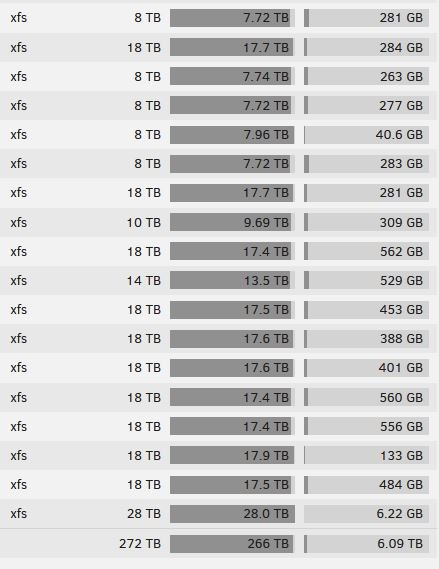
Now I just noticed another very strange thing: Yesterday I beleive I had 14TB or so of free space, today I have 27TB. I cannot see where I tried to download diagnostics to attach, but it got stuck at 35% because it lost connection again (same for the containers). I am confused as to what is going on...any help is appreciated.
-
Issues with IP Address - webGUI Access
Should I change both my PC and my unRAID Network settings instead? delete network.cfg to revert it back (to "Automatic" I assume) change to "Obtain IP address automatically" on Windows PC I access unRAID webGUI from? Pics of settings attached
-
Issues with IP Address - webGUI Access
I was able to boot into unRAID webGUI directly on the server tower late last night and, even though my mouse didn't work, was able to TAB to the network settings and change it back to "Static" and the DNS servers populated matched my PC. I am now able to access the webGUI of the server and the containers. One thing that is weird/persists is that if I leave the web pages open for a period of a couple hours or so, they seem to lose connection and then need refreshed/reloaded. I am concerend changing it to "Automatic" b/c it being set to "Static" is the only way I have been able to access the webGUI. But, like I said, I have a static IP reserved in DHCP settings on my router also Do you think resetting the network settings as you described will solve this? I've never experienced this before and am a little concened it is more related to my recent network instability Can I delete netwrok.cfg from the unRAID webGUI and then reboot? Or do I need to plug the flash drive into my PC? Thanks!
-
Issues with IP Address - webGUI Access
I recently reset my home network and my IP address to my unRAID server changed. I realized that I had forgotten to set a static IP in my router. So I did so and was able to access the webGUI from the old IP address after rebooting the server. A few hours later, I returned to my server and my webGUI and all my containers are inaccessible. In my router settings, everything looks good and the IP of the server is still preserved and is the correct (old) IP. The only thing I can think of, is that I had forgotten to go into unRAID network settings and switch off the static IP for dynamic there after making changes in my router. I am confused and was hoping someone could point me in the right direction. I can see that my server is runiing and my kids are watching Plex. I changed the subnet manually of the PC I use to access my unRAID server to "match" that of unRAID (at least I think) and was temporarily able to access the webGUI. I then wen into unRAID network settings and changed it from static to auto b/c I used my router to create the static IP and that shutdown Plex and still prevented me from accessing unRAID webGUI. I then rebooted unraid with "powerdown -r" and not sure what to do to regain access
-
Issues starting SABnzbd webGUI (docker)
I will do so upon my return from work travel this week. Thx!
-
Issues starting SABnzbd webGUI (docker)
I found this from a post you suggested this to another user. I plan to do so when I have time. Thx
-
Issues starting SABnzbd webGUI (docker)
This is leftover from a change that was made to already correct this. Thx
-
Issues starting SABnzbd webGUI (docker)
Strange about the cache, it may have been full quite awhile ago, but hasn't been full for several days (see screenshot attached). The NVME error is something ongoing that I simply ignore:https://forums.unraid.net/topic/118286-nvme-drives-throwing-errors-filling-logs-instantly-how-to-resolve/ I beleive the issue is more Firefox related, as closing it out and restarting tends to solve. I discovered this today. Strange things is that none of the other containers ever exhibit this behavior. Only Lidarr and SABnzbd Thanks for looking at this!
-
Issues starting SABnzbd webGUI (docker)
Attached. Latest example happened yesterday right after my initial post. Thx media-server-diagnostics-20260426-0929.zip
-
Issues starting SABnzbd webGUI (docker)
Lately if I leave my SABnzbd webGUI open for an extended time, it freezes. Lidarr also does this from time to time, but if I restart the docker, it loads without issue. Upon stopping and starting the SABnzbd docker, it takes a very long time for the webGUI to load. Sometimes 5 or more minutes. Below is log from unRAID. I have also posted on SABnzbd's Reddit. Any guidance is appreciated. 2026-04-25 10:15:33,919::INFO::[postproc:136] Saving postproc queue 2026-04-25 10:15:33,919::INFO::[__init__:405] All processes stopped 2026-04-25 10:15:33,919::INFO::[_cplogging:213] [25/Apr/2026:10:15:33] ENGINE Bus STOPPING 2026-04-25 10:15:34,163::INFO::[_cplogging:213] [25/Apr/2026:10:15:34] ENGINE HTTP Server cherrypy._cpwsgi_server.CPWSGIServer(('::', 8080)) shut down 2026-04-25 10:15:34,163::INFO::[_cplogging:213] [25/Apr/2026:10:15:34] ENGINE Bus STOPPED 2026-04-25 10:15:34,163::INFO::[_cplogging:213] [25/Apr/2026:10:15:34] ENGINE Bus EXITING 2026-04-25 10:15:34,163::INFO::[_cplogging:213] [25/Apr/2026:10:15:34] ENGINE Bus EXITED 2026-04-25 10:15:34,164::INFO::[notifier:166] Sending notification: SABnzbd - SABnzbd shutdown finished (type=startup, job_cat=None) 2026-04-25 10:15:34,164::INFO::[SABnzbd:1485] Leaving SABnzbd [migrations] started [migrations] no migrations found usermod: no changes ─────────────────────────────────────── ██╗ ███████╗██╗ ██████╗ ██║ ██╔════╝██║██╔═══██╗ ██║ ███████╗██║██║ ██║ ██║ ╚════██║██║██║ ██║ ███████╗███████║██║╚██████╔╝ ╚══════╝╚══════╝╚═╝ ╚═════╝ Brought to you by linuxserver.io ─────────────────────────────────────── To support the app dev(s) visit: SABnzbd: https://sabnzbd.org/donate To support LSIO projects visit: https://www.linuxserver.io/donate/ ─────────────────────────────────────── GID/UID ─────────────────────────────────────── User UID: 99 User GID: 100 ─────────────────────────────────────── Linuxserver.io version: 4.5.5-ls250 Build-date: 2026-04-23T03:50:04+00:00 ─────────────────────────────────────── [custom-init] No custom files found, skipping... 2026-04-25 10:15:38,135::INFO::[SABnzbd:1134] -------------------------------- 2026-04-25 10:15:38,135::INFO::[SABnzbd:1135] SABnzbd.py-4.5.5 2026-04-25 10:15:38,135::INFO::[SABnzbd:1136] Full executable path = /app/sabnzbd/SABnzbd.py 2026-04-25 10:15:38,135::INFO::[SABnzbd:1137] Arguments = "/app/sabnzbd/SABnzbd.py" "--config-file" "/config" "--server" "::" 2026-04-25 10:15:38,136::INFO::[SABnzbd:1146] Certifi version = 2025.10.05 2026-04-25 10:15:38,136::INFO::[SABnzbd:1147] Loaded additional certificates from /lsiopy/lib/python3.12/site-packages/certifi/cacert.pem 2026-04-25 10:15:38,136::INFO::[SABnzbd:1153] Using INI file /config/sabnzbd.ini 2026-04-25 10:15:38,138::INFO::[postproc:141] Loading postproc queue 2026-04-25 10:15:38,139::INFO::[scheduler:191] Scheduling RSS interval task every 60 min (delay=45) 2026-04-25 10:15:38,139::INFO::[scheduler:200] Scheduling version check in 10 minutes and daily at 2:17 2026-04-25 10:15:38,139::INFO::[scheduler:215] Setting schedule for midnight auto history-purge 2026-04-25 10:15:38,139::INFO::[scheduler:224] Setting schedule for midnight BPS reset 2026-04-25 10:15:38,139::INFO::[scheduler:233] Setting schedule for midnight server expiration check 2026-04-25 10:15:38,139::INFO::[scheduler:242] Setting schedule for server quota check 2026-04-25 10:15:38,140::INFO::[__init__:306] All processes started 2026-04-25 10:15:38,140::INFO::[SABnzbd:337] Template location for Glitter is /app/sabnzbd/interfaces/Glitter 2026-04-25 10:15:38,140::INFO::[SABnzbd:337] Template location for Config is /app/sabnzbd/interfaces/Config 2026-04-25 10:15:38,140::INFO::[misc:1324] [N/A] Running external command: ['/usr/bin/unrar'] 2026-04-25 10:15:38,143::INFO::[misc:1324] [N/A] Running external command: ['/usr/bin/7zz'] 2026-04-25 10:15:38,150::INFO::[misc:1324] [N/A] Running external command: ['/usr/local/bin/par2', '-V'] 2026-04-25 10:15:38,156::INFO::[SABnzbd:422] SABCTools module (v8.2.6)... found! 2026-04-25 10:15:38,156::INFO::[SABnzbd:423] SABCTools module is using SIMD set: AVX2 2026-04-25 10:15:38,156::INFO::[SABnzbd:424] SABCTools module is linked to OpenSSL: True 2026-04-25 10:15:38,156::INFO::[SABnzbd:441] Cryptography module (v46.0.3)... found! 2026-04-25 10:15:38,156::INFO::[SABnzbd:444] par2 binary... found (/usr/local/bin/par2) 2026-04-25 10:15:38,156::INFO::[SABnzbd:451] UNRAR binary... found (/usr/bin/unrar) 2026-04-25 10:15:38,156::INFO::[SABnzbd:459] UNRAR binary version 7.20 2026-04-25 10:15:38,157::INFO::[SABnzbd:466] 7za binary... found (/usr/bin/7zz) 2026-04-25 10:15:38,157::INFO::[SABnzbd:468] 7za binary version 25.01 2026-04-25 10:15:38,157::INFO::[SABnzbd:474] nice binary... found (/bin/nice) 2026-04-25 10:15:38,157::INFO::[SABnzbd:478] ionice binary... found (/bin/ionice) 2026-04-25 10:15:38,157::INFO::[SABnzbd:1350] Starting web-interface on :::8080 2026-04-25 10:15:38,157::INFO::[_cplogging:213] [25/Apr/2026:10:15:38] ENGINE Bus STARTING 2026-04-25 10:15:38,260::INFO::[_cplogging:213] [25/Apr/2026:10:15:38] ENGINE Serving on http://:::8080 2026-04-25 10:15:38,260::INFO::[_cplogging:213] [25/Apr/2026:10:15:38] ENGINE Bus STARTED 2026-04-25 10:15:38,260::INFO::[SABnzbd:1389] Starting SABnzbd.py-4.5.5 2026-04-25 10:15:38,261::INFO::[dirscanner:112] Dirscanner starting up 2026-04-25 10:15:38,261::INFO::[notifier:166] Sending notification: SABnzbd - SABnzbd 4.5.5 started (type=startup, job_cat=None) 2026-04-25 10:15:38,262::INFO::[__init__:460] Commit = 11ba9ae12ade8c8f2abb42d44ea35efdd361fae5 2026-04-25 10:15:38,262::INFO::[__init__:461] Python-version = 3.12.13 (main, Apr 10 2026, 13:58:11) [GCC 15.2.0] 2026-04-25 10:15:38,262::INFO::[__init__:462] CPU architecture = x86_64 2026-04-25 10:15:38,262::INFO::[__init__:463] Platform = Docker Unraid 2026-04-25 10:15:38,262::INFO::[__init__:464] JSON-module = orjson 3.11.3 2026-04-25 10:15:38,262::INFO::[__init__:465] Preferred encoding = UTF-8 2026-04-25 10:15:38,263::INFO::[__init__:466] SSL version = OpenSSL 3.5.6 7 Apr 2026 2026-04-25 10:15:38,272::INFO::[zconfig:61] No bonjour/zeroconf support installed 2026-04-25 10:15:38,272::INFO::[ssdp:108] Serving SSDP on REMOVED as SABnzbd [ls.io-init] done.
-
Download Locations
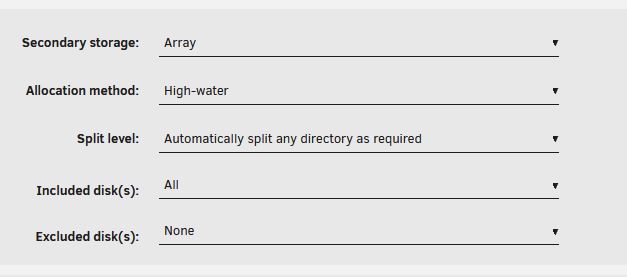
Yes, now that I turned off secondary storage (and knowing the Arr's are doing the moving prior to Mover) Thanks!
-
Download Locations
I beleive it is the arr's handling it. I can look through the settings. But it is working perfectly. I set everything up originally a year or so ago following SpaceInvader video(s), but some things weren't working correctly. Someone from here or Reddit provided help. They ended up changing some stuff that tested my OCD, but everything worked well, so I've left it alone. Probably would have learned more continuing to struggle through it myself, but...I ran everything for years on Windows, but it was unRAID OS that I didn't/don't fully understand. But I am learning (thanks to you and others on this forum)
-
Download Locations
docker run -d --name='sabnzbd' --net='bridge' --pids-limit 2048 -e TZ="America/New_York" -e HOST_OS="Unraid" -e HOST_HOSTNAME="MEDIA-SERVER" -e HOST_CONTAINERNAME="sabnzbd" -e 'PUID'='99' -e 'PGID'='100' -e 'UMASK'='022' -l net.unraid.docker.managed=dockerman -l net.unraid.docker.webui='http://[IP]:[PORT:8080]' -l net.unraid.docker.icon='' -p '8080:8080/tcp' -v '/mnt/user/Downloads/SAB/Completed/':'/downloads':'rw' -v '/mnt/user/Downloads/SAB/Incomplete/':'/incomplete-downloads':'rw' -v '/mnt/user/appdata/sabnzbd':'/config':'rw' 'lscr.io/linuxserver/sabnzbd' 7d435d28c4cbad83adef1c200c2d0d0dae3eb4a8800e1ffdb23e2aca51591be8 The command finished successfully!