





wdpaynter
Members
-
Joined
-
Last visited
Everything posted by wdpaynter
-
Thank you. Attached media-server-diagnostics-20251016-1326.zip
-
Had a brief outage. Family member pressed power button on server briefly (did not hold down). Seems it shut it down unsafely. When I returned and started array, (1) drive is unmountable. I shutdown the server through unraid and re-seated cables for that drive, but upon powering on and starting array, it is still the same. Not sure what to do to recover the files on that drive. Containers and files on other drives appear to be present/working. Any help is appreciated. Thx
-
I changed the minimum to 20GB on the relevant shares and the Move function is working on it now. Thank you! Maybe I'll change it back once I add more storage. Also ordered a new 18TB hdd to add to my data array (same as parity size). I need to consider upgrading my Parity drive to a larger size, as 18TB is an oddball size now. It used to be one of the best GB/dollar, but not anymore apparently. Thank you!!
-
I will try to lower the threshold (once I find the setting). I have been intending to get a new hard drive or two, so will check prices on 18TB today. Thank you both for your help!
-
I'm honest;y not sure why Appdata is spread. I assumed it was intentional. I am not well versed in unRAID. Are there any cons to leaving it this way (or not)? I will reboot as you suggested and repost diagnostics. Thank you!!
-
I recently had issues loading the WebGUI of several dockers (Radarr, Sonarr, etc). I noticed that cache drive was pretty full. I tried numerous times to manually invoke the Mover, but it would only run for a couple seconds and not move any files. I manually deleted a bunch of media files from the Cache and eventually the WebGUI's began working again. The Mover still won't run manually (I changed to hourly to see if schedule would start, but it doesn't look like it either.) I enabled Mover logging, but my logs don;t look like they are changing (viewed from Main page button). Looking for help troubleshoot, as I am not very knowledgeable on unRAID. I have never experienced the Mover not working and am afraid the cache will simply fill up again. My diagnostics are attached. Any help would be appreciated. Thanks media-server-diagnostics-20250923-1700.zip
-
Ok, thanks. I'll give that a read
-
I just changed it to nightly. Thank you again for your help! I have one more question. Let's say I want to replace the (2) 8TB drives with a 18TB drive. How do I do so? I actually have 20TB of free space currently. Can I just remove those two drives and the content will be replaced from parity? Sorry, I am still trying to wrap my head around
-
I have it hourly. I think I thought if I didn;t it would not instantly add it to Plex until each night. I am now assuming that is not the case? I do have notifications enabled and see now that it was notifying me that Mover had started and stopped when Parity check was pausing/resuming. I just didn't understand and thought they both were stopping because of my increment settings. I guess the hours where it wasn;t stopping meant there was nothing for Mover to move. I am learning! Thanks!! I really appreciate your's and everyone's help!!
-
Here are diagnostics too, sorry media-server-diagnostics-20250410-1408.zip
-
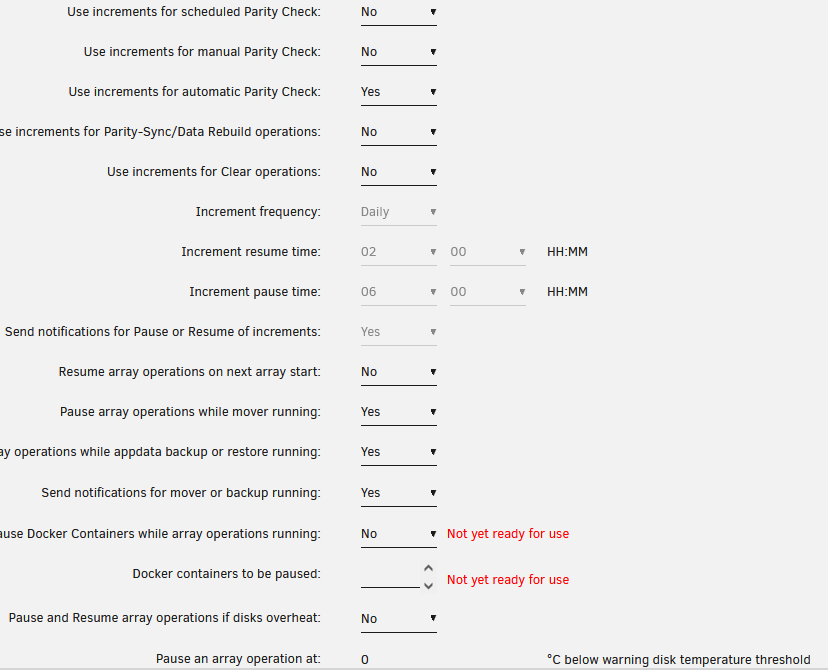
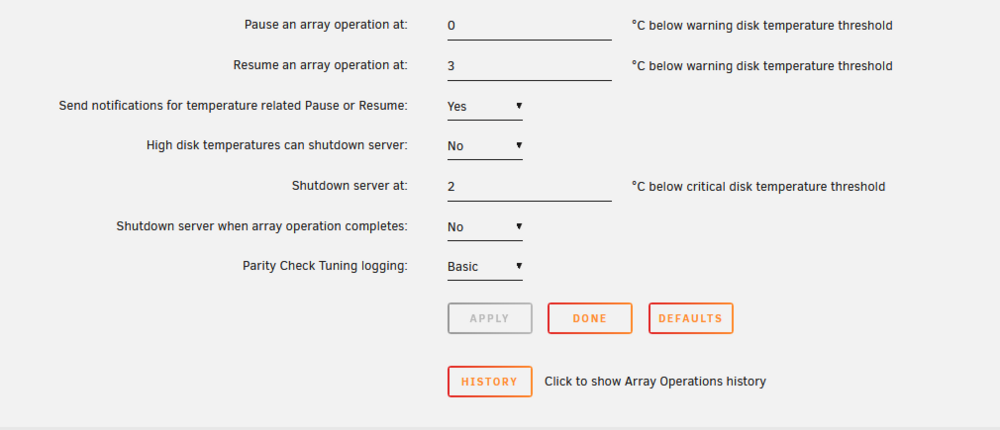
OK, wonder why it continued pausing after I changed the settings. Here are my settings if you can help guide to what will stop it from pausing. I didn;t notice any performance hit while parity check was running. I only use the server for Plex. None of my friends or family commented either. Maybe I got lucky
-
Ok, no problem. Attaching diagnostics
-
Thanks to the help from moderators/users on this forum, I have finally successfully built parity. I have a few questions and was hoping for some guidance/input. 1) it took nearly (2) full days for a large array of (17) drives with the largest/parity drive being 18TB. I assume this is normal, but wondering if my scheduled (monthly) will take that long) 2) at certain times of day, my check would pause for 6 mins every few hours on the hour. At first, I thought this was due to parity drive overheating settings, which I changed, but do not beleive that was the case. I think this may be due to using increments. I turned this off in parity check tuning for both manual and scheduled parity checks, but did so during the check. I was thinking maybe the settings apply only to the start of the check and hoping this won;t happen on my first scheduled check. Is this the issue? I can provide screenshot of these settings or welcome advice on how to set that up 3) I had a couple read issues/errors with (2) of my smaller 8TB drives: [MEDIA-SERVER] Parity Sync/Data Rebuild finished (416 errors) Elapsed Time 2 day, 18 min, 3 sec, Runtime 1 day, 20 hr, 11 min, 19 sec, Increments 12, Average Speed 113.2 MB/s Does this mean I should replace these drives? Playing files off these drives works, but I am not sure what this indicates. I can attache logs/diagnostics as well. I have not rebooted since Any help/information is appreciated. Thanks
-
Great! thanks for the reply!
-
I had (2) empty 18TB HDDs that I intended to use for parity, but needed to add one to my array for storage. I have yet to setup any parity and would like to do so soon. I still intend to have dual parity because I have 17 HDDs in my array, but was curious if it is a good idea to set up a single parity drive now and then add another parity drive later. Is it difficult to do it this way? Is it better to wait and do dual parity from the start? Any thing I need to be aware of? Thanks
-
I wanted to thank you again for identifying my cabling issues. I ordered the cables you suggested and have 3 days uptime since installing. Prior to this I would "lose" a random drive to read errors every 8-12 hours and only stopping and starting the array would bring everything back to normal. I now have (3) 1x4 molex to sata splitters to power (12) drives and (3) 1x2 sata to sata splitters to power (6) drives. I will continue to monitor and once comfortable, build my first parity. The help on this forum is appreciated!
-
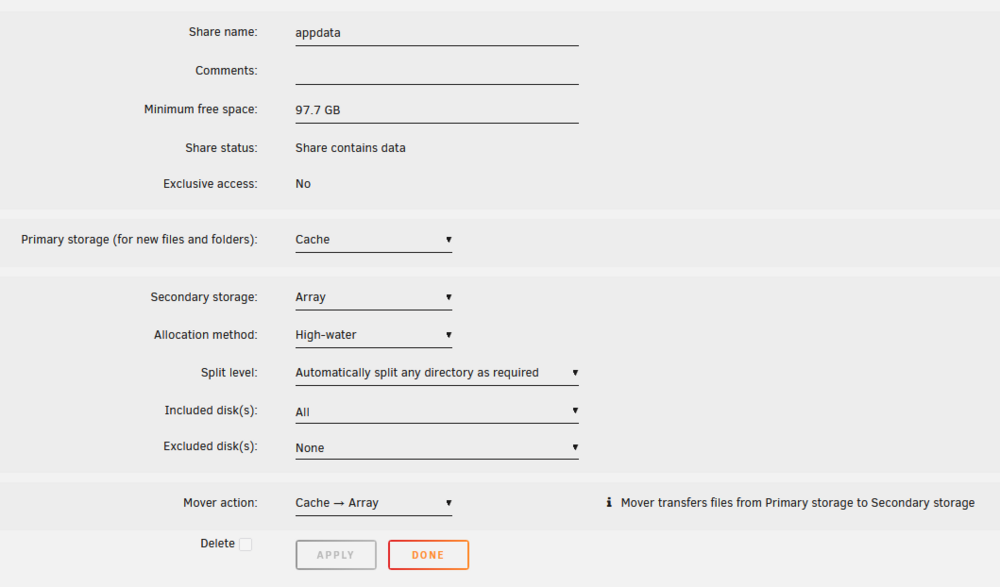
So I changed Secondary Storage to "None" and obviously that negated the mover direction setting. I now have the warning "Share appdata set to cache-only, but files / folders exist on the array", which is related to my question regarding removing appdata files from array. Do I need to go to each individual drive on the array to delete the appdata folder? Also, I have had the appdata backup installed for some time I guess. I have not changed any of its settings, so I guess it has been backing it up all along? I assumed those mover settings were moving those files/folders from cache to array. So maybe my idea of deleting mentioned in this post above is irrelevant? Sorry, quite new and confused. Thx!
-
Thanks! Ok, I will change it back. Do I need to change "Secondary Storage" and/or anything else? Is it recommended to use appdata backup plugin, or do most consider having it mirrored to be sufficient?
-
I believe I've had this warning for the entirety of using unRAID. I've read about it and am still confused (my own ignorance and understanding). I don't remember changing from the default settings, but perhaps I did. I guess I believed I was backing up the cache to the array or someone suggested I do this. I have attached how I have my settings. What changes should be made? Do I simply change secondary storage to "cache"? or Should it be "None"? I have my cache in a pool/mirrored on (2) NVME, so is that enough of a backup? Do I need to deleted appdata folders files from the array manually if I change the settings? Thanks for any help
-
Thank you! I've thought about this too and beleive at some point on this forum or unRAID Reddit, that kind folks helped me calculate my load and it was suffiient. But, I am open to revisit if you are willing to lend your thoughts. I have (18) HDDs, (2) 1TB NVMEs, the USB OS in a Define 7XL case. Also, (4) sticks of RAM (32GB DDR5 total) and (2) sata controller cards in Pci slots. I do not have a graphics card. This server is a simple Plex server and serves no other purpose. I believe I used an online calculator at one point too, and was OK, but again would welcome feedback. Thx MB is Gigabyte Technology Co., Ltd. B760M C CPU is 13th Gen Intel® Core™ i5-13500 @ 2475 MHz
-
I did, thank you. I am going to use (3) of these cables to power (12) drives and then (3) 1x2 SATA splitters to power the other (6) drives. Will report back. Then, hopefully, build parity for the first time. Thank you!
-
Thank you!! Do you think it is OK to use all (4) of the SATA ports on (3) of these from PSU?
-
They are SATA. I thought I was advised and/or read NOT to use Molex. Can;t remember if it was performance, fire hazard or something else. Is this bad information? Should I/can I use a combination of molex and SATA to even out the power load and use all 1x2 or 1x3 splitters as opposed to the 1x5? That way I don't have to replace PSU? Do you have any recommendations on molex to SATA splitters? I'm not sure I have many molex because I shoved all the unused cables underneath and they are difficult to see. I will look at my models specs online and/or shutdown server to check. EDIT: specs say I have (3) molex/peripheral. So add the (6) SATA. I need (1) SATA to power the case. So any suggestions on how to reconfigure my power? Thx!!
-
Another issue I am now having is that my Plex docker launches, but all my content is unavailable. All my other dockers seem to be working. I restored a Plex DB backup, but nothing changed. Perhaps my docker got screwed up. Not experienced enough to identify that issue. Any suggestions are appreciated. I can start a new topic for it too. Thx When I first launched it, it acted as if I was setting up a whole new server again taking me through a few screens. Those were populated with my orginal server name and libraries. Maybe that is the cause EDIT: it seems that I created duplicates of my libraries and had to unpin the existing and pin the correct versions. Plex issue appears solved. Still asking for power recommendations/advice
-
I shut down my server and reseated all of the SATA power cables and started it back up. Everything seems normal and it is reporting 0 disk errors. Reattaching Diagnostics I have a Thermaltake Toughpower GX2 600W that seems to have (6) Sata power cables (3 and 3). I have 18 drives right now I have those (6) SATA power cables set up like this: (1) SATA power (from PSU) going to a 1x5 daisy chain splitter (if that is what they are called). (1) going to another 1x5, (1) going to a 1x5 (but with only 4 SATAs being used), (1) going to 1x2 splitter (1) going to 1x2 splitter (1) going to case power (1) of my HDD is not part of the array and was intended to be a parity drive later (I actually wanted 2 parity drives, but used one prior to getting it setup correctly). It is an unassigned drive at the moment. Should I unplug it from power to help temporarily? Is there a better configuration? Length/distance dictates some of the above reasoning. I know these 1x5 splitters are not recommended. I've thought about getting a PSU that has (8) SATA power cables and/or consolidating some of my drives (ex. buying one or two 18TB drives and moving (2) 8TB drive's data to them each) Do you have any recommendations? Do you think power may be the culprit to my reoccurring issues? I'm still having trouble understanding how I'll go a couple months without issue and then it will start. Thank you for your help media-server-diagnostics-20250321-0737.zip

