





wdpaynter
Members
-
Joined
-
Last visited
Everything posted by wdpaynter
-
Can I Mount Unassigned drive while Parity operation is running? I have a drive connected via Unassigned Devices. It contains data (movie files/folders) that I am going to use Krusader to transfer to empty space on my Unraid server. Before I mounted the drive, I started my first parity operation (two 18TB parity drives and one empty 8TB drive). Those three drives are my entire array as of now (starting to move all my data drives from windows Plex server). Estimated to complete in 24 hours Can I not mount the unassigned drive while the parity operation is happening? The "Mount" button is greyed out in Unassigned Devices. I understand that I will have to wait to move the files themselves. I just want to view the files/folders in Krusader to ensure I have it set up correctly so that when the parity operation completes, I can start moving files to the array one HDD at a time. I tried pausing the parity operation, but drive still shows greyed-out. Also, if the 8TB drive is empty and so are the (2) 18TB Parity drives, why does it take an estimated 24 hours to complete? There is no data on any of the drives to read/write...(sorry brand new user and am confused). It's showing it as an 18TB array b/c of the parity drives EDIT: I hit the Refresh Disks and Configuration button at upper right of the Unassigned Disks section and the Mount option returned. But when I click Mount, it fails and points me to a log file. My question regarding mounting during a parity operation stands...Trying to find location of the "syslog" Changed the name of the partition where the files resided, removing parenthesis and other punctuation and it mounted successfully. Transferred (1) test movie folder to the array via Krusader successfully
-
Yeah, seems like the SATA cables were finicky. The final build will be using SAS breakouts, just waiting on my case. Thx!
-
So now I've got a new issue. Because of the unmountable drive above, I removed the data drive and installed a empty 8TB drive as discussed above (and planned to add (2) more empty drives). I needed to reset my array/setup, because I was no longer using the Windows-formatted drive. I used Tools>New Config to reset it and had to do a reboot (twice for some reason, as it seemed to get stuck on boot). I started the new array and the parity check speed is dropping to nearly nothing (currently 70 KB/s) it ran at over 200MB/s when I did the original array. Canceling parity check seems to freeze (Unraid symbol moving, but not canceling) Having a heck of a time. any help would be appreciated. Thx EDIT: After multiple reboots and unplugging SATA power and data, it seems like speeds have returned. Thank you both for your willingness to help and teach!
-
Ok, thx. I'll tinker with both methods when I get to that point again.
-
Thank you! Do you think it is usually faster (and/or easier) transferring via UD versus over the network?
-
I'm not understanding, my apologies. But thinking I should do everything the traditional way. Will doing the above allow me full functionality? Or is it just a way to move the files from one system/formatting to another? I'm BRAND NEW to this, sorry Thanks!
-
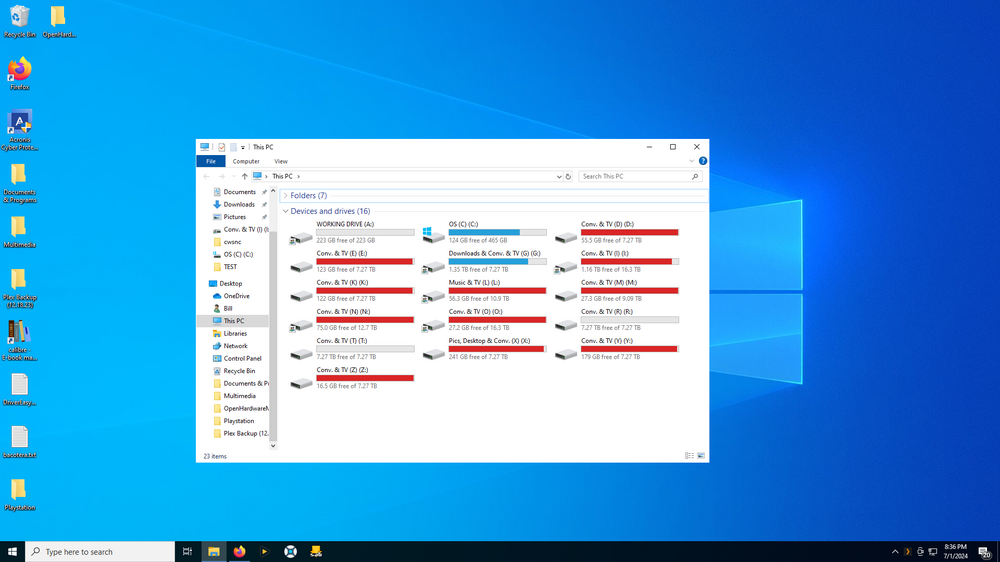
Attached are my Windows data drives. I have (3) empty 8TB HDDs (one is not installed in the screenshot). Can I move them to the array, format them correctly, and them move data drives over one at a time (creating a new "blank" drive each time)? I have a few 18TB data HDDs. Will the 24TBs I create allow me to move those larger drives, or do I need to buy a new empty 18TB? What is the easiest way to move my Windows files into the array? Over the network? Thanks for your help!
-
Ok, thanks for your reply. I guess I’m confused at how it all works. So what do others do? Buy an empty drive and move all the files over one drive at a time? How is it going to “see” the files? This will take weeks to move and then create parity for my (15) large HDDs 😅
-
Hi all. Attempting to build my first Unraid server. I am converting from a windows Plex server I've hosted for 12 or so years. I bought (2) brand new 18TB HDD for parity and a 1TB NVME for cache. I installed my first data drive (8TB) and started the array just to tinker around before I add the rest of the 15 or 16 data drives. It got 15 mins into parity creation and I noticed that the data drive and the NVME have Unmountable errors. The 8TB data drive: "Unmountable: Unsupported partition layout" The NVME cache drive "Unsupported or no file system". I beleive I should not format the data drive or I will lose all the files, but do not know what to do. I paused the parity creation. I don't mind formatting the cache drive, as it should be empty. How do I add my existing data drives from my Windows server? I'm guessing they will all have this error. Searching the forum it seems others with this issue had empty drives, so formatting wasn't a problem. Thx

