





wdpaynter
Members
-
Joined
-
Last visited
Everything posted by wdpaynter
-
This is true! But I do think it was setup this way
-
I'm fairly confident this is how it is. Thx
-
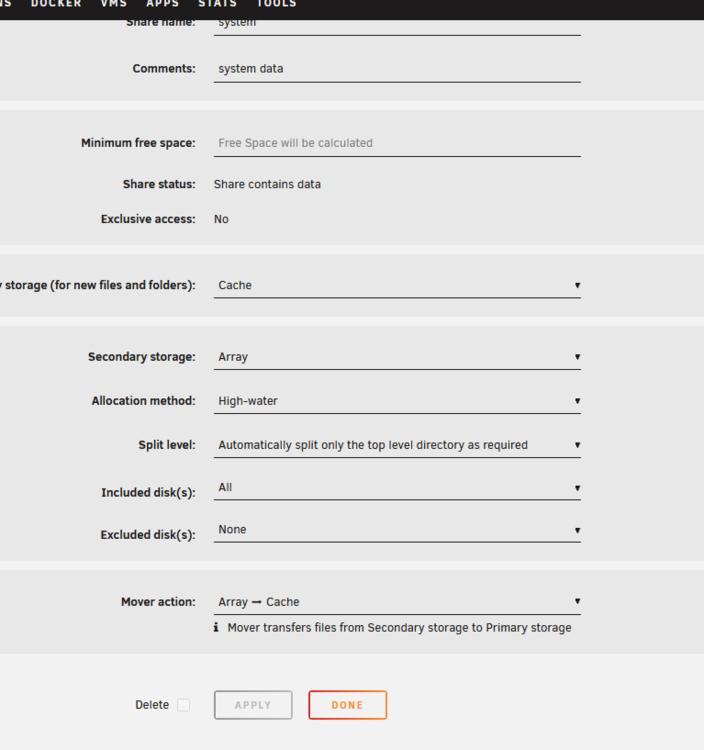
Wait, maybe SAB was moving files from "Downloads" to "Mediastorage" so I didn't have secondary storage selected for Downloads b/c it was just a temporary location. Then Mover would move files from "Mediastorage" on Cache to "Mediastorage" on Array ?
-
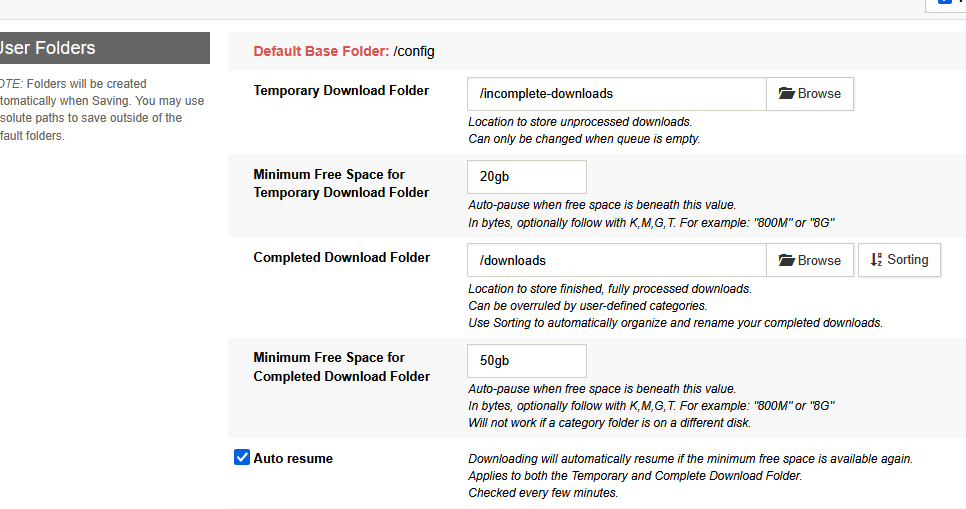
I am confused b/c I didn't change that and SAB was only showing Cache space prior. I think there's another setting or something that got changed in the shares or in unraid
-
I just want SAB to download to Cache and then mover move it all to Array every night like it did prior to my changes. SAB was also accurate with it setup like that
-
Yeah, this is weird b/c SAB was accurate and Mover worked as it chould (Cache>Array each night) prior to me making any changes today
-
I'll check it out. Thanks! EDIT: it worked removing the secondary. Thx! I thought it needed to be set that way so that the Mover would move from Cache to Array. Guess I am still confused
-
The free space that SAB reported instantly changed (accurately) when I changed downloading from Cache to Array. It was also correct for the last year or more before the change today. I then changed it back and it won't change back. I didn't change any settings
-
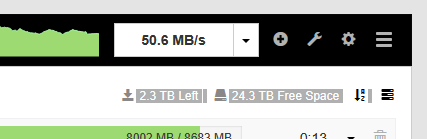
So I have around 400Gb free on my Cache Pool after Mover does it thing each night. Like I said, today I temporarily changed my share settings to download directly to the Array which has 24TB free, which SABnzbd shown accurately. I switched downloading back to the Cache like normal, but SABnzbd still shows the 24TB free (Array), instead of however much I have left in the Cache Pool
-
It seems to be working like it did prior to the temporary change, I just can't get SABnzbd to accurately show my free space. Diagnostics attached media-server-diagnostics-20260413-1250.zip
-
Got it. Thanks! I changed my share settings back to download to cache until I add the new pool. I restarted the docker container (SABnzbd), but it is still showing my free space as the Array. I've refreshed the webGUI, etc. Any ideas?
-
Yes, I have all my appdata on the cache. So I make another pool that is part of the cache, but not mirrored?
-
I have (2) 1TB nvme ssd drives mirrored for my cache pool. There is only about 400 GB available. When I download a large amount of data, I have to invoke the mover back and forth. I changed to downloading direct to the array temporarily, knowing it would affect speed. The actual download speed is about the same, but unpacking and other file completion processes are really slow on the array. I have an old SATA 2TB SSD drive and two mounting spots in my server case. I was wondering if I should install it to download to it. Would that help with speed? Can I added it to my cache pool, or will that screw up the mirrored aspect of the (2) nvme? Or leave it as an unassigned device and use it for temporary download location I realize I could upgrade the existing cache drives, but they are pricey. Any guidance/input is appreciated.
-
I am no expert, but I am certain that my current setup provides parity for any SINGLE disk in the array and not just disk1. No big deal. I know this, because I have rebuilt several drives due to various reasons (and that is the intent of an unRAID array)
-
Ok, I appreciate the info and idea. Seems pretty complicated for my peanut brain and I'd like to move forward on the path I am on. Perhaps in the future. I realize I only have parity for (1) drive at the moment, that is why I am wanting dual parity.
-
Not familiar. What would be the benefit? I am happy with my current setup, just need dual parity and more storage space. I also thought it was time to increase the drive size for the future instead of just buying more 18TB drives. Larger would also allow easier consolidation of existing drives.
-
I meant transfer data from 8TB to 28TB (not rebuild from parity), then do new config with dual 28TB parity. I only have room for 20 drives and already have 18 prior to adding the (3) 28TB. I guess it is kind of the reverse of your suggestion. I think yours makes more sense and will allow more available storage while I am building the new dual parity. Thanks!
-
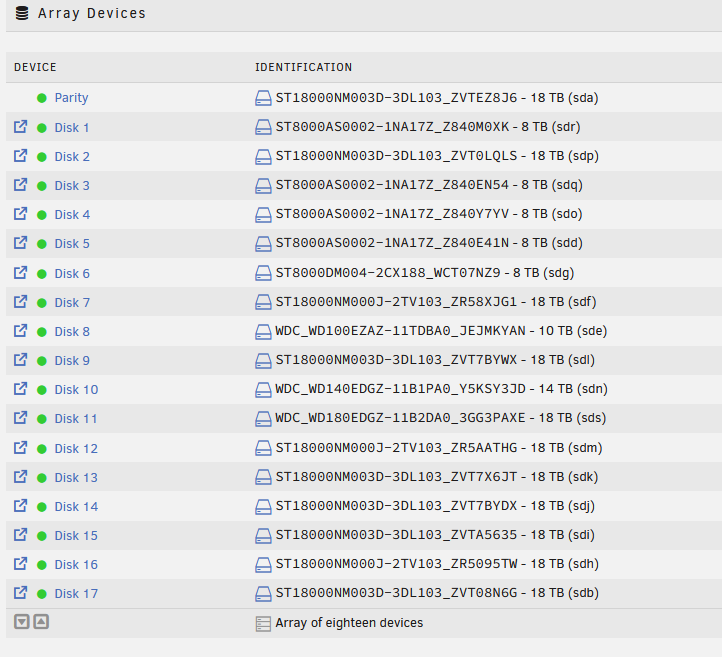
I have an array of 18 HDDs (pic attached). I have (3) 28TB HDDs arriving tomorrow. I am nearly out of free space on the array, so I want to upgrade (1) of my 8TB drives with (1) 28TB drive and then use the other (2) for parity. I really only have room for (20) total drives in my server case. What is the best order to tackle this? Can I upgrade the 8tb to 28TB first? Then do a new config to start a parity build on the (2) 28TB HDDs? It took 2 days to build 18TB parity. Not sure if 28TB will take 3+ b/c the (1) new 28TB data drive. Any thing I am overlooking? Thx
-
OK, thank you!!!
-
So move from array to cache manually? Should I let it overwrite duplicates on cache?
-
root@MEDIA-SERVER:~# ls -lah /mnt/user0/system total 0 drwxr-xr-x 1 root root 47 Nov 29 2024 ./ drwxrwxrwx 1 nobody users 74 Mar 20 14:36 ../ drwxr-xr-x 1 root root 24 Nov 29 2024 docker/ drwxr-xr-x 1 root root 33 Nov 29 2024 libvirt/ root@MEDIA-SERVER:~# ls -lah /mnt/cache/system total 16K drwxrwxrwx 1 nobody users 26 Nov 29 2024 ./ drwxrwxrwx 1 nobody users 90 Mar 19 20:10 ../ drwxrwxrwx 1 nobody users 20 Nov 29 2024 docker/ drwxrwxrwx 1 nobody users 22 Nov 29 2024 libvirt/ root@MEDIA-SERVER:~#
-
root@MEDIA-SERVER:~# ls -lah /mnt/user)/appdata bash: syntax error near unexpected token `)' root@MEDIA-SERVER:~# ls -lah /mnt/user0/appdata total 0 drwxrwxrwx 1 nobody users 29 Nov 7 2024 ./ drwxrwxrwx 1 nobody users 74 Mar 20 14:36 ../ drwxr-xr-x 1 nobody users 52 Nov 7 2024 Plex-Media-Server/ drwxrwxrwx 1 nobody users 26 Oct 10 2024 binhex-krusader/ drwxrwxrwx 1 nobody users 27 Jul 13 2024 sabnzbd/ root@MEDIA-SERVER:~# ls -lah /mnt/cache/appdata total 16K drwxrwxrwx 1 nobody users 372 Mar 5 16:29 ./ drwxrwxrwx 1 nobody users 90 Mar 19 20:10 ../ drwxr-xr-x 1 nobody users 264 Mar 20 15:35 ErsatzTV/ drwxr-xr-x 1 nobody users 12 Aug 20 2024 Kometa/ drwxr-xr-x 1 nobody users 58 Nov 7 2024 Plex-Media-Server/ drwxr-xr-x 1 nobody users 262 Nov 7 2024 Posterizarr/ drwxr-xr-x 1 1000 users 736 Jul 23 2024 TinyMediaManager3/ drwxrwxr-x 1 nobody users 226 Oct 10 2024 binhex-krusader/ drwxrwxr-x 1 nobody users 446 Mar 20 15:39 binhex-lidarr/ drwxrwxr-x 1 nobody users 402 Mar 20 15:29 binhex-radarr/ drwxr-xr-x 1 nobody users 50 Mar 5 16:29 channels-dvr/ drwxrwxrwx 1 nobody users 60 Aug 30 2024 overseerr/ drwxrwxrwx 1 nobody users 36 Sep 14 2024 plex\ (old\ linuxserver)/ drwxr-xr-x 1 root root 12 Nov 7 2024 posterizarr/ drwxrwxrwx 1 nobody users 248 Jul 15 2024 radarr/ drwxrwxrwx 1 nobody users 70 Jul 13 2024 sabnzbd/ drwxrwxrwx 1 nobody users 398 Mar 20 15:39 sonarr/ drwxr-xr-x 1 nobody users 158 Mar 20 15:42 tautulli/ drwxr-xr-x 1 root root 34 Aug 21 2024 tdarr/ root@MEDIA-SERVER:~#
-
settings already reflect this
 here is diag media-server-diagnostics-20260320-1442.zip



