fusselnerd
Members
-
Joined
-
Last visited
Everything posted by fusselnerd
-
Thank you for your fast response. Ok, I keep that in mind. Here's the requested output: root@GrayBigBerta:~# btrfs fi show ERROR: superblock checksum mismatch ERROR: cannot scan /dev/sdb1: Input/output error ERROR: superblock checksum mismatch ERROR: cannot scan /dev/sdg1: Input/output error Label: none uuid: af3b39b5-c791-4ea4-880d-fc1ad26cfc2d Total devices 1 FS bytes used 3.64TiB devid 1 size 7.28TiB used 3.72TiB path /dev/sdf1 Label: none uuid: 39a4d42e-8ae1-436c-ae74-488cb24183bb Total devices 1 FS bytes used 685.45MiB devid 1 size 465.76GiB used 4.02GiB path /dev/nvme0n1p1 Label: none uuid: ffae4078-e89d-4329-b2b9-bdd13773a8ec Total devices 1 FS bytes used 3.64TiB devid 1 size 7.28TiB used 3.71TiB path /dev/sdd1 Label: none uuid: c40c0298-85ed-4130-aa76-cdacac9ccfa5 Total devices 1 FS bytes used 120.40GiB devid 1 size 465.76GiB used 177.02GiB path /dev/sdm1 Label: none uuid: 5f5f56e8-f435-4b81-9042-8cccd1fb7f8e Total devices 1 FS bytes used 76.42GiB devid 2 size 223.58GiB used 78.03GiB path /dev/sdi1 Label: none uuid: d326d8d7-9da5-4d55-b3ad-43541260b369 Total devices 1 FS bytes used 144.00KiB devid 1 size 931.51GiB used 3.02GiB path /dev/nvme2n1p1 Label: none uuid: cf55c94a-4fd3-4030-a415-1d96a475aa3c Total devices 1 FS bytes used 5.40TiB devid 1 size 7.28TiB used 5.47TiB path /dev/sde1 Label: none uuid: a93250e3-43bc-41c9-adbc-76ac0b3b0b16 Total devices 1 FS bytes used 46.88MiB devid 1 size 111.79GiB used 3.02GiB path /dev/sdl1 Label: none uuid: 2e238485-e144-4d1f-aa1a-13097d3a3e99 Total devices 1 FS bytes used 66.90GiB devid 1 size 232.88GiB used 83.02GiB path /dev/nvme1n1p1 Label: none uuid: 05612964-8ba0-475a-b544-e716f5a03167 Total devices 1 FS bytes used 196.00KiB devid 1 size 465.76GiB used 5.02GiB path /dev/sdj1 Label: none uuid: b43c9020-8d0b-4e0e-a3c3-39ec11f9e096 Total devices 1 FS bytes used 3.64TiB devid 1 size 7.28TiB used 3.70TiB path /dev/sdh1
-
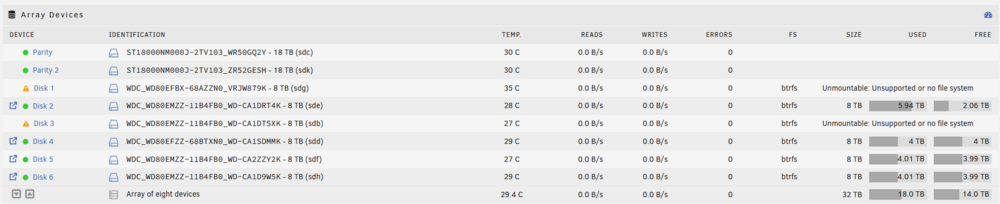
Hello community, I need some help or suggestions how to rebuild/repair an Array with two disks seemingly having a corrupted BTRFS file system. Setup Unraid Array (BTRFS) 2 x Parity Disk 18GB 6 x Array Disk 8GB Current State Parity: OK Disks 2, 4, 5, 6: OK Disk 1 and Disk 3: not mountable, BTRFS Error: superblock checksum mismatch... Array: unsafe, missing disks are emulated What happend For some time different disks got missing repeatedly. When that happend I managed to repair the array either because I got the missing disk running again or by clearing the disk and rebuilding the array. When two Array disks were missing at the same time I had enough and stopped all containers to search for the root cause. Because the missing disks were emulated I made a full backup with rsync first, which went well after the second try. Then I figured out that the main issue was the 10 Port PCIe SATA controller. So I switched to a proper SAS controller. The two missing disks are back, boot log doesn't throw any errors. So far so good. Then I assigned the missing disks back to the array, started the array and started the rebuild. Only after a couple of minutes I saw the warning that the disks ar unmountable. My mistake... So I stopped the rebuild/sync. Issue [...] Jul 2 12:22:13 GrayBigBerta emhttpd: Mounting disks... Jul 2 12:22:13 GrayBigBerta emhttpd: mounting /mnt/disk1 Jul 2 12:22:13 GrayBigBerta emhttpd: shcmd (1960): mkdir -p /mnt/disk1 Jul 2 12:22:13 GrayBigBerta emhttpd: /mnt/disk1: no btrfs or device /dev/md1p1 is not single Jul 2 12:22:13 GrayBigBerta emhttpd: /mnt/disk1 mount error: Unsupported or no file system Jul 2 12:22:13 GrayBigBerta emhttpd: shcmd (1961): rmdir /mnt/disk1 Jul 2 12:22:13 GrayBigBerta emhttpd: mounting /mnt/disk2 Jul 2 12:22:13 GrayBigBerta emhttpd: shcmd (1962): mkdir -p /mnt/disk2 Jul 2 12:22:14 GrayBigBerta emhttpd: shcmd (1963): mount -t btrfs -o noatime,space_cache=v2 /dev/md2p1 /mnt/disk2 Jul 2 12:22:14 GrayBigBerta kernel: BTRFS info (device md2p1): using crc32c (crc32c-intel) checksum algorithm Jul 2 12:22:14 GrayBigBerta kernel: BTRFS info (device md2p1): using free space tree Jul 2 12:22:15 GrayBigBerta kernel: BTRFS info (device md2p1): bdev /dev/md2p1 errs: wr 0, rd 0, flush 0, corrupt 22, gen 0 Jul 2 12:22:25 GrayBigBerta emhttpd: shcmd (1964): btrfs filesystem resize 1:max /mnt/disk2 Jul 2 12:22:25 GrayBigBerta root: Resize device id 1 (/dev/md2p1) from 7.28TiB to max Jul 2 12:22:25 GrayBigBerta kernel: BTRFS info (device md2p1): resizing devid 1 Jul 2 12:22:25 GrayBigBerta emhttpd: mounting /mnt/disk3 Jul 2 12:22:25 GrayBigBerta emhttpd: shcmd (1965): mkdir -p /mnt/disk3 Jul 2 12:22:26 GrayBigBerta emhttpd: /mnt/disk3: no btrfs or device /dev/md3p1 is not single Jul 2 12:22:26 GrayBigBerta emhttpd: /mnt/disk3 mount error: Unsupported or no file system Jul 2 12:22:26 GrayBigBerta emhttpd: shcmd (1966): rmdir /mnt/disk3 [...] Trying to mount the disks as unassigned devices: Jul 2 12:38:30 GrayBigBerta unassigned.devices: Mounting partition 'sdg1' at mountpoint '/mnt/disks/VRJW879K'... Jul 2 12:38:30 GrayBigBerta unassigned.devices: Mount cmd: /sbin/mount -t 'btrfs' -o rw,relatime,space_cache=v2 '/dev/sdg1' '/mnt/disks/VRJW879K' Jul 2 12:38:30 GrayBigBerta kernel: BTRFS: device fsid d92a06ea-1eb0-4fd1-8aa3-47e0d921bdd8 devid 1 transid 29956 /dev/sdg1 scanned by mount (4220) Jul 2 12:38:30 GrayBigBerta kernel: BTRFS info (device sdg1): using crc32c (crc32c-intel) checksum algorithm Jul 2 12:38:30 GrayBigBerta kernel: BTRFS error (device sdg1): superblock checksum mismatch Jul 2 12:38:30 GrayBigBerta kernel: BTRFS error (device sdg1): open_ctree failed Jul 2 12:38:32 GrayBigBerta unassigned.devices: Mount of 'sdg1' failed: 'mount: /mnt/disks/VRJW879K: wrong fs type, bad option, bad superblock on /dev/sdg1, missing codepage or helper program, or other error. dmesg(1) may have more information after failed mount system call. ' Jul 2 12:38:32 GrayBigBerta unassigned.devices: Partition 'VRJW879K' cannot be mounted. My own idea Because the array is still functional due to the emulated disks I had the idea to simply format the two disks and assign them as "new" disks to the array. I did that with single disks before but not with two at the same time, so I'm not sure if that is a good idea. Is ther a way to repair the filesystem? If yes, then I'd kindly ask for help. Note: the rebuild was running for ten minutes or so before I canceled it, don't know if this makes any difference. Or should I go with my idea? Thank you very much in advance! graybigberta-diagnostics-20240702-1251.zip