sharicov
Members
-
Joined
-
Last visited
-
Got "Stale file handle" samba error mounting private share from ubuntu linux after upgrade to 7.0.0 Fixed by adding noserverino parameter to /etc/fstab or in mount command in linux client
-
Thanks again, I meant Disl manager in windows even before formatting. Send the disk back to the store as faulty, Seagate tool sees it but cannot fix it.
-
Thanks for your feedback, JorgeB, I know USB is not recommended, but that's the way I use unraid, I think the problem is the disk itself, now it's not even initializing in windows. It doesn't start with PC PSU, only in USB boxes. Thanks everyone for your help, since I don't have another disk, will not be able to investigate further...
-
Booted from kubuntu live and got error when formatting the disk with xfs and btrf (strange thing, because I can install kubuntu on that disk formatting it with no errors). Booted to WinPE live and formated it ext4 using minitool partition wizard (no errors occured) Booted to unraid. it shows disk as xfs for some reason and cannot format it using unraid GUI, still getting unmountable: unsupported or no file system While formating disk changed from sdc to sdd and now unraid is in Array started - formating device state and not moving, stop array button is disabled Also cannot stop array with command emcmd cmdStop=Stop Rebooted unraid, booted into regular windows 10. Disk manager shows disk is MBR (changed to MBR in windows before to see if it fixes GPT record error in linux and didn't switch it back), now cannot change it back in windows, getting IO error message from disk manager. Minitool partition wizard pretends that it change it but it doesn't. Went to Seagate SeaTools: Short health test didn't pass, ran short fix now it's passing the health test. Simple overwrite format failed, now running Sanitize Overwrite format. no errors yet, should take 48 hours or so, it's Seagate IronWolf Pro 16TB disk. Seems all manipulations in linux completely messed the drive. n5105-diagnostics-20241129-0903.zip
-
Regards block size it's ok blockdev --getbsz /dev/sdb 4096
-
Thanks you both for quick response, much appreciated. I have done as per bnartino1 guidelines, only changed xfs commands with btrfs, because I use compression and skipped preclear step. Everything got smooth untill partition creation. mkfs.btrfs /dev/sdb1 Got: error during mkfs: Operation not permitted Reran everything again with xfs, got following errors: mkfs.xfs: pwrite failed: Input/output error libxfs_bwrite: write failed on (unknown) bno 0x746bfef00/0x100, err=5 mkfs.xfs: Releasing dirty buffer to free list! found dirty buffer (bulk) on free list! mkfs.xfs: pwrite failed: Input/output error libxfs_bwrite: write failed on (unknown) bno 0x0/0x100, err=5 mkfs.xfs: Releasing dirty buffer to free list! found dirty buffer (bulk) on free list! mkfs.xfs: libxfs_device_zero write failed: Input/output error n5105-diagnostics-20241129-0824.zip
-
Have an new disk in a new Maivo 4 disk DAS. Connecting to unraid over usb, see the disk, cannot format it nor by using Unassigned Devices nor in the array itself. Don't care about the data. Tried different PCs and different cables. Same disk in the same box n5105-diagnostics-20241128-2214.zipworks in linux and windows. Formatted, copied files in windows, then erased it and installed kubuntu, only unraid can't write to it for some reason. Tried unraid 6.12.10 and 7.0.0 beta4, tried new configuration, nothing helps. Other disks work fine in unraid. Please help
-
WebUI showing info incorrectly in Chrome (Edge is OK) Some data, such as scrubbing info, boot menu edit showing incorrectly in Chrome. Attaching Chrome screenshots vs Edge screenshots. Unraid version: 6.12.10, but the problem is the same in different version as well (7 beta, 6.12.9 etc). Boot menu seems messed up in Edge as well as in Chrome, attaching nano screenshot of nano /boot/syslinux/syslinux.cfg
-
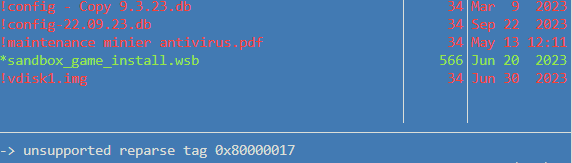
Unassigned device issue, some files appear with unsupported reparse tag 0x80000017 Filesystem is NTFS compressed with lzx compression within windows 11 (command: compact /c /s /a /i /exe:lzx "*") Mounting disk using Unassigned device plugin. Problematic files marked in red in mc. Please help. n5105-diagnostics-20240709-0844.zip