





coffee1978
Members
-
Joined
-
Last visited
-
I'm on 7.2.0. Latest available plugin is 2025.05.12 The change was merged to main on https://github.com/Fred78290/nct6687d/ two days after your most-recent version was pushed.
-
Is it possible to release a new version of the Nuvoton NCT6687 Driver with the latest code from https://github.com/Fred78290/nct6687d? An update was committed a few weeks back to fix fan control on newer MSI motherboards (and I have one of them). Thanks!
-
It's a known/reported issue but have not seen a fix yet. My slightly complicated solution is here but will continue to work once the plugin is fixed. Another solution was proposed here. A modified version of that solution is to setup everything how you like it in Unassigned Devices settings. Then look at the contents of file /etc/samba/unassigned-shares/Shares-Pools.conf. Copy the entire [Shares-Pools] block and append to the bottom of the "Samba extra configuration" section in SMB Settings, though rename to Shares-PoolsFixed or something. Restart and that should work as well, though it leaves extra crud in the configuration that requires cleanup once the plugin is fixed.
-
I had the same issue - reported on April 20 and no responses whatsoever. My hacky but effective workaround until the plugin is fixed was to create two User Scripts to save the permissions on shutdown and reinstall them on array startup. Script 1 - scheduled to run At Startup of Array echo "Done" Script 2 - scheduled to run At Stopping of Array Not the best solution but it works. From what I was able to gather during my debugging, it seems the plugin is initialized before unraid configures security and any configured users, so the plugin thinks the existing permissions are for non-existent users, so it drops them. Since the entire plugin system is essentially undocumented, so I stopped trying to figure out a better solution.
-
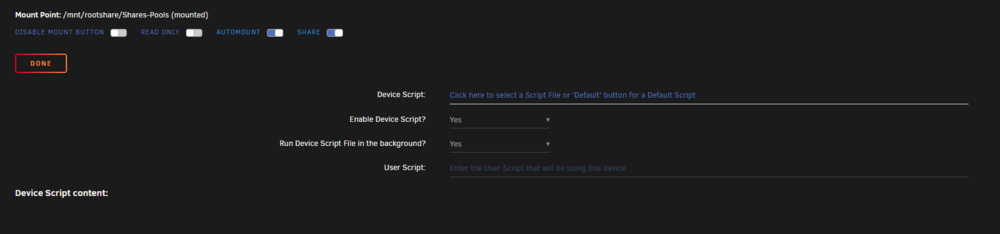
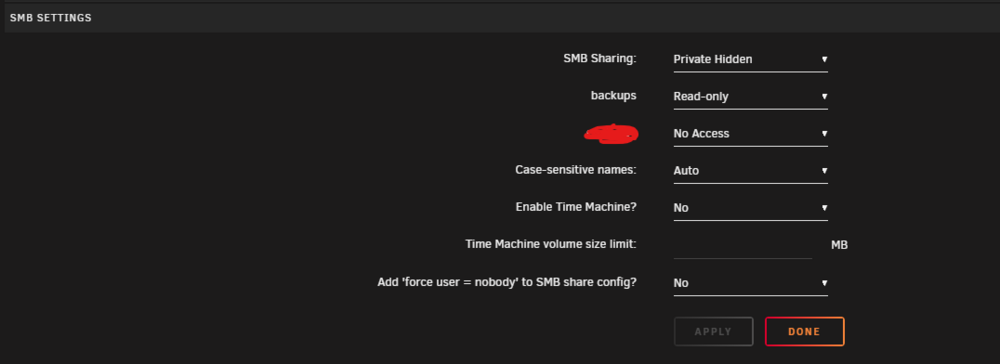
I have created a ROOT SMB share with UD, and have set read-only access to a single user in the UD settings page. On every single reboot, the user permissions are set back to No Access. I checked /boot/config/plugins/unassigned.devices/unassigned.devices.cfg and see smb_backups="read-only" at the end of the file, but all smb_ lines disappear on reboot. How can I make the user access stick across reboots? unRAID 7.0.1 UD 2025.04.14
-
Did you ever figure this out? I'm on a fresh install of unRAID 7 and this is also happening to me. I also get similar errors when running mv or rsync from the command line, so I think it is less a mover bug and more something wrong with the OS.
-
coffee1978 joined the community
-
Hello, I recently moved from unRAID on bare metal to using Proxmox on bare metal, with unRAID virtualized. I had a specific need to use Proxmox, and this setup is hopefully transitional (weeks or months). Below is my setup: Proxmox VM - 6 CPUs (host-passthrough), 16GB RAM, q35 chipset, OVMF BIOS Instead of passing through the entire HBA, I passed through each individual HDD (Disk cfg: Cache=Default, AsyncIO=thread, IO Thread=enabled. VM cfg: Controller=VirtIO SCSI Single) For cache, I just created a 256GB virtual disk inside an encrypted ZFS dataset on an NVMe-backed pool. Passed through the unRAID USB stick. I moved all VMs out of unRAID and disabled the VM system (I also disabled IOMMU to the unRAID VM) I moved all dockers out of unRAID except plex and filebot. My array is XFS + LUKS encrypted. Previously I would just login to the Web UI, enter the password and start the Array manually. This was getting annoying, so I did the below to safely(?) use a keyfile. Created a tiny 128MB disk on an encrypted ZFS dataset in proxmox, formatted it in unRAID but did not add to pool or cache. Manually mounted with the mount command as /key/ Started array, followed these instructions to create a keyfile /key/array, and uses the mentioned commands to add it to every /dev/mdXp1 in my array. Added this as the first command in /boot/config/go, since UD will not mount a disk until the array is started. mkdir /key && chown root:root /key && chmod 700 /key && mount /dev/XXXXX /key Ensured these lines were in /boot/config/disk.cfg: startArray="yes" luksKeyfile="/key/array" Not sure if this is overkill or not?? I could not figure out how to get the disk to auto-mount with UD, hence my addition to /boot/config/go. I also could not figure out how to add the keyfile entry to disk.cfg, so I added it myself. Since the array is encrypted, I wanted to ensure the passphrase and/or keyfile were secured. Since I have encrypted datasets on Proxmox, which require a passphrase on boot, I figured this is secure. The keyfile will only be accessible if the proxmox zfs passphrase is entered. Please let me know if I am crazy This is just transitional until I either get more hardware and/or decide what to do with my storage.




