Skip to content
View in the app

A better way to browse. Learn more.

Unraid

A full-screen app on your home screen with push notifications, badges and more.

To install this app on iOS and iPadOS
  1. Tap the Share icon in Safari
  2. Scroll the menu and tap Add to Home Screen.
  3. Tap Add in the top-right corner.
To install this app on Android
  1. Tap the 3-dot menu (⋮) in the top-right corner of the browser.
  2. Tap Add to Home screen or Install app.
  3. Confirm by tapping Install.

Somberland

Members
  • Joined

  • Last visited

Everything posted by Somberland

  1. If you mean Keycloak: I had to remove the extra-parameter `--proxy=edge` and replace it with `--proxy-headers xforwarded --http-enabled true` -> running again for me https://www.keycloak.org/docs/latest/upgrading/index.html#deprecated-proxy-option
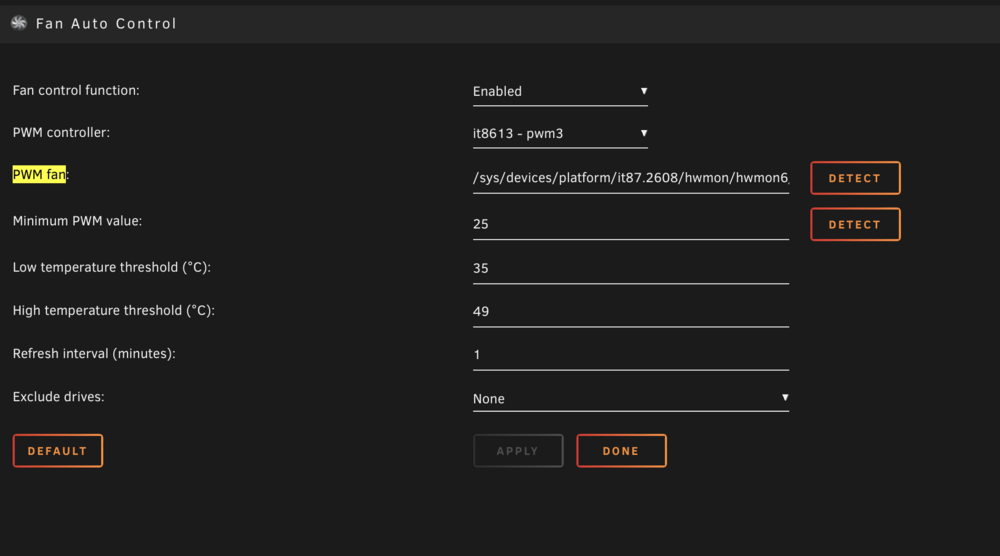
  2. thanks that helped for me, Min PWM of 70 is around 15% (400rpm)
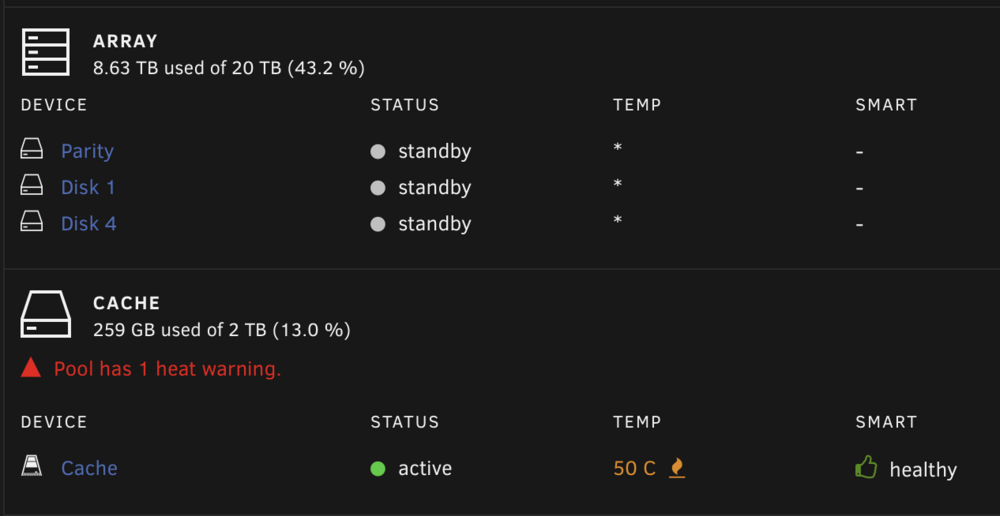
  3. Fan Auto Control ignores my cache-drive temp? (UnRaid 6.12.10, Plugin 2023.02.05a) Didn't exclude it from the drives-list. would also be happy if the fans didn't just go to 0 🤔

Account

Navigation

Search

Search

Configure browser push notifications

Chrome (Android)
  1. Tap the lock icon next to the address bar.
  2. Tap Permissions → Notifications.
  3. Adjust your preference.
Chrome (Desktop)
  1. Click the padlock icon in the address bar.
  2. Select Site settings.
  3. Find Notifications and adjust your preference.