





mmm77
Members
-
Joined
-
Last visited
Everything posted by mmm77
-
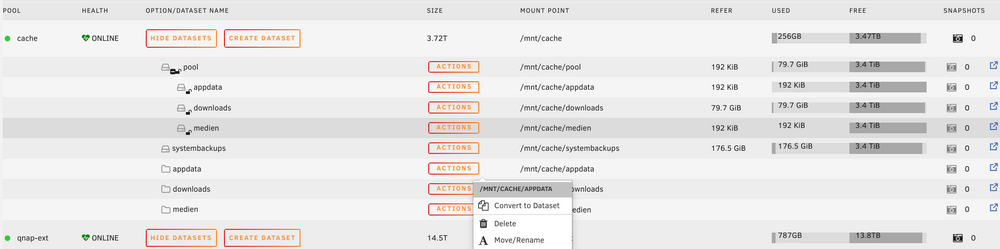
Tried to solve myself: What I now did: create 1 Dataset with settings I need. Created child Datasets in ZFS Master. To get this dataset in root I found the solution to change the mountpoint of this dataset with ZFS Master from /cache/pool/medien to /cache/medien This way all should work now. Only "problem" is that this new mountpoints /cache/medien will be shown in ZFS Master as a normal folder too. EDIT: It seems that it is not a correct child of the Dataset, when I create it in ZFS Master as described above... It does not unlock together.. This does only work when I create the child dataset in terminal with "zfs create cache/pool/medien" After restart the new mountpoint I set to cache/medien does also not work... The folder is empty. I have to set another mountpoint eg. cache/medien2 and set it back to cache/medien. Then it works...
-
Thank you for your help @Iker. Tried to understand , but I will also look for a German explanation to understand better. What I now did: Move Data of my cache ZFS drive to array. Formated cache again as ZFS without compression and encryption set in unraid settings... I understand how I can enable compression and encryption in every dataset, but I do not understand how I can enable this for the zpool itself, so the datasets can inherit the same passphrase and I do only have to unlock once. Okay, as child of the first Dataset this should work.... But Unraid creates the shares for first and second storage only in the home directory? First storage is this ZFS drive and second storage is my normal "xfs encrypted" array. Thanks ! Mike
-
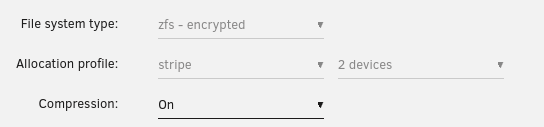
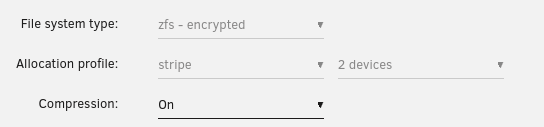
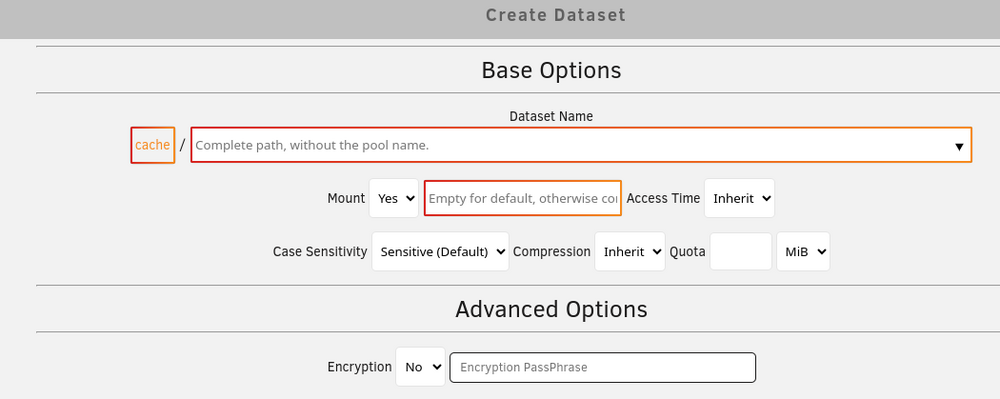
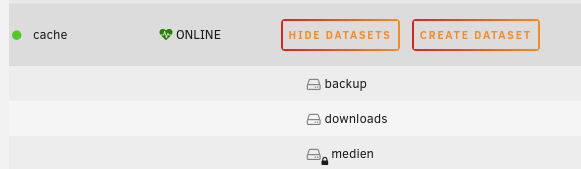
Hello everyone, I deleted and have up my CACHE drive and an external backup drive to ZFS. When setting up a RAID in Unraid settings, I also selected compression and encryption for this ZFS pools. I assume that this has now been done for all data. (not much on it yet) Now you can also create datasets with your ZFS Master, which also have the advantage of a snapshot. and others... But what I don't quite understand yet: Compression and encryption can now be selected here again. Is the data still encrypted with passphrase selected in UNRAID drive settings, if I don't select anything there? (do not touch the "no") If I select encryption for a dataset and enter the same PassPhrase as on unraid, it will subsequently have a lock symbol in the ZFS master.... like on "medien". Then of course I'm sure that it was encrypted,.... but twice ? Is backup and downloads also encrypted ? Disadvantage: I then have to decrypt this data set separately with a password if I restart UNRAID... (even it is the same password as in Unraid encryption settings) I hope one of you understands this better than I do. Greetings Mike
-
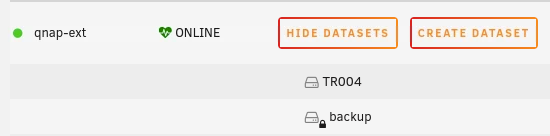
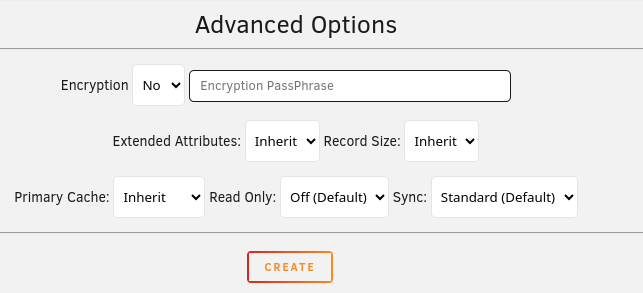
Hallo zusammen, ich habe mein CACHE Laufwerk bzw ein extrnes Sicherungslaufwerk auf ZFS umgestellt.. Beim Einrichten ein RAID ausgewählt auch auch die Komprimierung und Verschlüsselung eingerichtet. Ich gehe davon aus, daß das nun auch bei allen Daten so passiert ist. (noch nicht viel drauf) Jetzt kann man ja mit dem ZFS Master auch Datasets erstellen, die auch den Vorteil eines Snapshot haben. Was ich nun aber noch nicht ganz begreife: Hier kann ja nun wieder Kompression und Verschlüsselung ausgewählt werden. Sind die Daten verschlüsselt, wenn ich dort nichts auswähle ? Wenn ich für ein Dataset die Verschlüsselung auswähle und das selbe Passwort angebe, hat es nachher im ZFS Master ein Schlosssymbol.... Da bin ich mir dann natürlich sicher, daß verschlüsselt wurde,.... doppelt ? Nachteil: Ich muss dann dieses Datenset extra per Passwort entschlüsseln, sollte ich UNRAID neu starten... Beispiel von meinem externen Sicherungslaufwerk: Ich hoffe von euch versteht das jemand besser als ich. Gruß Mike


-
Hallo zusammen, bin noch recht neu hier (2 Wochen) und gerade am Konfigurieren meines Systems.... Es läuft soweit alles... Muss nur noch iobroker und zigbee2mqtt umziehen, wenn alles andere problemlos läuft. Zu meinem Problem: Komme von einem Qnap NAS mit zusätzlichem externen Gehäuse TR-004 (für Datensicherung) zu einem Ugreen NAS mit besserem Prozessor. Die Platten darin liefen auf dem alten NAS max 30-60 Minuten am Tag für eine Sicherung. Nutze ich das QNAP TR-004 als zusätzlichen Speicher für Datensicherung (und dann noch zusätzlich im Hardware Raid), dann habe ich damit den Nachteile, daß ich keine SMART-Daten und Festplattentemperaturen angezeigt bekomme in UNRAID. Eine Icybox hab ich auch noch rumliegen... Hier bekomme im SMART-Werte und Temperaturen, aber der Spin-Down funktioniert nicht richtig...Irgendwie scheint da nur Platte 1 runterzufahren, die anderen nur, wenn ich sie explizit anklicke. (zudem benötigt das Gerät auch mehr Strom im Standby) Vom QNAP-Gehäuse kann man die SMART-Daten auslesen, man muss nur den Befehl korrekt eingeben, was ich nach einigem Googlen herausgefunden habe. smartctl /dev/sdh -d jmb39x-q,0 -A smartctl /dev/sdi -d jmb39x-q,1 -A ... Bekomme ich das irgendwie in UNRAID rein, daß diese 4 Festplatten so abgefragt werden müssen ? Nach weiteren Googlen: Die Alternative : "Scrutiny" als Docker, da gibt es zumindest eine composer.yaml, in der man das reinschreibt Create collector.yaml in /docker/scrutiny/config: version: 1 host: id: "" # Leave empty if you only have one Scrutiny instance devices: - device: /dev/sda # type: ['jmb39x-q,0'] # Adjust as needed - device: /dev/sdb type: ['jmb39x-q,1'] - device: /dev/sdc type: ['jmb39x-q,2'] - device: /dev/sdd type: ['jmb39x-q,3'] Gruß Mike


