jdhill777
Members
-
Joined
-
Last visited
Everything posted by jdhill777
-
Did you follow the command listed in the template to install homebrew after install?
-
That is very strange, I just ran it on my end and it worked. You may be having some issues resolving the url...You can try to replace 'latest' with 'main'.
-
I am also still having the same issue.
-
That is awesome to hear, and glad you got it working! It is such a cool application, and can't wait for it to be on the CA! I am sure many will want to use tailscale with their OpenClaw deployment, so thank you for documenting what you did!
-
Hey @atl-far-east , sorry for the delay in responding to you. I did update the template this afternoon for Brew to be an optional/manual install (specifically for CA approval), however it may help here. Can you run the command found in the new template against your console CLI and see if that will connect to GitHub? My first though is that you might be running it not in bridge/host network mode and that it is almost failing DNS connectivity...Try running nslookup raw.githubusercontent.com or ping google.com from the container console to verify DNS is working. If both fail, check your Docker network settings, you might need to set custom DNS (like 8.8.8.8) in your container's network config.
-
Hey @Draco , I follow along now! Interesting concept! One thing to mention in how I personally run OpenClaw...I run it in Host mode for my network settings. It allows it to bind itself to any other port for spinning up applications and deploying services it downloads. My OpenClaw has built 10+ dashboards/web applications that I now access from any machine on my network, which would not work in the current Bridge mode template. I don't have the template do that, due to trying to keep the base template more secure for CA standards and approvals. So, in theory, if it was running in Host, it would allow the container to bind to other ports for you to run your browser in. However, the Chromium browser does not come with the OpenClaw docker build they publish. You can get it running a CLI command on the OpenClaw container console (apt-get update && apt-get install -y chromium), which I just tested and it works. It would survive restarts, but not rebuilds, meaning whenever OpenClaw releases a new docker image it would no longer stay alive. The solution to this, on the surface, would be similar to how I solved it for Homebrew: creating a mount point for persistent storage. However, Chromium via apt-get is messy and scatters files across /usr/bin/, /usr/lib/, and /usr/share/. Instead, you can leverage the Playwright that's already bundled with OpenClaw to install Chromium. Run this command in the container console: node $(find /app/node_modules/.pnpm -path "*/playwright-core@*/cli.js" | head -1) install chromium This downloads Chromium to Playwright's cache directory (~/.cache/ms-playwright/ by default). To make it persistent across rebuilds, you can: Set the environment variable PLAYWRIGHT_BROWSERS_PATH to a custom path (e.g., /browser-cache) Mount that path to your appdata (e.g., /mnt/user/appdata/openclaw/browser) Then configure OpenClaw to use headless mode in your openclaw.json: { "browser": { "enabled": true, "headless": true, "noSandbox": true } } I'm considering adding this as an optional advanced mount in a future template update, however I would love to test it more, so I would love to hear back from you with your findings! Re: gemini-cli failing - This is likely a timeout issue with the skill installer. Some skills that require Go or large downloads via Homebrew timeout on first install. Try clicking Install again, it usually succeeds the second time since the dependencies (go) are cached, however, if I am not following along, please correct me!
-
Hey Draco, the XML template already has the Brave key setting under the extra parameters at the bottom of the template. Have you been able to test putting your Brave key there?
-
Hey @JPHobby ! Good catch on the -f vs -s improvement. Just pushed that fix to the repo. Both the XML template and docker-compose.yml now use -s to catch empty/corrupted config files. Also noticed you're running an older version of the template (pre-Homebrew support). If you grab the latest from GitHub, you'll get: - Auto-install Homebrew on first boot (~60 sec) - Skills that need go, npm, etc. will work out of the box - Persists across container restarts cd /boot/config/plugins/dockerMan/templates-user && wget -O openclaw.xml https://raw.githubusercontent.com/jdhill777/openclaw-unraid/master/openclaw.xml Then recreate your container from the updated template. Your existing config and workspace data will be preserved since those live in your appdata paths, not the template file. Thanks for the feedback!
-
@Rev0991 , I am glad to hear you got Kimi working. Was my earlier response to your original comment able to help you find the solution? Upon review it looks pretty similar to the edit you made on your original post, however, I wasn't able to test it myself and only produced that from reading the OpenClaw docs. I'd love to hear more about your findings if Kimi can offer a similar level of competence while offering a significant decrease in costs. In regards to the security stuff you mentioned: I appreciate you sharing and I think it is always a good question to bring up. Those are legitimate hardening practices, but here's why they're not critical in this specific context. Let me clarify a few things: Running as root inside a container isn't the same as having root on your Unraid host. Docker's namespace isolation keeps those separate. That's the whole point of container-based infrastructure, compared to installing OpenClaw in a non-isolated environment. The bot can only see files that are explicitly mounted (config, workspace, homebrew), not your whole system. The claims about "escaping the container" or "running commands on the host" would require an actual container escape exploit or misconfiguration like mounting the Docker socket...which we don't do. Container root ≠ host root. OpenClaw needs broad access inside its container to do its thing: shell commands, file management, package installs, etc. That's the whole point of having a powerful AI assistant like OpenClaw vs other offerings. That said, it's still sandboxed from your actual Unraid system on purpose. The AI can't do anything the container itself can't do, as the container is isolated from your host by Docker's namespace/cgroup boundaries. In regards to your additional commands: running as root without restrictions is intentional here. Upon initial spin-up, OpenClaw is installing multiple dependencies for the skill library in its Post Arguments Fields (which --read-only would not allow). This initiation sequence that OpenClaw goes through is quite complicated, which is why creating this template has been a challenge for me taking days for me to get right. Also, no-new-privileges doesn't really do anything when you're already root with full capabilities, as there's nowhere higher to escalate to...but remember, this is root inside of the container itself. In regards to --cap-drop ALL, this has the potential to break some skills that need specific capabilities, but if anyone would like to test it, I would be interested to hear your findings! If you want to be extra cautious, just be thoughtful about what volume mounts you add (specifically in the optional projects mapping option I have in the template, outside of your standard appdata folder structure). Don't mount / or anything sensitive and you're good... or at least about as good as you can be with running such a powerful tool. I can attest that at least you aren't one of the tens of thousands currently running OpenClaw on your everyday machine with no limits. I want to be very clear though: thanks for thinking about this stuff! It is always good to question security. The suggestions the AI gave you are definitely valid Docker hardening practices, even if not strictly necessary for OpenClaw's threat model. If there is anything in the configuration you would like to change for your custom environment, feel free to do so. I'm sure, others and me would be very interested to see what limitations it may introduce.
-
Quick update (NOW Edited): Just pushed a fix for skills that require Homebrew/Go. The template offers a command to enter into the OpenClaw Container CLI to install HomeBrew) If you had issues with skill installs, grab the latest template from GitHub!
-
Hey shick! Thanks for testing. Let me address each of your points: 1. Telegram pairing After setting the bot token (either via the template's TELEGRAM_BOT_TOKEN variable or in the config), restart the container. Then DM your bot in Telegram. On first contact, it should generate a pairing code. You'll need to approve it in the Control UI under the pairing section in agents tab. Once approved, you're connected! Quick config via Raw JSON if you want to skip pairing and allowlist yourself directly, however, I haven't been able to test this myself and not sure I can recommend: { "channels": { "telegram": { "enabled": true, "botToken": "YOUR_BOT_TOKEN", "dmPolicy": "allowlist", "allowFrom": ["tg:YOUR_TELEGRAM_USER_ID"] } } }Full Telegram docs: https://docs.openclaw.ai/channels/telegram 2. CLI not working You're right, the openclaw command doesn't work out of the box in the container console. This is a limitation of how the OpenClaw team implemented their Docker container, at least to my understanding. For now, most configuration can be done via the Control UI. I am looking into other options but don't have a fix yet. 3. Local Ollama support Good news — OpenClaw does support Ollama! The catch for Docker: if your Ollama runs on your Unraid host, the container needs to reach it. You'd need to configure the baseUrl to point to your host's IP. In your config via Raw JSON: { "agents": { "defaults": { "model": { "primary": "ollama/llama3.3" } } }, "models": { "providers": { "ollama": { "baseUrl": "http://YOUR_UNRAID_IP:11434/v1", "apiKey": "ollama-local" } } } }Replace YOUR_UNRAID_IP with your Unraid server's IP (not localhost, since that would point inside the container). Make sure Ollama is running and accessible. Full Ollama docs: https://docs.openclaw.ai/providers/ollama 4. Primary/fallback models ("merge") Also supported! OpenClaw has built-in model fallback. If your primary model fails (rate limit, auth issue, etc.), it can automatically try fallback models. { "agents": { "defaults": { "model": { "primary": "anthropic/claude-sonnet-4-5", "fallbacks": ["openai/gpt-4o", "google/gemini-2.0-flash"] } } } }This will try Claude first, then GPT-4o, then Gemini if the others fail. Hope that helps! Let me know if you run into any issues.
-
Good question! OpenClaw does have built-in Tailscale Serve/Funnel support, but it requires the tailscale CLI to be available to the OpenClaw process. In Docker, that's not the case, the container doesn't have Tailscale installed. The issue you're hitting is that nodes require a secure connection (WSS/HTTPS), which plain HTTP over the Tailscale IP doesn't provide. I haven't personally tested this, but in theory you could run Tailscale Serve on the Unraid host (outside the container) to proxy HTTPS to the container's port. Something like: tailscale serve --bg --https=8443 http://localhost:18789 Then access via: https://<your-machine>.<tailnet>.ts.net:8443/ That said, I'm not an expert on Tailscale Serve with secure WebSocket connections, so use at your own discretion. I'd recommend checking the Tailscale and OpenClaw docs before running commands on your host: Tailscale Serve docs: https://tailscale.com/kb/1242/tailscale-serve OpenClaw Tailscale docs: https://docs.openclaw.ai/gateway/tailscale If you get it working, let us know! Would be great info for others hitting the same issue.
-
Glad to hear it is working for you! One thing I will tell you, the new version of the template on my GitHub features a change that will fix the replacement of your config file being overwritten upon restart. You may want to make sure you update your template to the newer version!
-
Good news: OpenClaw does support Kimi! The bad news: is it's not as simple as the other providers... Anthropic, OpenAI, Gemini, Groq, and OpenRouter work with just an API key because OpenClaw has them built-in. Kimi (Moonshot) requires a custom models.providers block in the config due to how the OpenClaw team implemented provider support for them. Adding this to the template would break it for users of the other LLMs, so I'm keeping the template focused on the built-in providers for now. If you want to use Kimi, you'll need to manually edit your config via Raw JSON in the Control UI: { "gateway": { "mode": "local", "bind": "lan", "controlUi": { "allowInsecureAuth": true }, "auth": { "mode": "token" } }, "models": { "providers": { "moonshot": { "baseUrl": "https://api.moonshot.ai/v1", "apiKey": "YOUR_MOONSHOT_API_KEY", "models": [{ "id": "kimi-k2.5", "name": "Kimi K2.5" }] } } }, "agents": { "defaults": { "model": { "primary": "moonshot/kimi-k2.5" } } } }From the OpenClaw docs it appears the available Kimi models are: - moonshot/kimi-k2.5 - moonshot/kimi-k2-thinking - moonshot/kimi-k2-turbo-preview Full docs: https://docs.openclaw.ai/providers/moonshot As for the config page disappearing, that sounds like a UI bug. Try refreshing, or use Raw JSON mode which tends to be more stable.
-
Hey Tommy_E! Great catch on the config overwrite issue! I've pushed your fix to the template after testing it myself. The PostArgs now checks if the config exists before writing. So configs will persist across container restarts now. Really appreciate you digging into this and suggesting the fix!
-
You might see my response to MrChunky above this chat. If that doesn't resolve your issue, feel free to send your container logs and I would be happy to work through it with you!
-
Hey MrChunky! Thanks for the detailed logs. That helped pinpoint the issue and test personally with my Gemini key instead of Anthropic. The "No API key found for anthropic" error happens because OpenClaw defaults to Claude models. When you're using a different provider (Gemini, OpenAI, Groq, OpenRouter), you need to change the default model to match your API key. Why this happens: OpenClaw is designed to run an onboarding wizard (openclaw onboard) that walks you through setup, including model selection. But with a Community Apps deployment, you're getting a ready-to-go container...no CLI wizard. So the default model stays set to Anthropic even if you provide a different provider's key. Quick fix: 1. Open the Control UI (http://YOUR-IP:18789/?token=YOUR_TOKEN) 2. Go to Config tab, go to the Agents tab 3. Click Raw JSON at the bottom 4. Add the agents section with your preferred model, might need to overwrite what is there: { "gateway": { "mode": "local", "bind": "lan", "controlUi": { "allowInsecureAuth": true }, "auth": { "mode": "token" } }, "agents": { "defaults": { "model": { "primary": "YOUR_PROVIDER/MODEL_NAME" } } } } Common model values: - Anthropic: anthropic/claude-sonnet-4-5 - Google Gemini: google/gemini-2.0-flash - OpenAI: openai/gpt-4o - Groq: groq/llama-3.1-70b-versatile - OpenRouter: openrouter/anthropic/claude-3-sonnet 5. Save and restart the container I've updated the GitHub README with a full guide: https://github.com/jdhill777/openclaw-unraid#using-non-anthropic-providers-openai-gemini-groq-openrouter Thanks for testing!
-
Can you check the container logs?
-
Good catch! You're right that Template Repositories were removed in 6.10. There's still a way to get it running though, as this is the process I did for testing on my 2nd server: 1. Download the template: https://raw.githubusercontent.com/jdhill777/openclaw-unraid/master/openclaw.xml 2. Copy it to /boot/config/plugins/dockerMan/templates-user/openclaw.xml 3. Docker tab → Add Container → select "OpenClaw" from the “Template” dropdown I just updated the GitHub README with instructions for 6.10+ users. This is the backend storage mechanism that the templates get saved to in Unraid. But totally understand if you'd rather wait for CA approval. 😃
-
Thank you for the interest Rubensz! Check out the install guide here: OpenClaw-Unraid GitHub Before CA approval, the easiest way is Option 1 located towards the bottom of the ReadMe, add my template repo and you'll get the same install experience as Community Apps. Let me know if you have any questions!
-
Thanks! Hopefully will be live in the CA soon! 🤞
-
No, it hasn't been approved yet. I submitted it to the selfhosters GitHub and through the forms for a personally managed template (my preference), but I'm still waiting on approval. Everything's submitted on my end. If you'd like to see it in CA sooner, vocalizing support in the forum and Discord can help speed things along. In the meantime, you can spin it up directly from the GitHub repo if you want, happy to help you get it running.
-
Once it is approved, keep your eyes on something hopefully coming to the CA Store today…https://forums.unraid.net/topic/196865-support-openclaw-ai-personal-assistant/
-
OpenClaw — AI Personal AssistantOpenClaw is a powerful, self-hosted AI personal assistant that connects to your favorite messaging platforms. Run your own Claude, GPT, or other LLM-powered assistant directly on your Unraid server. FeaturesMulti-Channel Messaging — WhatsApp, Telegram, Discord, Slack, Signal, iMessage, Google Chat, Microsoft Teams, and more File Management — Read, write, and organize files on your server Shell Commands — Execute scripts, manage Docker, automate tasks Browser Control — Research, fetch data, interact with web pages Cron Jobs — Schedule tasks and automated workflows Skills System — Extend with bundled or custom plugins (includes Homebrew support for go/npm tools) Voice Support — Talk mode with ElevenLabs TTS Mobile Apps — iOS and Android companion nodes RequirementsUnraid 6.x or 7.x API key from one of: Anthropic (Claude) — recommended OpenRouter (100+ models) OpenAI (GPT models) Google AI Studio (Gemini) Groq (Fast Llama/Mixtral) xAI (Grok models) Z.AI (Zhipu GLM models) Microsoft Copilot (Advanced Setup Required, But Documented) InstallationFrom Community Apps (Coming Soon)Search for OpenClaw in Community Applications Fill in Gateway Token (generate with: openssl rand -hex 24) Add your LLM API key (Anthropic recommended) Click Apply Access the Control UI at: http://YOUR-IP:18789/?token=YOUR_TOKEN Before CA ApprovalSSH into your Unraid server and run: curl -o /boot/config/plugins/dockerMan/templates-user/openclaw.xml https://raw.githubusercontent.com/jdhill777/openclaw-unraid/master/openclaw.xml Then refresh your browser, go to Docker → Add Container → Select OpenClaw from the Template dropdown. IMPORTANT: You must append ?token=YOUR_TOKEN to the Control UI URL. Using Non-Anthropic Providers (Gemini, OpenAI, Groq, OpenRouter, etc.)OpenClaw defaults to Anthropic's Claude model. If you're using a different provider, you must change the default model: Open the Control UI (http://YOUR-IP:18789/?token=YOUR_TOKEN) Go to Config tab → Agents section Click Raw JSON at the bottom Add or modify the agents section: {"agents": { "defaults": { "model": { "primary": "YOUR_PROVIDER/MODEL_NAME" } }}}Common model values: Provider Model Anthropic anthropic/claude-sonnet-4-5 (default) Google Gemini google/gemini-2.0-flash OpenAI openai/gpt-4o Groq groq/llama-3.1-70b-versatile OpenRouter openrouter/anthropic/claude-3-sonnet Save and restart the container Skills & Homebrew SupportOpenClaw includes a Skills system that extends functionality with plugins. Some skills require tools like go, npm, or other brew-installable packages. How it works: Homebrew is optional... only install if you need skills that require brew/go/npm tools To install, open the container console and run:NONINTERACTIVE=1 /bin/bash -c "$(curl -fsSL https://raw.githubusercontent.com/Homebrew/install/HEAD/install.sh)" You can ignore the "Next steps" output as the template has already configured the PATH for you on first run Homebrew and installed packages persist across restarts I recommend reviewing the install script at brew.sh before running Known limitation: Skills that require Go (like blogwatcher, blucli) may timeout on first install while Go is being downloaded. Just click Install again and it will succeed since Go is now cached. ConfigurationAfter installation, configure messaging channels via the Control UI Config page, or edit directly: /mnt/user/appdata/openclaw/config/openclaw.json 📚 Full channel setup guides: OpenClaw Docs - Channels Troubleshooting"control ui requires HTTPS or localhost"Make sure you're adding ?token=YOUR_TOKEN to the URL: http://YOUR-IP:18789/?token=YOUR_TOKEN "No API key found for anthropic"You're using a non-Anthropic provider but haven't changed the default model. See the Using Non-Anthropic Providers section above. Container won't startCheck logs: docker logs OpenClaw 2>&1 | tail -50 Skills install timing outSome skills (especially those requiring Go) may timeout on first install. Click Install again — it will succeed since dependencies are now cached. ResourcesDocumentation: https://docs.openclaw.ai GitHub (OpenClaw): https://github.com/openclaw/openclaw Template Repo: https://github.com/jdhill777/openclaw-unraid Discord Community: https://discord.gg/clawd Support the Template MaintainerIf this template saved you time, consider buying me a coffee: https://buymeacoffee.com/jdhill777 Questions? Post below or join the OpenClaw Discord!
-
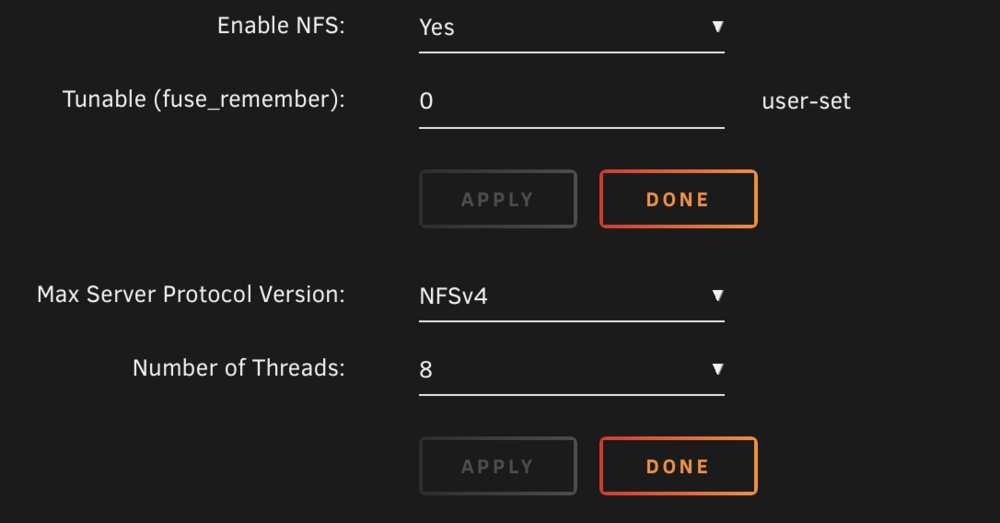
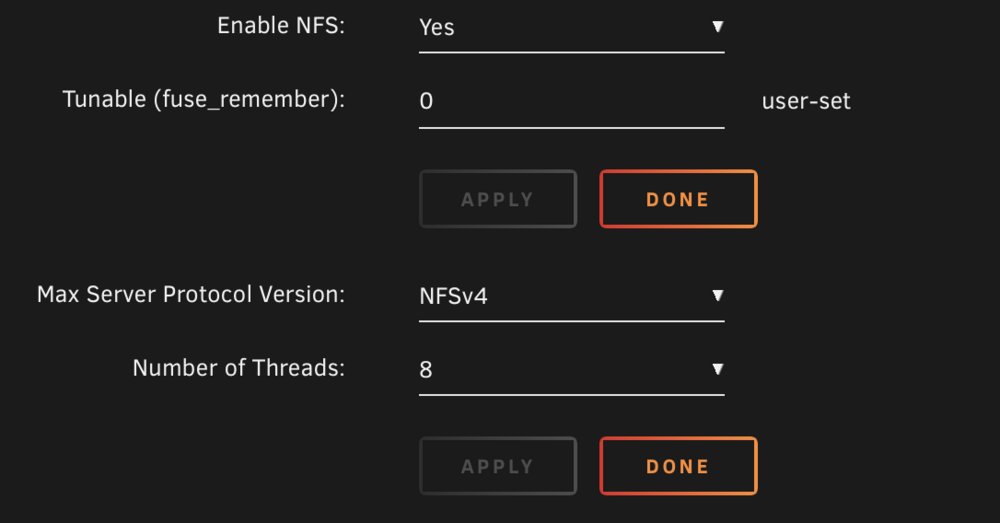
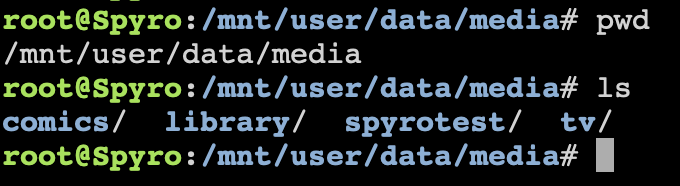
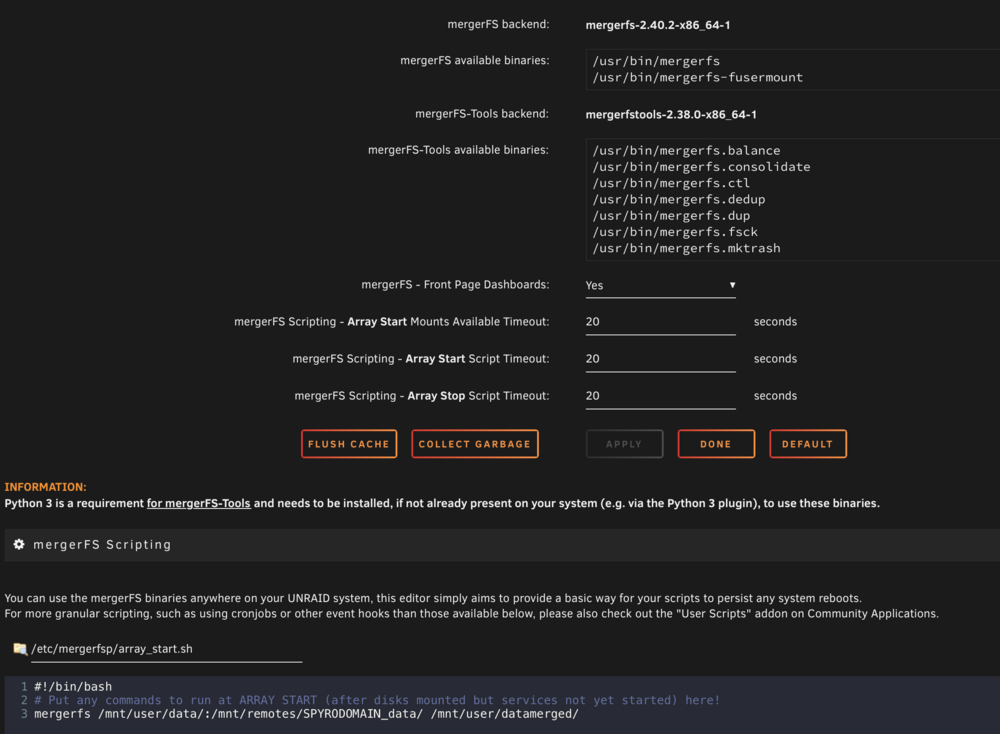
I currently have two unraid servers. One is named Bandicoot (Very Powerful, 200tb+) and one is named Spyro (Bought second hand, old, mainly trying to use as additional disk storage, also running Unraid). Physically Bandicoot has ran out of drive space, so I purchased a second server (Yes, I know I could have just bought additional disk storage devices, however I went this route). Basically, I have been trying to merge my second server (Spyro) using mergeFS into a /datamerged directory, for the Bandicoot server to see. This is due to all of my services and directories already being very well set up on the Bandicoot server, and I am truly just trying to give it extra space, not necessarily change how any of my 50+ docker containers are mapped and operating. Using the mergerfs plugin, I tried to run this command on Bandicoot: mergerfs /mnt/user/data/:/mnt/remotes/SPYRODOMAIN_data/ /mnt/user/datamerged/ trying to combine my local data directory (on Bandicoot), with the data directory on the Spyro server, saving it under a new directory names datamerged, on Bandicoot. However, I am not seeing any of the data stored on Spyro in this directory and when I go under /mnt/user/remotes/SPYRODOMAIN_data/ directly, it appears to be out of date and not saving information actually visible on the Spyro server. NFS Settings on Spyro: NFS Settings on Bandicoot: On Spyro directly, inside of the data folder: On Bandicoot directly, inside of the remotes directory: On Bandicoot inside of the MergerFS created directory: Bandicoot MergerFS plugin Settings: Does anyone have any ideas on what I may be doing wrong?