





ratzeputz
Members
-
Joined
-
Last visited
-
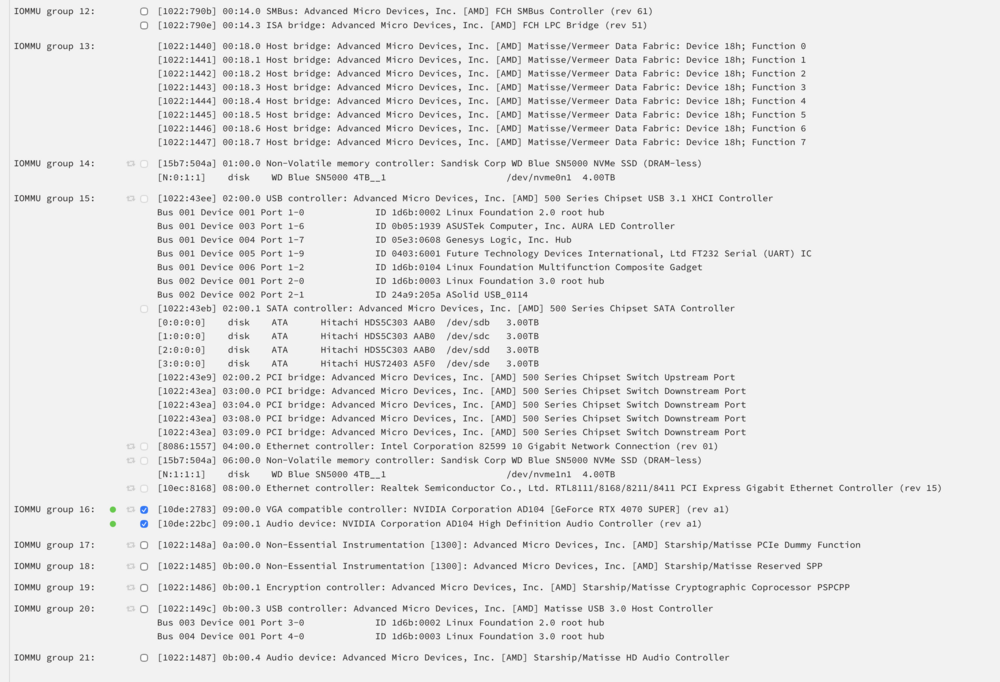
Hab ich gemacht ... das ist kein Problem bei dem Board (Asus B550-Prime Plus) Mittlerweile hab ich auch viel wieder hinbekommen ... ich musste aber in /boot/config/network.cfg und auch in /boot/config/network-rules.cfg alles manuell reinschreiben weil Unraid nachdem es gebootet hat immer die eth Zuweisungen verrtauscht hat und serltsamerweise, obwohl deaktiviert und noch kein Uplink auf der 10g Karte, immer versucht hat ein Bonding zwischen eth0 (1g) und eth1 (10g) zu machen. Und auch die VMs laufen wieder. Ich habe ein neues libvirt.img erstellt und die alten VMs aus den XML Files importiert. Nur eine VM wo die GPU durchgereicht wurde ging nicht. Dann hab ich gecheckt, dass ich in Tools-System Devices einmal "Acknowledge all PCi changes" klicken musste, damit Unraid den "Hardwaretausch" kapiert. Wahrscheinlich war das auch der Grund warum Unraid immer ein Bonding zwischen den Ethernet interfaces machen wollte. Die GPU ist jetzt nämlich auf nem anderen Bus wiewohl auch die 10g NIC in der IOMMU Group nun neu ist ... und das hat virsh wohl ausm Konzept gebracht. Mein letztes Problem ist jetzt eigentlich nur, dass in der Arrayübersicht die beiden NVMEs als "Unmountable: wrong or no filesystem" eingestuft werden. In der Share Übersicht passt es insofern, dass alle Shares, die Cache only sind (wie z.B die Daten vom LanCache Container) mit der Restgröße passen. Und ich muss jedes Mal, wenn ich das System neu starte (was natürlich nur vorkommt wenns notwendig is) recht schnell via SSH einloggen und dort zpool import -f machen muss, damit das auch alles richtig erkannt wird bvevor das System "da" ist und die Docker Container startet
-
Guten Tag zusammen! Ich habe gestern in meinem Unraid Server (7.2.0) eine 10g NIC eingebaut. Eine mit Intel X520 Chip, der ja eigentlich super für Unraid laufen sollte Es hat alles gebootet und ich hab auch gesehen, dass ich aufs WebUI komme ... also hab ichs über Nacht dann einfach so gelassen weil ich dachte "Fiber Switch ist eh noch nicht im Rack ... der Server hängt eh auch noch am 1g Ethernet ... mach ich morgen weiter" Und heute morgen hab ich gemerkt, dass ich nicht mehr ins WebUI komme. SSH ging auch nicht mehr .. nicht mal pingen Ich hab dann herausgefunden, dass Unraid irgendwie die Ethernets vertauscht hat, aus dem RJ45 Ethernet auf einmal eth1 gemacht hat und aus der SFP+ 10g NIC auf einmal eth0 Also das im Safe Mode alles wieder umgedreht und immerhin gings dann wieder. Bevor ich das bemerkt habe, hab ich zur Sicherheit auch Docker und VM abgedreht, damit das nicht mehr automatisch startet. Als ich das gefixt hatte und Unraid endlich wieder normal gebootet hat (das WebUI ging für ein paar Sekunden, dann wars aus und auf einmal waren die eth vertauscht), habe ich Docker und VM wieder aktiviert. Dann gings wieder los mit den Problemen. Unraid bootet, und mitten im Boot Prozess bleibts stecken und nichts geht mehr. Also wieder in den abgesicherten Modus und Docker und VM wieder deaktiviert. Dann gings wieder. Dann mal nur Docker aktiviert, weil das Problem hatte ich schon Mal nach einem Update auf eine neuere Unraid Version, dass auf einmal libvirt Probleme gemacht hat. System hat normal gebootet Dann waren auf einmal alle Docker Container weg. Also via Apps-Previous Apps wieder alle reinstalliert und dann habe ich gemerkt, dass der LanCache container nicht starten will Ins Error Log geschaut und dort gesehen, dass er einen "Hab keinen Platz" Fehler wirft. Der hat grad mal 2TB/8TB belegt dachte ich ... wie kann das sein? Ich schau also in die Main Übersicht und dort ist mir aufgefallen, dass der Cache Pool auf einmal weg war. Man muss dazu sagen. Ich hab 2 NVMEs eingebaut die zusammen im RAID0 (ja das ist Absicht) via ZFS als zpool eingebunden waren. Hat immer funktioniert. Die Drives werden auch beide erkannt, also liegts nicht am Mainboard, dass da was blockieren könnte, weil da jetzt noch ein PCIe Slot belegt ist. Ich kann den Pool auch importieren via zpool import -f cache und ich seh ihn dann auch in der WebUI Übersicht, aber ich kann es nicht mehr als Cache Pool nutzen. Sobald ich "Add Pool" klicke, ihn cache benenne und 2 Slots auswähle habe ich in der Übersicht "Cache" und "Cache 2" stehen Ich könnte die NVMEs dann adden, aber dann habe ich nur 2 einzelne Drives, die als "Unmountable: wrong or no file system" drin stehen. Falls jemand fragen oder sich denken sollte "Warum ZFS?" Naja ... BTRFS mag Docker nicht ... damit hatte ich mit meinen Docker Containern SO unglaublich viele Probleme, dass ich das halt nicht nutzen konnte. Und mit XFS konnte ich kein richtiges RAID0 aus den beiden NVMEs machen Die Shares haben z.B teilweise noch Cache->Array drinnen stehen aber jene shares, die Cache only gewesen sind (wie z.B. der LanCache share) die haben als free space 64.9 GB stehen. Wo auch immer diese 65GB herkommen. Der Flash-Drive kanns nicht sein weil der ist nur 16GB groß Ich weiß nicht mehr was ich mit dem Ding machen soll. Es funktioniert so gut wie gar nix mehr und ich hab da noch nicht mal wieder libvirt aktiviert. Denn das ist dann die nächste Baustelle, denn sobald ich das aktiviere, schmiert Unraid unmittelbar beim booten ab. Hat irgend jemand nen Rat?
-
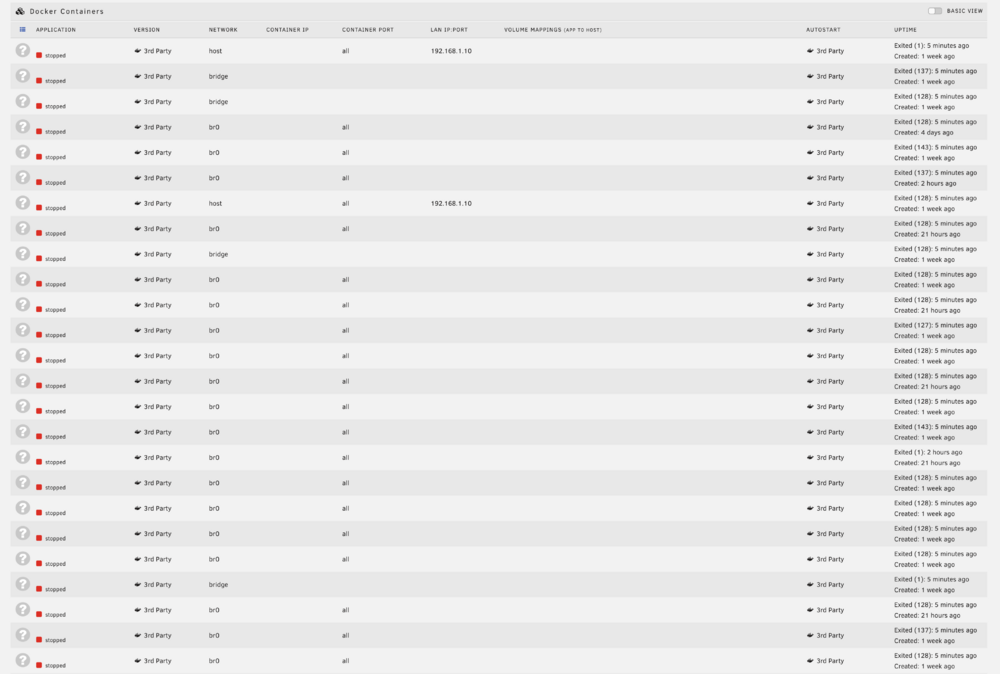
From 7.1.3 to 7.1.4 destroyed all my docker containers (see screenshot) Try to fixing it right now (Downgrading again did not help)
-
Mit den Docker Containern isses tatsächlich so, dass ich scheinbar in den Settings die Grafikkarten nicht anhaken darf. Sonst schmiert das System jedes Mal, wenn ich einen Docker Container starten will, wo die GPU durchgereicht wird, ab. Der Nvidia Treiber "sieht" die GPUs dann auch nicht. Erst wenn ich sie beide abhake (aber sie durch ACS getrennt sind) sind sie für den Treiber sichtbar, wiewohl für die Docker Container und die VMs verwendbar. Bisher läuft alles ohne Probleme aber deine Warnung hat natürlich ihre Berechtigung
-
Ach Gott ... kenn ihr das auch?: Man weiß einfach nicht mehr weiter und steht komplett auf dem Schlauch und denkt sich "Na gut dann poste ich eben ins Forum ... ich hab keine Idee mehr" und dann ... keine 20 Minuten später stolpert man über ein Schlagwort oder einen Ansatz den man noch nicht versucht hat und genau der funktioniert dann Es war tatsächlich das ACS Override, das geholfen hat. Ich lass die Lösung mal stehen, falls jemand anderes auch auf das Problem stößt. Man kennt das ja ... "BOAH der hat genau das gleiche Problem wie ich" aber man bekommt entweder keine Lösung oder der TE schreibt nur "Hat sich erledigt" Von daher: In den Settings von Unraid -> VM Manager -> PCIe Override auf "Both" gestellt Nach einem Reboot war die zweite GPU als eigene IOMMU Group erkenn- und auswählbar und ich kann nun 2 separate VMs damit betreiben. Ob die Docker Container noch klappen muss ich rausfinden .. aber ich befürchte wahrscheinlich nicht.
-
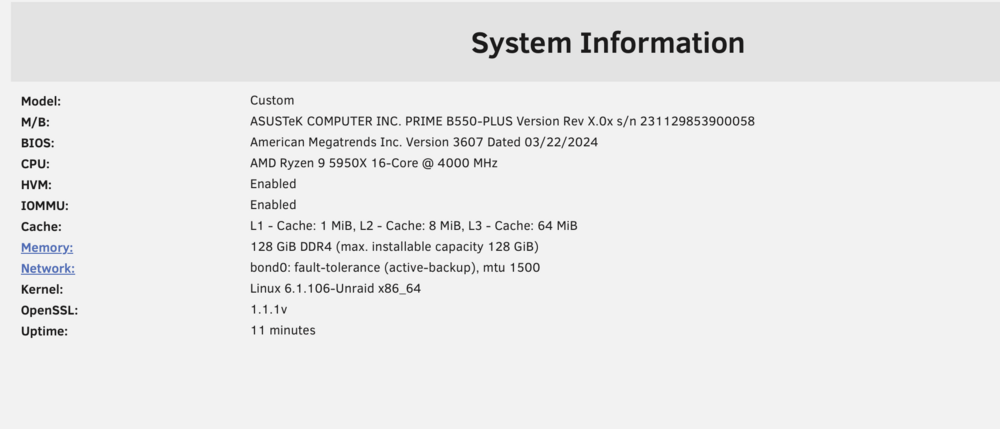
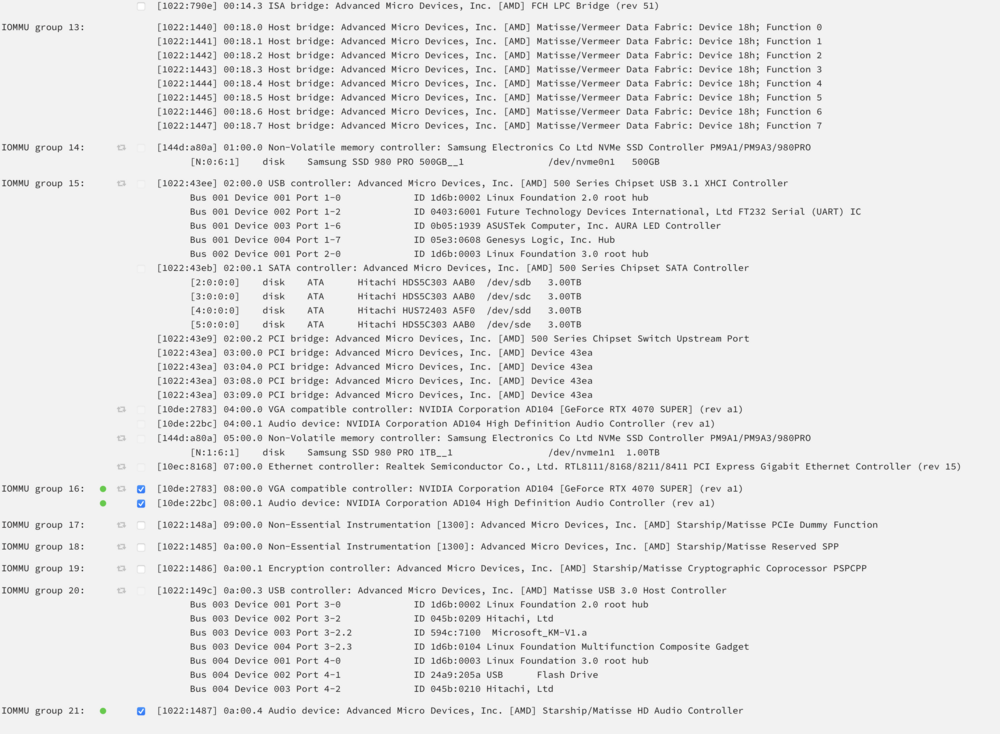
Hallo zusammen! Ich habe mein Unraid heute um eine zweite 4070 Super erweitert. Innerhalb von Unraid in Docker Containern funktioniert sie wunderbar ... z.B habe ich mal Ollama KI benutzt und mit nvidia-smi im Terminal sieht man sofort, dass bei einer Antwort beide GPUs benutzt werden. "Prima" dachte ich. Dann kann ich ja 2 Gaming VMs für die Kinder aufsetzen (sie wollen beide unbedingt weg von Konsolen und PC Gaming machen ... nie war ich als Vater stolzer ) und sie können beide unabhängig mit kleinen Geräten im Zimmer hocken und zocken. Mein Problem ist jetzt aber, dass nur eine der beiden GPUs mit Passthrough funktioniert. Bei der anderen kommt immer eine Fehlermeldung von wegen iommu_group not viable (in meinem Fall die Group 15) Nach googlen und benutzen der SuFu fand ich heraus, dass man in Tools - System Devices auch die entsprechende IOMMU Gruppe anhaken muss, damit die für Passthrough verfügbar wird. Und genau hier hakts. Im Screenshot seht ihr bestimmt mein Problem -> ich kann die zweite GPU nicht aktivieren weil die Haken ausgegraut sind. An irgendwelchen Bios Einstellungen kanns eigentlich nicht liegen, denn ich bezweifle dass das Board IOMMU nur für den "Haupt" PCIe Slot aktiviert und für den zweiten nicht. Ich hänge auch einen Screenshot zu meiner System Information dazu, dass ihr seht, dass sowohl HVM, als auch IOMMU aktiviert sind. Kann mir jemand bei meinem Problem weiterhelfen?
-
Ah ... so einfach is das. Hat geklappt! Jetzt sind leider alle Docker Container weg ... aber ich habe gesehen, dass man die aus den Apps mittels Action->Reinstall From Previous Apps wieder reinbekommt. Is halt ein bisschen unnötige extra Arbeit aber, dass ich nun auch größere Docker Images pullen kann is schon super. Vielen Dank!
-
Hey zusammen! Ich bin noch komplett neu in der Unraid Welt und habe mich nun dazu entschieden, dem Ding mal eine Chance zu geben und wenns mir gefällt was ich damit machen kann wird auch eine Vollversion geordert Bisher hab ich immer einen eigenen Dockerhost betrieben nachdem mein ESXi in Rente geschickt wurde und gerade die Einfachheit und die Vielfalt die Unraid in Bezug auf Docker respektive Apps anbietet hats mir angetan weswegen ich nun wechseln will (vorher hab ich alles immer mühsam per Hand gemacht und das nervt auf Dauer einfach ) Dass man damit auch eine Gaming VM für die Kinder aufziehen kann is natürlich umso besser ... so brauchen sie nur nen kleinen Thinclient mit Parsec drauf und geht schon. Aber gerade ärgert mich ein Punkt sehr. Ich wollte mal ein AI Image ausprobieren um eine AI selbst zu hosten und beim Pullen schlägt das schon fehl. Error: write /var/lib/docker/tmp/GetImageBlob1912477946: no space left on device Und mittels SSH erkundet sehe ich dann das: /dev/loop2 20G 14G 5.8G 71% /var/lib/docker Das is wirklich wenig bis gar nix an Platz. Ich habe ja auch einen 64GB USB Flash-Drive, den ich für das Unraid OS nutze und Festplatten sind mehrere TB verbaut ... Platz sollte ich also genug haben. Kann man das Image irgendwie vergrößern? Ich habe in der Suche ein Thema eines anderen Benutzers gefunden der genau das gleiche Problem hatte (wobei bei dem der Docker Container schon gelaufen ist wies scheint) aber eine Lösung konnte ich da nicht herausfinden. Kann mir jemand helfen? LG





