





phillip.de
Members
-
Joined
-
Last visited
Everything posted by phillip.de
-
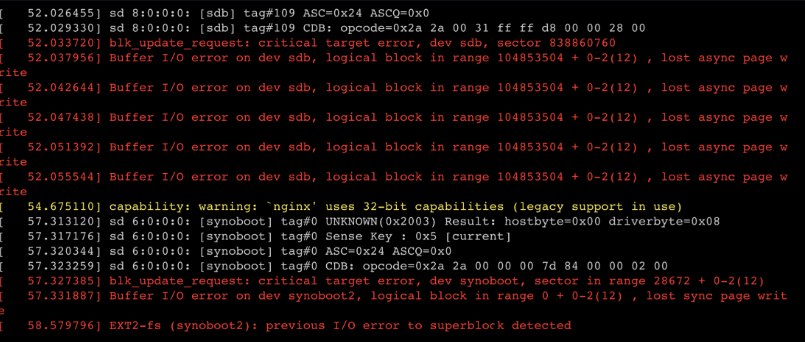
Hello! I installed my Virtual Diskstation on my Unraid server as a Docker. To test it, I had the data in the cache (NVME) and now I wanted to push the data to the array (HDD). I created a share that only writes to the array. I copied the files from the NVMe to the new Share and set the permissions. And when I start the container, I get the error messages from the screenshot. Permissions are correct so far. What can I do to make the container start correctly? I also try it to create a new Container with new virtual harddisks. Same error.
-
Ich hatte das Mainboard günstig bekommen, daher Öhm, das heißt, wenn die HDDs in "Standby" sind? Richtig?
-
Verbaute Hardware: - Intel Core i5 12400 - 64GB DDR5 RAM (4800 MHz ohne XMP!) - Gigabyte Z790 GAMING X AX , Version x.x - 550w BeQuiet Netzteil - 4x Sata / 4x NVMe
-
Wie hast du den Idle so niedrig bekommen? Meiner liegt momentan bei 60W ca…
-
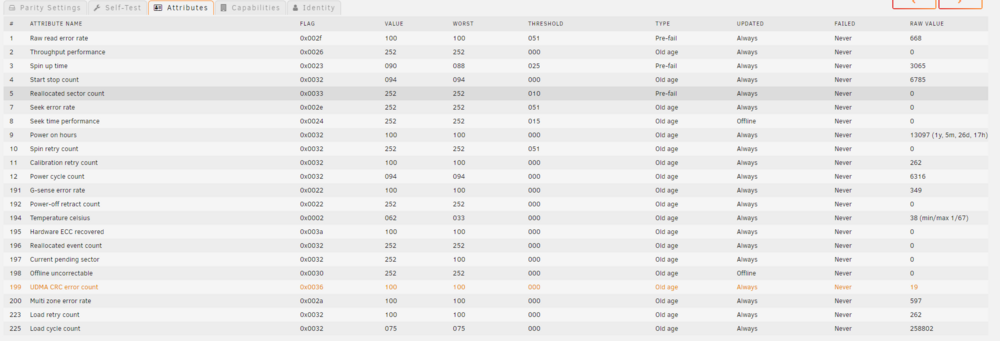
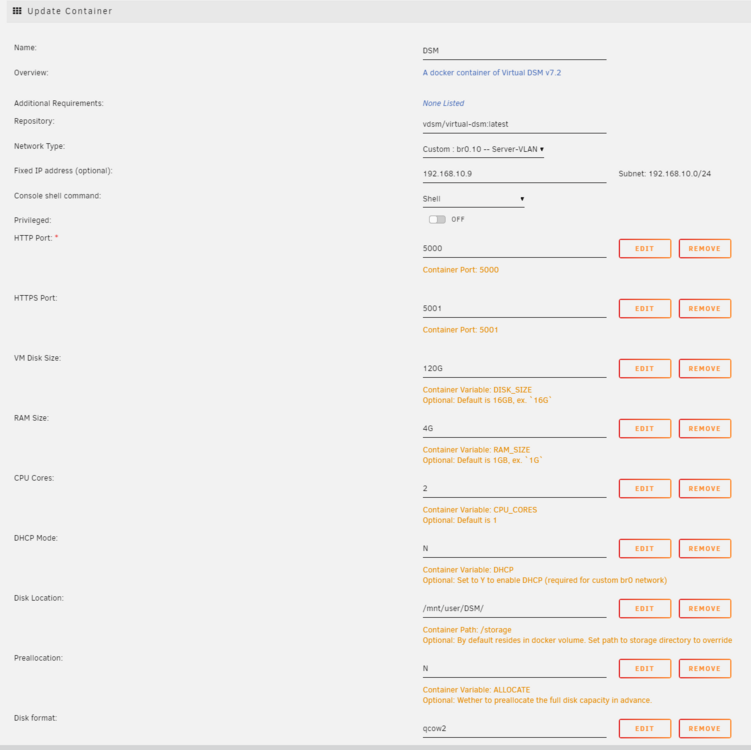
Guten Morgen zusammen, ich versuche momentan meine Synology auf eine virtuelle DSM umzustellen. Daher habe ich einen Container mit dem virtual dsm Image erstellt. Leider bekommt die Maschine beim booten ganz viele Fehlermeldungen: text error warn system array login ❯ ----------------------------------------------------------- ❯ You can now login to DSM at http://192.168.10.9:5000 ❯ ----------------------------------------------------------- [ 49.972838] iSCSI:target_core_ep.c:802:ep_attach_hba ODX Token Manager is enabled. [ 50.576436] sd 6:0:0:0: [synoboot] tag#0 UNKNOWN(0x2003) Result: hostbyte=0x00 driverbyte=0x08 [ 50.578153] sd 6:0:0:0: [synoboot] tag#0 Sense Key : 0x5 [current] [ 50.579203] sd 6:0:0:0: [synoboot] tag#0 ASC=0x24 ASCQ=0x0 [ 50.580351] sd 6:0:0:0: [synoboot] tag#0 CDB: opcode=0x2a 2a 00 00 00 7d 84 00 00 02 00 [ 50.582003] blk_update_request: critical target error, dev synoboot, sector in range 28672 + 0-2(12) [ 50.583549] buffer_io_error: 2 callbacks suppressed [ 50.584397] Buffer I/O error on dev synoboot2, logical block in range 0 + 0-2(12) , lost sync page write [ 51.224167] EXT2-fs (synoboot2): previous I/O error to superblock detected [ 51.224167] [ 51.228903] sd 6:0:0:0: [synoboot] tag#0 UNKNOWN(0x2003) Result: hostbyte=0x00 driverbyte=0x08 [ 51.233295] sd 6:0:0:0: [synoboot] tag#0 Sense Key : 0x5 [current] [ 51.235898] sd 6:0:0:0: [synoboot] tag#0 ASC=0x24 ASCQ=0x0 [ 51.238713] sd 6:0:0:0: [synoboot] tag#0 CDB: opcode=0x2a 2a 00 00 00 7d 84 00 00 02 00 [ 51.242697] blk_update_request: critical target error, dev synoboot, sector 32132 [ 51.246433] Buffer I/O error on dev synoboot2, logical block 1, lost async page write [ 51.250755] sd 6:0:0:0: [synoboot] tag#0 UNKNOWN(0x2003) Result: hostbyte=0x00 driverbyte=0x08 [ 51.255080] sd 6:0:0:0: [synoboot] tag#0 Sense Key : 0x5 [current] [ 51.258213] sd 6:0:0:0: [synoboot] tag#0 ASC=0x24 ASCQ=0x0 [ 51.261012] sd 6:0:0:0: [synoboot] tag#0 CDB: opcode=0x2a 2a 00 00 00 7d 84 00 00 02 00 [ 51.264992] blk_update_request: critical target error, dev synoboot, sector 32132 [ 51.268601] Buffer I/O error on dev synoboot2, logical block 1, lost sync page write [ 51.272349] EXT2-fs (synoboot2): previous I/O error to superblock detected [ 51.272349] [ 51.276912] sd 6:0:0:0: [synoboot] tag#0 UNKNOWN(0x2003) Result: hostbyte=0x00 driverbyte=0x08 [ 51.281493] sd 6:0:0:0: [synoboot] tag#0 Sense Key : 0x5 [current] [ 51.284608] sd 6:0:0:0: [synoboot] tag#0 ASC=0x24 ASCQ=0x0 [ 51.287405] sd 6:0:0:0: [synoboot] tag#0 CDB: opcode=0x2a 2a 00 00 00 7d 84 00 00 02 00 [ 51.291388] blk_update_request: critical target error, dev synoboot, sector 32132 [ 51.295154] Buffer I/O error on dev synoboot2, logical block 1, lost sync page write [ 51.299628] VFS: Dirty inode writeback failed for block device synoboot2 (err=-5). [ 51.309364] sd 6:0:0:0: [synoboot] tag#0 UNKNOWN(0x2003) Result: hostbyte=0x00 driverbyte=0x08 [ 51.311759] sd 6:0:0:0: [synoboot] tag#0 Sense Key : 0x5 [current] [ 51.313565] sd 6:0:0:0: [synoboot] tag#0 ASC=0x24 ASCQ=0x0 [ 51.315844] sd 6:0:0:0: [synoboot] tag#0 CDB: opcode=0x2a 2a 00 00 00 7d 84 00 00 02 00 [ 51.319468] blk_update_request: critical target error, dev synoboot, sector 32132 [ 51.321491] Buffer I/O error on dev synoboot2, logical block 1, lost sync page write [ 51.327136] sd 6:0:0:0: [synoboot] tag#1 UNKNOWN(0x2003) Result: hostbyte=0x00 driverbyte=0x08 [ 51.329514] sd 6:0:0:0: [synoboot] tag#1 Sense Key : 0x5 [current] [ 51.331457] sd 6:0:0:0: [synoboot] tag#1 ASC=0x24 ASCQ=0x0 [ 51.332712] sd 6:0:0:0: [synoboot] tag#1 CDB: opcode=0x2a 2a 00 00 00 9d 84 00 00 02 00 [ 51.334748] blk_update_request: critical target error, dev synoboot, sector in range 36864 + 0-2(12) [ 51.337209] EXT2-fs (synoboot2): previous I/O error to superblock detected [ 51.337209] [ 51.340271] sd 6:0:0:0: [synoboot] tag#0 UNKNOWN(0x2003) Result: hostbyte=0x00 driverbyte=0x08 [ 51.342315] sd 6:0:0:0: [synoboot] tag#0 Sense Key : 0x5 [current] [ 51.343814] sd 6:0:0:0: [synoboot] tag#0 ASC=0x24 ASCQ=0x0 [ 51.345149] sd 6:0:0:0: [synoboot] tag#0 CDB: opcode=0x2a 2a 00 00 00 7d 84 00 00 02 00 [ 51.347034] blk_update_request: critical target error, dev synoboot, sector in range 28672 + 0-2(12) [ 51.349052] Buffer I/O error on dev synoboot2, logical block 1, lost sync page write [ 51.351159] EXT2-fs (synoboot2): error: ext2_fsync: detected IO error when writing metadata buffers [ 51.360152] EXT2-fs (synoboot2): previous I/O error to superblock detected [ 51.360152] [ 51.362593] sd 6:0:0:0: [synoboot] tag#1 UNKNOWN(0x2003) Result: hostbyte=0x00 driverbyte=0x08 [ 51.362595] sd 6:0:0:0: [synoboot] tag#1 Sense Key : 0x5 [current] [ 51.362596] sd 6:0:0:0: [synoboot] tag#1 ASC=0x24 ASCQ=0x0 [ 51.362598] sd 6:0:0:0: [synoboot] tag#1 CDB: opcode=0x2a 2a 00 00 00 81 84 00 00 02 00 [ 51.362600] blk_update_request: critical target error, dev synoboot, sector in range 32768 + 0-2(12) [ 51.371632] sd 6:0:0:0: [synoboot] tag#0 UNKNOWN(0x2003) Result: hostbyte=0x00 driverbyte=0x08 [ 51.373249] sd 6:0:0:0: [synoboot] tag#0 Sense Key : 0x5 [current] [ 51.374362] sd 6:0:0:0: [synoboot] tag#0 ASC=0x24 ASCQ=0x0 [ 51.375338] sd 6:0:0:0: [synoboot] tag#0 CDB: opcode=0x2a 2a 00 00 00 7d 84 00 00 04 00 [ 51.376688] blk_update_request: critical target error, dev synoboot, sector in range 28672 + 0-2(12) [ 51.378110] Buffer I/O error on dev synoboot2, logical block 1, lost async page write [ 51.379333] Buffer I/O error on dev synoboot2, logical block in range 0 + 0-2(12) , lost async page write [ 51.380701] sd 6:0:0:0: [synoboot] tag#1 UNKNOWN(0x2003) Result: hostbyte=0x00 driverbyte=0x08 [ 51.381927] sd 6:0:0:0: [synoboot] tag#1 Sense Key : 0x5 [current] [ 51.382764] sd 6:0:0:0: [synoboot] tag#1 ASC=0x24 ASCQ=0x0 [ 51.383505] sd 6:0:0:0: [synoboot] tag#1 CDB: opcode=0x2a 2a 00 00 00 7f 88 00 00 06 00 [ 51.384551] blk_update_request: critical target error, dev synoboot, sector in range 28672 + 0-2(12) [ 51.385744] Buffer I/O error on dev synoboot2, logical block in range 0 + 0-2(12) , lost async page write [ 51.386990] Buffer I/O error on dev synoboot2, logical block in range 0 + 0-2(12) , lost async page write [ 51.388245] Buffer I/O error on dev synoboot2, logical block in range 0 + 0-2(12) , lost async page write [ 51.389495] blk_update_request: critical target error, dev synoboot, sector in range 28672 + 0-2(12) [ 51.390685] Buffer I/O error on dev synoboot2, logical block in range 0 + 0-2(12) , lost async page write [ 51.392089] blk_update_request: critical target error, dev synoboot, sector in range 28672 + 0-2(12) [ 51.393291] Buffer I/O error on dev synoboot2, logical block in range 0 + 0-2(12) , lost sync page write [ 51.394718] EXT2-fs (synoboot2): previous I/O error to superblock detected [ 51.394718] [ 51.396359] blk_update_request: critical target error, dev synoboot, sector 32132 [ 51.397393] Buffer I/O error on dev synoboot2, logical block 1, lost sync page write [ 51.398549] VFS: Dirty inode writeback failed for block device synoboot2 (err=-5). [ 51.502632] workqueue: max_active 1024 requested for vhost_scsi is out of range, clamping between 1 and 512 [ 54.614354] findhostd uses obsolete (PF_INET,SOCK_PACKET) [ 58.408993] fuse init (API version 7.23) Die Paritätsplatte (Temporär) meines Arrays gibt derzeit auch Smart-Errors aus, aber ich warte hier noch bis ich die Daten übertragen habe damit ich die Platten aus dem Synology einbauen kann. Kann der Fehler mit dem Smart-Error zusammenhängen? Ich habe mal ein Screenshot der Smart-Werte der betroffenen Platte anhängt... Ein Bild der Containerkonfiguration habe ich auch angehängt. Nebeninformationen: Ich habe für die Daten der DSM einen eigenen Share angelegt (Public / No Export) wo die Daten der DSM direkt auf dem Array liegen sollen. Ich brauche hier ja keine Performance, nur Speicher. Die Partition qcow2 habe ich genutzt, da ich hier die Platte beizeiten gerne vergrößern würde. Danke!
-
Keiner eine Idee?
-
Nabend zusammen! Ich bin momentan dabei, mein vorhandenes NAS-System auf eins von Unraid umzubauen. In meiner Umgebung steuere ich mittlerweile alle Berechtigungen über die Windows Benutzer meines Domaincontrollers (Active Directory). Auf meiner Synology ist es bisher ohne Probleme möglich, Berechtigungen auf die Freigaben mittels Auswahl des AD-Benutzers einzustellen. Muss ich hier den Umweg über "Virtual DSM" gehen, oder kann man das irgendwie direkt machen? Und da die Rechner alle in der Domäne sind, und sich alle über die AD-Benutzer am Rechner anmelden, würde es das Einrichten vereinfachen... Vielleicht hat da jemand ja eine Idee Vielen Dank!
-
Okay, danke für die Tipps! Das mit dem Exchange, etc. stimmt natürlich. Ich werde dann vermutlich den alten PVE Host weiterhin laufen lassen, und dann schauen das ich diese dann auf dem laufen lasse. Den Rest in Docker, etc. werde ich dann auf Unraid verschieben. Ich habe mir jetzt erstmal Hardware mit einem i5 12400 bestellt. Ich werde dann schauen, wie ich das alle verbaue! Vielen Dank!
-
Moin zusammen! Ich benötige mal vielleicht ein paar Ratschläge Ich versuche momentan mein Homelab etwas "aufzuräumen" und mir mehr Speicherplatz für Jellyfin zu organisieren. Mein Homelab sieht momentan so aus: - Synology DS224+ (Für Backups, generelle Dateiablage und Ablage für Jellyfin) (2x 4TB) - ASROCK Deskmini X600 (Ryzen 5 8600G / 64GB DDR5 (2x 250GB SSD) => Proxmox Host für VMs - ASUSTOR FS6706T (12GB RAM / 6x 1TB NVMe SSD) => iSCSI Target für Proxmox VM & LXC-Daten - Mini PC mit Intel N100 & 32GB DDR5 (Proxmox Host 2 für LXC) - Mini PC mit Intel Core i5 7500T (Momentaner Unraid Test PC) Aufzählung von VMs und Diensten: - Exchange-Server 2019 - Domain-Controller - Diverse Docker Container - Jellyfin VM - ... (Komme in der Summe auf rund 20 VMs / LXC Container) Meine erste Idee war es gewesen, den Deskmini X600 mit Unraid auszustatten und die VMs darauf laufen zu lassen und dann ggf. ein USB-Festplattengehäuse anzuhängen? Der X600 hat ja leider nur 2x Sata intern und 2x NVMe. Sollte ich da dann ggf. einen M2 to 4x Sata Splitter verwenden, um die Festplatten so anzubinden? Ich würde gerne mindestens 4 weitere HDDs mit 12TB anschließen. => Generelle Dateiablage und für Jellyfin Das ASUSTOR NAS würde ich dann nutzen, um die Unraid VM-Daten darauf, laufen zu lassen. Falls nötig, könnte ich mir auch neue Hardware zulegen. Diese sollte aber gerne stromsparend sein! (20 - 30W im Idle). Hat jemand eine Idee, wie es am meisten Sinn macht? Proxmox würde ich vermutlich auf dem N100 laufen lassen für LXC-Container und die CPU frisst hier ja sogut wie keinen Strom Danke!

