Dominoes0522
Members
-
Joined
-
Last visited
Everything posted by Dominoes0522
-
Thanks guys, I've decided it's probably easier to just copy the files I need in batches over to some spare space I have on the windows drive.
-
Hi All, I have have some files on one of my array drives which I want to use directly in windows 11 (not over network). I pulled the drive and installed in the W11 machine but the XFS file system is not natively recognized by windows. I could format it back to NTFS, but the issue is I don't have enough space available to temporarily transfer the files to (and I'd also have to transfer everything twice). Ideally I'd like to be able to mount the drives in order to be able to read and write to them in windows like any normal drive, but then when I'm finished, reconnect them back to the array. Is this possible and if so, will there be a performance bottleneck? If it's not possible, whats my options? Thank You
-
All makes perfect sense and I'm starting to see why user shares are more flexible. The main reason I'm hesitant about user shares at the moment is I'm new to Unraid and I find the split level and allocation method settings a bit confusing, especially because a lot of my folders are not organised with common hierarchy. Also the transfers of data I've done with user shares (using Krusader) have either put all the files on one disk or have given unexpected results. I expect that this is just due to lack of understanding & experience so will persevere and keep experimenting. Thanks again for your time and very helpful responses.
-
Once again - thank you for your thorough explanation - this has cleared up a lot of my doubts. I do however have another question or two (sorry) When my drives were in my windows desktop everything was done manually so I'm used to that way of working. I'm still unclear about what benefits of user shares I would be missing out on, other than that it distributes files across disks. You would still need to copy or move files or folders to the user share, so you're either copying or moving to a user share or a disk share - it's more that the user share controls file and folder placement on the array automatically based on settings, whereas disk share is just specifying which disk your data goes to (pretty much the same as if your saving files to a disk in windows). Does that sound correct? You also mentioned about user shares being beneficial when you want to expand your array or frequently add/modify data. Could you explain why as I'm unsure on this. Thanks!
-
Thanks so much for taking the time to provide such a detailed response - very helpful and much appreciated! It leads me to a few more questions: Re. Q1) Does this take into consideration the included disks selection? So if disk 3 & 4 are the only included disks in the share, it will only look at those disks to find the disk with the most free space? Re. Q2) Lets say I decided I wanted to always manually move and copy files to the disk(s) of my choice, would it be a better approach to create disk shares rather than user shares? So rather than adding files/folders to a user share which may end up on either disk depending on configuration, I could just add them directly to the disk I want them to be on? And would there be any drawbacks to this approach? Thanks!
-
Hello, I have a parent folder which has 8 folders in it, and each of those has other folders and files underneath (named contents in this example). I have two 2TB disks that I want to split the data across using high-water allocation method, and they have been selected as included disks in the share. Parent Folder 1 Folder 1 Contents Folder 2 Folder 2 Contents ... Folder 8 Folder 8 Contents All folder 1 contents should remain under folder 1, folder 1 can reside on either disk. All folder 2 contents should remain under folder 2, folder 2 can reside on either disk. ... All folder 8 contents should remain under folder 8, folder 8 can reside on either disk. (But in addition to the above) when copying the parent folder to the share, it splits the data equally between the two disks that are selected as included i.e folders 1-4 go to first disk, folders 5-8 go to second disk OR folders 5-8 go to first disk, folders 1-4 go to second disk. Q1. When using high-water, does the first disk have to reach half full before it will write anything to the second disk? Q2. Is it possible to get the 8 folders equally distributed across both disks if the total size of the parent directory is smaller than half the size of one of the disks? Q3. How do I copy the data across to prevent folders all being created on one disk, and it copying everything to only one disk? Q4. How should my split level setting be set to achieve the structure proposed? Any help is much appreciated Thanks
-
Hi All, I have 3x 3 pin case fans connecting to my MB, and 1x 4 pin CPU cooler connected to MB. I've currently set fan speeds in BIOS to acceptable noise levels to try and keep HDD's cool, but these are based on CPU and MB temps. Is there a better way of controlling the fans in the Unraid server that can include HDD temps in the overall fan speed required, without having to spend ages configuring and fiddling? And being able to set fan curves etc? Obviously the goal is to keep the server as quiet as possible while maintaining suitable temps throughout. Thanks
-
Ok thanks. Would that manual delete approach be the correct way to proceed generally if the cache disk get full ? I assume I would only do it like that in this case where the whole file couldn't fit on the drive?
-
Hi All, I was transferring a large backup file to my array but forgot to turn off cache as primary storage. The size of the backup is bigger than the cache drive so I got an error in Krusader saying disk is full. I cancelled the operation but now my cache disk is full, and I don't seem to be able to launch the binhex-Krusader docker container with an error 403 (which I assume is a result of the cache drive being full?). I've now changed the destination share to array only. In circumstances like this, when the cache drive is full with only a proportion of the file, do I need to manually empty the cache drive somehow and then restart the transfer now that the share is set to array only? If so, how do I remove the (part) file from the cache drive? When I browse /mnt/cache I don't see any option to delete files. Thanks
-
Thanks for your reply. As far as I know all hardware is fine and data has copied across without interruption or errors so I'll assume all is good. I've actually taken a step backwards because I loaded the drive with data before I had tested it, so I've now installed the preclear plugin and am running that on the parity and data drives (each 16TB). I figure it's worth doing at least one pass on each for a bit of peace of mind, especially because both drives are re-certified drives (they were about 60% of the price of new so decided it was worth a shot) and both came in sealed anti-static bags. Both have passed short SMART test and show 0 power on hours. Once the preclear has completed, is there any point in running a long SMART test on each as well? Cheers
-
Used the wrong terminology there! I meant covered by parity. Thanks for confirming
-
After copying all of my data from my unassigned drives to my array, is it recommend to somehow verify all the data has copied correctly before I format the unassigned drives to add to the array? And is there an easy way to achieve this? Thanks
-
Ah ok cool - simple as that! I was obviously overthinking it I assume the encrypted drives will be backed up by the parity drive in the same way that any non-encrypted drive would be? Thanks
-
Hi All, I'm new to Unraid so the thinking/logic below may be uninformed, and hopefully what I've written makes sense! I have 1x 16TB parity drive and 1x 16TB array drive which does not need encryption. I also have 2x 4TB drives that I would like to combine into a 8TB array and encrypt that array. So I'd end up with 16TB non encrypted array and a 8TB encrypted array. The reason I ask is because I far as I understand, you cannot encrypt individual shares, only disks. And so rather than encrypting each 4TB as separate drives, ideally I want to combine them into a 8TB array and then encrypt the array. If it's not possible to create a second array (and encrypt it) with the 2x 4TB drives, what's the best way to implement such a setup using just one array? (and is it even possible?) Lastly, would the parity drive be able to work with the encrypted array? Many Thanks
-
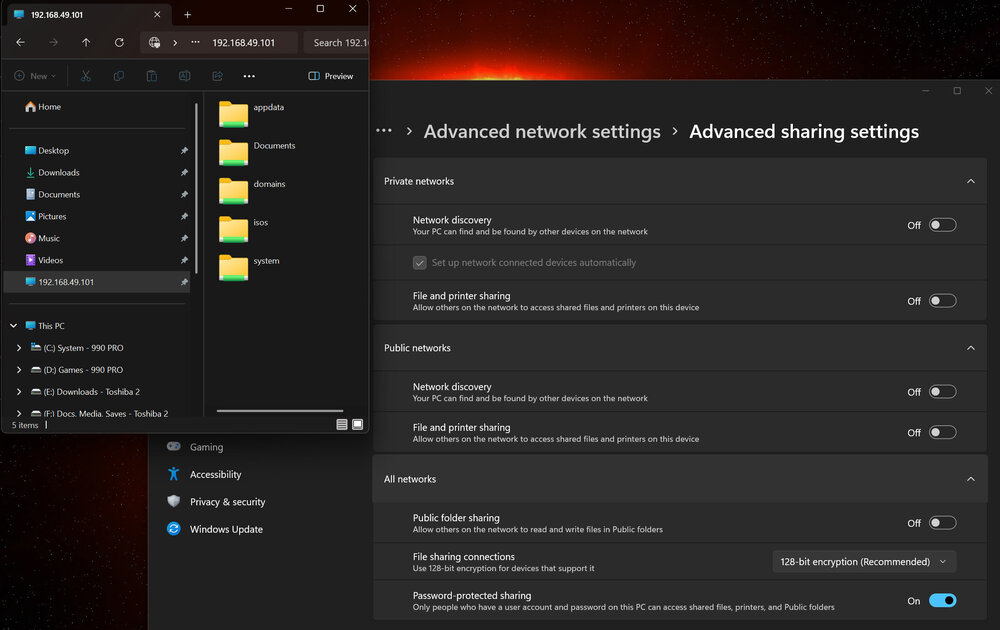
Well I've managed to get the shares visible now. I still get the banner when on the explorer > network location, but if I click on the desktop shortcut or the pinned quick access item I can see the shares. In case it helps anybody: To get it to work I had to: -Enable all file and printer sharing rules in my firewall (MWB windows firewall control) - some of them were disabled -Set network properties to private under settings > network & internet > properties -Start unraid array -Create the user in unraid and set password -Add the IP address of the server, and set the username and password the same as the unraid user (in credential manager > windows credentials > add new credential) -Right click on desktop > new shortcut > \\IP of server > name: tower -Right click on tower desktop icon > pin to quick access (some reason it shows it as the IP rather than tower, but that'll do) I didn't need to: -Turn on network discovery or file & printer sharing under settings > network & internet > advanced network settings > advanced sharing settings -Change any windows services -Add SMB 1.0/CIFS under turn windows features on/off -Change any registry or group policy items If I start my array, I can now see the shares via one of the links, even though network discovery / file & printer settings are off. Not sure if this is expected behavior but it's working.
-
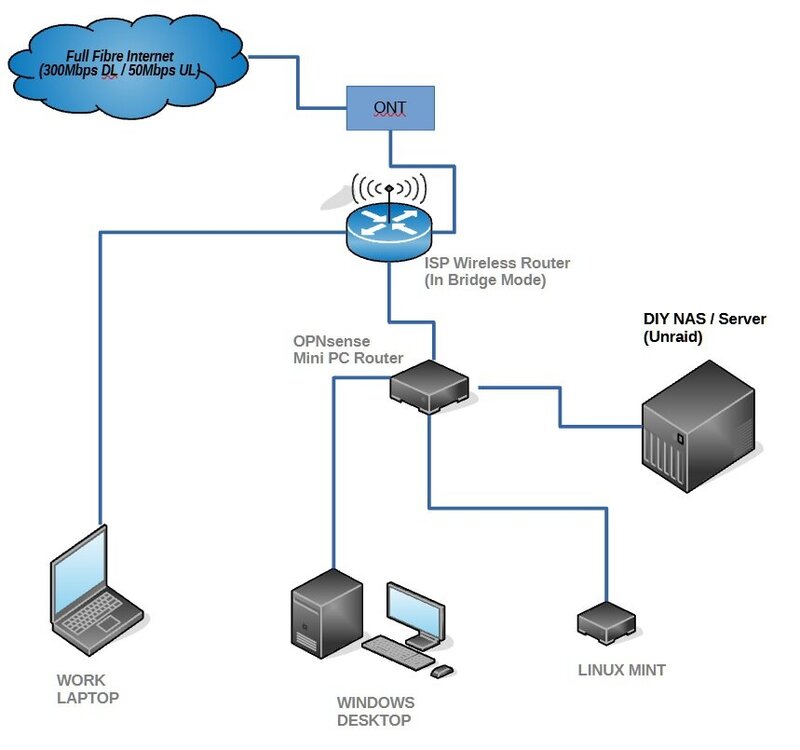
Yes I already checked. It is set to Private. Would it make any difference if I'm connected to a VPN? Another thing to note is that I'm connecting both the windows PC and server PC directly to my router which is running OPNsense router firmware. I don't have a network switch (yet) so I've bridged the three LAN ports in the OPNsense GUI to act as a switch in accordance with the OPNsense documentation. I don't see this to be a problem though as I can see the DHCP lease for both PC and server and can access the Unraid web GUI. I think that JorgeB is correct that it's a windows configuration issue.
-
Enable SMB is set to Yes (workgroup) Under user shares the SMB column is set to private for each share. The next column named NFS all have a minus (-) symbol for each share.
-
Did you mean the second attachment titled "An Alternative Method to Network Neighborhood to Add Unraid Server(s) to Windows File Explorer/Manager" ? I followed that and created and new shortcut on my desktop using the IP as the address and pinned it to quick access. If I click on it, the results pane shows "This folder is empty" Yes WSD is enabled but netbios isn't. Thanks for your help on this so far guys, I appreciate it.
-
If I type the IP it takes me to the web GUI login page. If I type \\tower it comes up with a dialog saying it can't access - check the spelling etc
-
UPDATE: I have also tried the approach of disabling SMB signing and guest fallback protection as documented in the link in the other linked thread: https://techcommunity.microsoft.com/blog/filecab/accessing-a-third-party-nas-with-smb-in-windows-11-24h2-may-fail/4154300 Unfortunately this didn't work either - I'm still getting the same pesky banner in explorer "Network discovery is turned off. Network computers and devices are not visible. Click to change..." and every time I enable it, it reverts straight back to off. I've never seen anything (i.e tower) under network except for the banner. Could this be anything to do with the fact that I'm currently using the trial of Unraid? And should I be accessing via SMB or WS-Discovery? In unraid SMB settings I have enable netbios set to no, and enable WSD set to yes.
-
No Unraid doesn't like spaces in the user name. Sorry to ask, but could you expand on exactly what I have to do? Do you mean create a new windows user or new unraid user? In credential manger I have options for web credentials and windows credentials. I assume it would be add a windows credential under windows credentials? This wants a network address, username and password. What would I enter for these? Sorry if this is dumb! EDIT: I've made an assumption that you meant create an unraid user (with no spaces) and set a password. I've then added a new windows credential and given network address of tower, and the username and password of the unraid user. However after doing this, I still get the "Network discovery is turned off. Network computers and devices are not visible. Click to change..." banner in explorer. Please let me know if I've missed the point of your suggestion.
-
Thanks for replying. I'd like to use with signing enabled if possible. I use a local account in windows and my account name is in CAPS with a space in it. Do I create my user in unraid as the same name in lower case with no space? And can the user password in Unraid be anything or should it match the sign in password for the windows user? Thanks
-
Hi All, I'm new to Unraid and I'm trying to see and access my Unraid server in explorer. When I go to explorer > network, I get a banner pop up which says "Network discovery is turned off. Network computers and devices are not visible. Click to change..." When I do that and enable the settings for network discovery and file and printer sharing under network & sharing centre, the settings immediately revert to off, and the banner just reappears. I've tried the following: - Enabled SMB 1.0/CIFS File Sharing Support under "Turn windows features on or off" - Set the following services to automatic > DHCP Client / Function Discovery Provider Host / Function Discovery Resource Publication / SSDP Discovery / UPnP Device Host - Checked that workgroup is matched between Unraid and windows (both set to WORKGROUP) - Set up my shares and set them to export > yes - Tried changing some registry entries that I've seen suggested. After trying these things, I still cannot see anything under network other than the banner which just keeps reappearing. I can access the Unraid web GUI by typing it's IP into the browser. What else can I try to get network discovery and file and printer sharing settings to stick, and to see the server/shares in explorer>network? It seems many people have trouble with this, is it even worth it? If not, what is the best alternative approach to see and access files on the server? Many Thanks

-
I decided to order 2 of these so I'll have 2.5GBe ports for all of the LAN side of the OPNsense router. Now just got to figure out what drives I need.
-
Hi All, I'm about to build my first DIY NAS / server, which initially will be first and foremost a NAS, but in time I will probably also want to run a media server (i.e plex), VM's, Docker containers, home security etc. Not very clued up so far on my options, but just trying to purchase the (best or correct) hardware for my needs before starting the build. I have attached my basic network diagram. I'm trying to figure out how I can get the best transfer speeds possible based on the limitations of my existing hardware. ------ My Mini PC OPNsense router has 2.5gB ethernet ports (1 WAN, 3 LAN). Plan is to connect the NAS/Server to the spare LAN port. The motherboard I'm planning to use in the NAS build has 1gb ethernet port. The windows desktop has 2.5gb ethernet port on the motherboard. The Linux box has 1gb ethernet port. Question I have is, does it make sense to change the linux box for one with 2.5gb port, and install a 2.5gb PCIe card in the NAS so I'm running everything on 2.5gb ports, so transfers on the LAN side are faster? ------ For drives, I currently have 3x 4TB HDD's, I plan to buy more drives to extend my storage to 20-24TB usable space. I think I also need at least one parity drive which is the largest? Does this depend on what type of RAID configuration I choose? Could I do something like this (and would it be suitable / recommended)? (4) + (4) + (4) + 4 + 4 + 6(P) or (4) + (4) + (4) + 6 + 6 + 6(P) What type of RAID configuration would these be, and are there better options available for at least 20TB of usable space within the 6 drive limit of the starter license ? ------ And lastly, Based on the limitations of my existing hardware, does it make sense to use a cache drive? I already have a PCIe 3.0 500GB Samsung 970 EVO NVMe, and the motherboard going in the NAS has 2x M.2 slots, one is PCIe 3.0 and the other is PCIe 2.0. Does this NVMe I have sound suitable if used in the PCIe 3.0 slot to get the best transfer speeds based on everything else? Hopefully with some guidance, I can purchase the rest of the components for the rig to get started with the Unraid installation and configuration. Many Thanks, Paul