





Qui
Members
-
Joined
-
Last visited
-
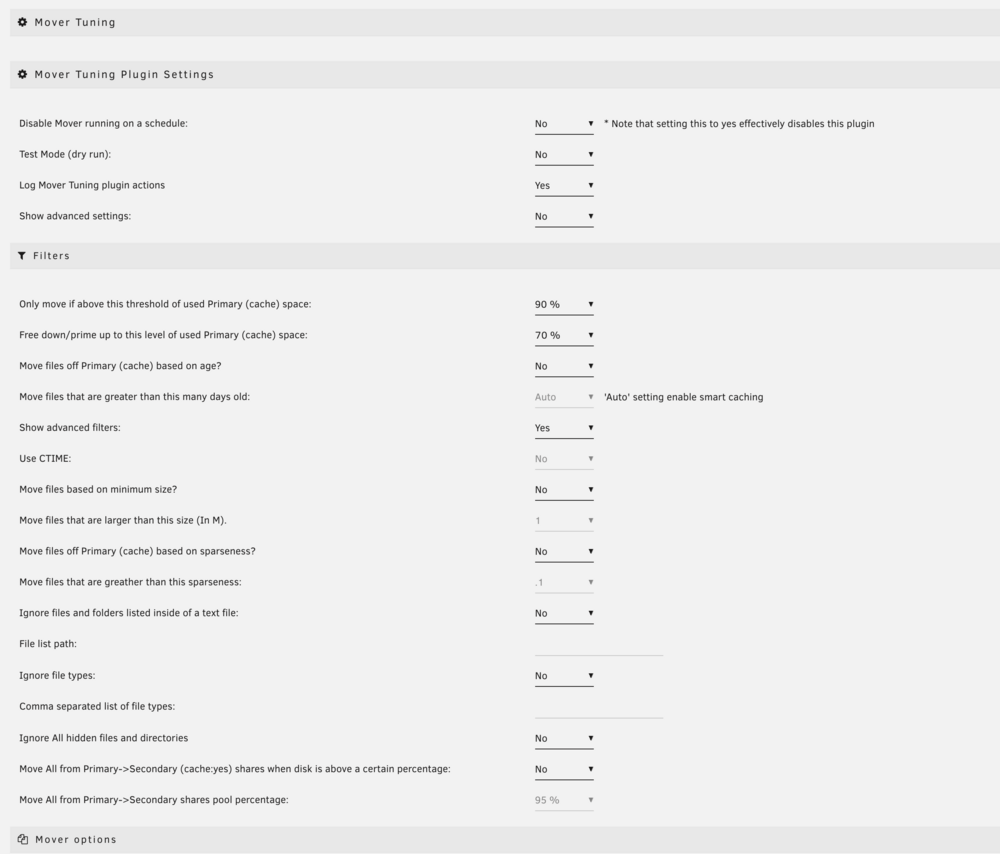
Ah okay ich schätze wie bei dir im Screenshot. Also im Share NICHT überschreiben und in General dann sowas:

-
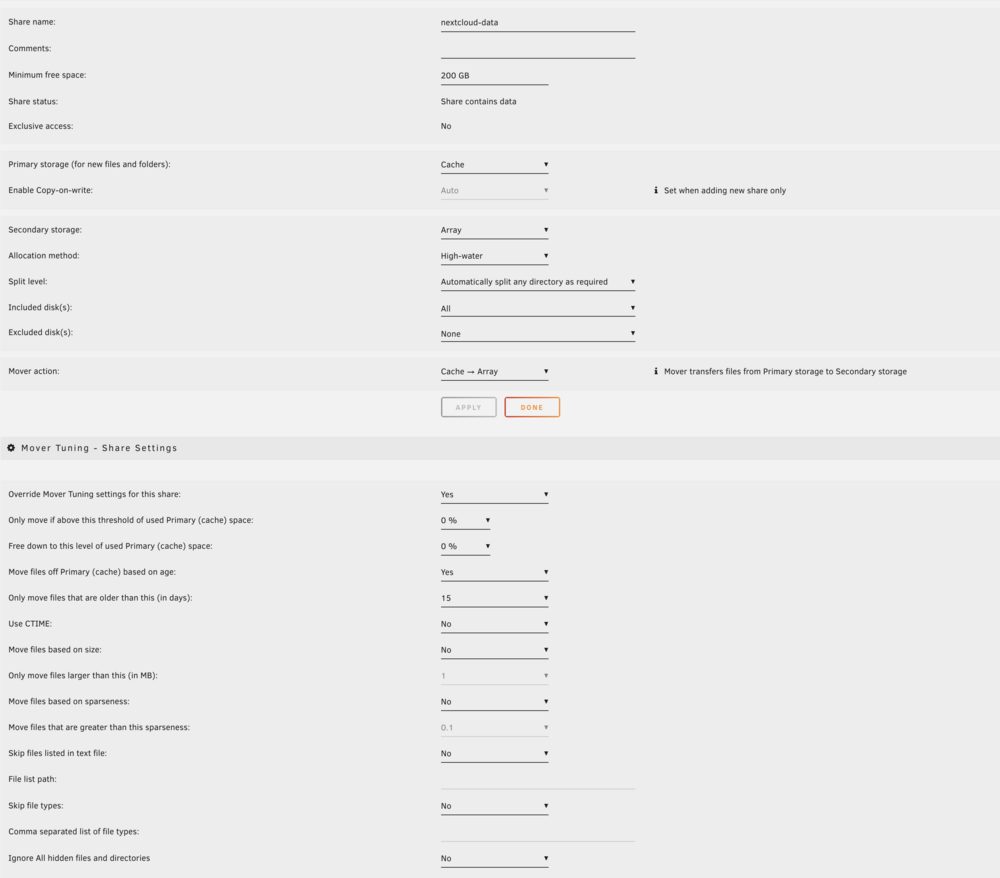
Wie würde ich einstellen: Verschieb Dateien älter als > 15Tage Oder wenn Primary >90% belegt ist ? Interessanterweise kann ich im Nextcloud share nicht einstellen, auf wie viel Prozent er "free downen" soll: Es gibt nur 0% zur Auswahl

-
Ok ich habe jetzt folgendes eingestellt: Generell: Die shares: Und speziell für nextcloud: Ich interpretiere das jetzt so Verschieb nur Dateien älter als > 15Tage (egal wie voll der Primary ist)

-
Und "Only move if above threshold" verstehe ich als verschiebe nur dann vom Primary weg, wenn Primary soundso voll ist. Aber zurückschieben kann er immer außer es ist >95%
-
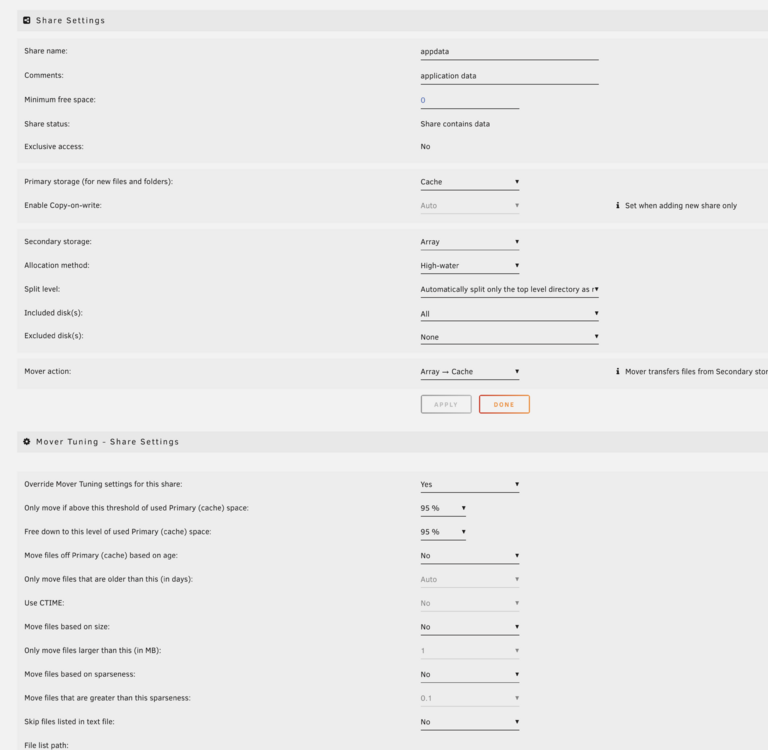
Ich versteh halt nicht warum er überhaupt appdata anfasst, wenn die Mover action NUR das schieben auf den Cache vorgibt und somit gar nicht die möglichkeit offen lässt dass es auf das array verschoben wird
-
Kann mir jemand bitte das Mover Tuning plugin erklären? Ich hab das jetzt removed + den appdata share auf Primary Cache Secondary Array Mover action Array -> Cache gestellt und jetzt moved er tatsächlich zurück. Warum macht das plugin so komische dinge?
-
Ja das probier ich gerade. Ich hoffe dass er das was jetzt auf dem Array ist auch wieder zurückschiebt. Meine Postgres hat sich nun auch beschwert: 2024-12-07 18:02:58.167 PST [1] LOG: could not open file "postmaster.pid": No such file or directory 2024-12-07 18:02:58.167 PST [1] LOG: performing immediate shutdown because data directory lock file is invalid 2024-12-07 18:02:58.167 PST [1] LOG: received immediate shutdown request 2024-12-07 18:02:58.167 PST [1] LOG: could not open file "postmaster.pid": No such file or directory 2024-12-07 18:02:58.178 PST [4555] ERROR: could not open file "base/19313/1259": No such file or directory 2024-12-07 18:02:58.209 PST [1] LOG: database system is shut down initdb: error: directory "/var/lib/postgresql/data" exists but is not empty initdb: hint: If you want to create a new database system, either remove or empty the directory "/var/lib/postgresql/data" or run initdb with an argument other than "/var/lib/postgresql/data". initdb: error: directory "/var/lib/postgresql/data" exists but is not empty initdb: hint: If you want to create a new database system, either remove or empty the directory "/var/lib/postgresql/data" or run initdb with an argument other than "/var/lib/postgresql/data". The files belonging to this database system will be owned by user "postgres". This user must also own the server process. The database cluster will be initialized with locale "en_US.utf8
-
Es war noch genügend frei im Cache. >50%
-
Komischerweise schiebt er jetzt auch appdata auf das array obwohl er das gar nicht soll. Dadurch ist gerade Nextcloud am brechen.
-
Danke schonmal. so hab ich das mir auch vorgestellt. ich frag mich nur ob ich dann für Nextcloud noch irgendwelche indexing Befehle machen muss oder file Berechtigungen oder so
-
Ahhhh ok! kann ich dann einfach das data dir in den neuen Share verschieben oder ist das problematisch? also wie mach ich das sinnvoll
-
Ja also die NC Daten sind ganz normal in appdata auf dem Cache. (Pool / Nvme) aber ich möchte dass die Nextcloud Dateien halt mit der Zeit ausgelagert werden dass ich den Speicher von den HDDs nutzen kann
-
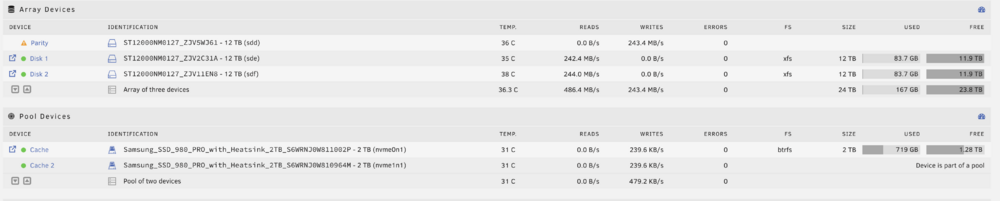
Hallo zusammen! Ich habe ein paar Fragen zu Array und Pool und hoffe ihr könnt mir weiterhelfen. Folgende Konfiguration habe ich: Aktuell ist alles im Pool, da ich erst neu die HDDs dazu habe. Mein Ziel mit dem Kauf der HDDs war, die als long term Speicherort für meine Clouddaten zu haben. Auf dem Pool laufen einige Docker Container, mir geht es aber vor allem um Nextcloud. Ich hätte gern, dass die Nextcloud Daten, wenn sie länger nicht gebraucht werden, auf das Array verschoben werden. Wie konfiguriere ich das? Ich versteh das nicht ganz... Danke schonmal
-
how can i fix "docker not found" in the pipeline?
-
Tatsächlich gibt es das nicht!! 4.5 Thermal & Fan (Available on X11SCA-W) drüber steht das! ich habe ein anderes mainboard. auch kann man im Screenshot von mir sehen dass ich die Kategorie im BIOS gar nicht habe?


