datarepos
Members
-
Joined
-
Last visited
Everything posted by datarepos
-
Thank you for you hard work @Schubi05 With 5.0.0 The Power LED on the front of my DXP-480T Plus is glowing white continuously. There isn't a way to turn it off or change its color in the plugin, is there? Or am I just not finding it? The switch for me has no function or LED change.

-
Hi, It's not yet on the list of supported models, but I installed the new plugin on my DXP-480T Plus as a test. However, the LED only flashes white with this plugin. After “downgrading” to the LED plugin, the LED lights up continuously again as it should. Do you plan to support the DXP again? Best datarepos
-
Hi Schubi05, Thank you for this quick update. After disabling the script and installing version 0.23.0, the LED stays on continuously after a reboot and no longer flashes. The color is now orange; previously, it was always white. Best datarepos
-
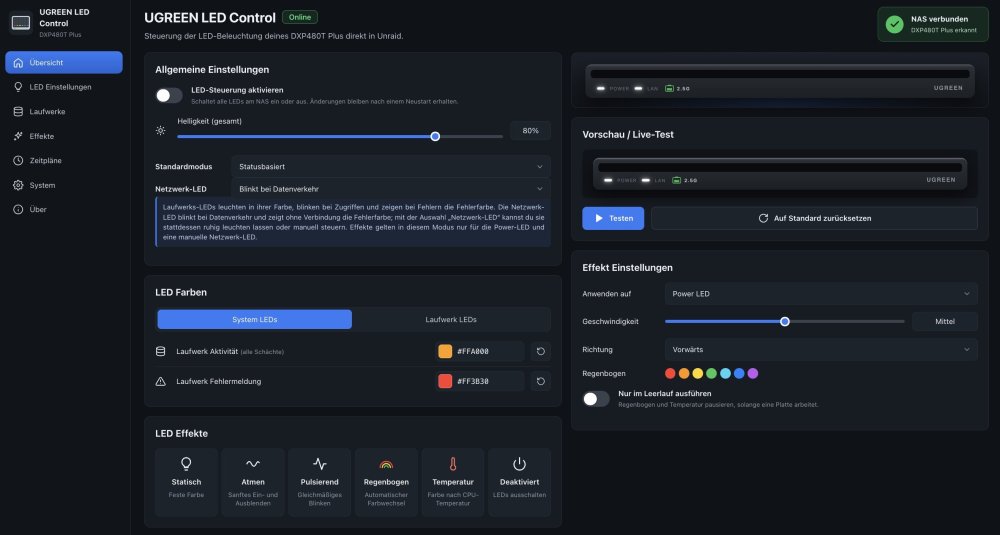
Hi, here ist my terminal output: # /usr/local/emhttp/plugins/ugreen-led-control/backend/ugreen-led-ctl smbus /usr/local/emhttp/plugins/ugreen-led-control/backend/ugreen-led-i2c probe i2cdetect -l i2cdetect -y $(i2cdetect -l | grep "SMBus I801" | grep -Po "i2c-\K\d+") SMBus adapter: /sys/bus/i2c/devices/i2c-0/name:SMBus I801 adapter at 0000:00:1f.4 { "address": "0x3a", "bus": "/dev/i2c-0", "leds": null } ERROR: no LED answered on /dev/i2c-0 -bash: i2cdetect: command not found -bash: i2cdetect: command not found -bash: i2cdetect: command not found The script ist configured to run at first start of array. But the blinking also does not stop when i run the script manually after everything is started. A screenshit from the plugin is attached. Many thanks for you support! Best datarepos
-
Hi, I have this startup script installed on my DXP-480T Plus on Unraid 7.4.0-RC1. It seems not to work, the LED remains in blinking status. The Plugin is installed. #!/bin/bash I2C_DEV=$(i2cdetect -l | grep "SMBus I801 adapter" | grep -Po "i2c-\d+" | cut -d'-' -f2) modprobe -v i2c-dev i2cset -y ${I2C_DEV} 0x26 0xa0 1 b # red off i2cset -y ${I2C_DEV} 0x26 0xa0 2 b # white off i2cset -y ${I2C_DEV} 0x26 0xb1 2 b # white on i2cset -y ${I2C_DEV} 0x26 0x51 0 b # slow flash off i2cset -y ${I2C_DEV} 0x26 0x50 0 b # permanently on Do you have any ideas? Thx and best datarepos
-
Das hat funktioniert! Vielen Dank 😀
-
Hi zusammen, ich habe innerhalb meines shares "vm" zwei Unterordner Windows 11 und Windows 11_clone. Sie stammen von alten VMs und sind komplett geleert. Sie lassen sich schlichtweg nicht löschen. Über die GUI passiert schlichtweg garnichts, per Shell meldet unraid "resource busy", siehe Screenshots. Was ich bereits probiert habe: VM Dienst beenden Server neu starten Ordner unmounten Komplettes Share löschen (dies scheitert an genau den beiden besagten Ordnern) Ist ein kosmetisches Problem und jetzt erstmal kein Drama, aber vielleicht hat ja jemand von Euch eine Idee dazu. ich bin für jede Hilfe dankbar. Im Log steht leider nichts dazu. LG zoidberg-diagnostics-20250120-1739.zip


-
Hi guys, as discussed, I made some tests during the last days. Unfortunately, I still can't pinpoint exactly what triggers the behavior. In any case, it seems to be independent of whether the system was simply restarted via the GUI or console, or whether it was completely switched off and is switched on again. I have already made the system logs available here. Sometimes the behavior occurs, sometimes not. In any case, I can now confirm this. If the status of the LED was off after the last system start and I then use the commands, the LED comes on immediately and lights up continuously.
-
Thank you, guys. I will do some more testing on the weekend, also with the commands….
-
Hi, this morning I did a complete shutdown of my machine. After 5 minutes, I rebooted it. The led was blinking when booting up. After boot was complete, the led went off. zoidberg-diagnostics-20241121-0701.zip

-
After the next restart the LED remained off, after the next but one it lit up again. Maybe a timing problem?
-
Push 🙂
-
Hi, diagnostics are attached. zoidberg-diagnostics-20241115-1233.zip
-
Hi there, I have a question about the UGREEN LED Plugin on my DXP-480T Plus. Everything looks good after installation. The flashing stops and the LED lights up continuously. This always lasts for a few days and restarts, then the LED simply stays off more often. Sometimes it works again after a restart, sometimes not. If I uninstall the plugin and reinstall it, everything immediately works again as it should, but only for a few days. Is there a way to narrow down the error more precisely? Thanks in advance. datarepos
-
Jetzt kann ich mich den nächsten Baustellen zuwenden....Ist schon ein gewaltiger Unterschied Syno - ugos - unraid...
-
Krass, das hat funktioniert, danke!!!
-
In der Config des "Alten" gibt es hier einen Eintrag zur Hardware. Beim "Neuen" gar nicht...
-
Ich mag keine Mischung aus Community Containern und meinen über Portainer / watchtower gemanagten. Habe z.B. für AdGuard bisher noch keine Möglichkeit gefunden, meine macvlan Konfiguration mit festen V4 / V6 Adressen über die Apps zu konfigurieren. Auch nutze ich für nahezu alle Container selbst signierte SSL Zertifikate meiner eigenen CA. Die Einbindung über die yaml Files geht mir leichter von der Hand. Bin dann einfach bei einer "Seite" geblieben....aber wer weiss. Vielleicht geht über die GUI ja auch noch mehr.
-
Ich habe jetzt mal einen zweiten Plex Server mit meinem yaml hochgezogen. Der läuft auch einwandfrei inkl hw transcoding. Ich habe absolut keine Ahnung warum...werde nun den Weg gehen, den ich eigentlich vermeiden wollte. Mediatheken neu einlesen, Konfiguration neu anlegen. Sehr ärgerlich, aber wenigstens funktioniert es jetzt. Ich möchte mich dennoch nochmal herzlich bei Euch beiden bedanken. Ihr habt hier eine ganz tolle Community und ich werde hier bestimmt noch viel unterwegs sein 😀
-
ok, unter JellyFin geht es offenbar Bei Plex ist es dieses Bild


-
OK, ich teste JellyFin Nicht wirklich, ich nutze Windows 11 für Desktop Apps ohne großarte Grafikelemente und ab und an mal einen Ubuntu Server. Ich habe die Einstellung testweise mal deaktiviert und die Kiste neu gestartet, bei Plex macht es leider keinen Unterschied.
-
Sodele, habe jetzt mit dem offiziellen Image getestet, vielen Dank Euch, leider der gleiche Effekt 🤷♂️. Zur von Dir genannten Einstellung. Die kam aus einem Beginner Tutorial zum VM Manager auf unraid. Sollte ich sie lieber deaktivieren?
-
So sieht es aktuell aus: Mit diesem Stack deploye ich, damit lief es auf dem Ugreen OS (Claim anonymisiert 🙂). services: plex: image: ghcr.io/linuxserver/plex:latest container_name: Plex hostname: plex network_mode: host mem_limit: 8g cpus: 4 cpu_shares: 1024 security_opt: - no-new-privileges:true volumes: - /mnt/zoidberg/PlexMediaServer:/config:rw - /mnt/zoidberg/media/moviez:/moviez:ro - /mnt/zoidberg/media/seriez:/seriez:ro - /mnt/zoidberg/media/concerts:/concerts:ro devices: - /dev/dri/ environment: TZ: Europe/Berlin VERSION: public PLEX_CLAIM: <zzzzzzzzzzzzzzzz> restart: always

-
Plex gibt in den Logs die Meldung aus: TPU: hardware transcoding: enabled, but no hardware decode accelerator found. In den Settings wird die Karte angezeigt.


-
OK, jetzt getestet. Plex transcodiert weiterhin nicht auf der GPU. Plex Pass ist natürlich vorhanden. Der Plex Server lief vor dem Umstieg auf unraid auch mit HW-Transcoding auf dem Ugreen OS und vorher auf meiner Synology. Dort hatte ich den Docker auch via Portainer deployed.