





JeepGuy
Members
-
Joined
-
Last visited
-
I have a Dell HBA355i that I am playing with trying to get it to work in a CWWK Q670 LGA1700 and Asrock Z790 LGA1700 motherboard with no luck. I have tried the pin B5 and B6 tape hack but both motherboards take a long time to post and neither windows or Unraid see the PCIE card. Is there any FW hack or does that not matter since I can't seem to see the PCIE card?
-
I guess I wasn't very clear. I'm already using the 8 onboard SATA ports. I have a more immediate need for 8 more SATA ports with a long term goal of 16 additional SATA ports to max out at 24 combined 3.5" spinning drives and 2.5" SATA ssd drives in my case.
-
I'm needing to expand from 8 native Sata ports to 8 more now with a future plan of another 8 more a year or 2 down the road. This is on a Z790 chipset with plans for 9-10 years of use. I'm leaning towards a 9500 series HBA board but can't decide between the 9500-8i with a 12Gbps SAS Expander or jump to 9500-16i. It seems the 16i has lower power consumption per port but I won't need 8 of them right away. 16i is more than double the 8i price. 8i consumes more power per port but I wouldn't need to hook up 12Gbps SAS Expander for a year or 2 and this combo is cheaper. Does the 12Gbps SAS Expander consume much power? First 8 drives will mostly be spinning disk with maybe a couple 2.5" sata ssd. Do I just plan for the 8 drives expansion now or should I plan for the max of 16 drives?
-
I'm starting to migrate from Windows 10 to Unraid. The MB has been quirky with W10 with some sleep/hibernation issues. Sometimes the board doesn't want to wake up even though the hard drive activity lights are on. I was testing an old Marvell 4xSata card that didn't like W10 but has no problem under Unraid. I'm also looking into testing current I5-13500T vs I5-14600K with lower PL1 and PL2 settings to mimic something between the "T" series and "standard" series. Things I don't like: doesn't appear to be any Bios updates? (link from CWWK is broken) PWM Fan control applies to all fans; no individual controllers. The WIFI A+E key slot seems to only work with WIFI cards and not Sata or Ethernet adapters. Bios can be confusing and no XMP or other memory settings. It appears 4 sticks of 32gb runs very slow (listed on website) compared to 2 sticks. Marvell 10GB ethernet card randomly disappears under windows; not sure how it will behave with unraid.
-
My motherboard was delivered last night from CWWK and I'm running some memory test right now. It does appear my T-Create 64gb ram only runs at 4800MT/s I received a manual from the Amazon seller Stonestorm. It includes basic info. https://www.dropbox.com/scl/fi/q6pf6y8pff5l9caqs2urk/StoneStorm-Q670-H670-Product-Manual.pdf?rlkey=6q867rb78xmp99luexoawv4s2&st=ug3dy20n&dl=0 Thanks for the additional information. Did you orders your board direct from CWWK?
-
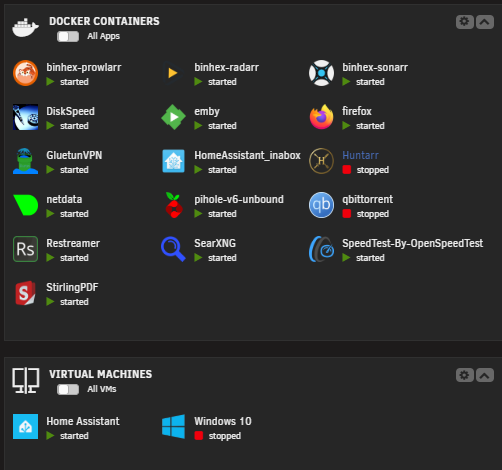
My main use is I run an Emby container and most of my media is converted to HEVC/X265. I have ran 8 4k mixed streams where only 2 devices were 4k capable. I saw that Emby was transcoding 6 of the streams and they seemed to be fine with the stock iGPU. I'm not sure if that is a proper test but I don't think I have ever used more than 3 streams in daily use. My media players were Galaxy S23, 2*shield TV, FireTV tablet, 2*PCs 1080p display, 2*FireTV on 1080p TVs. I plan to do more with Home assistant, frigate, and automated library conversion, I will also be retiring my daily windows PC and setting the image up as a VM. I do run a view dockers and I never had problems with my 13600t and 64gb ram but I decided to up the performance since I will be retiring my Windows box with Drive Bender that used to be my Emby server. I'm also going to be making a backup Unraid server out of my old Antec 900 case with a new q670 MB and the 13600t and 65gb ram. I haven't found anyone using the MB yet so that will be interesting. CWWK 12-bay NAS MB
-
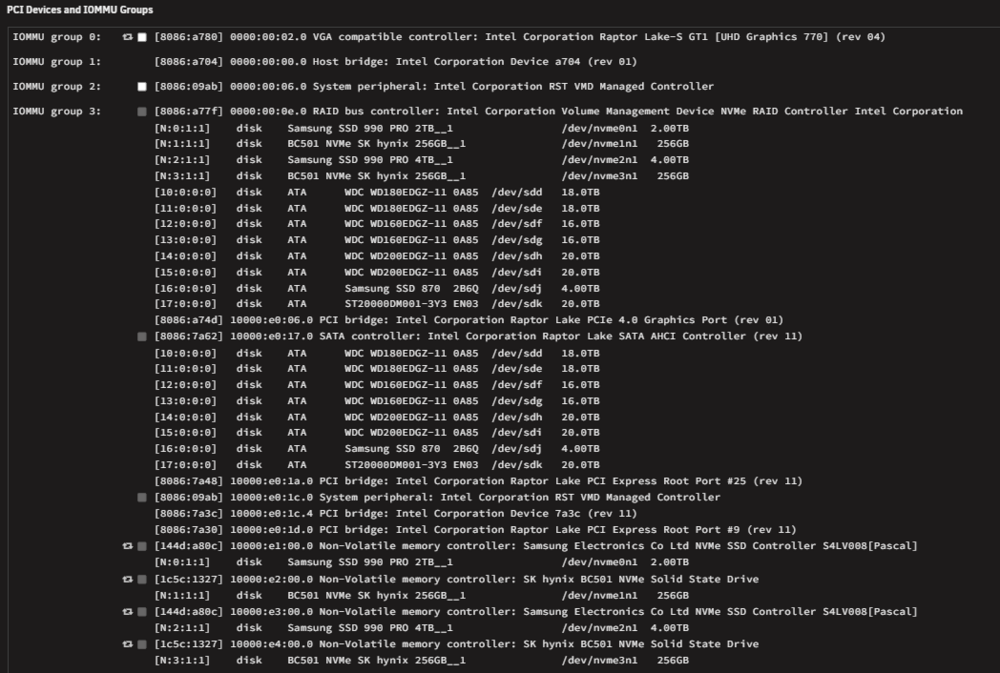
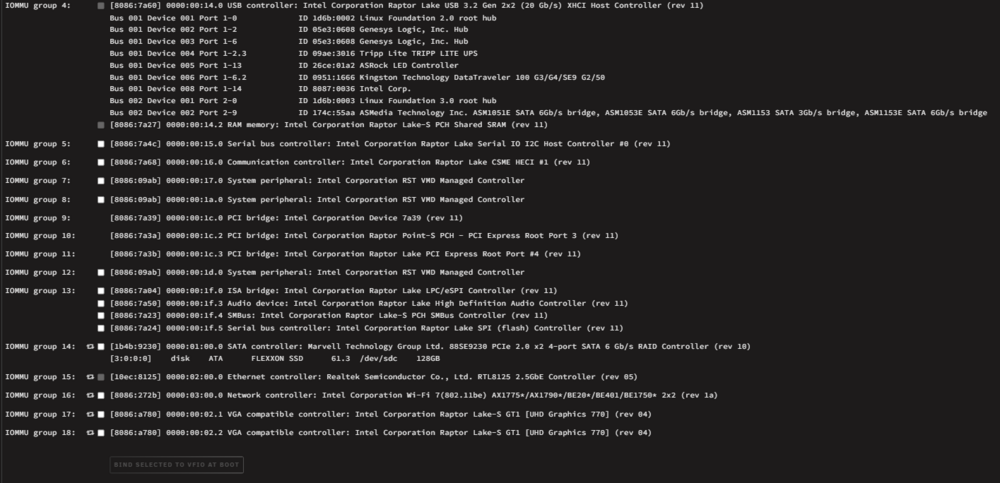
I'm not that advanced with Unraid yet but I do have the ASRock z790 Pro RS WiFi with 14600k. I haven't installed my Arc 310 Eco GPU yet. Is that what you are looking for in System Devices?
-
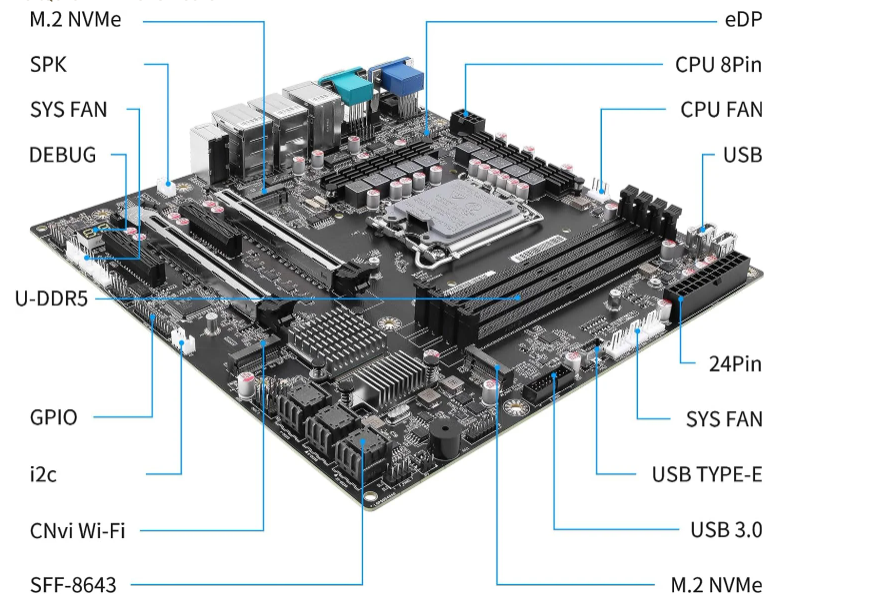
Here is a link. I haven't heard much about it yet. cwwkCWWK Q670 12-Bay NAS M-ATX Motherboard(LGA1700, 12th/13th...CWWK is committed to developing a reliable, secure, and customizable firewall or VPN appliance for network professionals and enthusiasts. Sata 1-8 are on q670 chipset 9-12 use JMB585 chip I just placed the order direct from CWWK to save a few bucks. So I guess it will be a couple weeks before it arrives. This will be a backup and test server. I haven't found much info about this board yet. I have seen it on eBay and on Amazon under the StoneStorm brand. I haven't found much on Bios or Manual yet. I've been reading up on the 8*sata white MB. I still need to select a 10gbe ethernet card for this new server and my main Unraid server. Sata 1-8 are on q670 chipset 9-12 use JMB585 chip CWWK Q670 12-Bay NAS M-ATX Motherboard(LGA1700, 12th/13th/14th Gen. Desktop Processor), 4* U-DIMM DDR5 MAX 128GB, 2* M.2 NVMe, 12* SATA 3.0, 1* Type-C 20Gbps, 6* USB, DP/HDMI/VGA/eDP, COM PortQ670 M-ATX+3x SFF8643 Parts I already have: CWWK MB replacing: Z97 MB with I7-4700t and 32gb DDR3 ram running Windows 10. I5-13600t with Dark Rock 4 CPU cooler Sparkle A310 Eco (Emby transcoding or maybe for security cameras) 64gb DDR5 (2x32gb) Antec 900 case with 3*Rosewill 4-bay hot swap cages 10 various drives 4-14TB size (72tb in windows pool) 2* 1tb NVME ssd 750 Watt power supply


