





halloleo
Members
-
Joined
-
Last visited
-
Currently
Viewing Topic: Unassigned Devices Preclear - a utility to preclear disks before adding them to the array
Everything posted by halloleo
-
Another question about the Preclear operation: Can I run the normal script for two disks at the same time? Or do I need the docker setup for it?
-
Thanks. Thanks. Good to know. Will do “Clear Disk”. I was asking because Clear Disk’s description “The disk is cleared and the Unraid signature is written to the disk. This will create an empty partition on the disk.“ didn’t reveal clearly to me that it tests the disk…
-
I do not understand which of these options does the test-and-clear operation which gives users "a sense of confidence with pre-testing their disks"?
-
I understand now. This is crucial. Thanks.
-
Thanks for this. Reading through the first posts right now. Very helpful. I was aware of the idea of Support Threads and also scared of them because they have sooo many (for me as a newby) unrelated replies. But I now I can see: The first post is always somewhat the doco of the plugin. 🙃
-
So, I can add slots (and with that hard drives) after I use a smaller set up for a while? Or should set the number of slots to the number of bays in my NAS?
-
I have decided to Preclear the hard drives before putting them in an array. So I installed the Unassigned Devices and the Unassigned Devices Preclear plugins. In Unassigned Devices Preclear I only get the message "There are no disks that can be precleared. - A disk must be cleared of all partitions before it can be precleared. You can use Unassigned Devices to clear the disk" Then I looked in Unassigned Devices: Here I see only that I can mount the drives but no way to clear them. (See attached screenshot.)

-
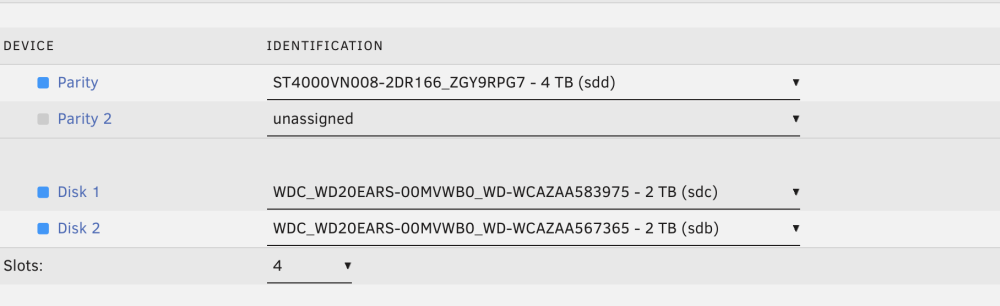
I try to create my first (test) array. 😃 (See attached.) If I want a 1-parity array, do I just leave the "Parity 2" slot unassigned? Also, If I want my array to consist of 3 disks (1 parity +2 data), I need to choose 4 slots (in order to leave one slot unassigned for Parity 2, right? Finally, what is the slot setting for in any case? Why should I set the number of slots higher than hard drives I have? (And that number can the system detect...) Many thanks for any help - and your patience with me!
-
Thanks for your detailed response! To the idea of multiple user shares: Can they write to the same disks? E.g. let’s say, I have a DMG user share with 800GB limit and it has filled up a disk A to a left over of 500GB. Can another “normal” user share with a 50GB limit still continue to fill up this physical disk A? When a copy fails, can I “just try again” and it might work because Unraid chooses another disk? Also, is there maybe a “compactor” service/plugin available which (overnight?) reorganises the files on the various disks to have at the end one disk with the most free space? Does this make any sense?
-
I am setting up Unraid with 8 older smaller drives (2,3 & 4TB HDDs) and I am confused about the Minimum Free Space setting. 1. Some of the files I want to store are "cold" historic archives of complete bootable macOS machines. These are DMG files around normally 300GB to 700 GB in size. (One or two are up to 1.5TB.) When I go with the recommendation in the doco to "set this value to twice the size of your largest file", I have to set it to 3TB - which sounds absurd. 2. Also what does this setting mean for smaller files? Let's say I set it to ("only") 500GB. When I have filled up a 2 TB drive to 1.8TB, does Unraid still squeezes all the many small files I have (photos, etc) in the left over space? Thanks for any clarifications!
-
I setup Unraid with some older smaller drives (2,3 & 4TB HDDs), before using them in my Unraid, I want to check the drives. Is running the long self test (smartctl -t long) enough? Or is there a plugin recommended which does more thorough tests? Thanks for any advice!
-
Now I can! Very strangely and a day later it works now. 😄 Thanks for the great plugin!
-
I realised the basic question about best practice ("What people do") is more something for reddit than for here. - So I asked the same thing on reddit: https://www.reddit.com/r/unRAID/comments/1xt2ec1/in_which_bay_should_i_put_which_drive/
-
For each I do a long SMART self-test via Unraid's GUI. Sufficient?
-
Cool. But is there some common practice?
-
I see. So it is written to the USB and should survive a reboot, right?
-
Good explanation. thanks. Just thought of it as a good practice to having a 2nd account with less power from which I than can elevate for things I do need to do as root. No, no, not at all. I is just a home server. But I hope there is a way to access it from the outside via VPN/Tailscale or similar...
-
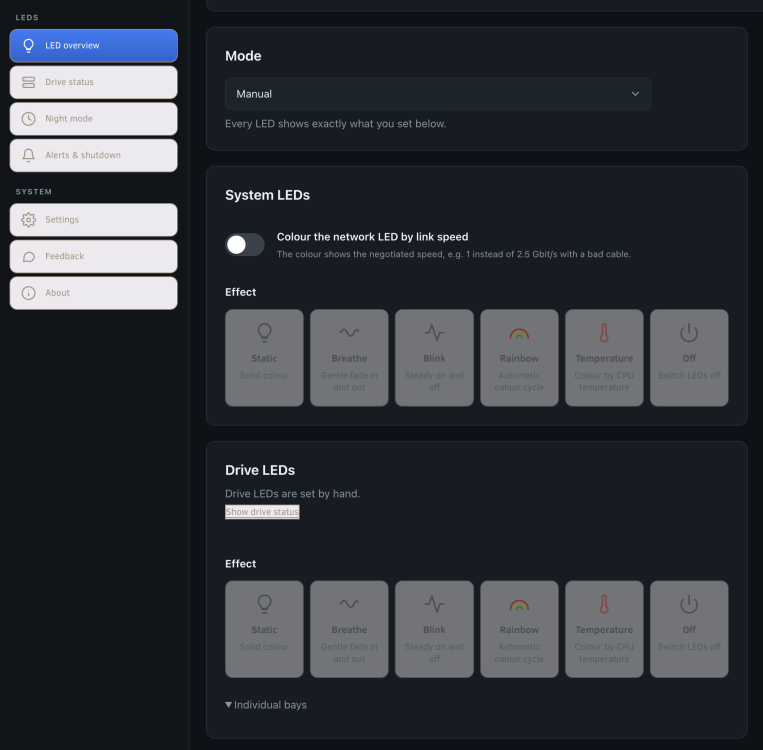
Hi there I am trying the plugin on the new UGREEN DXP 8800 Ultra. It seems to install fine. Here the install output: plugin: installing: ugreen-nas-control.plg Executing hook script: pre_plugin_checks plugin: downloading: ugreen-nas-control.plg ... done plugin: downloading: ugreen-nas-control-5.6.0.tar.xz ... done [UGREEN NAS Control] Installing 5.6.0 on kernel 6.18.58-Unraid [UGREEN NAS Control] WARNING: No supported fan controller found; only system info and temperatures are available. [UGREEN NAS Control] Installation complete. plugin: ugreen-nas-control.plg installed Executing hook script: post_plugin_checksBut when i switch manual LED mode on the LEDS of the bays are still rolling over in a loop. I cannot not click "All LEDS off". It seems to be (with all other optiosn) grayed out.
-
I have not yet set up an array to store data. However I have installed a pluginfor my UGREEN NAS - and I am wondering: Where does Unraid stores the plugin settings and other settings if there is no storage yet? Or is everything l(plugin, etc) lost on restart? Many thanks for any pointers!
-
I just setup a shiny new 8-bay NAS with HD bays 1 - 8. I am planning to populate it with five or sic old 2, 3 and 4 TB drives. Obviously one 4TB one neds to be the parity. Any advise where in the 8bays to palce which? Is ot more common to place the parity at the beginning (bay 1) or separated from the others at the very end?
-
Thanks heaps for this! (I tried to add a like to your answer, but got a message that "there was a problem...") Your advise makes sense. Just to confirm: If I want access to the machine via ssh, i should do this always through root, right?
-
I have just setup UnRAID 7.3.4 on my UGREN NAS. I am intending to use the system for storage, VMs and with SSH access. What additional users should I create? At the moment I ssh in as root but I guess that is not ideal... Also, are there other users I should set up now (e.g. for storage/share access, etc)? Thanks a lot for any pointers!
-
Thanks @JorgeB. I'm doing the MemTest right now. Might do stress-ng from a Linux USB afterwards. Then the smartctl as I add discs.
-
Thanks for the info. I have managed to get a trial license. Now I have to gather my harddrives and create arrays! 😄
-
I have just successfully setup UnRAID on my brand new UGREEN NAS. 😃 I would like to check that the new hardware works ok. Is theer under UnRAID atest program availble taht check RAM, CPU, system clock, etc? Many thanks for any pointers!


