





famousjaxx
Members
-
Joined
-
Last visited
Everything posted by famousjaxx
-
Thanks, how can I increase the image size?
-
Unraid version 6.12.13 Hi all, I need some assistance understanding the error in the attached picture that I experience when attempting to update my Nextcloud Linuxserver container. The error is "failed to register layer, no space left on device." Attached is the output of df -h on my Unraid server. I note the /dev/loop2 filesystem being near to full but I'm not sure what this is nor how it would relate to this docker container.
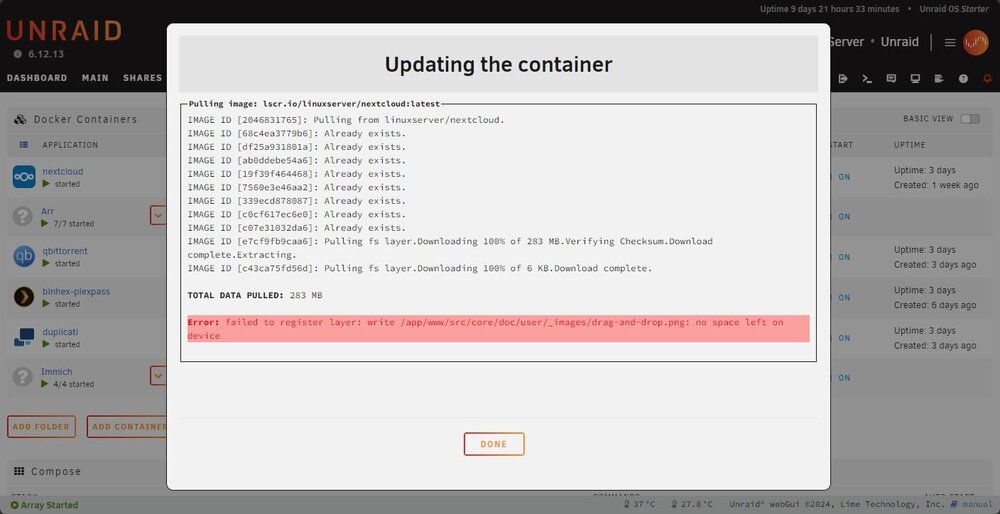
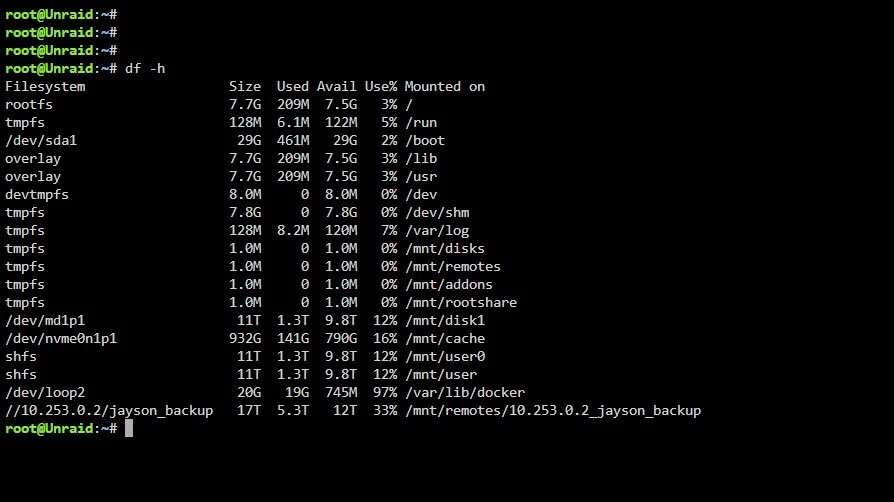
-
Thanks for the reply - yeah that appears to fix it immediately. I get that we might frown on such a configuration but there's no reason this shouldn't work if you know what you're doing and set the proper gateways and route metrics etc. I guess the alternate solution is to put both NICs on separate VLANs to achieve the same solution.
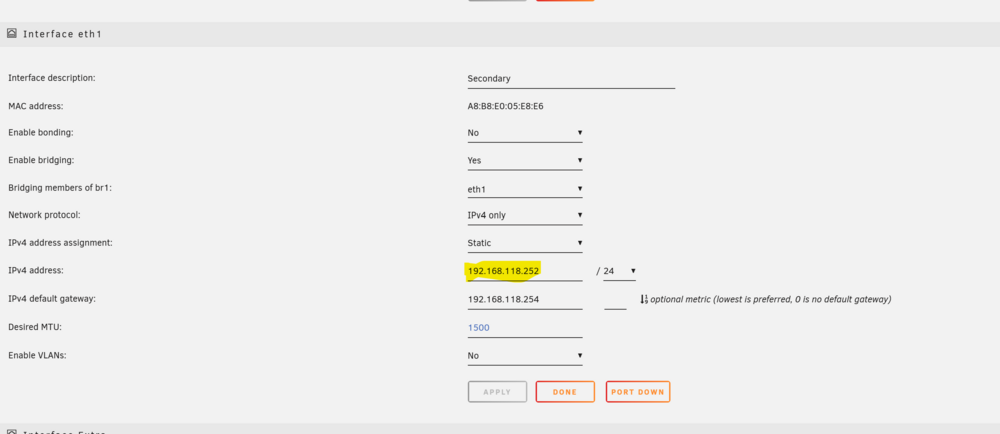
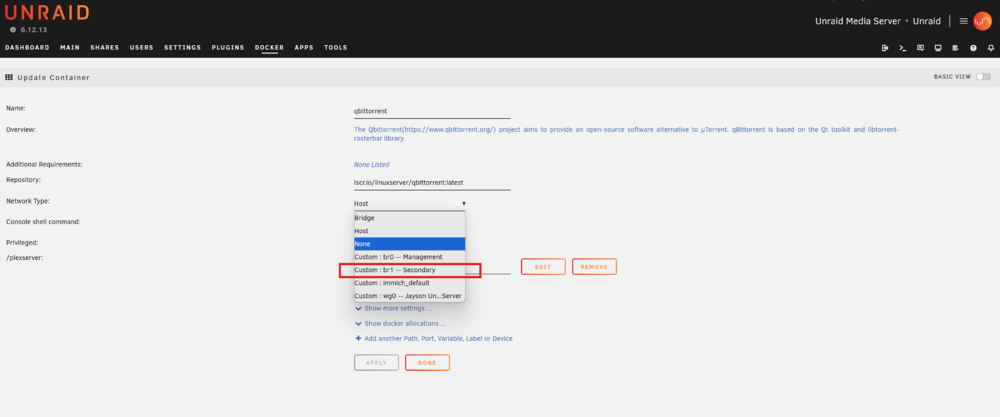
-
Shameful bump
-
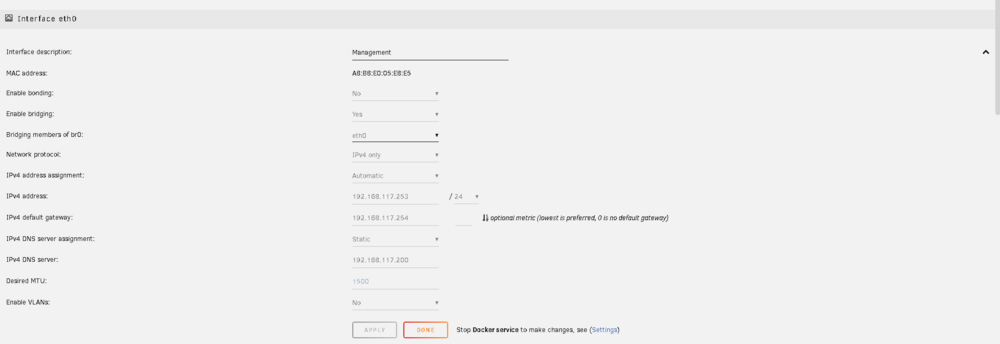
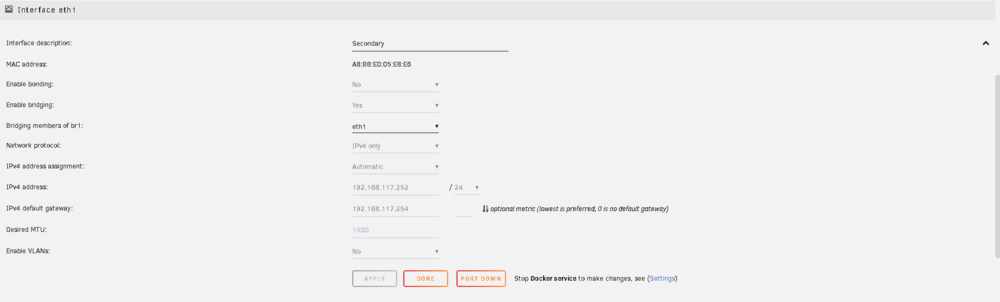
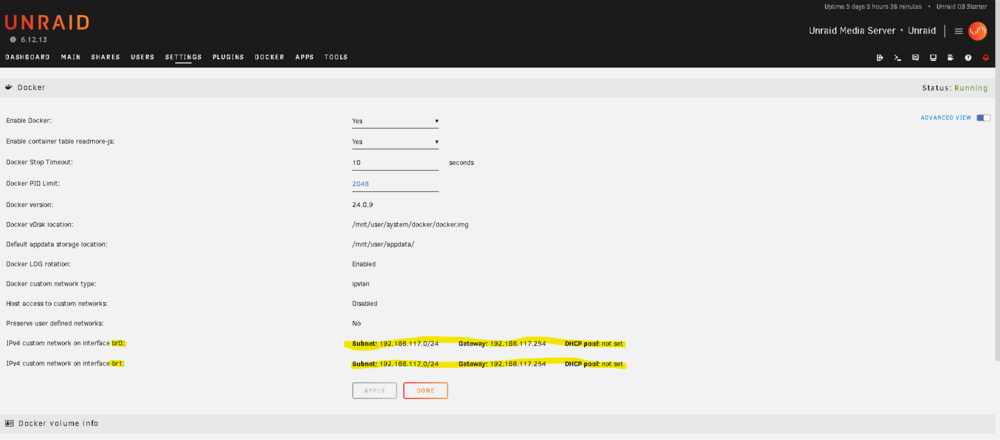
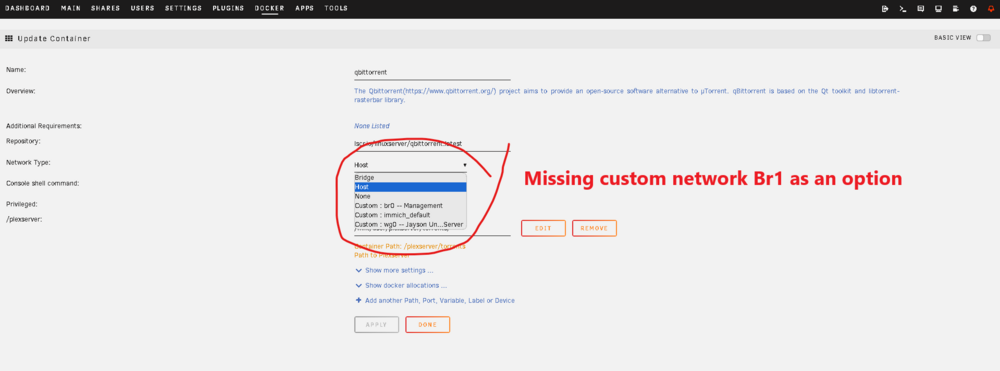
G'day all, For my own reasons, I have two NICs on my Unraid server connected to my home network. These are not combined into any sort of etherchannel and by intention both get separate IP addresses from my DHCP server on the same LAN subnet, which is 192.168.117.X Under Unraid networking settings, I've configured ETH0 interface to DHCP and assigned it as a member of bridging interface Br0. Furthermore, I've configured ETH1 interface to DHCP and assigned it as a member of bridging interface Br1. So far so good. They both receive IPs ending in .253 and .252 respectively. My issue is that when I go to create a docker app and select the network to attach to the container, my only option is bridging interface Br0. Must be missing something obvious here I feel. Anyone know a trick to get the Br1 interface to show as an option? Thanks! Jayson
-
bmartino1, you absolute legend. This is exactly what I need and will suit my purpose fine. I'll just have the script you supplied execute at array start and every hour after that to ensure the mount point sticks. I'm sorry I still don't understand what advantage Rclone offered over this solution. I get your point that Duplicati doesn't support backing up to SMB shares out of the box and so we need to mount the remote SMB share to a local folder that Duplicati can use as a backup destination. It appears to me we can use the inbuilt 'mount' command as demonstrated in your script above to accomplish this. So what's the benefit of using Rclone? Is it just an alternative way to mounting SMB shares locally? Is there any advantage to using Rclone for this purpose over the built in 'mount' command?
-
Question: why would I need to use Rclone if I can mount the remote SMB perfectly fine using the command above natively?
-
Looks like I can get it to mount with the below command: mount -t cifs -o username="username",password="password" //[remote_IP]/[remote_share] /mnt/remote_backup_folder Now I'm looking for a script that can check whether the share is mounted already and if not then re-run the above command to mount it. I've installed the User Scripts plugin but am googling for now.
-
Thanks all for the fantastic advice! I will look into RClone and an associated startup script to map each others SMB share locally. Any advice on installing this would be amazing but I'm about to google-educate myself regardless.
-
Unraid v6.12.13 Hi All - wanted to put this to the community to get recommendations for the best and easiest way to achieve the outcome I want. My friend and I have both recently spun up our own Unraid servers at our respective houses. Part of the appeal for moving to Unraid was to become "self hosted" and have a solid platform to run the Arrs suite on so we could cancel our subscriptions to the various streaming services and save money. We've since followed the trend and migrated to Immach to replace Google Photos and NextCloud to replace OneDrive. Now we're reviewing our backup strategy and we know any good backup solution follows the 3-2-1 methodology. When considering our options for the 'offsite backup' part, and in keeping with the self hosted theme we've been going for, we had the idea to setup an SMB share on each others Unraid server that the other could do a once a week backup too. The connectivity to each others server was handled very easily thanks to the server-to-server built in Wireguard VPN, but the backup to SMB share has me scratching my head. It should be simple in theory, but because of the following considerations it's become unexpectedly difficult. Considerations: - Each server should have full RW access to a dedicated share on the remote server setup for this purpose - Each servers should be unable to read data inside any additional shares the remote server is hosting - The backed up data should be encrypted so that the owner of each server cannot (without great difficulty) read the contents of the others backup data To meet those considerations, we each created the other a local SMB share with a user account for the other person set with full RW access to the share. I came across Duplicati after some research which supports client side encryption - great! The initial strategy was to enable the FTP service and have the other person use Duplicati to backup to the share via FTP. I soon found unfortunately that the FTP functionality built into Unraid was super basic and that granting a user account FTP access gave them permission to traverse the whole server. This is a deal breaker as while we don't suspect the other of malicious intent, we do want to follow best practices and minimise our attack surface by not giving the other person more access than is needed. Then we thought to leverage the SMB protocol and its permissions by backing up directly to the SMB share and inputting the required user credentials. Unfortunately Duplicati doesn't seem to support backing up to an SMB share and I haven't had any luck finding a backup app that does. So I'm putting it to the communicaty - given our setup and considerations, how would you achieve what we're trying to do? Thanks very much in advance


