





ThiccAdmin
Members
-
Joined
-
Last visited
Everything posted by ThiccAdmin
-
I appreciate the details! I'm new to server hosting and game hosting, so i am trying to understand where the fault lies and the correct fixes are. So basically this issue could persist across many games, if a game which is supposed to update upon server restart, does not update, then i probably have to just rebuild the game server in order for steam to prompt the download of the actual most recent files. Once it has, i can transfer over my config to it and launch the new server. The issue with games not updating is most likely coming from the steam update process, and not necessarily the individual game itself or the individual docker container app that is running it. If i have explained that correctly, then that is damn helpful for troubleshooting in the future. Always appreciate your insight and quick responses @Nodiaque !
-
I was not able to get this fixed by force updating the docker container or any update process at all. I would go to the server list and find my private server, as nerd demonstrates above, and it would give version mismatch. My client is updated to the latest version of enshrouded, but the server is not. When i check the logs i can see the version of the game server is out of date, and no amount of updating via restarts or steamcmd was getting me the new files for the enshrouded server. I did fix this by just giving up, changed the name of the ensrhouded server, backed up my game files, backups, and json. Then created a whole new enshrouded server in docker using the original server template, transferred over my game files, json, etc. When i launch the new server it does have the correct game version and correct files, fully working and can be signed into. So i have "solved" the problem for myself, but haven't answered the question of how to fix the docker container without just redownloading and rebuilding it. So in my case, is just creating a full blown new docker container and transferring over the server world files the answer? Or is there a force validate/update process that i am missing?
-
Thanks for the tips @Nodiaque . I made some changes, got everything working, and then started playing and everything has been fine. However, a new patch has hit the game and i once again run into the original error i had way back when. I now have version mismatch error on my server, and i can't seem to get it to update. So far i've restarted the server which should theoretically update it, but i still am on an old patch. I've also, while it was running, logged into the steamcmd console for the docker container and tried to run app_update 2278520 validate and even got a little bit to download from this, but still no version update. At this point im trying to figure out how to do this update with the container offline, but im a total noob in CLI and unraid and trying to figure that out. Until i can, i figured i would ask, if Enshrouded does a game update and my server does not update, and rebooting it does not update it, what is the best steps to take to get the version back up to date?
-
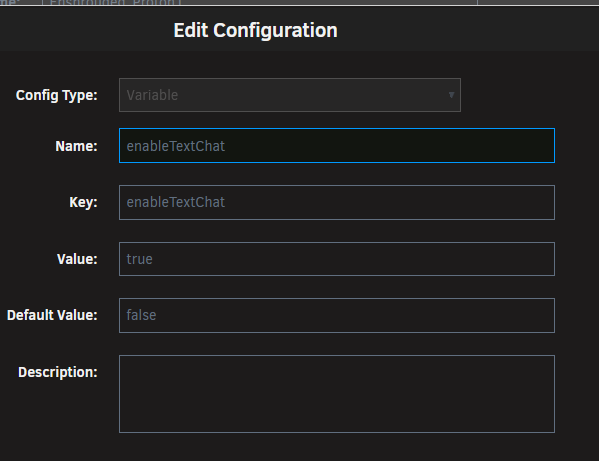
Hmm, im having a few problems after the water update. Long story short i had a version mismatch issue and the server refused to update, i gave up on it almost entirely and just nuked my server and made a fresh one. However, i now have my new server, and the game loads in, fresh new world, no issues. However, i cannot seem to adjust any game settings. I am using unraid and i have tried to update the config file direction, i go to /user/appdata/enshrouded_proton and then edit the enshrouded_server.json directly. To do this i had to use the unraid ui, download the JSON file, edit in my editor, change the values, make sure the server is off, then delete the JSON on the server and upload onto it my edited version. I do this process and boot the server back up, everything is working however none of the changes i made to the json file worked. I even tried going through unraid itself and setting a variable to enable text chat, which i probably did wrong but this also did not work. b Any idea what im doing wrong here that would cause enshrouded to not read my JSON file that i edited? It didn't create another one, the only json file is the one i sent, but it does not want to read from it and retains all the default settings. Here is the json i sent with passwords and details edited from the original text.enshrouded_serverEXAMPLE.json I've also included a screenshot of the permissions menu as well, which appear fine to me. Any idea what im doing wrong here? server runs, game plays, things are golden, but i can't change a single setting for some reason. We are running on default user names and passwords because it won't accept any changes i make to the JSON. What gives?

-
Much appreciated! I'll update it manually then, I just wanted to make sure I fully understood the problem and the solution. I'm very green to Linux (first docker setup, second Plex setup, first arch vm ever, etc) and wanted to make sure that I was doing this right and understood what was shared. I appreciate you taking the time to walk through that with me!
-
Oh no worries here, i literally just haven't set this up. My network is probably golden, i just need to get around to doing this and testing it. Have no troubleshooting questions on this for you. So when you say template, do you mean the app found on docker? Because let me show you what im talking about here, in docker it produces a JSON file with the following content: { "name": "FAKESERVERNAME", "saveDirectory": "./savegame", "logDirectory": "./logs", "ip": "0.0.0.0", "queryPort": 15637, "slotCount": 16, "gameSettingsPreset": "Default", "gameSettings": { "playerHealthFactor": 1, "playerManaFactor": 1, "playerStaminaFactor": 1, "playerBodyHeatFactor": 1, "enableDurability": true, "enableStarvingDebuff": false, "foodBuffDurationFactor": 1, "fromHungerToStarving": 600000000000, "shroudTimeFactor": 1, "tombstoneMode": "AddBackpackMaterials", "enableGliderTurbulences": true, "weatherFrequency": "Normal", "miningDamageFactor": 1, "plantGrowthSpeedFactor": 1, "resourceDropStackAmountFactor": 1, "factoryProductionSpeedFactor": 1, "perkUpgradeRecyclingFactor": 0.5, "perkCostFactor": 1, "experienceCombatFactor": 1, "experienceMiningFactor": 1, "experienceExplorationQuestsFactor": 1, "randomSpawnerAmount": "Normal", "aggroPoolAmount": "Normal", "enemyDamageFactor": 1, "enemyHealthFactor": 1, "enemyStaminaFactor": 1, "enemyPerceptionRangeFactor": 1, "bossDamageFactor": 1, "bossHealthFactor": 1, "threatBonus": 1, "pacifyAllEnemies": false, "tamingStartleRepercussion": "LoseSomeProgress", "dayTimeDuration": 1800000000000, "nightTimeDuration": 720000000000 }, "userGroups": [ { "name": "Default", "password": "wAz5u(KT", "canKickBan": false, "canAccessInventories": true, "canEditBase": true, "canExtendBase": true, "reservedSlots": 0 } ], "password": "testpassword", "gamePort": 15636 } And in the UI you see these variable options: https://imgur.com/a/zW2gdhE However, if i update the SERVER_PASSWORD it slaps some random thing at the bottom of the JSON that does nothing, as demonstrated by the ("password": "testpassword",) at the bottom of the JSON file above. Updating password does not update the default password under the usergroups section. That remains the same no matter what. However, if i type in the "Default User" password when attempting to sign into the game it works fine, while using the "testpassword" fails. So how exactly am i supposed to update/utilize variables within docker to modify the JSON? Or should i just manually update the JSON and do it that way? Or am i just a young new user to linux who doesn't understand how to create a custom variable within Docker that directly interacts with the JSON file? Let me know if this is making any sense, or if you need better screenshots/details.
-
So i'm at a loss here, i've installed the enshrouded_proton server. I've got it up and running, resolved a few problems, getting great performance with two local users. (Haven't tested online connectors yet but im sure that'll be fine/ill figure it out). However, when installing the app from the Unraid store i see a note telling me NOT to edit the json file and to do everything from variables. But im kind of newer to Unraid and am not understanding what variables i am supposed to be adjusting here. Updating the variables that are already there add a password at the end of the JSON file that doesn't let anyone join the game. But there is a default user in the JSON file with a password defaulted and built for that user. This is the only password that lets anyone get into the game. So its clear to me i need to do the following: 1. In the unraid docker container settings create a variable for that password. (No idea how, as the key SERVER_PASSWORD is already used for a password that does nothing?) 2. Create a second user titled Admin so i can control the server in game. (Which without editing the JSON file i have no idea how to achieve this) 3. Find myself some links to good guides explaining the gap in knowledge i clearly have on the topic. So in short, it calls out in the docker store that i should use variables within the unraid app, and not edit the JSON. But i'm not sure how i would create a variable within Docker to 1. Fix the useless password, 2. create a new Admin user with its own parameters, 3. give that admin user its own seperate password, and 4. bridge the gap of my missing knowledge. So am i just not understanding how to make variables? Or should i just ignore the store message and go update the JSON manually?
