





ashtoruin
Members
-
Joined
-
Last visited
-
I would also like to see this. It's somewhat annoying to have to remember to create the directory before creating a share just to avoid having a dataset being created.
-
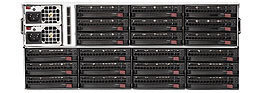
No the problem is the wrong trays are deleted when I tell it I only want 21 trays. Compared to server/jbod front I want 1/2/3 removed not 22/23/24 so that it actually matches how the back of the chassis looks in real life. Honestly if I could just tell it to be a 4x6 array and then give it a comma seperated list of trays to black out that would be perfect. Then I could even combine server/jbod and delete the trays in the middle.
-
Not sure if the new version will change things but one of the things that I'm struggling with right now is a 45 drive Supermicro 847 JBOD. I'd like to be able to get it to disable 1-3 on JBOD Back rather than 22-24. Not sure if I'm just an idiot or if this actually isn't possible.

