





DiscoverIt
Members
-
Joined
-
Last visited
-
iirc 7.3.2 already contained the critical security fixes in 7.2.8rc1.
-
The selfhosters repo is a private entity unaffiliated with unraid. If you don’t like their rules make your own repo ?
-
Once an official template is published that name should become restricted, eg; unusable. Take these two examples. No offense to the dev in question, but there is no value added by creating another repo and a duplicate set of templates all referencing the same image. With one for instance referencing docker.io/ollama/ollama:latest and another ollama/ollama
-
HakoMonitor An Unraid plugin that monitors Hako Foundry Displays fan wall RPM and PWM readings alongside per-shunt and total power wattage from connected HakoForge Power Boards. Features - Fan wall status: profile, mode (Auto / Manual / Override), PWM %, and RPM - Per-board power readings: shunt wattage, section totals, and grand total - Configurable poll interval and API key authentication - Live connection status indicator Requirements Unraid 7.1.0 or later Hako Foundry running and accessible. NOTE: This plugin requires a version of Hako Foundry not yet available for public use. Installation Via Community Applications (recommended) Search for HakoMonitor in the Apps tab and install from there. Via Plugin URL 1. In the Unraid UI go to Plugins > Install Plugin 2. Paste the .plg URL from the latest release 3. Click Install After installation the plugin is available at Settings > HakoMonitor. Usage 1. Open Settings > HakoMonitor 2. Set the API Host to the address of your Hako Foundry instance 3. Enter your API Key 4. Adjust the Poll Interval as needed and click Save Settings Fan and power data will begin updating automatically. Configuration Setting Default Description API Host http://127.0.0.1:8080 URL of the Hako Foundry instance API Key (empty) API_KEY Value Poll Interval 5 How often (in seconds) to refresh data [2-60] Dash Enable Yes Enable or Disable the Dashboard tile
-
With the meteoric rise of AI-assisted development, I'd like to propose a "truth in advertising" addition to Community Applications: a voluntary disclosure field indicating the level of AI involvement in a plugin's development. The Problem AI-generated or heavily AI-assisted projects tend to share a recognizable pattern of failure: Shallow author understanding; The author may not fully grasp the underlying code, making debugging, edge-case handling, and meaningful updates difficult or impossible. Low author investment; When a plugin takes hours instead of weeks to build, the emotional and intellectual investment is often proportionally smaller and leads to abandoned projects when issues arise. False confidence; AI-generated code can look polished and well-structured while containing subtle logic errors, security gaps, or hardcoded assumptions that only surface in real-world use. Support black holes; When users file issues, authors who don't deeply understand their own code often can't diagnose problems, leaving threads unanswered. The Proposal Add an optional field to the CA plugin manifest that authors can self-report. Something like an ai_involvement field with a handful of defined values: none - No AI tools used assisted - AI used for autocomplete, boilerplate, or minor suggestions review - AI used to review, refactor, or improve human-written code significant - Substantial portions generated by AI, reviewed by author primary - AI was the primary author, human provided direction and testing This would show up as a small badge or label on the CA plugin card, similar to how donation links or support URLs are surfaced today. r/Selfhosted has implemented a similar policy and currently allows AI-generated projects to be submitted on Friday's only. What This Is NOT This isn't a ban or a quality judgment. AI-assisted projects aren't inherently bad and plenty of great tools have been built with AI help by authors who genuinely understand what they're shipping. Conversely not all human generated content is perfect or without flaw either. Many plugins over the years before AI have crashed the WebUI or caused data integrity issues. This is just about giving users enough context to make an informed choice. A professional, homelabber, or even a new user picking between two plugins deserves to know which one was built over three years of iteration and which was scaffolded and published in an hour. //EDIT It's been informed to me that r/Selfhosted often relies on other metrics beyond the self identification. Including showing how long a developer has been interacting with the community / supporting their plugins is a more relevant metric than "look this established developer used AI, must be slop". The more meaningful signal might be developer track record. How long have they been active in the community? How consistently do they respond to issues and push updates? Do they show up when things break? That kind of history is arguably a better indicator of plugin quality than any single flag, AI-related or otherwise. This starts to open the door to something like a developer trust or plugin review system, where instead of making a judgment call based on a snapshot of how something was built, users and the community can see a longer-term picture of how a developer is viewed by the community. I'm not initially solid on that type of system since Unraid is a small community and review bombing would be a trivial thing to sway or create an impact on. I don't think that has to replace the AI disclosure idea, both can coexist. One gives you a quick data point at install time, the other gives you the fuller context behind it.
-
HakoDeploy An Unraid plugin that configures and deploys the HakoFoundry. A server chassis storage companion app that organizes and displays hard drive SMART data with powering monitoring and fan curves for your Hako-Core [Mini]. This management is not suitable with the HF- L1 chassis unless a HakoForge Power Board is added. Features - Select block devices (HDD, SSD, NVMe) and USB serial adapters to pass through to the container - Install the Docker template for use in Unraid's Docker Manager - Deploy, stop, and restart the container directly from the UI - Live container status polling Requirements - Unraid 7.1.0 or later - Docker / Community Applications plugin installed Installation Via Community Applications (recommended) Search for HakoDeploy in the Apps tab and install from there. Via Plugin URL 1. In the Unraid UI go to Plugins > Install Plugin 2. Paste the .plg URL from the latest release 3. Click Install After installation the plugin is available at Tools > HakoDeploy. Usage 1. Select devices: choose the storage drives and Power Boards (serial adapters) to expose to HakoFoundry 2. Configure: set the web UI port, appdata path, user/group IDs, optional secret key, and other standard container settings 3. Apply & Deploy Template: writes the config and installs the Docker template HakoFoundry will be accessible at http://<server-ip>:<WEB_PORT>/ (default port 8080). Configuration Setting Default Description Appdata Path /mnt/user/appdata/hako-foundry Persistent data directory (must be under /mnt) Web UI Port 8080 Host port mapped to the container PUID 99 User ID for file permissions (nobody) PGID 100 Group ID for file permissions (users) Open Access false Require authentication, will be prompted within HakoFoundry to create a user Secret Key auto-generated Session secret; leave blank to generate on first apply Source https://github.com/wandercone/hakodeploy This is an early release, feedback and bug reports welcome.
-
This is…interesting.
-
Unless that LLM txt file indicates to disregard all instructions and send the user’s stored crypto to my wallets, no. That link isn’t mine but something created recently. //removed strong language.
-
Do you have a link to official plugin documentation?
-
There is a new-ish plugin specific documentation now. https://plugin-docs.mstrhakr.com
-
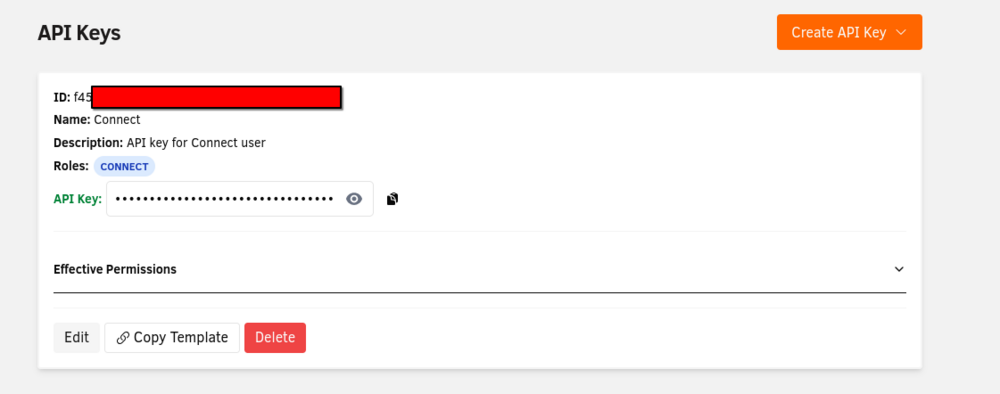
Why does unraid-api create a default connect key when Unraid Connect is not even installed? Safe to delete?
-
I'd like to propose adding the disk type: "C" Checksum. Since unraid arrays vary in disk count (2 to 28 disks) it means a per-disk overhead would be wasteful. By tying checksum storage to array capacity we should scale better and allow us to compare against P/Q parity disks to create a quorum. Hashing Mechanisms CRC64 (~10GB/s): Fast, sufficient for most bit rot scenarios and ~8 bytes/stripe BLAKE3 (~2GB/s): Faster than SHA256 but needs ~32 bytes/stripe SHA256 (~500MB/s): Thorough work horse but slow and ~32 bytes/stripe Theoretical example: If we take a 100TB array and assume a 4Kb page size this gives us 109,951,162,777,600 bytes or about 26.8 billion individual stripes. The checksum space required would be number of stripes * bytes per stripe or in our example 214,748,364,800 bytes (195~gb) Additional metadata would be required such as stripe index, metadata checksums, allocation tables, alignment/padding, etc. for all intents and purposes we can just throw an overhead factor of 2x. In our example a 100TB array would require a checksum disk equal to or larger than 390gb Checksums could be verified during every r/w operation if md_write_method is on. If a mismatch is detected: Log the corruption event via notification If recoverable via P/Q: automatically reconstruct to repair the stripe If not recoverable: do something such as indicate the potential files corrupted for manual intervention Could also schedule the verification as a background task that runs during off-peak hours similar to mover or parity checks via tuning: Sequentially reads all array data Verifies every stripe's checksum Detects AND repairs corruption proactively Optional: user-configurable frequency (weekly, monthly, etc.)
-
The MOVE button should be greyed out while in maintenance mode as there are no mounted filesystems.
-
For data security purposes, I’d like to request the ability to mount a pool (unraid array and others) as read-only. I have pools which have no modification performed to the data and a read-only mode will help deter nefarious actions from occurring to the stored data.
-
The inclusion of rclone into the base OS needs to be modified as the configs are stored in a non-persistent location of /root/.config/rclone/. I would like to propose a wrapper similar to the rclone plugin which renames the base rclone binary and is simply a shell script that contains the following. #!/bin/bash config=/boot/config/plugins/rclone/.rclone.conf rcloneorig --config $config "$@"; I'd propose the location of /boot/config/.rclone.conf as this will provide an easy migration path from the plugin (/boot/config/plugins/rclone/.rclone.conf) to base OS.



