





stahlblau
Members
-
Joined
-
Last visited
Everything posted by stahlblau
-
Absolutely. I just wanted to clarify what you mean by “good backups" in that case. Thank you Jorge!
-
Thanks again. Last question: what do you mean by "good backups"? Backups of the NAS content, in case of drive failure and raidz1 cannot solve it, cause raidz2 or more would have been needed?
-
Thanks @JorgeB - drives are 16TB each (Seagate Ironwolf Pro). Would you rather add drives gradually as more space is needed, or go straight to a larger RAIDZ2 setup? I’ve read that RAIDZ expansion puts quite a bit of IO stress on all drives, so I’m wondering whether doing a bigger migration upfront might actually be better for drive-health. Or is the additional IO load during RAIDZ expansion basically negligible in terms of overall drive health, if it only happens every 3 months or so? For some additional context: with my current storage growth, adding just a single drive would probably buy me around 3 more months before needing another expansion. Adding 4-6 drives instead would likely give me much more breathing room and possibly avoid another expansion entirely for the next few years.
-
Hi all, Currently running a 4x16TB ZFS RAIDZ1 pool on a machine that could handle much more. I’m thinking about expanding storage. My original plan was to add 1-4 drives and eventually move to RAIDZ2 / dual parity. From what I understand, you can grow an existing RAIDZ1, but cannot later convert it into RAIDZ2. Is that correct? So what would you consider the smarter approach, especially now in light of the insane prices for storage? 1) Expand the existing RAIDZ1 gradually? Like 1 drive at a time. (if so, how many drives would you risk to keep in RAIDZ1?) 2) Rebuild/migrate into a fresh RAIDZ2 pool? (If so, where do you park your stuff during migration? I could temporary expand a cloud storage. Is that already the answer to my question? ;) ) 3) Or any other idea? Thanks for any advice. :) And sorry if this has been asked a million times before.
-
Thanks! I should be good then. Does ECC require config in Unraid or is proper setup in BIOS enough?
-
Hi all, I’m moving my system from a Ugreen NAS to a custom build. Both are Intel, different CPU and RAM though. Drives stay the same. Not much other hardware to pass through. Yes, I have watched Spaceinvader’s video about hw migration. Q: I wonder whether ZFS pools make a difference in the process? Does Unraid require config for ECC? That is also new for me on the new system. And is there anything else to keep in mind except the obvious backup? Thanks!
-
I will test without for now first, and see if that behavior shows again. Did you spot anything suspicious in the diagnostics? Any chance you could take a glance at it? :) @MAM59 hot glue lol
-
Hi everyone, my Unraid NAS (Ugreen 4-bay) has been crashing more often. I noticed, that during boot the Unraid stick does not get recognized by BIOS, so it loads into Ugreen OS directly instead. The Unraid USB stick is connected to a right-angled usb adapter. Without the adapter it works reliably, with it only sometimes. Stick: Transcend USB 2.0 32GB (2 years old), adapter was used for 6 months now without causing issues (afaik). Can a right-angle USB adapter just fail from one day to the next, or is it more likely the USB stick starting to die? Any tips on how to properly diagnose which component is failing would be very helpful. Thanks! edit: diagnostics from after last succesful reboot attached mercury-diagnostics-20250926-0840.zip
-
Hi, downloading diagnostic fails / time-outs at the step shown in screenshot. Marked it as urgent as it prevents me troubleshooting regarding another urgent issue. Feel free to re-categorize. Tested to download on Brave/Safari/Firefox on MacOS, all latest versions to date. Thanks downlod-syslog-log.txt
-
I keep getting these false error mesages about my attached UPS named 'mercury', despite batteries should be fine and there were no power outage or any other power-related incident at all. These errors started to appear about 2-3 weeks after installing the UPS. Before that: no error messages. I tested power cut-offs twice, batteries were running fine during the calculated up-time and the controlled shut-down worked as intended, too. The UPS unit incl. batteries is new. I have the same model on a proxmox cluster which works fine, too and does not output any errors, so I am assuming a bug on Unraid-end. Please help to troubleshoot / or at least confirm if its a bug! This is concerning. (I marked this as urgent as these errors appear nearly anytime I log into the Unraid gui and make me worry if this is a false emergency or an actual issue with the UPS, which I absolutely require to work reliable. Feel free to re-categorize, of course.) Thanks! btw. while writing this post I realized, that downloading diagnostics fails. Don`t know what`s up. This always worked. Going to open a seperate thread for that one. Edit: here. Meanwhile, please find latest syslog atached. As you can see, lots of UPS related errors. syslog.txt
-
Hi, what docker registry is Unraid using? Whatsupdocker running on another host is complaining: "No Registry Provider found" for all containers installed through the Unraid app store. (Yes, I am passing the Unraid Docker API through) Thanks!
-
+1
-
Hi there. Before I dive too deep into this: what are your thoughts about feasibility of this idea? Automatically de-crypt a whole zfs-pool through a go-script that checks if a YubiKey usb key is present. The steps I had in mind roughly: Create a LUKS key file and encrypt it with GPG using a public key whose private key resides on the YubiKey Store the GPG-encrypted file on Unraid flash drive Use a startup script to copy and decrypt key requiring the YubiKey to be present Delete decrypted key copy so that the pool remains unlocked, but cannot be re-unlocked if the YubiKey isn’t available First of all, what do you think? Bananas? If not, how would you implement the Unraid specific part (step 3)? I assume doing this for a whole zfs pool a script in /boot/config/go must be required, so that it happens before the array starts? Any other thoughts or recommendations?
-
Thanks @JorgeB
-
There you go @JorgeB <edit: deleted after solution>
-
Hi, what can I do to debug and fix this? I installed a new cache ssd as a xfs pool called 'cache' A storage from a zfs pool called 'data' is supposed to use it as primary save location. But that does not happen and files get saved directly on the secondary storage called 'storage'. The logs show 'Dec 26 15:11:50 NAS shfs: share cache full' – which is not true. It utilizes only 19GB out auf 1TB. The minimum free space is set to 10GB. Any help is much appreciated. Thanks!
-
Hi, danke für die Antworten und sorry für die späte Rückmeldung meinerseits. Leider hatte ich in der Zwischenzeit größere, andere Probleme und musste ohnehin alles frisch neu aufsetzen. Ich meld mich nochmal, sollte das wieder vorkommen, und dann auch mit Screenshots/logs
-
Hi, so ganz werde ich aus der Cache Logik von Unraid noch nicht schlau und finde leider im Forum und der Doku keine Antworten. Daher versuche ich es mal hier mit ein paar Fragen: Eine SSD kann man doch als Cache für 2 HDD`s, die beide in einem ZFS mirror pool sind, nutzen, ohne die SSD dem HDD pool hinzuzufügen, oder? Einfach die SSD z.B. als xfs formatieren, einen eigenen Pool dafür anlegen, "Cache" nennen und dann in den storage shares als primary storage definieren. Richtig? Sind Schreibvorgänge über NFS davon ausgenommen? Ich habe gerade festgestellt, dass ein anderes Gerät über NFS direkt auf die HDD geschrieben hat, obwohl für den betroffenen share die cache SSD als primary storage definiert war. Und letztlich: das Plugin "fix common problems" gibt mir folgende Meldungen für alle meine shares: Share <XY> set to use pool cache, but files / folders exist on the storage pool. Ja, da sind Daten auf dem storage pool, weil der mover die zwischenzeitlich vom cache dort hin geschoben hat. Das ist korrekt. Kann mir jemand bitte helfen meine Verwirrung aufzulösen? 1000 Dank! DIe meisten Infos zu dem Thema die man findet, beziehen sich noch auf Arrays und Cache Pool Einstellungen, die aus der Zeit vor Unraid 7 stammen müssen. Hab erst mit der Beta gestartet..
-
could be, yes. As the timing of CPU load issues with the LED plugin errors is corresponding, this was my first guess. Will let you know once I know more. Thanks
-
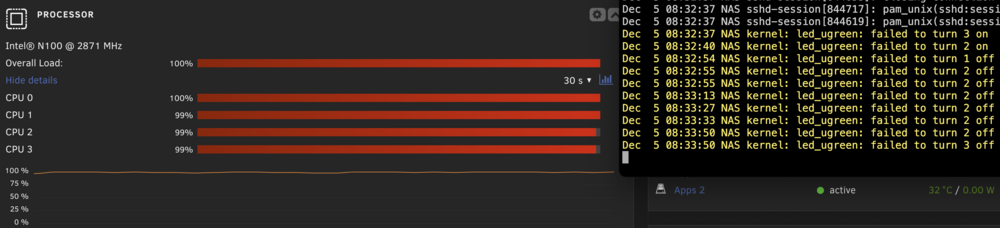
@ich777 hi. CPU load is again at 100%. Diagnostics attached. I checked the running processes and none of them show a significant CPU load over 1 digit. Which is confusing... I also checked the CPU load with an external tool and it`s confirming the load up to 100%. I de-installed the LED plugin for now and will report back. nas-diagnostics-20241205-0844.zip
-
There you go. Diagnostics are attached. thanks again for the responsiveness and also thanks for the heads up on the RC. Will update right away and let you know if this happens again. nas-diagnostics-20241204-0947.zip
-
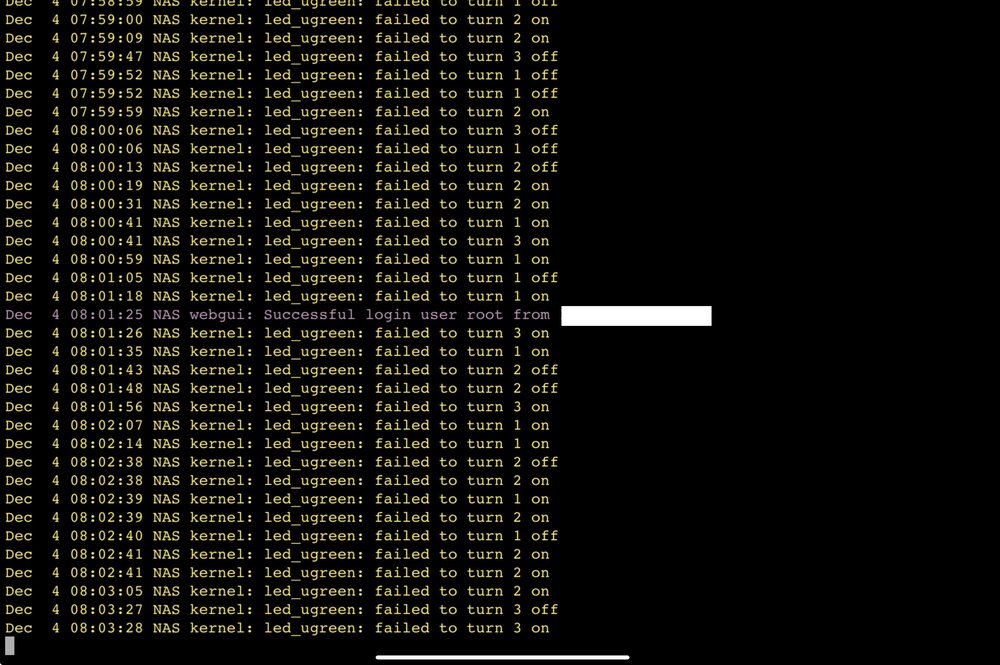
Hi again. Another issue popped up. CPU was constantly at its max level. All cores. No task at all was running. What can I do to prevent it? Again, it`s a fresh Unraid installation on new hardware. Only 2 small docker containers running so far. Intel N100. Unraid 7 beta 4. Could the beta cause the problems due to the new Kernel they use, afaik? Typical workload of the CPU normally does not exceed 10%. (Sorry for not copy pasting text from the log. I could only take a screenshot on my iPad at that time.)
-
@ich777 it was set to a bright yellow. I forgot the exact value. And the LED affected was the left one (of three) on the front of the case. I tested it with a 1gb connection, and then the LED turned blue, with the same blinking frequency. I hope this helps
-
Thanks for the very swift response and for clarifying that this is normal behavior I made the edit and it works. However I also needed to change COLOR_NETDEV_LINK_2500= to white, as your script successfully detected the 2.5g network. May I suggest to change anything that`s referring to a default or 'good state' to another color code than yellow, orange or red? These colors typically indicate warnings. Maybe white, green or blue for different network speeds? Just an idea... thanks!
-
Hi, running the UGREEN led driver plugin on a fairly fresh installation of UNRAID 7 beta 4 on my UGREEN DXP2800. The first led is flashing orange (yellow to my eyes ). It does this immediately after booting and is always in that state. Ugreen manual reads: 'Data transfer (no internet)' Howewer the NAS is connected to my LAN and internet works very well, too. And there is no active service running that transfers data. At least none that I have started and am aware of. UNRAID syslogs do not report anything suspicious. What can I do to troubleshoot? Thanks :)



