




Skip to content
View in the app

A better way to browse. Learn more.

Unraid

A full-screen app on your home screen with push notifications, badges and more.

To install this app on iOS and iPadOS
  1. Tap the Share icon in Safari
  2. Scroll the menu and tap Add to Home Screen.
  3. Tap Add in the top-right corner.
To install this app on Android
  1. Tap the 3-dot menu (⋮) in the top-right corner of the browser.
  2. Tap Add to Home screen or Install app.
  3. Confirm by tapping Install.

scrap

Members
  • Joined

  • Last visited

Everything posted by scrap

  1. Thank you! -Steve
  2. I can't seem to search for any plugins, even ones I have already installed. When I go to the Apps tab in Unraid and click on Plugins I get "No Matching Applications Found". Also, when I go to "Installed Apps" I get the same message when I click on Plugins eventhough I have a dozen or so plugins installed. Dockers seem to be working, just the plugins aren't. I removed the Community Applications plugin and reinstalled and still no dice. I have rebooted multiple times as well. Thanks for any help. -Steve CA-Logging-20241207-1853.zip zeus-diagnostics-20241207-1847.zip
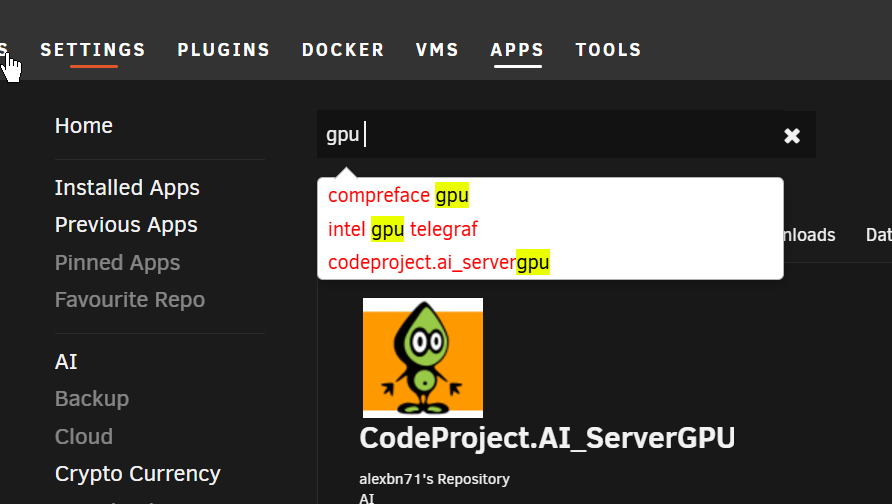
  3. Anyone know why I can't find the GPU statistics plugin when I search the community apps? I'm currently running 6.12.13 Unraid with an Intel GPU. Thanks. -Steve
Account

Navigation

Search

Search

Configure browser push notifications

Chrome (Android)
  1. Tap the lock icon next to the address bar.
  2. Tap Permissions → Notifications.
  3. Adjust your preference.
Chrome (Desktop)
  1. Click the padlock icon in the address bar.
  2. Select Site settings.
  3. Find Notifications and adjust your preference.