hhhhh
Members
-
Joined
-
Last visited
-
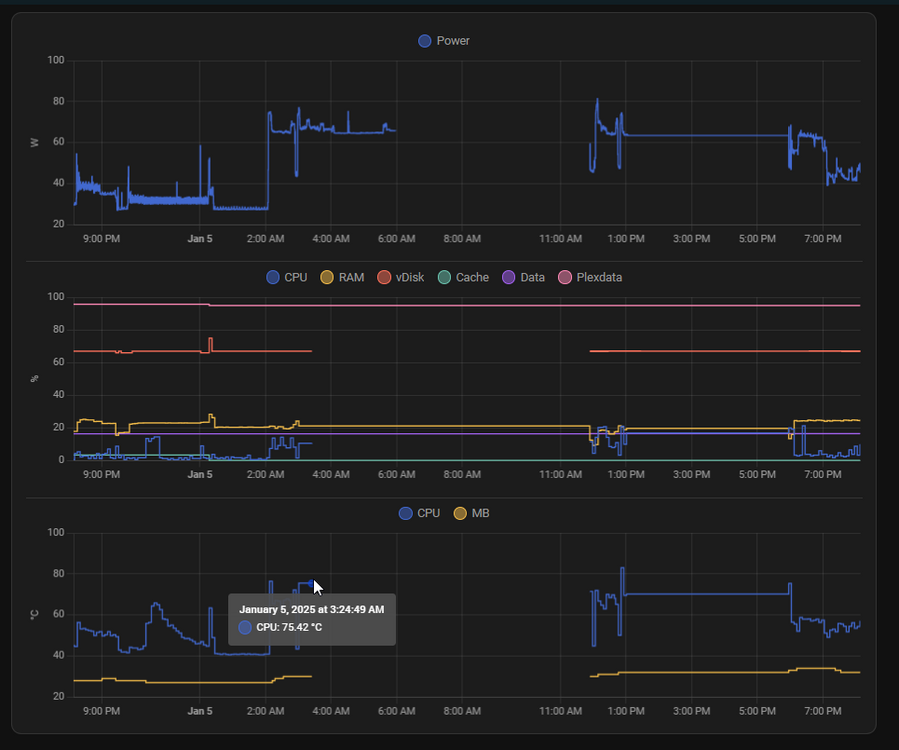
This morning the server was unresponsive on the web UI. I tried to login locally, which was very laggy and ended up with "login: timed out after 60 seconds" after entering the username, exact behavior as mentioned in following post: Because of these stability issues and recent checksum issues I ran a memtest after a reboot which failed when using 2*16GB, tried either RAM stick 1x16GB in either slot when running memtest, both slots/sticks failed. Both memory sticks started failing somehow in the last month. Strange as this memory was working fine in the same system running windows prior to using unraid. I performed a memtest after deciding to go with ZFS, which passed mid december. This system ran fine for 2 years. Either way I purchased a new 1x32GB and no memtest errors. I will keep monitoring, and hope faulty memory caused the issues I experienced. I did notice the CPU was getting quite hot due to some scheduled maintenance/backup tasks between 2 to 3:25 AM, which I believe is when unraid got stuck, HA (running on unraid) did keep collecting data from the external power monitor, but no longer from unraid, until I suppose docker even got stuck, ending any data stored after 6 AM. I've changed my fan settings to keep the CPU temp lower under full load, and also improved ventilation so that the memory / cache drives run less hot. Hoping these changes will solve the issues with system instability
-
Did you ever solve this? I have the same issue happening. memtest passed multiple times, checked monthly, although I have only been running unraid for one month, I have ran it at least 3 times and all passed. root@NAS2:~# zpool status cache -v pool: cache state: ONLINE scan: scrub repaired 0B in 00:00:29 with 1 errors on Tue Dec 31 10:16:17 2024 config: NAME STATE READ WRITE CKSUM cache ONLINE 0 0 0 mirror-0 ONLINE 0 0 0 nvme0n1p1 ONLINE 0 0 4 nvme1n1p1 ONLINE 0 0 4 errors: Permanent errors have been detected in the following files: cache/domains:<0x4> root@NAS2:~# zpool status cache -v pool: cache state: ONLINE scan: scrub repaired 0B in 00:00:29 with 1 errors on Tue Dec 31 10:16:17 2024 config: NAME STATE READ WRITE CKSUM cache ONLINE 0 0 0 mirror-0 ONLINE 0 0 0 nvme0n1p1 ONLINE 0 0 7 nvme1n1p1 ONLINE 0 0 7 errors: Permanent errors have been detected in the following files: /mnt/cache/system/docker/docker.img cache/domains:<0x4> As you can seen docker.img pops up inbetween two command runs for some reason, without any change in docker containers The 0x4 shows because I deleted the file earlier today as that file was irrelevant, one one but now same is happening for docker.img I am having similar issues on other drives as well, all zfs/btrfs are having corruption. 16TBx2 MIRROR Seagate Exos x18 root@NAS2:~# zpool status data -v pool: data state: ONLINE scan: scrub in progress since Tue Dec 31 10:00:33 2024 2.21T / 4.78T scanned at 504M/s, 972G / 4.78T issued at 216M/s 256K repaired, 19.87% done, 05:09:15 to go config: NAME STATE READ WRITE CKSUM data ONLINE 0 0 0 mirror-0 ONLINE 0 0 0 sdc1 ONLINE 0 0 7 (repairing) sde1 ONLINE 0 0 7 (repairing) errors: Permanent errors have been detected in the following files: /mnt/data/Backup/2024-12-23.zip /mnt/data/PlexData/Series/...1080p.mkv 8TBx2 MIRROR IronWolf UUID: 9920b33f-88eb-49cf-a2d7-784bb99eaab9 Scrub started: Mon Dec 30 03:03:45 2024 Status: finished Duration: 16:03:12 Total to scrub: 13.85TiB Rate: 251.06MiB/s Error summary: csum=2 Corrected: 0 Uncorrectable: 2 Unverified: 0 It shouldn't be related to the ssd/drives, as they were running fine without any issues in another system. All drive extended smart tests are all passing, HDDScan ERASE passed, newly formatted afterwards Running 7.0.0-rc.2
-
The refresh somehow seems to have stopped, and I am not sure how to reproduce as I didn't really do anything or change any settings. If it ever happens again, I will drop a comment
-
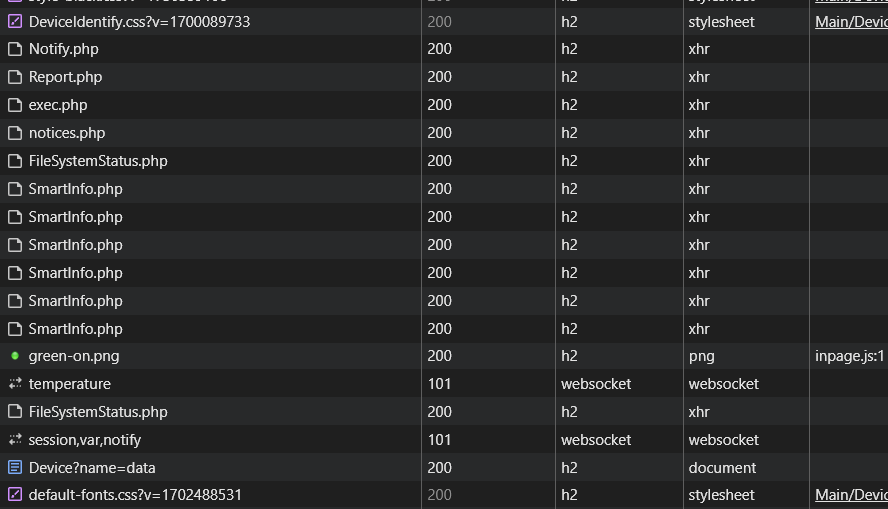
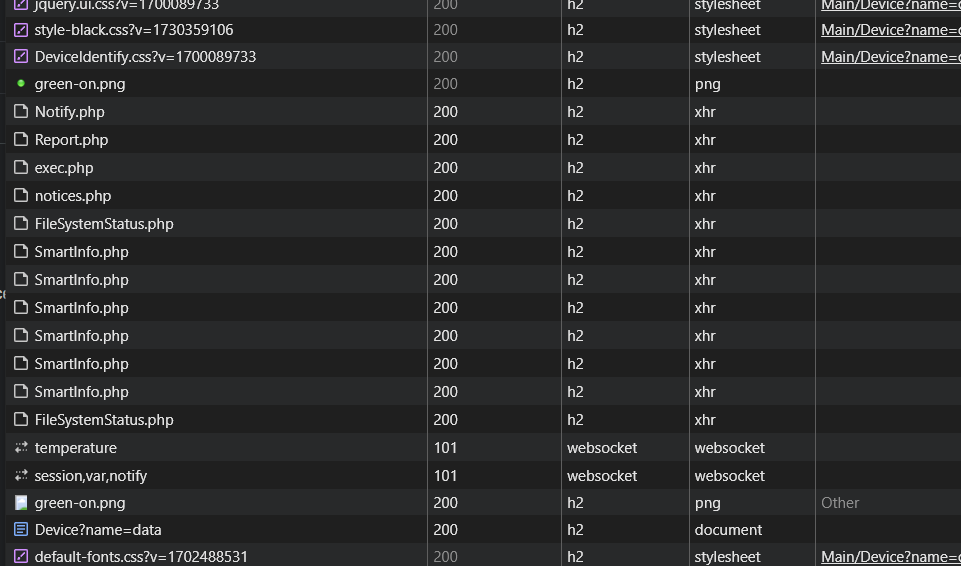
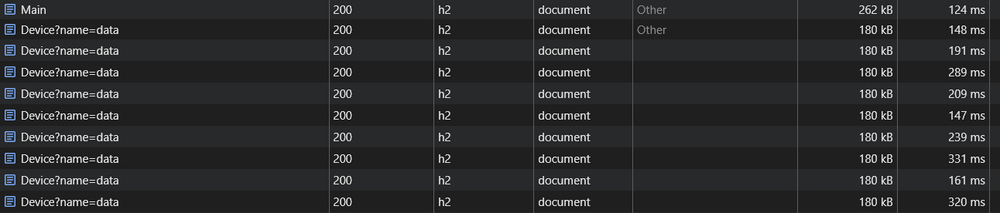
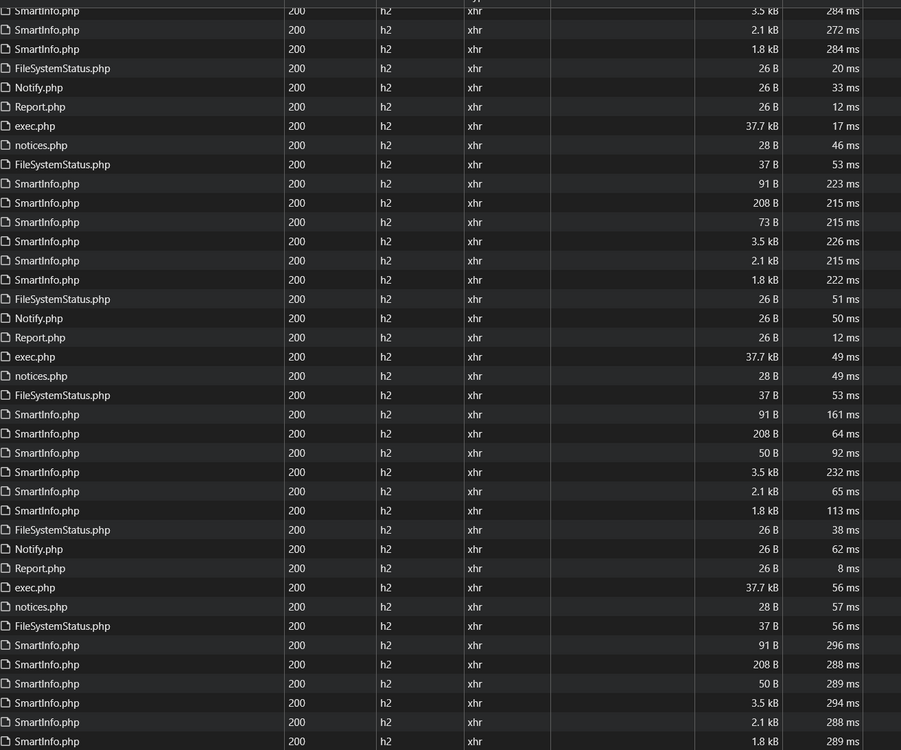
Hi, In the main screen whenever I click on my pool named data which has a data w data 2 mirror zfs, the page keeps refreshing around 2-3 times per second. I have tried with incognito, same behavior, so it is not related to browser cache. It seems briefly fixed after a full restart before it stops working again. Not all of my pool devices are affected, for example a single btrfs drive, cache and data 2 are not affected. The only affected device is data which is part of the 1 drive ZFS mirror. I recently updated to 7.0.0-rc.2 and hadn't seen this issue before I do not see any issues in the console or requests just before some more css/js/html and againt:
-
Thank you for your reply. As mentioned, I have already added a manual smb config bind interfaces only = no This settings will not restrict it to a single interfance and use all interfaces including for example the tailscale one. Which is why I was able to write at max speed, but not read at max speed from the unraid setup. It seems truenas has the same issue and demonstrated here https://www.truenas.com/community/threads/smb-multichannel-only-one-way.78658/ https://www.truenas.com/community/threads/multiple-network-interfaces-on-a-single-subnet.20204/ The comment states: In short, your Windows server can send to each IP - the networking behavior of FreeBSD will mean that FreeNAS "responds" from a single IP only. Therefore my post wondering if there is any way to achieve this on unraid, or better setting, other than the above setup of manually assigning a different subnet to each ip. Thanks
-
Same issue, a winmerge root folder comparison is showing 50GB of files missing in multiple folders, after krusader shows successful transfer of 600GB of photos/videos, keeping the dialog open. After investigation found some of the files in diferent subfolders due to drag and drop issue. Resolved it afterwards, still have issue with certain . files though
-
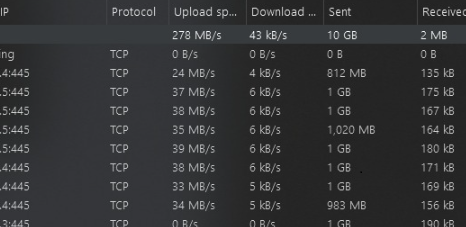
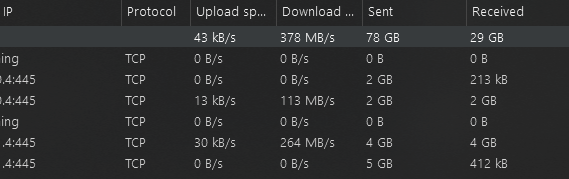
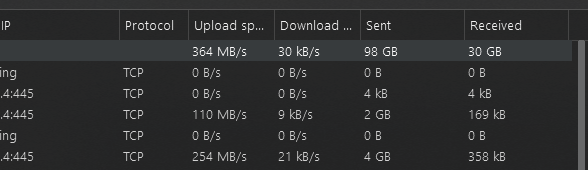
I had a very time consuming experience to find the right SMB and network configuration to enable full SMB multichannel throughput for a multi network interface on the same subnet. Details below. Did anyone experience the same problem in a similar setup, and how to resolve it? Is there a know way to enable both interfaces to send smb back in unraid? Thanks setup - 8 port 2.5G switch - unraid server with 2 x 2.5G NICs, both connected to 2.5G switch - win10 desktop with 1 x 1G and 1 x 2.5G NICs, both connected to 2.5G switch - old synology NAS with 2 x 1G NICs, both connected to 2.5G switch test setup write directly to cachdisk share enabled drive 990 pro \\tower\cache \\192.168.1.2\cache \\192.168.1.3\cache old synology stats (for comparison of this setup) - NIC1 ip 192.168.1.2 - NIC2 ip 192.168.1.3 - send @ 230 MB/s - win 10 receives 2 tcp connections 115MB/s from 192.168.1.2, 115MB/s from 192.168.1.3 - receive @ 230 MB/s - win 10 sends 2 tcp connections 115MB/s from 192.168.1.2, 115MB/s from 192.168.1.3 As we can see here it is using proper multi channel setup by default, and able to aggregate data out over both nics This works out of the box on synology by just enabling multi channel and having multiple ips unraid stats (achieved before hacky fix) - NIC1 ip 192.168.1.4 - NIC2 ip 192.168.1.5 - send @ 280 MB/s, all data on unraid side sent over single interface eth0 - receive @ 360 MB/s - win 10 sends 245MB/s to 192.168.1.2, 115MB/s to 192.168.1.3 Looking on the unraid network I can see all data is sent over just 1 interface to the win10 desktop and capped at max speed of this interface, 280 MB/s After messing around for quite a while, I finally managed to achieve above one-way multichannel results (shown above) with various SMB settings: Enable SMB Multi Channel: Yes Enable NetBIOS: No extra samba configurations (not required I believe, but synology setup had this config) bind interfaces only = no win10 desktop network adapter configuration tried Interrupt Modulation setting enabled / disabled on both nics win10 desktop powershell admin commands Get-SmbConnection -> shows smb 3.1.1 is used Get-SmbClientNetworkInterface -> shows RSS Capable to true for both nics, I had to explicitely disable RSS because it would drop my read/write speeds back to 2xxMB/s over multi ip transfers, disable RSS for clients using commands Disable-NetAdapterRss -Name "Ethernet 2" and Disable-NetAdapterRss -Name "Ethernet 3" Get-SmbMultichannelConnection -IncludeNotSelected -> should show 2 records for unraid with selected "True" and respective client/server ips After hours of testing different settings, and comparing various route/gateway settings, I found a forum post on google: SMB Multichannel only one way, related to the exact same issue on a truenas setup It has to do with multiple network interfaces on a single subnet I was able to achieve full throughput for both send and receive by configuring a new subnet, while keeping my existing synology setup to work being: configure the 2nd interface to have a different subnet configure synology nic2 to 192.168.2.2/24 configure unraid nic2 to 192.168.2.4/24 configure win10 desktop nic2 to 192.168.2.4/24 downloads from unraid cache: uploads to unraid cache: