





tehg
Members
-
Joined
-
Last visited
Everything posted by tehg
-
Done. Looks good still!
-
Looks like you're right. I see this in my docker logs after doing a stop/start: > 12:21:46,686 |-ERROR in ch.qos.logback.core.FileAppender[sdwan_log] - openFile(logs/sdwan.log,true) call failed. java.io.FileNotFoundException: logs/sdwan.log (Permission denied) After making the launch setting changes, it looks like the webUI launched. Devices are adopting as well. No worries on doing more testing too!
-
Made those changes and restarted the container. No issues so far. I see devices adopting again as they check in.
-
Updating to 10.0.160 using Method 1 above worked for me. Everything re-adopted and looks to be functioning. I didn't test any specific features, since I mainly just use the controller for managing WiFi.
-
Just upgraded from 9.0.114. No issues with the upgrade and everything connected back again.
-
It doesn't look like the per share overrides are happening with the mover. Mar 12 11:27:46 falcon move: ----------------------------------------------------------- Processing [backups] share ---------------------------------------------------------- Mar 12 11:27:46 falcon move: Settings override: Mar 12 11:27:46 falcon move: ------------------ Mar 12 11:27:46 falcon move: Using share (cache) moving threshold: 0 % Mar 12 11:27:46 falcon move: Primary threshold to Move all Primary->Secondary shares to secondary: 20 % Mar 12 11:27:46 falcon move: Age: no = 0 ; daysold: Mar 12 11:27:46 falcon move: ------------------------------------------------------------------------ Mar 12 11:27:46 falcon move: Primary storage: cache_array - size: 466GiB - used: 29 % (134GiB) Mar 12 11:27:46 falcon move: Secondary storage: user0 Mar 12 11:27:46 falcon move: Share Information: Name: backups - Path: /mnt/cache_array/backups Mar 12 11:27:46 falcon move: Moving threshold: 0% (0B) ; Freeing threshold: 95% (443GiB) Mar 12 11:27:46 falcon move: Mover action: cache_array->user0 (cache:yes). Move All from Primary->Secondary shares option is selected and pool is above move all threshold percentage: 29% > 20%. Mar 12 11:27:46 falcon move: => Moving all files from cache_array to user0 Mar 12 11:27:46 falcon move: ----------------------------------------------------- Debugging [backups] share Find Function --------------------------------------------------- Mar 12 11:27:46 falcon move: FINDSTR: find "/mnt/cache_array/backups" -type f -depth -not -name '.placeholder' -printf '%T@|%s|%S|%n|%i|%p|\0' | awk -v RS='\0' -v FS='|' -v SPARSENESS='0' -v PRIMARYSTORAGENAME='cache_array' -v SECONDARYSTORAGENAME='user0' -v SHARENAME='backups' -v SHAREUSECACHE='yes' -v PRIMARYSIZETHRESH='475101472768' ' { printf "%s|%s|%s|%s|%d|%d|%d|%d|%d|%d|%s\n", PRIMARYSTORAGENAME, SECONDARYSTORAGENAME, SHARENAME, SHAREUSECACHE, $1, PRIMARYSIZETHRESH, $2, $3, $4, $5, $6}' Mar 12 11:27:46 falcon move: Mar 12 11:27:46 falcon move: Updated Filtered filelist: /tmp/ca.mover.tuning/Filtered_files_2025-03-12T112745.list for backups That indicates it should move files. The filtered filelist gets populated with a number of files from that share. But then nothing is moved: Mar 12 11:27:55 falcon move: ************************************************************ ANALYSING MOVING ACTIONS *********************************************************** Mar 12 11:27:55 falcon move: Deciding the action (move/sync/keep) for each file. There are 113619 files, it can take a while... Mar 12 11:29:48 falcon move: No new files will be moved/synced from primary to secondary Mar 12 11:29:48 falcon move: No new files will be moved/synced from secondary to primary Mar 12 11:29:48 falcon move: Cleaning lock and stop files Mar 12 11:29:48 falcon move: ****************************************************************** WE ARE DONE ! ****************************************************************
-
I am seeing the same behavior Mar 5 11:31:55 falcon move: ----------------------------------------------------------------- Global settings --------------------------------------------------------------- Mar 5 11:31:55 falcon move: Using global moving threshold: 80 % Mar 5 11:31:55 falcon move: Using global freeing threshold: 40 % -------------------------------------------- Mar 5 11:31:55 falcon move: Primary storage: cache_download - size: 239GiB - used: 16 % (37GiB) Mar 5 11:31:55 falcon move: Secondary storage: user0 Mar 5 11:31:55 falcon move: Share Information: Name: media - Path: /mnt/*/media Mar 5 11:31:55 falcon move: Moving threshold: 99% (237GiB) ; Freeing threshold: 0% (0B) Mar 5 11:31:55 falcon move: Mover action: user0->cache_download (cache:prefer). Pool is above freeing threshold percentage and below priming threshold percentage: 0% < 16% < 99%. Mar 5 11:31:55 falcon move: => Skipping Created https://github.com/masterwishx/ca.mover.tuning/issues/25
-
It won't since this is in bash. Bash will take the quoted text as a literal. It needs to be out of quotes to expand regex. Changing the description didn't do it. I mentioned in github, but I think it is tied to the ZFS checks that are there: https://github.com/masterwishx/ca.mover.tuning/issues/9
-
Thank you so much for the help. I just enabled debugging in my instance to help get some logs. It looks like it is happening when on cache prefer. Feb 24 16:12:46 falcon move: ------------------------------------------------------------ Processing appdata share ----------------------------------------------------------- Feb 24 16:12:46 falcon move: Primary storage: cache_virt - size: 466GiB - used: 14 % (61GiB) Feb 24 16:12:46 falcon move: Secondary storage: user0 Feb 24 16:12:46 falcon move: Share Information: Name: appdata - Path: /mnt/*/appdata Feb 24 16:12:46 falcon move: Moving threshold: 80% (373GiB) ; Freeing threshold: 40% (187GiB) Feb 24 16:12:46 falcon move: Mover action: user0->cache_virt (cache:prefer). Pool is below priming threshold percentage: 14% < 40%. Feb 24 16:12:46 falcon move: => Will smart move newest files from user0 to cache_virt until threshold. Older files will be moved from cache_virt to user0. Feb 24 16:12:46 falcon move: FINDSTR: find "/mnt/*/appdata" -type f -not -path '/mnt/user*' -depth -not -name '.placeholder' -printf '%T@|%s|%S|%n|%i|%p|\0' | awk -v RS='\0' -v FS='|' -v SPARSENESS='0' -v PRIMARYSTORAGENAME='cache_virt' -v SECONDARYSTORAGENAME='user0' -v SHARENAME='appdata' -v SHAREUSECACHE='prefer' -v PRIMARYSIZETHRESH='200042725376' ' { Feb 24 16:12:46 falcon move: find: '/mnt/*/appdata': No such file or directory Feb 24 16:12:46 falcon move: Updated Filtered filelist: /tmp/ca.mover.tuning/Filtered_files_2025-02-24T161246.list for appdata I think it is because the find command is wrapping the path in quotes, so find is taking it as a literal instead of expanding the regex. Output from a shell on my unraid box: root@falcon:~# find "/mnt/*/appdata" -type f -not -path '/mnt/user*' -depth -not -name '.placeholder' -printf '%T@|%s|%S|%n|%i|%p|\0' find: ‘/mnt/*/appdata’: No such file or directory If I remove the quotes, I get the full output (I cut some out since it has a lot of results) root@falcon:~# find /mnt/*/appdata -type f -not -path '/mnt/user*' -depth -not -name '.placeholder' -printf '%T@|%s|%S|%n|%i|%p|\0' 66|/mnt/cache_virt/appdata/scrutiny/engine/data/a2cac7725d3d6544/autogen/12/index/0/L0-00000001.tsl|1740272400.3190134880|419|9.77566|1|167072|/mnt/cache_virt/appdata/scrutiny/engine/data/a2cac7725d3d6544/autogen/12/index/0/MANIFEST|1740272400.3180134400|0|1|1|167067|/mnt/cache_virt/appdata/scrutiny/engine/data/a2cac7725d3d6544/autogen/12/index/3/L0-00000001.tsl|1740272400.3190134880|419|9.77566|1|167073|/mnt/cache_virt/appdata/scrutiny/engine/data/a2cac7725d3d6544/autogen/12/index/3/MANIFEST|1740272400.3180134400|0|1|1|167068|/mnt/cache_virt/appdata/scrutiny/engine/data/a2cac7725d3d6544/autogen/12/index/6/L0-00000001.tsl|1740272400.3190134880|419|9.77566|1|167076|/mnt/cache_virt/appdata/scrutiny/engine/data/a2cac7725d3d6544/autogen/12/index/6/MANIFEST|1740272400.3180134400|0|1|1|167069|/mnt/cache_virt/appdata/scrutiny/engine/data/a2cac7725d3d6544/autogen/12/index/1/L0-00000001.tsl|1740272400.3190134880|419|9.77566|1|167077|/mnt/cache_virt/appdata/scrutiny/engine/data/a2cac7725d3d6544/autogen/12/index/1/MANIFEST|1740272400.3180134400|0|1|1|167070|/mnt/cache_virt/appdata/scrutiny/engine/data/a2cac7725d3d6544/autogen/12/index/4/L0-00000001.tsl|1740272400.3200135370|419|9.77566|1|167078|/mnt/cache_virt/appdata/scrutiny/engine/data/a2cac7725d3d6544/autogen/12/index/4/MANIFEST|1740290400.3374298240|442|9.26697|1|167079|/mnt/cache_virt/appdata/scrutiny/engine/data/a2cac7725d3d6544/autogen/12/index/2/MANIFEST|1740290400.3234291290|0|1|1|169947|/mnt/cache_virt/appdata/scrutiny/engine/data/a2cac7725d3d6544/autogen/12/index/2/L0-00000002.tsl|1740290400.3304294770|623|6.57464|1|169948|/mnt/cache_virt/appdata/scrutiny/engine/data/a2cac7725d3d6544/autogen/12/index/2/L1-00000001.tsi|1740272400.3190134880|0|1|1|167074|/mnt/cache_virt/appdata/scrutiny/engine/data/a2cac7725d3d6544/autogen/12/index/7/L0-00000001.tsl|1740272400.3200135370|419|9.77566|1|167080|/mnt/cache_virt/appdata/scrutiny/engine/data/a2cac7725d3d6544/autogen/12/index/7/MANIFEST|1740272400.3190134880|0|1|1|167075|/mnt/cache_virt/appdata/scrutiny/engine/data/a2cac7725d3d6544/autogen/12/index/5/L0-00000001.tsl|1740272400.3200135370|419|9.77566|1|167081|/mnt/cache_virt/appdata/scrutiny/engine/data/a2cac7725d3d6544/autogen/12/index/5/MANIFEST|1740272400.3470148440|99|41.3737|1|167083|/mnt/cache_virt/appdata/scrutiny/engine/data/a2cac7725d3d6544/autogen/12/fields.idx|1740316201.1476871160|1676|2.44391|1|174252|/mnt/cache_virt/appdata/scrutiny/engine/data/a2cac7725d3d6544/autogen/12/000000002-000000002.tsm|1739667600.2250993810|4194304|0.000976562|1|71831|/mnt/cache_virt/appdata/scrutiny/engine/data/a2cac7725d3d6544/_series/00/0000|1739667600.2320997250|4194304|0.000976562|1|71833|/mnt/cache_virt/appdata/scrutiny/engine/data/a2cac7725d3d6544/_series/01/0000|1739667600.2381000200|4194304|0.000976562|1|71835|/mnt/cache_virt/appdata/scrutiny/engine/data/a2cac7725d3d6544/_series/02/0000|1739667600.2451003650|4194304|0.000976562|1|71837|/mnt/cache_virt/appdata/scrutiny/engine/data/a2cac7725d3d6544/_series/03/0000|1739667600.2521007090|4194304|0.000976562|1|71839|/mnt/cache_virt/appdata/scrutiny/engine/data/a2cac7725d3d6544/_series/04/0000|1739667600.2621012010|4194304|0.000976562|1|71841|/mnt/cache_virt/appdata/scrutiny/engine/data/a2cac7725d3d6544/_series/05/0000|1740272400.3360143110|4194304|0.000976562|1|71843|/mnt/cache_virt/appdata/scrutiny/engine/data/a2cac7725d3d6544/_series/06/0000|1739667600.2761018890|4194304|0.000976562|1|71845|/mnt/cache_virt/appdata/scrutiny/engine/data/a2cac7725d3d6544/_series/07/0000|1740384094.0957630970|28672|1|1|36101|/mnt/cache_virt/appdata/scrutiny/scrutiny.db|1740411730.2199417770|3932160|1|1|70904|/mnt/cache_virt/appdata/homarr/db/db.sqlite|1740443270.0799743700|22712|1.08207|1|194465|/mnt/cache_virt/appdata/homarr/redis/du EDIT: I'll open an issue on github too
-
This was perfect. The piece I wasn't sure on was the syntax for folders and what I needed to fill in manually. Thanks a ton!
-
Sorry for double posting. It looks like the issue is on line 525 in the age mover: https://github.com/masterwishx/ca.mover.tuning/blob/06a0061ecbe915c7afc8d508de2480fc3fe8e311/source/ca.mover.tuning/usr/local/emhttp/plugins/ca.mover.tuning/age_mover#L525C1-L527C11 If you have prefer cache or rebalance shares, it sets the SHAREPATH to "/mnt/*/$SHARENAME". That never seems to actually get changed to a valid find format that I can tell. I'm far from a good shell scripter though, so I could be wrong.
-
Is there a quick guide for setting up Simple Mover? I'd love to populate a new pool for Plex with some files to improve performance in Plex.
-
It doesn't seem like the primer move is working at all. I see this message in the summary file: 16:52:57.037 Primary storage: cache_download - size: 239GiB - used: 1 % (5.8MiB) 16:52:57.038 Secondary storage: user0 16:52:57.041 Share Information: Name: media - Path: /mnt/*/media 16:52:57.044 Moving threshold: 80% (191GiB) ; Freeing threshold: 50% (120GiB) 16:52:57.045 Mover action: user0->cache_download (cache:prefer). Pool is below priming threshold percentage: 1% < 50%. 16:52:57.046 => Will smart move newest files from user0 to cache_download until threshold. Older files will be moved from cache_download to user0. 16:52:57.048 Updated Filtered filelist: /tmp/ca.mover.tuning/Filtered_files_2025-02-19T165256.list for media But no files were moved to the cache_download pool. I did notice it has a tiny bit more in the syslog message: Feb 19 17:17:08 falcon move: ------------------------------------------------------------- Processing media share ------------------------------------------------------------ Feb 19 17:17:08 falcon move: Primary storage: cache_download - size: 239GiB - used: 32 % (75GiB) Feb 19 17:17:08 falcon move: Secondary storage: user0 Feb 19 17:17:08 falcon move: Share Information: Name: media - Path: /mnt/*/media Feb 19 17:17:08 falcon move: Moving threshold: 80% (191GiB) ; Freeing threshold: 80% (191GiB) Feb 19 17:17:08 falcon move: Mover action: user0->cache_download (cache:prefer). Pool is below priming threshold percentage: 32% < 80%. Feb 19 17:17:08 falcon move: => Will smart move newest files from user0 to cache_download until threshold. Older files will be moved from cache_download to user0. Feb 19 17:17:08 falcon move: find: '/mnt/*/media': No such file or directory Feb 19 17:17:08 falcon move: Updated Filtered filelist: /tmp/ca.mover.tuning/Filtered_files_2025-02-19T171708.list for media Note the error about finding the media folder. Maybe it isn't getting the right output of files?
-
Weird! I will blame OPNSense and mess around with it. Maybe bridge mode is making it sad with how my network is setup or something.
-
I've tried both. It works as a whole, which is great. It was more just a curiosity about how to get remote access working. At the end of the day, I can't imagine I need remote access ever, but I like trying to figure things out.
-
Tried this, sadly no joy. Here are the logs I am seeing: :0 Permanent error code on allocate request: 420 - . This was after receiving a valid nonce :0 TURN instance failed: TURN id: 3; fd: 256 0.0.0.0:40124 -> 141.101.90.1:3478 (all_interfaces) DTLS id: :0 STUN id: 4; fd: 263 172.17.0.6:60069 -> MY.IP.ADDR:53190 (eth0) DTLS id: 0 () (PEER) timed out :0 STUN id: 5; fd: 263 172.17.0.6:60069 -> MY.IP.ADDR:57366 (eth0) DTLS id: 0 () (PEER) timed out :0 STUN id: 6; fd: 263 172.17.0.6:60069 -> 104.30.144.212:53535 (eth0) DTLS id: 0 () (PEER) timed out :0 STUN id: 7; fd: 263 172.17.0.6:60069 -> 104.30.144.212:22212 (eth0) DTLS id: 0 () (PEER) timed out :0 STUN id: 8; fd: 263 172.17.0.6:60069 -> 104.30.144.212:58178 (eth0) DTLS id: 0 () (PEER) timed out :0 STUN id: 4; fd: 237 172.17.0.6:40744 -> MY.IP.ADDR:19547 (eth0) DTLS id: 0 () (PEER) timed out :0 STUN id: 5; fd: 237 172.17.0.6:40744 -> MY.IP.ADDR:23328 (eth0) DTLS id: 0 () (PEER) timed out :0 STUN id: 6; fd: 237 172.17.0.6:40744 -> 104.30.144.212:32691 (eth0) DTLS id: 0 () (PEER) timed out :0 STUN id: 7; fd: 237 172.17.0.6:40744 -> 104.30.144.212:59751 (eth0) DTLS id: 0 () (PEER) timed out :0 STUN id: 8; fd: 237 172.17.0.6:40744 -> 104.30.144.212:22938 (eth0) DTLS id: 0 () (PEER) timed out :0 STUN id: 4; fd: 223 172.17.0.6:47224 -> MY.IP.ADDR:47032 (eth0) DTLS id: 0 () (PEER) timed out :0 STUN id: 5; fd: 223 172.17.0.6:47224 -> MY.IP.ADDR:21813 (eth0) DTLS id: 0 () (PEER) timed out :0 STUN id: 6; fd: 223 172.17.0.6:47224 -> 104.30.144.213:10607 (eth0) DTLS id: 0 () (PEER) timed out :0 STUN id: 7; fd: 223 172.17.0.6:47224 -> 104.30.144.212:31146 (eth0) DTLS id: 0 () (PEER) timed out :0 STUN id: 8; fd: 223 172.17.0.6:47224 -> 104.30.144.212:19737 (eth0) DTLS id: 0 () (PEER) timed out :0 TCP candidates not supported yet :0 Permanent error code on allocate request: 420 - . This was after receiving a valid nonce :0 TURN instance failed: TURN id: 3; fd: 237 0.0.0.0:37336 -> 141.101.90.1:3478 (all_interfaces) DTLS id: :0 STUN id: 4; fd: 247 172.17.0.6:39115 -> MY.IP.ADDR:17267 (eth0) DTLS id: 0 () (PEER) timed out :0 STUN id: 5; fd: 247 172.17.0.6:39115 -> MY.IP.ADDR:50323 (eth0) DTLS id: 0 () (PEER) timed out :0 STUN id: 6; fd: 247 172.17.0.6:39115 -> 104.30.144.212:47547 (eth0) DTLS id: 0 () (PEER) timed out :0 STUN id: 7; fd: 247 172.17.0.6:39115 -> 104.30.144.212:29280 (eth0) DTLS id: 0 () (PEER) timed out :0 STUN id: 8; fd: 247 172.17.0.6:39115 -> 104.30.144.212:16033 (eth0) DTLS id: 0 () (PEER) timed out That led me down a bit of a rabbit hole. So I have setup the container to be on the bridge network, which would lead it to have 172.17.0.0/16 as the subnet. What is the recommended network to run the container on? I do see that IP being blocked as a destination from my local PC when I try to go to unifi.ui.com and select that network, so it is definitely tied to the Docker container's IP address.
-
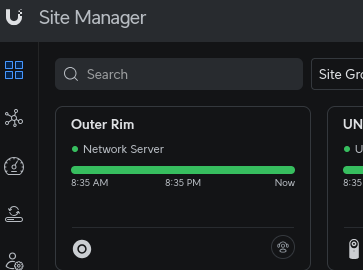
That is what is odd. I did login using SSO and I see it in site manager, but just clicking on it causes it to load indefinitely with the `Connecting to Site is taking longer than expected ...` message. So my theory is something is being blocked that I should allow.
-
Is there a way to get this container exposed so that I can access it via https://unifi.ui.com/? It appears there for cloud access, but I can only get into the management portal by referencing the Docker container's IP and port directly.

