





Gepelmario
Members
-
Joined
-
Last visited
Everything posted by Gepelmario
-
That command shows the media i am playing.
-
Your suggestions did not solve my issues. The plugin still do not recognize the playback in "only" mode. And the Cache Cleaner is still writing the content is "still in range " in the log. What else can i try to solve my problems ?
-
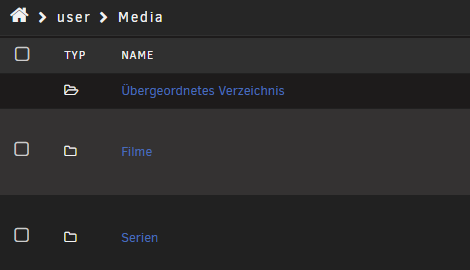
My library pathes in the emby settings are the following:


-
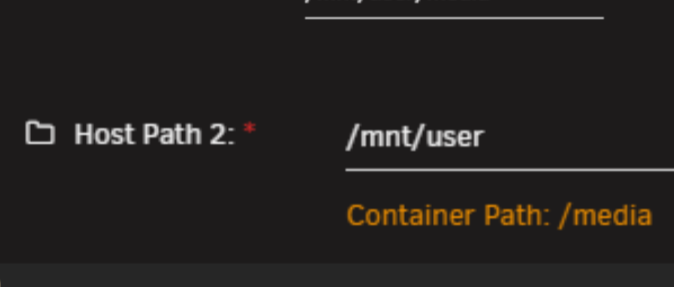
My docker mounts are :
-
Yes I meant the cache user plugin. I read the help text multiple times, but I am not able to adapt it to my setup. All my file pathes are in my attached pictures. Can you please give me a hint?
-
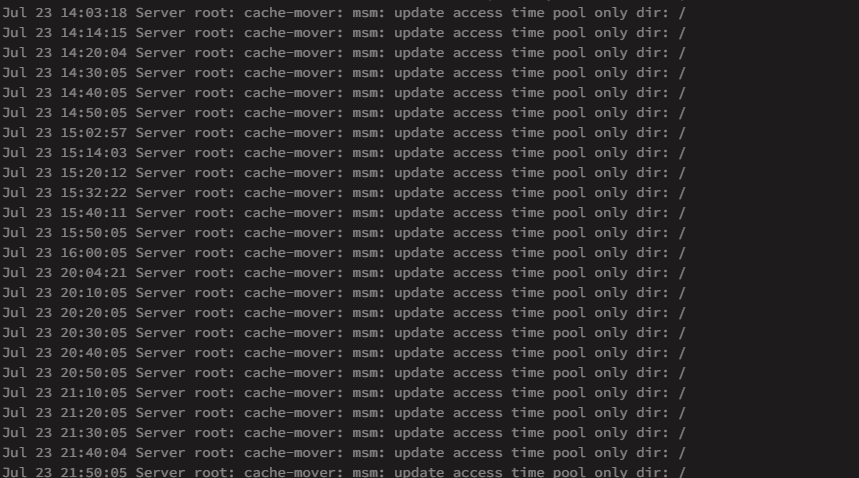
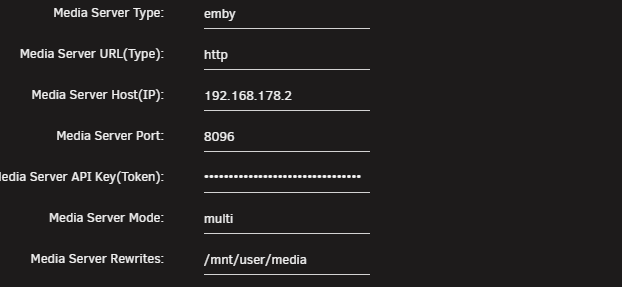
Good Morning, after hours of try und error i have the mover tuner partially working at the moment. Problem 1 : The Mover does not work in Media Server Mode In Media Server Mode, the playback is not recognized. I attached the cache mover picture. The other 3 pictures show my folder structure and my plugin configuration. Problem 2: The Plugin does not delete files from my cache drive, although the 24 hour wait time is long gone. The log says the file are still in range although the 24 hours are over. What can i do to solve my problems ? Thanks for your help.

-
Kannst du mir das vielleicht genauer erklären. Terminal ist nicht gerade meine Stärke 🤐
-
Also muss ich einfach damit leben, dass ich nie wirklich weiß, wann das Array voll ist ? Verstehe ich das richtig ?
-
Hallo, ich habe meinen Unraid Server vor ungefähr einer Woche aufgesetzt und bin noch am " Befüllen" der Festplatten im Array. Kann mir jemand von euch erklären, warum Unraid immer die " Brutto" Festplattengrößen anzeigt ? Meine 18TB Festplatten werden mit 18 TB nutzbarem Speicher angezeigt. Nutzen kann man aber logischerweise nur ca. 16,2 TB. Gibt es eine Einstellung, die ich bisher nur nicht finden konnte ? Danke im Voraus für eure Hilfe. MfG Gepelmario


