





BobbyTables
Members
-
Joined
-
Last visited
-
I'm also looking to do this, did you find a solution? For me it could be the size of a share or a disk or a folder approaching a certain limit, the oldest files should be deleted
-
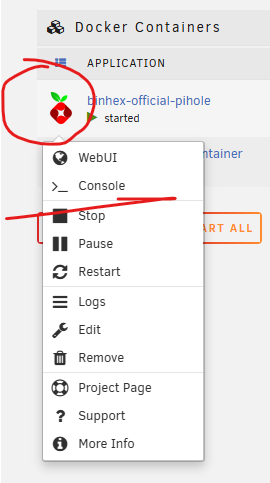
Just to clarify the excellent solition provided by @trurl The icons per container on the far left, show a dropdown menu when clicking it. A very low hanging usability fix is to communicate this hidden behaviour to the user by an "actions" or "..." dropdown to the far right.
-
Just following up on my own topic here for future googlers. Its solved by not connecting directly to the motherboard It's not the 3.3v issue that i see a lot when googling these Exos disks. The symptom would be reversed (not powering up, while mine is powering up). Further the sata cables i had did not have the 3.3v line on them (power source is a mini 4x port on the mobo) I have gotten the disk to work, althogh not directly connected to the mobo but via a 1x PCI-e to 4x sata board with this controller: https://www.asmedia.com.tw/product/A58yQC9Sp5qg6TrF/58dYQ8bxZ4UR9wG5 It's still a mystery to me why this certain disk model would not work - i blame Lenovo
-
BobbyTables changed their profile photo
-
So I'm dipping my feet into Unraid and cannot get my first disk on board Its an empty Seagate Exos drive coming from a cheap QNAP NAS. Its not visible on my new machine in BIOS, connected directly to the mobo. I have tried different SATA ports and cables. Its audibly spinning up when powering on, and if I put it back in the NAS its detected just fine again (thought i had bricked it!) I'm thinking of the following issues: - Removing disks from QNAP needs some special treatment - Compatibility with my new machines motherboard and the disk Any thoughts or insights welcome. Disk model: Seagate Exos 7E10 ST8000NM017B New machine: Lenovo LOQ 17irb8 (pre-built)

